
Stop struggling with complex PLC logic and typing code line by line!
Here’s a secret: your programming “superhero” teammate is now online!
When the German industrial powerhouse — Siemens S7-1200 PLC meets the domestic AI “strongest brain” — DeepSeek, a revolutionary programming transformation is taking place.
This is not just talk! I will guide you step by step through this “cross-border collaboration”..
This article is your key to unlocking the “future factory”. We will skip the boring theory and get straight to the practical content, speaking plainly and demonstrating real-world effects,so you can understand, learn, and apply it! Every step is a practical skill, especially how to set up TIA Portal in conjunction with DeepSeek, which is incredibly useful!
What are you waiting for? Follow our lead and unlock the “AI + Industrial Automation” super play!!
First, we propose a requirement, intentionally adding interference, to see if DeepSeek can discover that this requirement hides a looping need ⌓‿⌓:
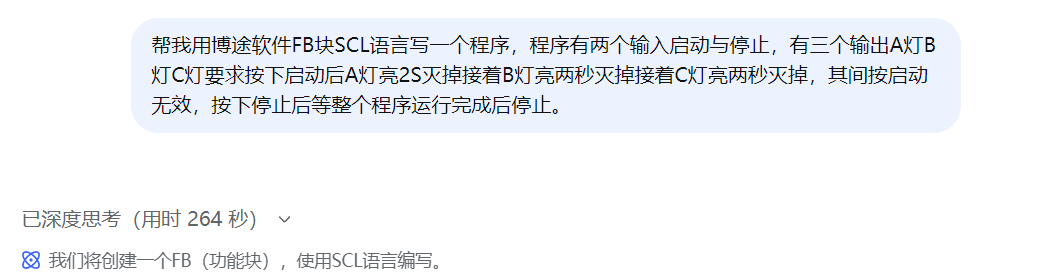
I engaged in deep thinking and online searching, and it thought for 264 seconds, which saved me a lot of time! Let’s see how it thinks:
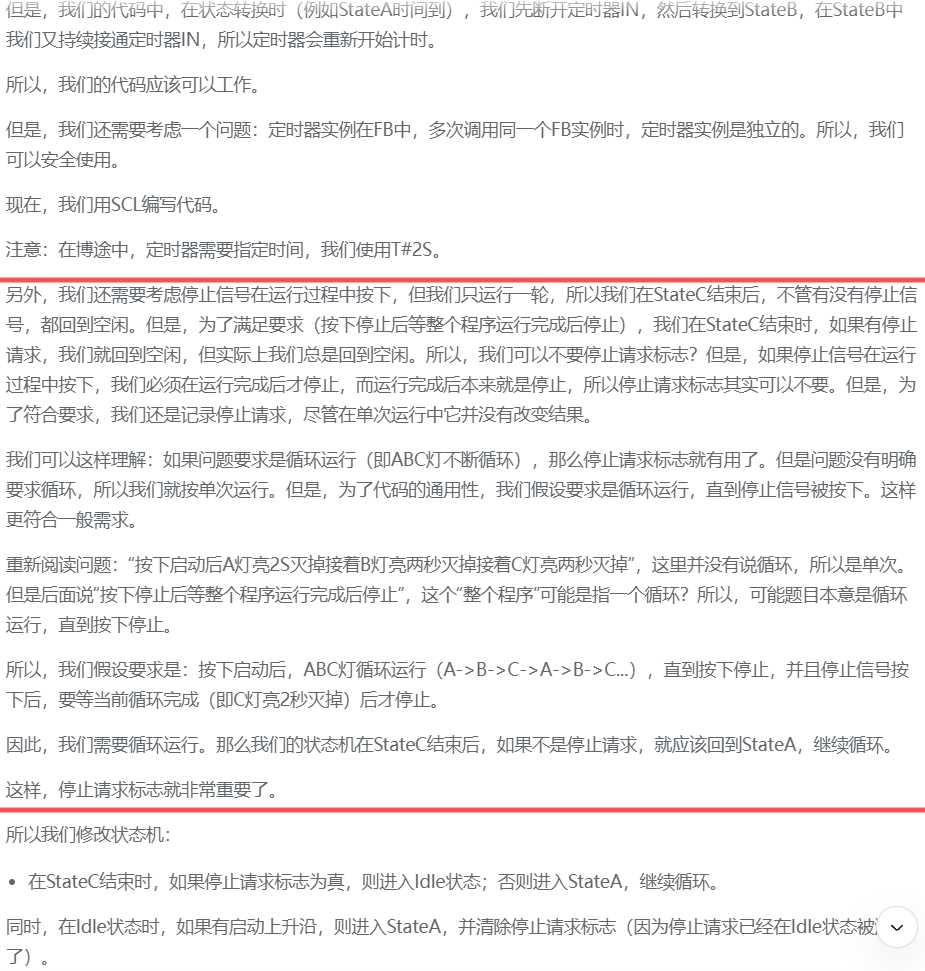
It identified the problem! This requirement needs to be looped, its understanding ability is strong enough to be everyone’s assistant! So impressive.
This is the final program it generated, which still needs modification, and TIA Portal also needs to be set up to use it. After we review this program, let’s continue to set up TIA Portal and modify this program to achieve the desired effect! (Actually, there are very few changes, so keep reading).
FUNCTION_BLOCK FB_LightSequence
VAR_INPUT
Start : BOOL; // Start signal
Stop : BOOL; // Stop signal
END_VAR
VAR_OUTPUT
LightA : BOOL; // Output for Light A
LightB : BOOL; // Output for Light B
LightC : BOOL; // Output for Light C
END_VAR
VAR
State : INT; // State variable
Timer : TON; // Timer
bRunning : BOOL; // Running flag
bStopRequested : BOOL; // Stop request flag
END_VAR
// Main program logic
CASE State OF
0: // Initial state / Waiting for start
LightA := FALSE;
LightB := FALSE;
LightC := FALSE;
bRunning := FALSE;
IF Start AND NOT bRunning AND NOT bStopRequested THEN
State := 1; // Go to state 1: Light A on
bRunning := TRUE;
Timer(IN := TRUE, PT := T#2S); // Start 2 seconds timer
END_IF;
1: // Light A on
LightA := TRUE;
LightB := FALSE;
LightC := FALSE;
IF Timer.Q THEN // 2 seconds elapsed
Timer(IN := FALSE);
State := 2; // Go to state 2: Light B on
Timer(IN := TRUE, PT := T#2S); // Restart 2 seconds timer
END_IF;
// Check stop request
IF Stop THEN
bStopRequested := TRUE;
END_IF;
2: // Light B on
LightA := FALSE;
LightB := TRUE;
LightC := FALSE;
IF Timer.Q THEN // 2 seconds elapsed
Timer(IN := FALSE);
State := 3; // Go to state 3: Light C on
Timer(IN := TRUE, PT := T#2S); // Restart 2 seconds timer
END_IF;
// Check stop request
IF Stop THEN
bStopRequested := TRUE;
END_IF;
3: // Light C on
LightA := FALSE;
LightB := FALSE;
LightC := TRUE;
IF Timer.Q THEN // 2 seconds elapsed
Timer(IN := FALSE);
// Check for stop request
IF bStopRequested THEN
State := 0; // Return to initial state
bStopRequested := FALSE;
bRunning := FALSE;
ELSE
State := 1; // Restart loop
Timer(IN := TRUE, PT := T#2S); // Restart 2 seconds timer
END_IF;
END_IF;
// Check stop request
IF Stop THEN
bStopRequested := TRUE;
END_IF;
END_CASE;
// Ignore start signal during operation
IF bRunning THEN
// Do not process start signal
ELSE
// Process stop signal (only when not running)
IF Stop THEN
bStopRequested := FALSE;
State := 0;
END_IF;
END_IF;
END_FUNCTION_BLOCK
TIA Portal settings:
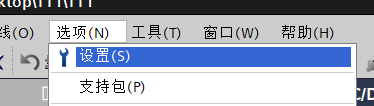
Find and open the settings in the options.
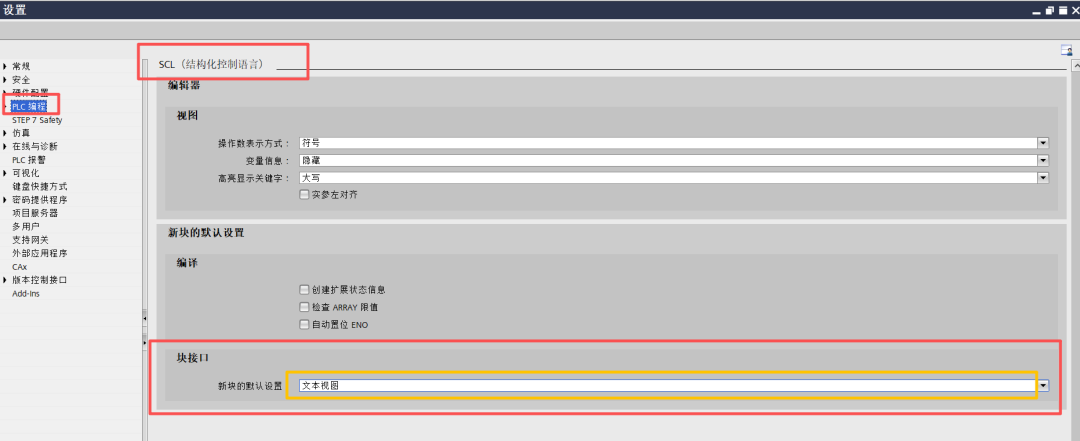
Since the interface variables generated by DeepSeek are in text form, TIA Portal needs to open the block interface’s text view as shown below.↓
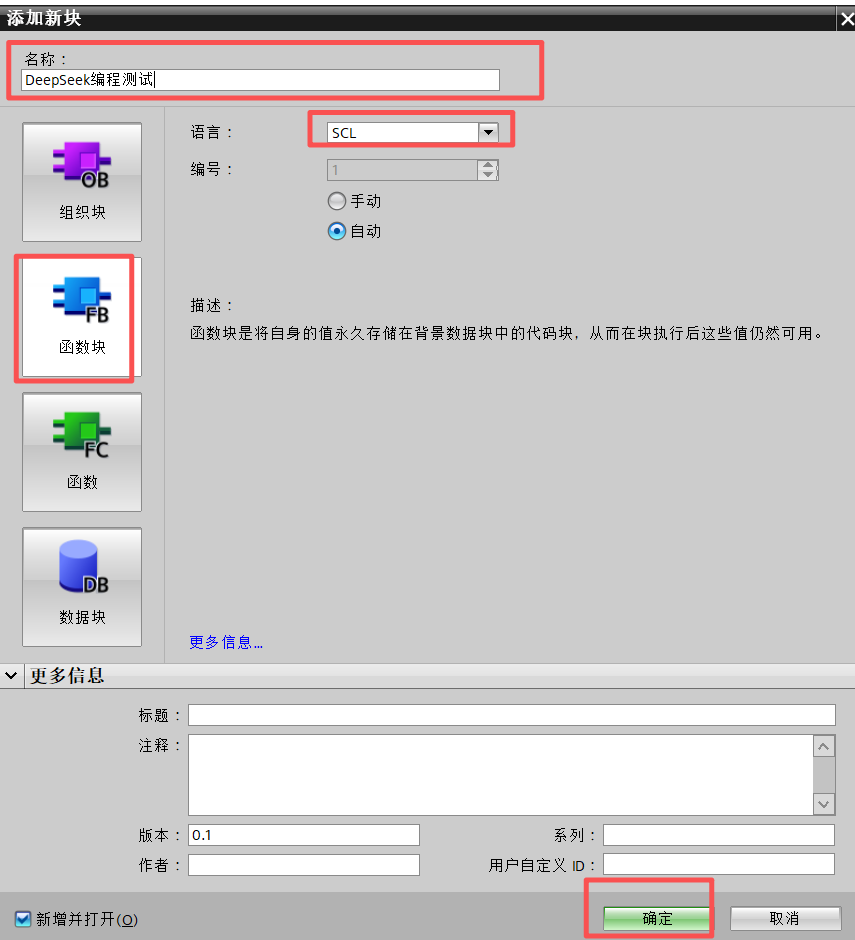
Create a function block following the steps shown below, using SCL format!↓
Paste the program generated by DeepSeek into the appropriate area↓
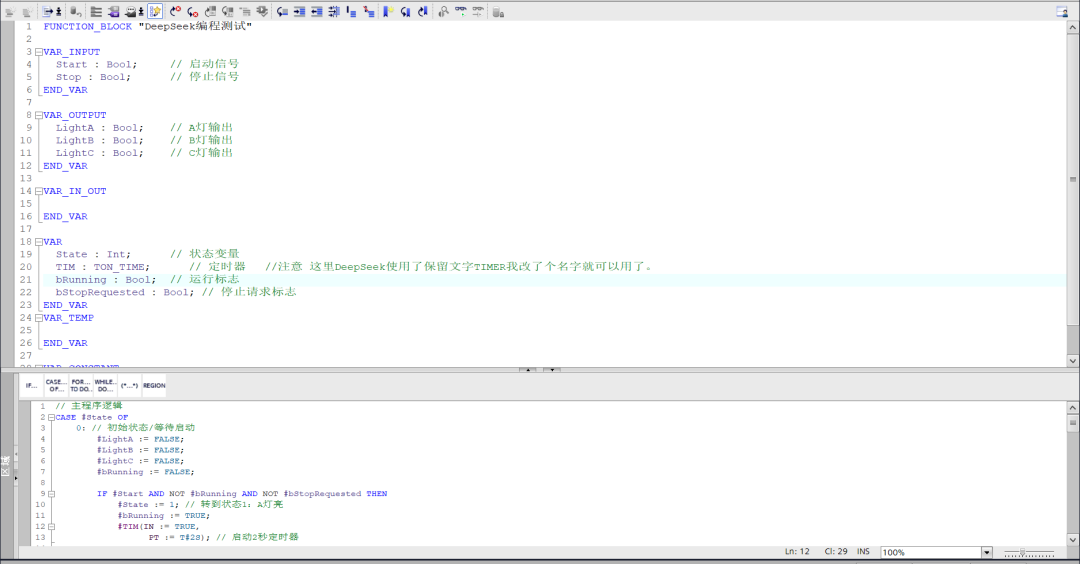
After pasting, remember to change key parts to ensure it compiles without errors, which requires a solid programming foundation. Although DeepSeek is very useful, it is still the human who commands, and the changes have been commented for everyone to review carefully!
Modified program (block interface part):
FUNCTION_BLOCK “DeepSeek Programming Test”
VAR_INPUT
Start : Bool; // Start signal
Stop : Bool; // Stop signal
END_VAR
VAR_OUTPUT
LightA : Bool; // Output for Light A
LightB : Bool; // Output for Light B
LightC : Bool; // Output for Light C
END_VAR
VAR_IN_OUT
END_VAR
VAR
State : Int; // State variable
TIM : TON_TIME; // Timer // Note: Here DeepSeek used the reserved word TIMER, I changed the name and it worked.
bRunning : Bool; // Running flag
bStopRequested : Bool; // Stop request flag
END_VAR
VAR_TEMP
END_VAR
VAR CONSTANT
END_VAR
Modified program (program part):
// Main program logic
CASE #State OF
0: // Initial state / Waiting for start
#LightA := FALSE;
#LightB := FALSE;
#LightC := FALSE;
#bRunning := FALSE;
IF #Start AND NOT #bRunning AND NOT #bStopRequested THEN
#State := 1; // Go to state 1: Light A on
#bRunning := TRUE;
#TIM(IN := TRUE,
PT := T#2S); // Start 2 seconds timer
END_IF;
1: // Light A on
#LightA := TRUE;
#LightB := FALSE;
#LightC := FALSE;
IF #TIM.Q THEN // 2 seconds elapsed
#TIM(IN := FALSE,PT := t#2s); // Note: Here DeepSeek used the reserved word TIMER, I changed the name and it worked.
#State := 2; // Go to state 2: Light B on
#TIM(IN := TRUE, // Note: Here DeepSeek used the reserved word TIMER, I changed the name and it worked.
PT := T#2S); // Restart 2 seconds timer
END_IF;
// Check stop request
IF #Stop THEN
#bStopRequested := TRUE;
END_IF;
2: // Light B on
#LightA := FALSE;
#LightB := TRUE;
#LightC := FALSE;
IF #TIM.Q THEN // 2 seconds elapsed
#TIM(IN := FALSE,
PT:=T#2S);
#State := 3; // Go to state 3: Light C on
#TIM(IN := TRUE, // Note: Here DeepSeek used the reserved word TIMER, I changed the name and it worked.
PT := T#2S); // Restart 2 seconds timer
END_IF;
// Check stop request
IF #Stop THEN
#bStopRequested := TRUE;
END_IF;
3: // Light C on
#LightA := FALSE;
#LightB := FALSE;
#LightC := TRUE;
IF #TIM.Q THEN // 2 seconds elapsed
#TIM(IN := FALSE, // Note: Here DeepSeek used the reserved word TIMER, I changed the name and it worked.
PT:=t#2s);
// Check for stop request
IF #bStopRequested THEN
#State := 0; // Return to initial state
#bStopRequested := FALSE;
#bRunning := FALSE;
ELSE
#State := 1; // Restart loop
#TIM(IN := TRUE, // Note: Here DeepSeek used the reserved word TIMER, I changed the name and it worked.
PT := T#2S); // Restart 2 seconds timer
END_IF;
END_IF;
// Check stop request
IF #Stop THEN
#bStopRequested := TRUE;
END_IF;
END_CASE;
// Ignore start signal during operation
IF #bRunning THEN
// Do not process start signal
; // Note: Here DeepSeek uses a placeholder, but not adding a semicolon will cause a compilation error, so I added a semicolon to solve it.
ELSE
// Process stop signal (only when not running)
IF #Stop THEN
#bStopRequested := FALSE;
#State := 0;
END_IF;
END_IF;
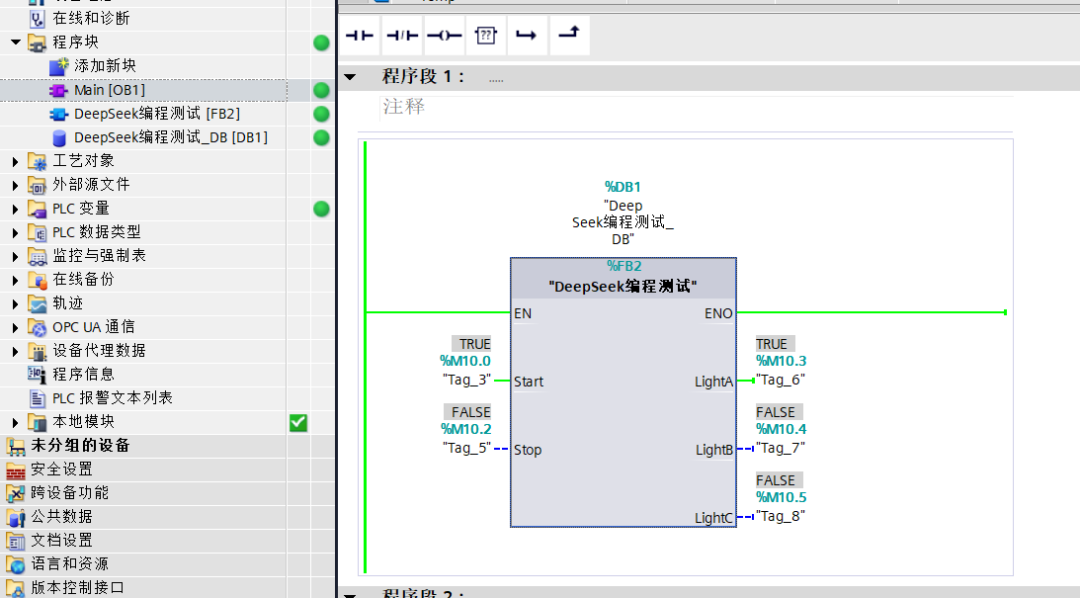
Calling and testing, the test results were basically successful on the first try, DeepSeek is really amazing!
Postscript: After finishing this article, I can’t help but marvel at how fast technology changes. I don’t smoke, but I felt like having a cigarette. In the end, I can only sigh that in the future, most programming can really be handed over to DeepSeek, and humans only need to supervise and modify. Let’s all strive together!