
When changing materials on the production line, are colors mixed up or materials confused? Essentially, this is due to the process of “barcode color reading → information caching → cross-item comparison → material change reminder → data reset” not being closed-loop! Follow this PLC logic, and without needing to understand complex character parsing, just fill in the variables at the designated points, and you can implement it in 1 hour, avoiding pitfalls when changing materials.
1. Color Comparison Control Requirements
1. Information Acquisition: The barcode scanner reads the workpiece color code (3-character code) and directly stores it in the data block without needing to unpack and parse;
2. Signal Debouncing: When the workpiece position signal is interrupted due to mechanical vibration, a timer filters the fluctuations to ensure data is not lost;
3. Cross-item Comparison: Store the current workpiece color and the previous workpiece color, compare the differences bit by bit, and trigger corresponding material change reminders;
4. Cycle Reset: After the workpiece flows to the next station, automatically clear the current color storage area to avoid data cross-contamination affecting the next round of comparisons.
2. DB Point Table (Mapping Hardware to Data)
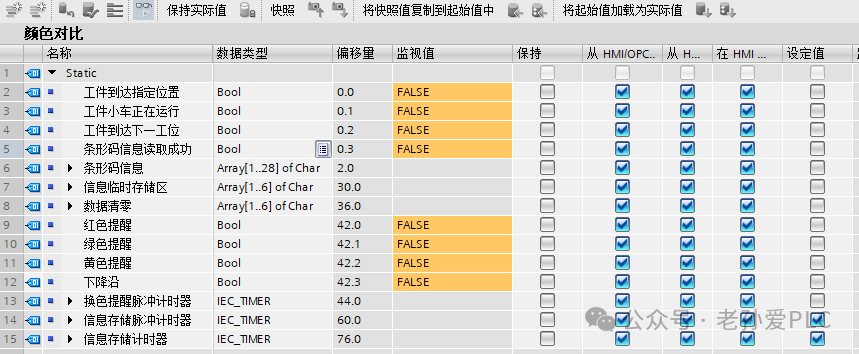
3. 4 Steps to Program Color Comparison (Logic Breakdown)
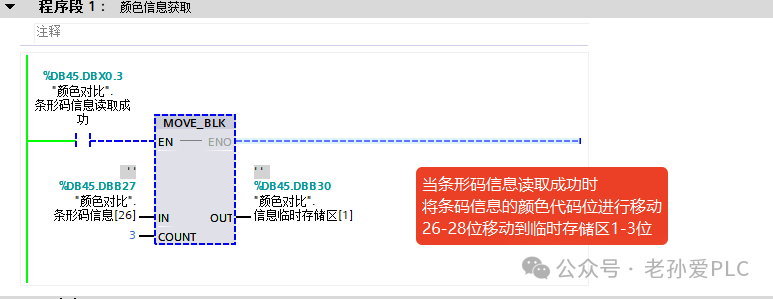
Step 1: Read Barcode Color and Store in Storage Area (Program Segment 1)
Core Logic: Use the MOVE_BLK block move instruction to skip complex parsing and directly transfer the color code from the barcode.
Operation Steps:
1. Call the MOVE_BLK block move instruction, enabling the input (EN) to connect to the “barcode read success signal” (DBX0.3);
2. Set the source address to DBB27 (the segment where the color code is located in the barcode) and the target address to DBB30 (the current workpiece color storage area);
3. Set the transfer length to 3 (corresponding to the 3-character color code), and upon triggering, directly store the color code intact in the storage area without needing to split the data.
Step 2: Dual Timer Debouncing, Store Previous Workpiece Color (Program Segment 2)
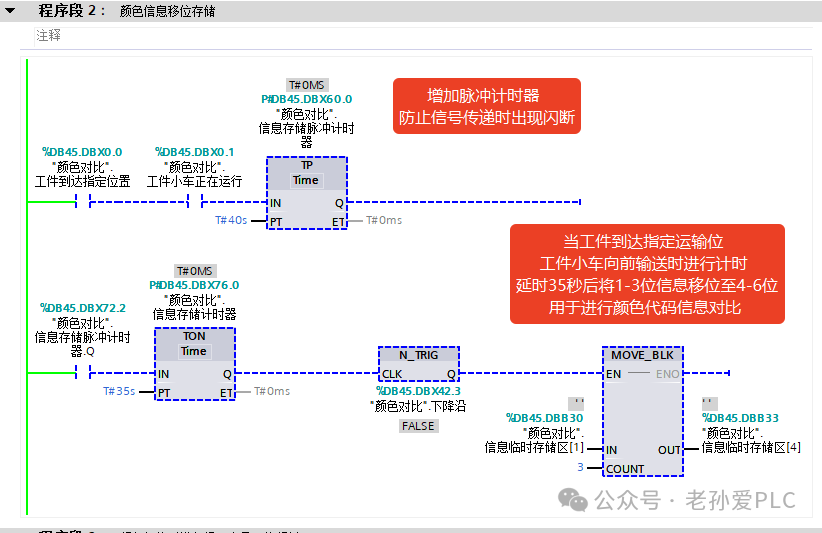
Core Logic: Use dual-level timers to filter signal interruptions, then use block moves to store historical color data, avoiding errors in shifting.
Operation Steps:
1. Series connect the “workpiece position signal” (DBX0.0) and the “cart running status” (DBX0.1) to trigger the “information storage pulse timer” (DBX6.0), setting a 40-second timer;
2. The pulse timer output signal triggers the “information storage timer” (DBX6.1), setting a 35-second delay;
3. After the delay ends, call the MOVE_BLK instruction to transfer DBB30 (current color) to DBB33 (previous workpiece color storage area), completing the retention of historical data.
Step 3: Character-by-Character Comparison, Trigger Material Change Reminder (Program Segment 3)
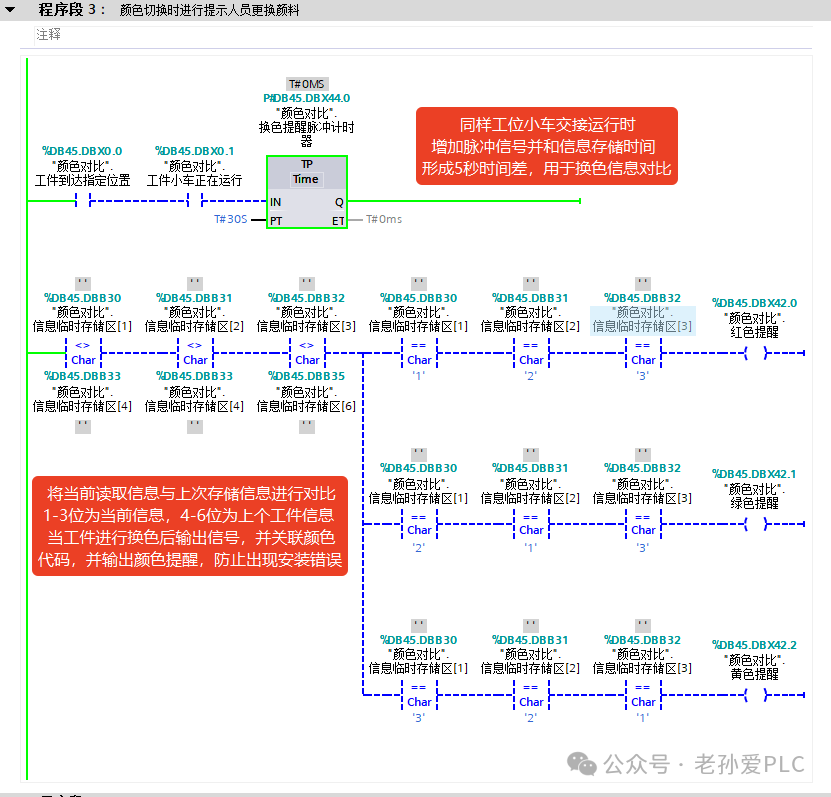
Core Logic: Compare the current and previous workpiece color codes, trigger corresponding reminders based on differences, and use a pulse timer to prevent misjudgment.
Operation Steps:
1. Call the character comparison instruction, taking DBB30 (current color) and DBB33 (previous color) for a 3-character consistency check;
2. If the current is “123” and the previous is “213”, trigger the “red material change reminder” (DBX42.0) to set to 1; if the current is “213” and the previous is “123”, trigger the “green material change reminder” (DBX42.1) to set to 1; other difference combinations trigger the “yellow confirmation reminder” (DBX42.2) to set to 1;
3. Call the “color change reminder pulse timer” (DBX4.0), setting a 5-second pulse output, linked with the reminder signal to avoid signal conflicts during workpiece handover.
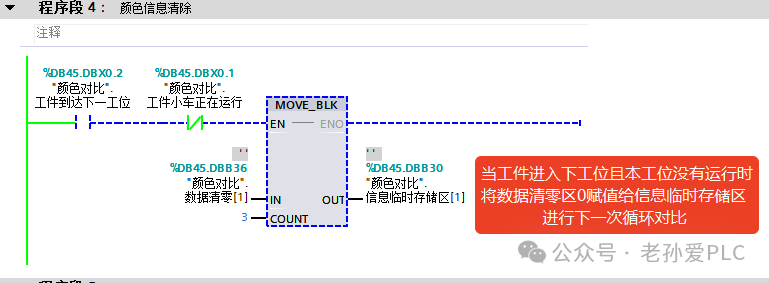
Step 4: Automatically Clear Storage Area After Workpiece Flows Away (Program Segment 4)
Core Logic: Use station signals to clear the current color storage area, preparing for the next round of comparisons.
Operation Steps:
1. Series connect the “workpiece to next station signal” (DBX0.2) and the normally closed contact of the “cart running status” (DBX0.1=FALSE, cart stopped);
2. Trigger the MOVE_BLK block move instruction, setting the source address to DBB36 (data clearing area, value 0) and the target address to DBB30 (current workpiece color storage area);
3. Set the transfer length to 3, clearing the storage area to 0, avoiding old data affecting the comparison results of the next workpiece.
4. Core Logic of Color Comparison (2 Points for Beginners)
1. Data Transfer Saves Time: Use MOVE_BLK to directly transfer the color code segment from the barcode, skipping the parsing step, simplifying the program and avoiding unpacking errors; this is a common technique for storing character-type data;
2. Dual Timer Prevents Pitfalls: 40 milliseconds pulse filters the position signal interruptions, 35 seconds delay ensures the workpiece is fully in place before storing historical data, plus a 5-second reminder pulse, providing three layers of protection to ensure 100% accuracy in comparison results, allowing beginners to avoid issues with signal jitter.
Solidly learn technology, making progress every day! Doing my best to help more people!