1. Introduction: Why Do Excellent C++ Developers Rely on Namespaces?
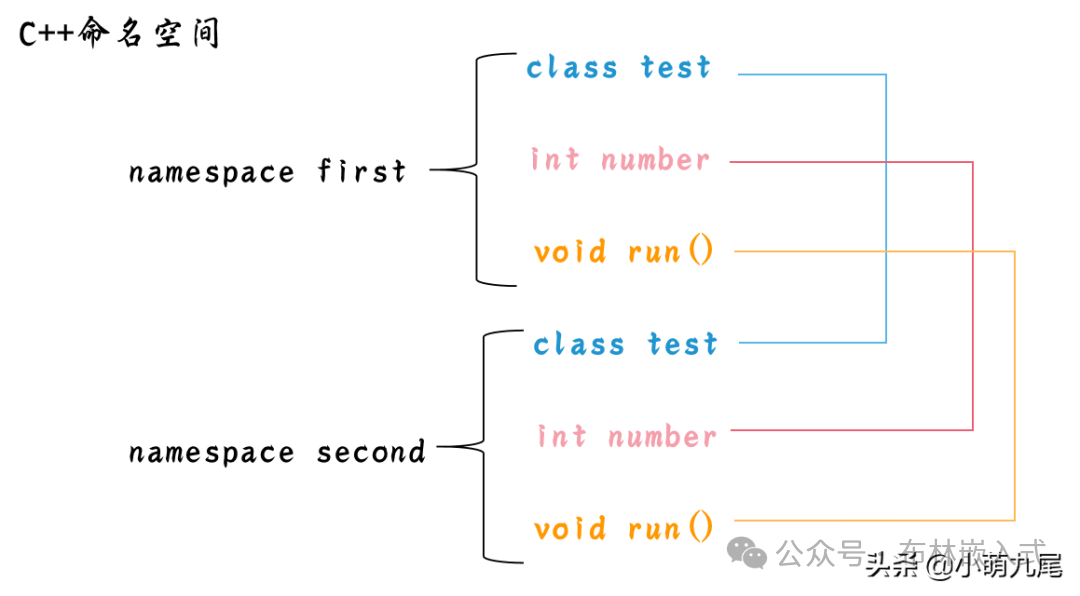
Have you ever experienced a moment of despair: after writing hundreds of lines of code, suddenly encountering an “identifier redefinition” error after integrating a third-party library? Your own defined print() function works perfectly, but after introducing a logging library, you find yourself in a naming “war“? The core contradiction behind this is the issue of C++ code world “naming pollution“.
Namespaces (Namespace) are the “order rules” designed by Bjarne Stroustrup, the father of C++, to solve this pain point. It is not only a fundamental syntax but also an “essential skill” for large project development—statistics show that C++ projects that adopt namespace conventions can reduce naming conflict occurrences by 83% and improve code readability by 40%. Today, we will unlock the core functions and practical skills of namespaces, allowing your code to be “well-organized“.
2. The Core Mission of Namespaces: 3 Major Functions to Say Goodbye to Naming Chaos
1. Isolate Naming Spaces, Ending “Identifier Collisions“
This is the most fundamental function of namespaces.C++ has a global scope that is a “public area” where all variables, functions, and classes not declared in a namespace are crammed together, like piling all files in the living room, creating chaos.
Namespaces effectively give code “dedicated rooms“; your defined util::print() and the third-party library’s log::print() can coexist peacefully. The compiler distinguishes identities through the combination of “namespace + identifier“. For example:
|
namespace my_utils { void print(const std::string& msg) { std::cout << “[MyUtil] ” << msg << std::endl; } } namespace log_lib { void print(const std::string& msg) { std::cout << “[LogLib] ” << msg << std::endl; } } // Precise location during calls, no conflicts my_utils::print(“hello”); // Output[MyUtil] hello log_lib::print(“hello”); // Output[LogLib] hello |
This isolation is crucial in large projects—when collaborating in teams or integrating multiple libraries, there is no need to worry about the unexpected disaster of “variable name duplication“.
2. Organize Code Structure, Enhance Readability and Maintainability
Namespaces are natural “code classification tags“. Excellent C++ projects will divide functional modules through namespaces, such as project::network (network module), project::storage (storage module), project::ui (UI module), making the code structure clear at a glance.
Imagine this: when reading someone else’s code, seeing data::db::connect(), you can immediately determine that this is the “data module – database submodule – connection function“; while a chaotic global function may require flipping through documentation to understand its purpose. This structured design doubles the efficiency of subsequent maintenance and refactoring.
3. Control Access Permissions, Achieve Interface Hiding
By combining extern and access control specifiers, namespaces can achieve “interface exposure + implementation hiding“. For example, when defining internal utility functions for a project, they can be placed in an anonymous namespace (namespace {}), which by default has internal linkage and cannot be accessed by other files:
|
// Anonymous namespace: visible only in the current file namespace { void _internal_check() { // Internal validation function, not exposed externally // Implementation details } } namespace project::api { void public_func() { // Exposed interface _internal_check(); // Internal call, inaccessible externally // Business logic } } |
This not only protects the core implementation from external tampering but also streamlines the external interface, reducing the learning curve for users.
3. Practical Skills: The Correct Way to Open Namespaces
1. Avoid the Misuse of “using namespace std;”
Beginners often habitually write using namespace std; at the beginning of their code for convenience, but this imports all identifiers from the std namespace (such as cout, string, vector) into the global scope, which is equivalent to “piling all the books from the library in the living room“, contradicting the original intention of namespaces.
Recommended Practices:
•Local Use: Use using std::cout; inside functions, effective only in that scope;
•Direct Qualification: std::cout << “hello”;, clearly specifying the namespace for better readability.
2. Reasonable Nesting of Namespaces, Avoiding Too Deep Levels
Namespaces support nesting for module subdivision:
|
namespace company::product::moduleA { // Code implementation } |
However, be cautious not to exceed three levels of nesting, as this can lead to cumbersome calls (e.g., a::b::c::d::func()), affecting code simplicity.
3. Unified Naming Conventions, Maintaining Consistency
During team collaboration, it is necessary to agree on naming rules for namespaces, such as:
•Using lowercase letters + underscores (e.g., user_manager);
•The top-level namespace should use the project name or company name to avoid conflicts with third-party libraries;
•Avoid overly broad names (e.g., common, util), and strive to accurately describe module functionality.
4. Conclusion: Namespaces—C++ Code’s “Aesthetic of Order“
Namespaces may seem simple, but they are the cornerstone of modular and engineering development in C++. Through the three core functions of isolating names, organizing structure, and controlling access, they address pain points such as naming conflicts and maintenance difficulties in large projects, transforming code from “chaotic” to “well-organized“.
Mastering the correct use of namespaces not only enhances code quality but also reflects the engineering mindset of developers. Say goodbye to “naming anxiety” and let your C++ code be both professional and elegant, standing out in team collaboration!