Mastering the ‘Three Musketeers’ of Linux: A Detailed Guide to grep, sed, and awk
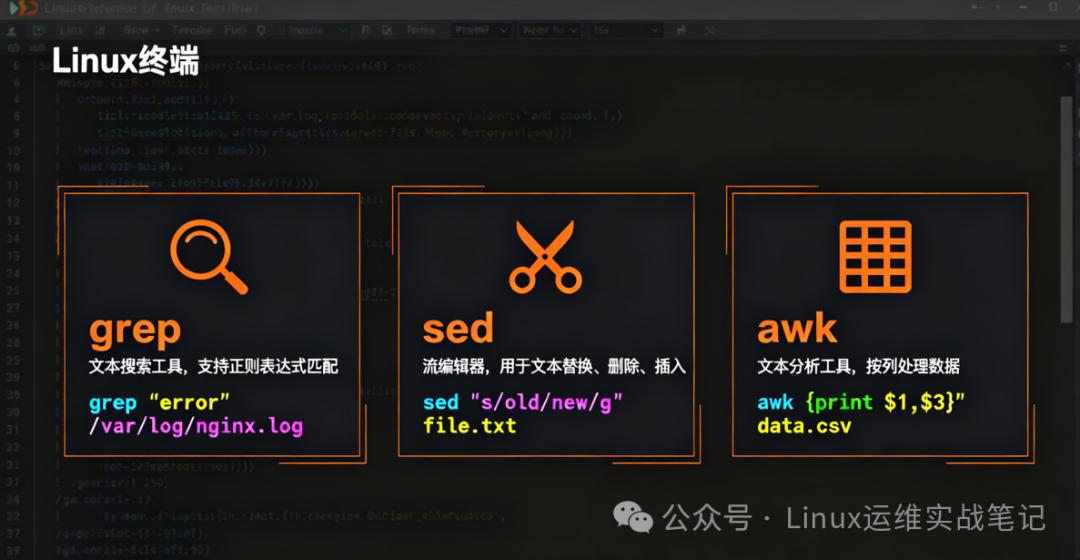
Introduction: “Why can others complete log analysis in 5 minutes while I have to manually search for a long time?” “Why do my operations colleagues always seem to perform ‘magic’ in the command line?” The answer is simple: They have mastered the Three Musketeers of Linux — grep, sed, and awk. These are not ‘dead commands’, but rather a multiplier for operational efficiency. Today, I will take you from ‘only knowing the basics’ to mastering the ‘Three Musketeers combo’ through real scenarios and practical cases, enhancing your command line efficiency by 5 times!
🔍 1. grep: The ‘Eagle Eye’ of Text Search
Basic Usage: More than Just Searching
# Find lines containing "error" (case-sensitive)
grep "error" /var/log/nginx/access.log

# Case-insensitive
grep -i "error" /var/log/nginx/access.log

# Show only matching parts
grep -o "error" /var/log/nginx/access.log
Advanced Usage: Regular Expressions + Context
# Match IPs starting with "192.168"
grep -E "192\.168\." /var/log/nginx/access.log

# Show 3 lines before and after the matching line
grep -A 3 -B 2 "404" /var/log/nginx/access.log

# Count matching lines
grep -c "404" /var/log/nginx/access.log
💡 Practical Tip:
<span>grep -v</span>is used to exclude unwanted content, for example:<span>grep -v "GET /" access.log</span>→ Exclude all GET requests
✏️ 2. sed: The ‘Swiss Army Knife’ of Text Editing
Basic Usage: Add, Delete, Modify, Query
# Replace all "old" with "new"
sed 's/old/new/g' file.txt

# Modify the original file directly
sed -i 's/old/new/g' file.txt
Advanced Practice: Batch Modify Configuration Files
# Change the port in the Nginx configuration file
sed -i 's/listen 80/listen 8080/g' /etc/nginx/sites-enabled/default

# Insert a line before line 5
sed -i '5i # This is a new line' config.conf
💡 Practical Tip:
<span>sed -n '10,20p' file.txt</span>→ Only print lines 10-20, avoiding output of the entire file
📊 3. awk: The Data Cleaning and Reporting Tool
Basic Usage: {print $1}
# Print the first column
awk '{print $1}' access.log

# Print the last column
awk '{print $NF}' access.log
Advanced Practice: Log Analysis
# Count page views (PV)
awk '{print $1}' access.log | sort | uniq -c | sort -nr

# Calculate total page views
awk 'END {print NR}' access.log

# Format output
awk '{printf "IP: %-15s, Time: %s\n", $1, $4}' access.log
💡 Practical Tip:
<span>awk -F: '{print $1}' /etc/passwd</span>→ Use colon as a delimiter to extract usernames
🧪 4. Comprehensive Practice: Analyzing Nginx Access Logs
Objective: Count daily PV, UV, and the most popular URLs
Steps:
- 1. Extract Date and URL
awk '{print $4, $7}' access.log | cut -d'[' -f2 | cut -d']' -f1 > date_url.txt- 2. Count Daily PV
awk '{print $1}' date_url.txt | sort | uniq -c | sort -nr- 3. Count UV (Unique IPs)
awk '{print $1}' date_url.txt | sort | uniq | wc -l- 4. Find the Most Popular URLs
awk '{print $2}' date_url.txt | sort | uniq -c | sort -nr | head -5Output Results:
  125 /index.html
   98 /about
   85 /contact
   72 /products
   67 /blog
💡 Tip: Combine these commands into a script to automatically analyze logs daily and generate reports sent to your email.
🧠 5. The Three Musketeers Combo: Ultimate Efficiency
Case Study: Find URLs with More than 1000 Visits
awk '{print $7}' access.log | sort | uniq -c | awk '$1 > 1000 {print $2}'Explanation:
- 1.
<span>awk '{print $7}'</span>→ Extract URLs - 2.
<span>sort | uniq -c</span>→ Count occurrences of URLs - 3.
<span>awk '$1 > 1000'</span>→ Filter URLs with occurrences > 1000
💡 Practical Effect: This command can complete the analysis of 100,000 lines of logs in 1 second, while manual operation takes several minutes.
📚 6. Conclusion: Practice Makes Perfect
The Three Musketeers are not ‘dead commands’, but rather your command line productivity tools. The key is:
- 1. Start Simple: First master the basic usage of grep
- 2. Gradually Deepen: Try sed’s replacements and awk’s field extraction
- 3. Practical Application: Use them in real work, not just ‘theoretical discussions’
- 4. Combine Usage: The power of the Three Musketeers doubles when used together
🛠️ Appendix: Practical Exercises
- 1. Basic Exercise: Count the number of lines with “GET /” requests in the logs
- 2. Advanced Exercise: Find all requests with a 200 status code and sort by time
- 3. Challenge Exercise: Analyze the logs to find the top 5 IPs with the highest traffic
Answer Hints:
- • Basic Exercise:
<span>grep -c "GET /" access.log</span>- • Advanced Exercise:
<span>grep " 200 " access.log | sort -k4</span>- • Challenge Exercise:
<span>awk '{print $1}' access.log | sort | uniq -c | sort -nr | head -5</span>
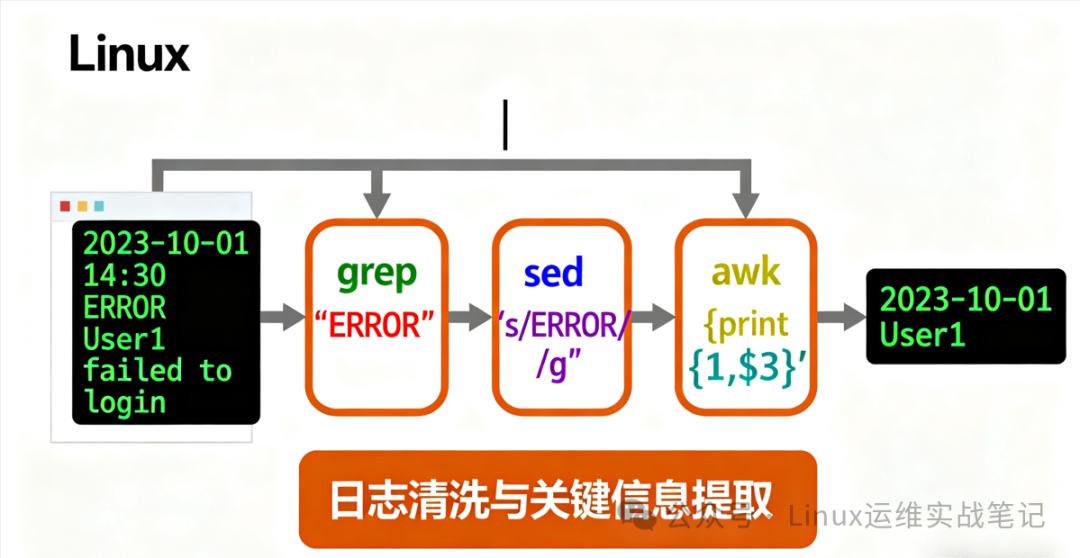
“The command line is not just commands, but your productivity tool.” — A veteran who has used the Three Musketeers for 5 years in operations