useradd(8) Command – Linux
1. Basic Information about the Command
1. Functionality
The useradd command is used in Linux systems to create new user accounts or update default new user information.
When executed, it combines command line specified values with system default values.
It may also update system files, create user home directories, and copy initial files. By default, it creates a dedicated group for the new user (this can be adjusted with related options).
It is part of the shadow-utils package.
2. Command Syntax (Overview)
|
Syntax Format |
Description |
|
useradd [options] login_name |
Regularly creates a new user, requiring options and a login name to be specified |
|
useradd -D |
View current default configuration values |
|
useradd -D [options] |
Modify default configuration values; only specific options can be used for this operation |
3. Core Option Analysis
1. Basic Configuration for User Accounts
-b, –base-dir BASE_DIR:
1If not specified with -d, the home directory is formed by concatenating BASE_DIR and the login name (e.g., /home/user_name)
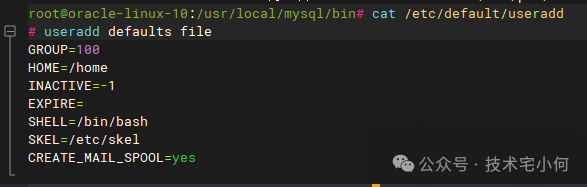
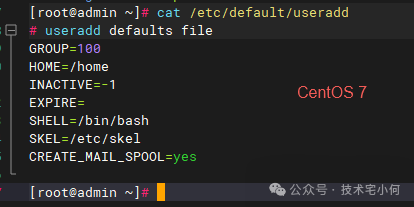
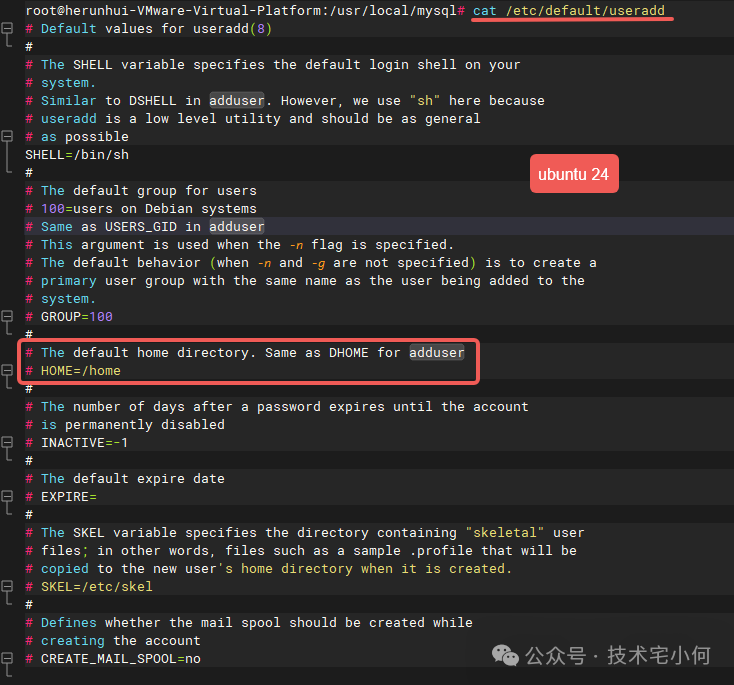
1If not using -m, BASE_DIR must exist (the -m option creates the directory; if not creating, the user’s home directory must be a subdirectory of /home), defaulting to the value of the HOME variable in /etc/default/useradd or /home
-c, –comment COMMENT:
1Add user comment
-d, –home HOME_DIR:
1Specify user home directory; defaults to BASE_DIR plus login name; the directory will not be created automatically if it does not exist
-e, –expiredate EXPIRE_DATE:
1Set account expiration date, format is YYYY-MM-DD, defaults to the value of the EXPIRE variable in /etc/default/useradd or never expires (empty string)
-f, –inactive INACTIVE:
1Days until the account is permanently disabled after password expiration; 0 means disabled immediately after password expiration, -1 disables this feature, defaults to the value of the INACTIVE variable in /etc/default/useradd or -1
2. User Group Related Options
|
Option |
Function Description |
|
-g, –gid GROUP |
Specify the initial login group for the user (group name/group number); the group must already exist; if not specified, behavior is determined by the /etc/login.defs variable USERGROUPS_ENAB (if yes, creates a group with the same name; if no, uses the default group) |
|
-G, –groups GROUP1[,GROUP2,…] |
Specify additional groups the user belongs to, separated by commas with no spaces; groups must comply with the restrictions of the -g option; defaults to only the initial group |
|
-N, –no-user-group |
Do not create a group with the same name as the user; add the user to the group specified by the -g option or the group specified by the /etc/default/useradd variable GROUP |
|
-U, –user-group |
Force the creation of a group with the same name as the user and add the user to that group |

3. Home Directory and File Configuration Options
|
Option |
Function Description |
|
-k, –skel SKEL_DIR |
Specify skeleton directory; when -m is effective, files in this directory will be copied to the user’s home directory; defaults to the value of the SKEL variable in /etc/default/useradd or /etc/skel |
|
-m, –create-home |
Create the home directory if it does not exist, and copy the contents of the skeleton directory; unless /etc/login.defs has CREATE_HOME set to no, it will be created by default, usually used in conjunction with -d |
|
-M |
Forcibly do not create a home directory, even if /etc/login.defs has CREATE_HOME set to yes |
4. System Account and Permission Options
|
Option |
Function Description |
|
-o, –non-unique |
Allow the creation of accounts with duplicate UIDs, must be used with -u |
|
-p, –password PASSWORD |
Set encrypted password (generated by crypt(3)), defaults to no password; not recommended as the password will be exposed in the process list and must comply with system password policies |
|
-r, –system |
Create a system account; /etc/shadow has no aging information, UID/GID taken from /etc/login.defs SYS_UID_MIN-SYS_UID_MAX/SYS_GID_MIN-SYS_GID_MAX, defaults to not creating a home directory (must use -m to force creation), commonly used for service accounts |
|
-s, –shell SHELL |
Specify login shell, defaults to the value of the SHELL variable in /etc/default/useradd or an empty string. When the value is /bin/false, the user will be unable to log in |
|
-u, –uid UID |
Specify user UID, non-negative and defaults to unique (-o can repeat); defaults to the smallest ID greater than 999 and greater than other users, 0-999 is usually reserved for system accounts |
5. Configuration and Auxiliary Options
|
Option |
Function Description |
|
-D, –defaults |
View default configuration alone, modify default values when used with other options (only -b/-e/-f/-g/-s can be used for modification) |
|
-h, –help |
Display help information and exit |
6. Modifying Default Values (Used with -D Option)
Only the following options can be used to modify default configurations, and changes will update the corresponding variables in /etc/default/useradd:
1-b BASE_DIR:Modify the prefix of the home directory path (corresponding to the HOME variable)
1-e EXPIRE_DATE:Modify the default account expiration date (corresponding to the EXPIRE variable)
1-f INACTIVE:Modify the default number of days until the account is disabled after password expiration (corresponding to the INACTIVE variable)
1-g GROUP:Modify the default initial group (corresponding to the GROUP variable, effective when -N or USERGROUPS_ENAB=no is set)
1-s SHELL:Modify the default login shell (corresponding to the SHELL variable)
7. Key Configuration Files
|
File Path |
Function |
|
/etc/passwd |
Stores basic user account information |
|
/etc/shadow |
Stores secure user account information (such as encrypted passwords, expiration dates) |
|
/etc/group |
Stores basic group account information |
|
/etc/gshadow |
Stores secure group account information |
|
/etc/default/useradd |
Defines default configuration values for account creation |
|
/etc/skel/ |
Stores default user files, copied to new user home directories when -m is used |
|
/etc/login.defs |
Controls the behavior of the shadow password suite, such as UID/GID ranges, password policies, etc. |
8. Considerations and Limitations
1External group and account limitations: Cannot add users to NIS or LDAP groups; operations must be performed on the corresponding servers; if the username already exists in external databases like NIS/LDAP, creation will be denied.
1Username length: Up to 32 characters.
1System account characteristics: By default, does not create a home directory, has no password aging information, and UID/GID taken from a dedicated range.
1Split group support: MAX_MEMBERS_PER_GROUP can limit the number of group members (default 0 means no limit), but some tools may not support split groups; avoid using unless necessary.
9. Exit Status Meaning
|
Exit Status |
Meaning |
|
0 |
Execution successful |
|
1 |
Unable to update password file |
|
2 |
Invalid command syntax |
|
3 |
Invalid option parameter |
|
4 |
UID already in use and not using -o |
|
6 |
Specified group does not exist |
|
9 |
Username already in use |
|
10 |
Unable to update group file |
|
12 |
Unable to create home directory |
|
13 |
Unable to create mail spool |
|
14 |
Unable to update SELinux user mapping |
10. Related Reference Commands
1Modify user information: chfn(1) (modify user comment), chsh(1) (modify login shell), passwd(1) (modify password)
1Group management: groupadd(8) (create group), groupdel(8) (delete group), groupmod(8) (modify group)
1Others: crypt(3) (password encryption function), login.defs(5) (configuration file description), newusers(8) (batch create users), userdel(8) (delete user), usermod(8) (modify user), id (view user UID, GID, and groups), groups (view user groups), adduser (more user-friendly interactive user creation command on Debian/Ubuntu)
11. Practical Examples
|
Shell sudo useradd -m -d /home/jane -s /bin/zsh -c “Jane Doe” jane Home directory: /home/jane Login shell: zsh Comment: Jane Doe Automatically create home directory sudo useradd -m -G sudo,developers,web jane Add user jane to the additional groups sudo, developers, web Note: The primary group is still specified by -g or defaults to creating a group with the same name sudo useradd -r -s /sbin/nologin mysql Create system user mysql No home directory assigned (-r implies -M) Cannot log in (shell is /sbin/nologin) sudo useradd -u 1005 -g staff -m alice Set UID to 1005 Primary group is staff Create home directory /home/alice sudo useradd -m -e 2025-12-31 tempuser User tempuser will expire after December 31, 2025 |