 Greetings, I am known by the same name across the internet [Algorithm Gold]
 Zero-based transition to AI, multiple algorithm competitions Top[Daily updates for ten thousand days, allowing more people to enjoy the fun of intelligence]
Introduction
In the world of programming, logging is a fundamental and important task that helps us understand the operational state of software, monitor issues, and troubleshoot problems.However, while Python’s standard logging module is powerful, its configuration process is complex and not user-friendly for beginners.
Loguru was created to solve these problems. It is known for its simplicity and ease of use, making logging a pleasant experience.Currently, Loguru is one of the most popular third-party logging frameworks for Python on GitHub, with over 13k stars.Project address: https://github.com/Delgan/loguru
Why Choose Loguru?
Loguru is a third-party logging library designed to make logging painless. Compared to Python’s standard logging module, Loguru offers the following advantages:
- No configuration required: With Loguru, you can start logging immediately without a cumbersome configuration process.
- Easy to use: Loguru provides a simple and intuitive API that makes logging easy.
- Feature-rich: Despite its simplicity, Loguru supports many advanced features such as file rotation, log compression, and colored log output.

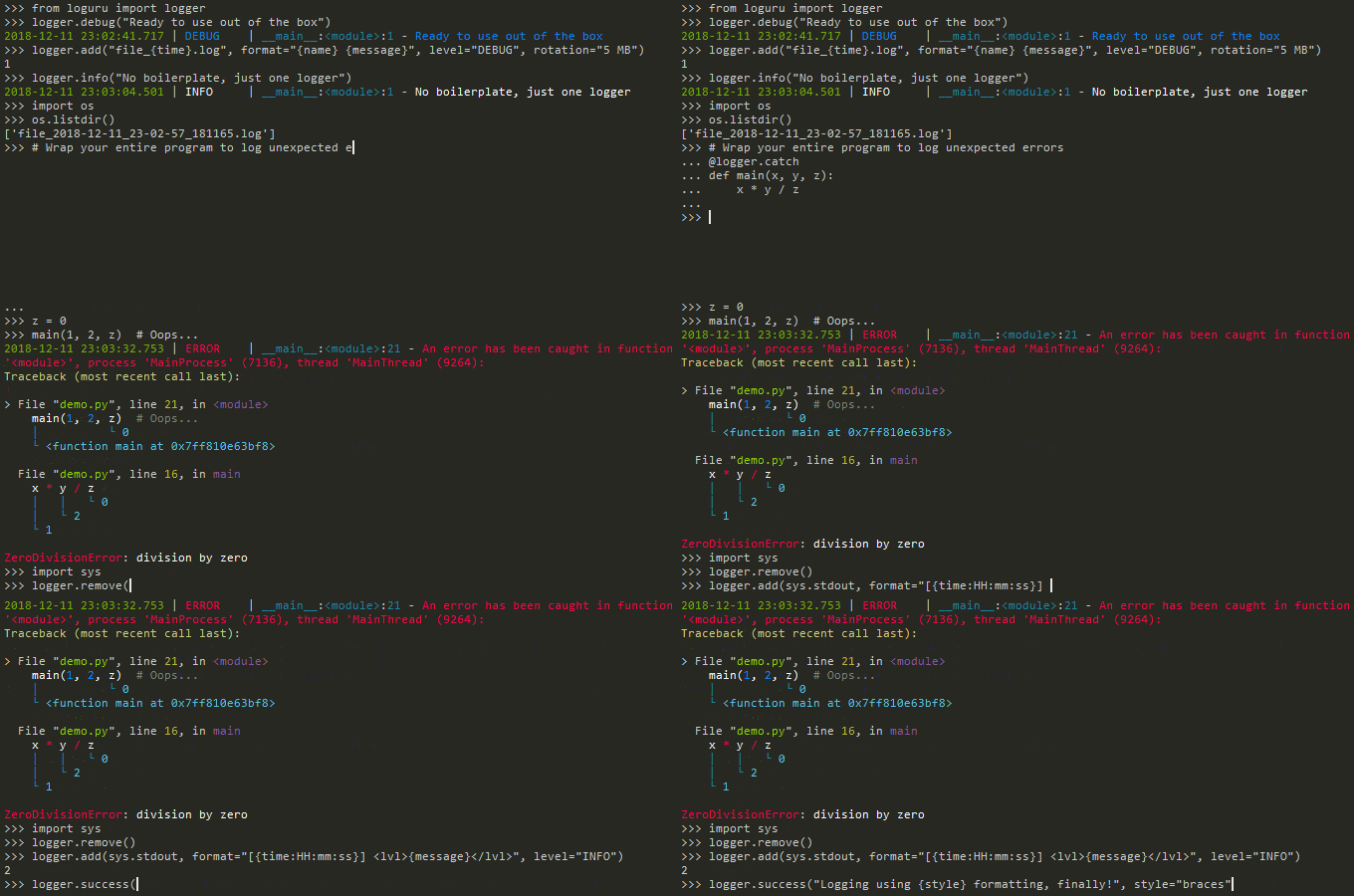
Effect Diagram

Features and Advantages
Features
-
No cumbersome configuration, ready to use out of the box
-
Simple and intuitive API, reducing the learning curve
-
Automatic log rotation and log compression
-
Colored log output for a more intuitive debugging experience
-
Rich contextual information: time, filename, line number, etc.
Advantages
-
More lightweight and user-friendly compared to Python’s built-in logging
-
Avoid reinventing the wheel, improving development efficiency
-
Combines advanced features with simple usage, suitable for both beginners and professional developers
-
Quickly locate issues in real projects, enhancing the debugging experience
Core Features
-
Automatic log rotation: new log files can be generated automatically based on file size or time
-
Log compression and retention policies: save storage space and control the number of logs
-
Rich log formats: by default includes time, level, file location, line number, etc.
Example:
logger.add(“my_log_{time}.log”, rotation=”1 day”, retention=”7 days”)
The above configuration will generate a log file every day and retain logs for the last 7 days.
Installation and Getting Started
Installation is very simple, just one command:
pip install loguru
Quick start example:
from loguru import logger
logger.add("my_log_file.log")  # Output to file
logger.info("This is an info log")
logger.warning("This is a warning log")
logger.error("This is an error log")
Practical Exercise
Loguru provides seven unique log levels:
logger.trace("A trace message.")
logger.debug("A debug message.")
logger.info("An info message.")
logger.success("A success message.")
logger.warning("A warning message.")
logger.error("An error message.")
logger.critical("A critical message.")
Output:
Output
2024-02-04 11:58:33.224 | DEBUG | __main__:<module>:12 - A debug message.
2024-02-04 11:58:33.224 | INFO | __main__:<module>:13 - An info message.
2024-02-04 11:58:33.225 | SUCCESS | __main__:<module>:14 - A success message.
2024-02-04 11:58:33.226 | WARNING | __main__:<module>:15 - A warning message.
2024-02-04 11:58:33.226 | ERROR | __main__:<module>:16 - An error message.
2024-02-04 11:58:33.227 | CRITICAL | __main__:<module>:17 - A critical message.
These log levels will be printed in different colors, helping developers visually distinguish severity. With just a few lines of code, you can easily write log files, experiencing a smoother process than with the standard library.
Example: Using the debug() method in app.py
from loguru import logger
logger.debug("Happy logging with Loguru!")
Output:
2024-02-04 11:16:59.511 | DEBUG | __main__:<module>:3 - Happy logging with Loguru!Output includes:
-
Timestamp
-
Log level
-
File location and line number
-
The log message itself
With this detailed information, developers can quickly locate issues, enhancing development and debugging efficiency.
In Conclusion
Logging is an indispensable part of development. Proper log output is often the key difference between quickly fixing issues and troubleshooting like a headless chicken.
Loguru, with its extremely simple API and rich features, eliminates the pain points of complex configurations in the logging module, making it an ideal choice for logging libraries.
I hope this content helps you quickly get started with Loguru, making your logging more efficient and smooth.
“I choose a lazy person to do a hard job because a lazy person will find an easy way to do it.” — Bill Gates
[ Everyone is watching ]
- 100 Questions and Answers on Basic Knowledge of Machine Learning
- Common Data Analysis in Experiments – Regression, Classification, Clustering
- Evaluation of Machine Learning Models, Overview of Model and Algorithm Selection
- Complete Process of Deep Learning Modeling and Prediction, with Python Code Examples
- Understanding Artificial Intelligence, Machine Learning, and Deep Learning, and Their Differences!
- 10-Step Guide to Choosing the Best Machine Learning Model, with Python Code
- Illustration of 10 Major Deep Learning Neural Network Architectures, with Python Code Implementation
- Comprehensive Summary of 10 Major Optimization Algorithms in Machine Learning, with Python Code Implementation
- 10 Major Feature Importance Analysis Methods, with Python Code
- 10 Major Clustering Algorithms, with Python Code
- 10 Major Basic Distributions in Data Science, with Python Code
- 10 Major Basic Charts in Data Science, with Python Code
- 7 Methods for Dimensionality Reduction, with Python Code
- The Most Classic Algorithm – Bayesian Algorithm, with Python Code
- Cupy, a Magical Python Library
- Dask, a Powerful Python Library
For more content, please follow our public account ↓Finishing up [Fist salute],Daily updates for ten thousand days, allowing more people to enjoy the fun of intelligence

– This article contains Algorithm Gold advertisements, please enjoy it carefully –