TinyML is rapidly becoming a popular technology in the Internet of Things (IoT) field, allowing machine learning models to run on resource-constrained microcontrollers. This article introduces the tinyml-esp project, which demonstrates how to develop TinyML applications on the ESP32 using MicroPython, implementing posture recognition based on accelerometer and gyroscope data.
Project Overview: Implementing TinyML on ESP32
The tinyml-esp project provides a complete example of how to implement TinyML applications on the ESP32 microcontroller using MicroPython. The project focuses on posture recognition by collecting data from the MPU6500 accelerometer and gyroscope, using a random forest classifier to identify three different postures: movement along the X-axis, movement along the Y-axis, and circular motion. Ultimately, the recognition results are sent to a backend database for storage. This project is very beginner-friendly, providing a clear step-by-step guide covering hardware connections, software installation, code implementation, and data transmission.
Hardware Preparation: ESP32 and MPU6500
The project requires the following hardware:
- • ESP32 development board (e.g., ESP32-DevKitC)
- • MPU6500 accelerometer and gyroscope module
- • Breadboard
- • Jumper wires
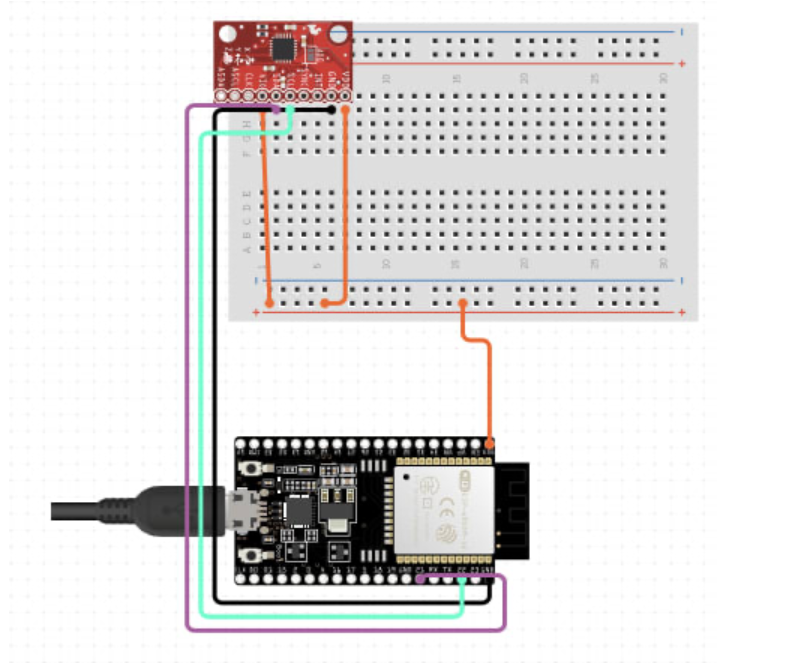
The MPU6500 connects to the ESP32 via the I2C interface. The project provides a clear circuit diagram detailing the connections: SCL connects to pin 22 of the ESP32, and SDA connects to pin 21 of the ESP32.
Setting Up the Software Environment: MicroPython and Pymakr
The project uses MicroPython as the programming language, which is a lightweight implementation of Python 3 designed specifically for microcontrollers. You need to download the MicroPython firmware suitable for ESP32 (version 1.14 or higher).
To simplify the development process, it is highly recommended to use the Pymakr VSCode extension. Pymakr is a powerful tool that allows you to edit, upload, and debug MicroPython code directly in VSCode, greatly improving development efficiency. You need to install this extension in VSCode and configure the ESP32’s serial connection according to its instructions.
Code Structure and Implementation Details: MicroPython Code Explained
The MicroPython code provided by the project mainly consists of the following parts:
- 1. Sensor Data Collection: The code first initializes the MPU6500 sensor and reads data from the accelerometer and gyroscope. This part of the code needs to be configured according to the I2C address and register addresses of the MPU6500.
- 2. Feature Engineering: The raw sensor data collected usually needs to be preprocessed and feature-extracted to serve as input for the machine learning model. This project may have performed simple feature extraction, such as calculating the mean and variance of the data.
- 3. Machine Learning Model: The project uses a random forest classifier to recognize different postures. Random forests are relatively simple and robust machine learning algorithms suitable for this resource-constrained environment. Model training may be completed on a PC, and then the trained model parameters are loaded onto the ESP32.
- 4. Posture Recognition: The extracted features are input into the trained random forest model for posture recognition.
- 5. Data Transmission: The recognition results and raw sensor data are sent to a backend server. The backend server may use a database to store this data for further analysis and visualization.
Data Analysis and Visualization: Backend Data Processing
The project sends the collected data and recognition results to a backend server. The backend server is responsible for storing data and performing data analysis and visualization. This part may not be elaborated in the project, requiring developers to choose suitable databases and visualization tools based on their needs.
Project Advantages and Limitations
Advantages:
- • Complete Example: Provides a complete TinyML application example, covering all aspects from hardware connections to data transmission.
- • Beginner-Friendly: Written in MicroPython, the code is concise and easy to understand, suitable for beginners.
- • High Resource Utilization: Runs machine learning models on resource-constrained ESP32, showcasing the potential of TinyML.
Limitations:
- • Model Complexity: Due to resource constraints, the machine learning models used may be relatively simple, and accuracy may not match that of models trained on high-performance devices.
- • Data Transmission: Data transmission relies on network connectivity, making it non-functional in offline environments.
Conclusion
The tinyml-esp project provides us with a valuable learning opportunity to understand how to implement TinyML applications on the ESP32 using MicroPython. Through this project, we can learn key technologies such as sensor data collection, feature engineering, machine learning model application, and data transmission. Although the project has certain limitations, it provides a great starting point for exploring TinyML applications in embedded systems.
Project Address:https://github.com/tkeyo/tinyml-esp