📘 Introduction to UART + DMA (Fixed Length Reception)
(This article focuses solely on DMA, excluding IDLE, which is essential to understand before learning about variable length reception.)
🎯 Objectives of this article:
- • Understand what DMA is
- • Why UART should use DMA
- • Configure UART + DMA
- • Implement “fixed length reception”
- • Implement “DMA transmission”
- • Clarify the advantages and disadvantages of DMA
The next article (3.5) will discuss “DMA + IDLE → Variable Length Reception (Industrial Level)”
🧩 1. What is DMA?
DMA stands for:
Direct Memory Access
Understanding in simple terms: It acts as a “porter” for the MCU, automatically transferring data from peripherals to memory without CPU involvement.
🔧 Understanding DMA with a Simple Analogy:
Imagine you are the “CPU” holding a bucket (RDR), and someone keeps delivering water to you (data received by UART). Traditional approach:
Every drop of water requires you to run and pour it into the tank (memory buffer) yourself — it’s exhausting, as you have to handle every drop.
What DMA does:
You hire a “porter” to handle the pouring of water. You only check and process when the “tank is full” — much easier, faster, and safer.
It’s that simple.
🟦 2. Why should UART use DMA? (Addressing the drawbacks of interrupts)
1) Fatal issues with interrupt reception (especially single-byte interrupts):
- • Every byte received → triggers an interrupt
- • High byte frequency → interrupt explosion
- • Any slight delay results in data loss
- • Callbacks cannot perform complex logic
- • CPU spends a lot of time “moving data”
If UART sends data at 115200bps:
11520 bytes per second → 11520 interrupts/second → MCU simply cannot handle itDMA’s solution:
Every received byte → DMA automatically transfers it to the buffer0 interrupts! The CPU doesn’t even know what’s happening
Only after you define the length as “full” does it trigger a callback.
🟧 3. This article only discusses: DMA reception of fixed length data
Applicable scenarios:
- • Sensors sending a fixed 16 bytes each time
- • Modules sending a fixed 8 bytes each time
- • Fixed format communication between MCUs
- • Need for stable data reception (not concerned about length variations)
Variable length → will be discussed in the next article (DMA + IDLE).
In this article, you will implement:
“Execute a callback processing once 10 bytes are received”
🟩 4. CubeMX Configuration (only necessary parts for DMA)
✔ 1. Enable UART (e.g., USART2)
- • Mode: Asynchronous
- • Check RX
- • Baud rate: 115200
✔ 2. Configure DMA (key point)
In USART2 → DMA Settings → Add:
- • Direction: Peripheral to Memory
- • Mode: Normal (non-circular)
- • Priority: Medium
Why not use Circular?
Normal mode is the simplest for fixed length reception. Circular mode will be reserved for the next article on variable length.
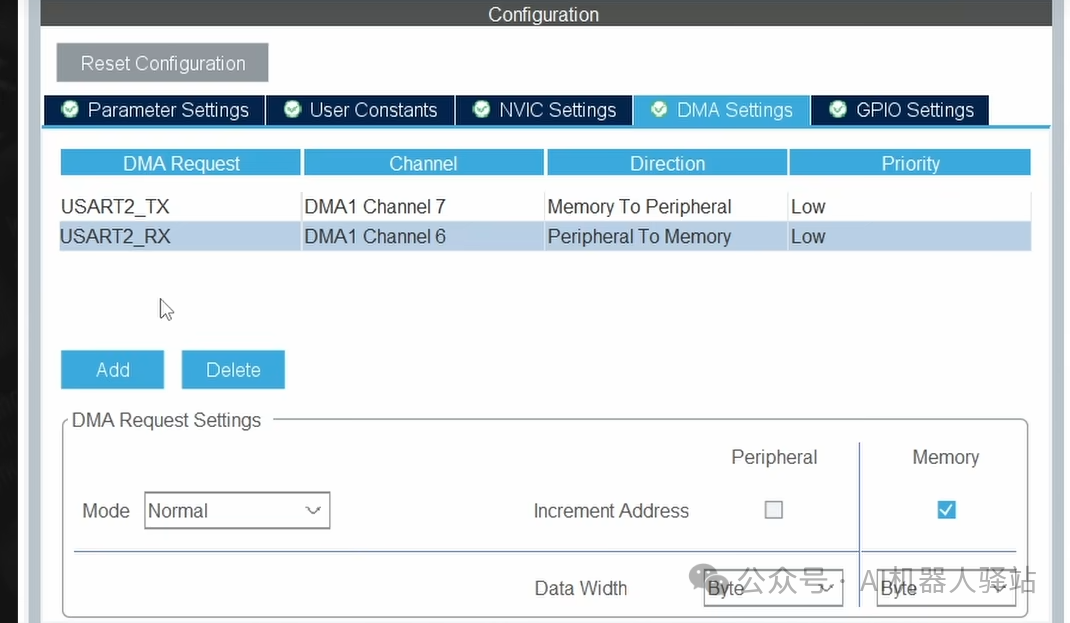
✔ 3. Enable NVIC Interrupt (used by HAL)
USART2 Global Interrupt → Enable
🟦 5. Code Structure (Fixed Length Reception)
We assume receiving 10 bytes (fixed length frame):
uint8_t dma_rx_buf[10];① Define the reception buffer
#define UART_RX_LEN 10
uint8_t dma_rx_buf[UART_RX_LEN];
② Start DMA reception (execute once in main)
HAL_UART_Receive_DMA(&huart2, dma_rx_buf, UART_RX_LEN);This means:
“UART, I want to use DMA to receive, putting the 10 bytes you receive into dma_rx_buf.”
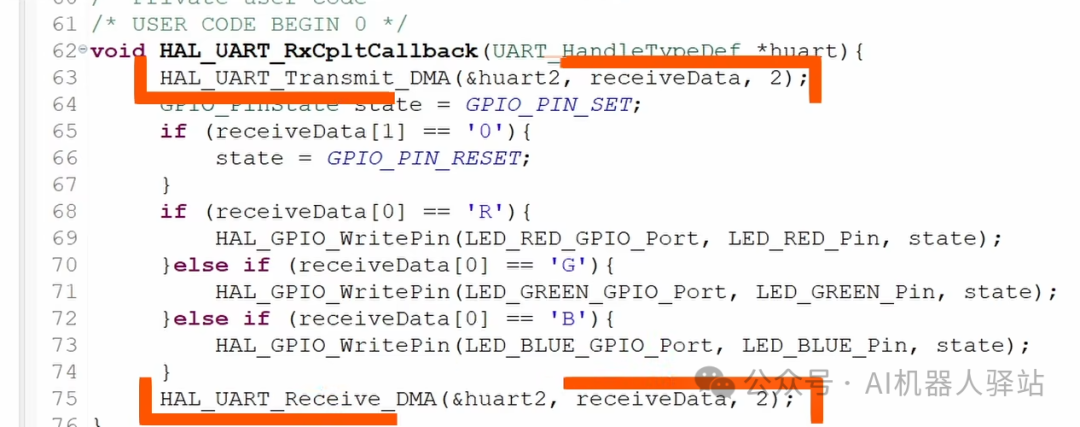
③ Reception complete callback (automatically called by DMA)
When DMA receives 10 bytes, it will trigger:
void HAL_UART_RxCpltCallback(UART_HandleTypeDef *huart)
{
    if (huart->Instance == USART2)
    {
        // Data has been completely written to dma_rx_buf by DMA
        UART_ProcessData(dma_rx_buf, UART_RX_LEN);

        // Restart DMA (otherwise it will only receive once)
        HAL_UART_Receive_DMA(&huart2, dma_rx_buf, UART_RX_LEN);
    }
}
You mustrestart DMA, otherwise reception will only occur once.
🟩 6. How to Process Received Data?
Write a simple function:
void UART_ProcessData(uint8_t *data, uint16_t len)
{
    // Example: Echo back
    HAL_UART_Transmit(&huart2, data, len, 100);
}
🟦 7. DMA Transmission (optional but very useful)
HAL also supports DMA transmission:
HAL_UART_Transmit_DMA(&huart2, tx_buf, tx_len);DMA transmission can:
- • Not block the CPU
- • Transfer large amounts of data faster
- • Avoid timeout issues with HAL_UART_Transmit
Suitable for real-time systems.
🟥 8. Errors and Troubleshooting
❌ 1. Callback not executed
Reasons:
- • UART interrupt not enabled
- • Incorrect DMA mode selected (must be Peripheral → Memory)
- • Buffer length incorrectly specified
- • HAL_UART_Receive_DMA not called again
❌ 2. Data garbled
Reasons:
- • Baud rates on both sides do not match (115200 vs 9600)
- • Clock configuration errors leading to significant baud rate discrepancies
❌ 3. Program hangs
- • Do not use HAL_Delay in callbacks
- • Do not perform complex calculations in callbacks
🟩 9. Advantages and Disadvantages of Fixed Length DMA (Engineering Perspective)
| Feature | Description |
| Advantages | 🚀 Stable, no byte loss, no interrupt explosion, low CPU usage |
| Advantages | 👍 Suitable for fixed format sensors, protocol frames |
| Disadvantages | ❌ Does not support variable length frames (to be addressed in the next article) |
| Disadvantages | ❌ Does not know when a frame ends (needs to be combined with IDLE) |
Therefore:
Fixed length DMA = the simplest and most stable method for large data reception in engineeringDMA + IDLE = industrial level variable length solution (next article)
🟦 10. Complete Minimal Working Template (can be copied directly)
#define UART_RX_LEN 10
uint8_t dma_rx_buf[UART_RX_LEN];

void UART_ProcessData(uint8_t *data, uint16_t len)
{
    // Echo back (for testing)
    HAL_UART_Transmit(&huart2, data, len, 100);
}

void HAL_UART_RxCpltCallback(UART_HandleTypeDef *huart)
{
    if (huart->Instance == USART2)
    {
        UART_ProcessData(dma_rx_buf, UART_RX_LEN);

        // Restart DMA
        HAL_UART_Receive_DMA(&huart2, dma_rx_buf, UART_RX_LEN);
    }
}

int main(void)
{
    HAL_Init();
    SystemClock_Config();
    MX_GPIO_Init();
    MX_DMA_Init();
    MX_USART2_UART_Init();

    // Start DMA reception
    HAL_UART_Receive_DMA(&huart2, dma_rx_buf, UART_RX_LEN);

    while (1)
    {
        // Main loop does its own thing
    }
}
🎉 Summary of this article (can be directly pasted at the end of the article)
“DMA = Automatic Porter” It helps you automatically transfer the data received by UART to memory, without the CPU needing to process each time.
- • Fixed length transmission → requires only DMA
- • Variable length transmission → DMA + IDLE (next article)
- • The truly stable and popular method in engineering
👉 Next article (Part 3.5): DMA + IDLE (Idle Interrupt)
Allowing you to receive data frames of any length: sensors, modules, host protocols, industrial Modbus all use this set.