
【Warm Reminder: Click on the images in the article to view them in larger size】
The STM32 family, based on the ARM Cortex M4 core, includes a special SRAM storage area in the STM32F3 and STM32F4 series chips—Core Coupled Memory [CCM RAM], which is exclusively accessed by the CPU. This is mainly to execute code at the highest system clock frequency while avoiding wait states. Therefore, compared to executing code from flash memory, it significantly reduces the execution time of critical tasks.
CCM RAM is generally used for high real-time or compute-intensive programs, such as:
* Control loops for digital power supplies (switching power supplies, lighting)
* Three-phase vector motor control
* Real-time DSP tasks
When the program code is located in CCM RAM and the data is stored in conventional SRAM, the M4 core operates in the optimal Harvard architecture configuration, allowing for zero-wait execution of instructions to maximize speed. If the interrupt service routine is located in CCM RAM, it ensures the shortest latency and improves response speed.
When CCM RAM is not used to store executable code, it can also be used as conventional SRAM. However, it cannot be accessed by DMA. Additionally, it is not recommended to store both instruction code and data in CCM at the same time, as this may cause conflicts when the core accesses data and instructions in CCM, affecting CPU processing performance. 【However, for STM32F4, CCM can only be used to store data and cannot execute instruction code. For details, refer to the comparison of system framework diagrams for the two series】
This article mainly introduces the configuration steps or key points for executing simple functions or interrupt service routines from CCM RAM based on the MDK-ARM development environment.
1. Execute Functions or Interrupt Handlers from CCM RAM
The steps to execute functions or interrupt handlers from CCM RAM are as follows:
1. Specify the start and end addresses of CCM, and define a new REGION area in the scatter file 【CCM RAM】;
2. Indicate to the linker that sections with the ccm ram attribute must be placed in the CCM RAM area;
MDK-ARM scatter file
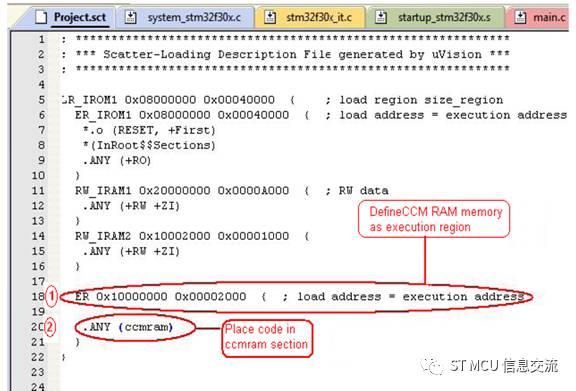
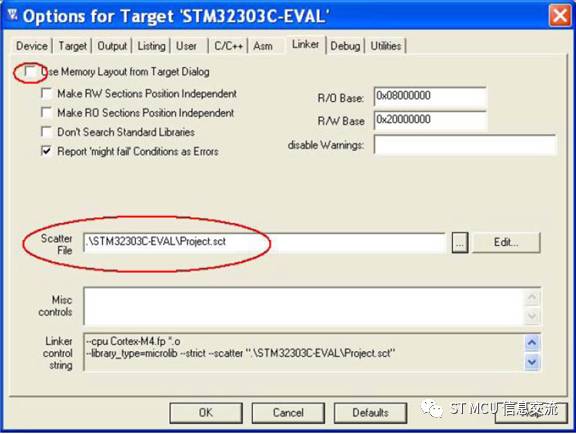
3. Configure the project options, as shown in the figure below.
MDK-ARM options menu
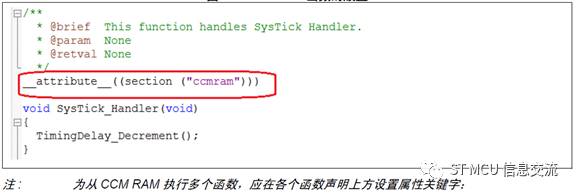
4. Place the code that needs to be executed from CCM RAM into the above-defined ccm ram area. This can be done by adding the attribute keyword above the function declaration. As shown in the figure below.
MDK-ARM function placement
2. Execute Source Files from CCM RAM
Executing source files from CCM RAM means that all functions declared in that file are executed from the CCM RAM area. Configure it as follows:
1. Specify the CCM RAM area in the project option (Project>option>target);
MDK-ARM target memory area

2. Right-click the file, place it in CCM RAM, and then select options;
3. In memory assignment, select the CCM RAM area;
MDK-ARM file placement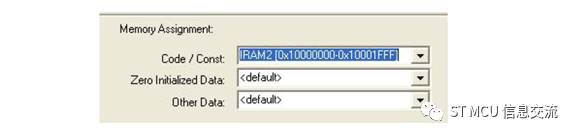
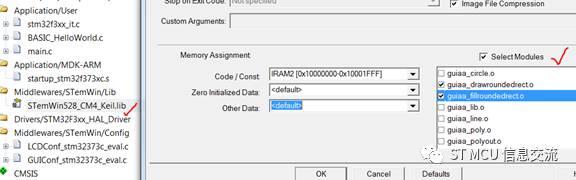
3. Execute Libraries or Library Modules from CCM RAM
Follow these steps to execute libraries or library modules from CCM RAM:
1. Set CCM RAM as a memory area, as shown in the MDK-ARM library placement figure;
2. Right-click the library in the workspace and select options;
3. You can place the entire library into CCM RAM, or only place a single module from the library;
MDK-ARM library placement
The above briefly introduces the steps and key points for executing programs from CCM RAM in the ARM MDK compilation environment. For applications in other environments, such as IAR and GNU, please refer to the official ST application note AN4296. You can search and download it at www.st.com/stm32, or click the “Read Original” link at the bottom left to download from the ST MCU Chinese website www.stmcu.com.cn.
=============================
Previous topics link:
1. Crosstalk between ADC channels in scanning mode
2. Several terms of STM32 CAN filters
3. The topic of not updating the STM32 RTC calendar value
4. Interpretation of STM32 timer DMA BURST transfer
5. Common issues in the STM8 MCU development process
 Scan or long press the QR code to follow the public account