
Source: https://blog.csdn.net/qq_32348883/article/details/123894312
Compiled by: Technology Makes Dreams Greater | Li Xiaoyao
Introduction
Keil MDK-ARM can be used with the GNU Compiler Collection (GCC). GCC is an open-source development tool with numerous contributors, widely available and supporting many devices.
Keil defaults to using ARMCC to compile MCU project code. Therefore, to set it to compile with GCC, the following configurations are needed.
Download Steps
ARM GCC Compiler download link: https://developer.arm.com/tools-and-software/open-source-software/developer-tools/gnu-toolchain/gnu-rm/downloads
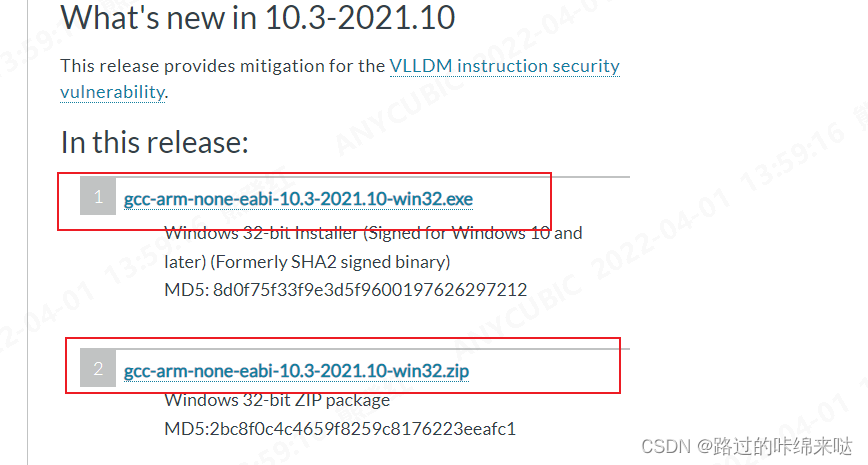
Operation Steps
1. To enable MDK-ARM to use GCC: 1. Open the Components, Environment and Books dialog
Project > Manage > Components, Environment, Books…
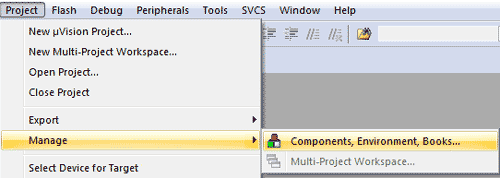 μVision GNU Tool Selection
2. Select the Folder/Extensions tab,
3. And check to use the GNU Compiler. 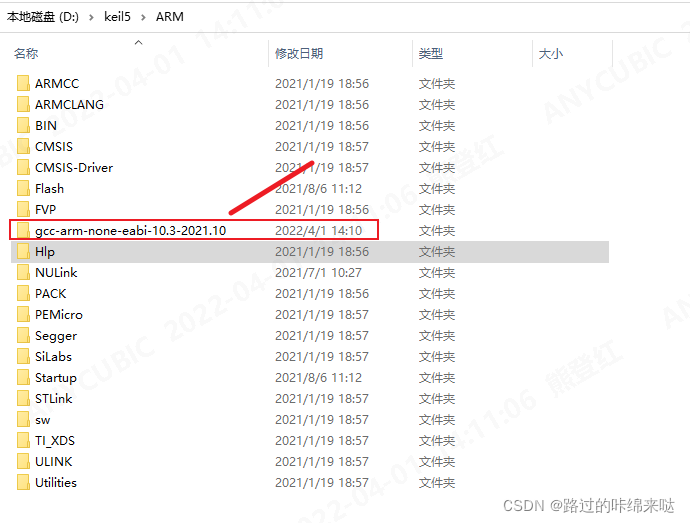
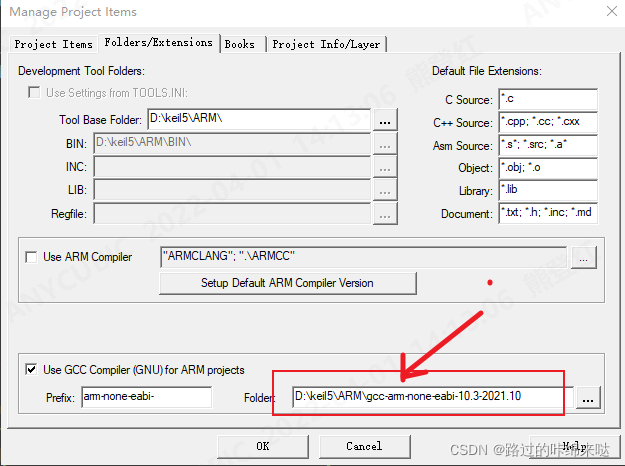
1. Configure CC Compilation Rules
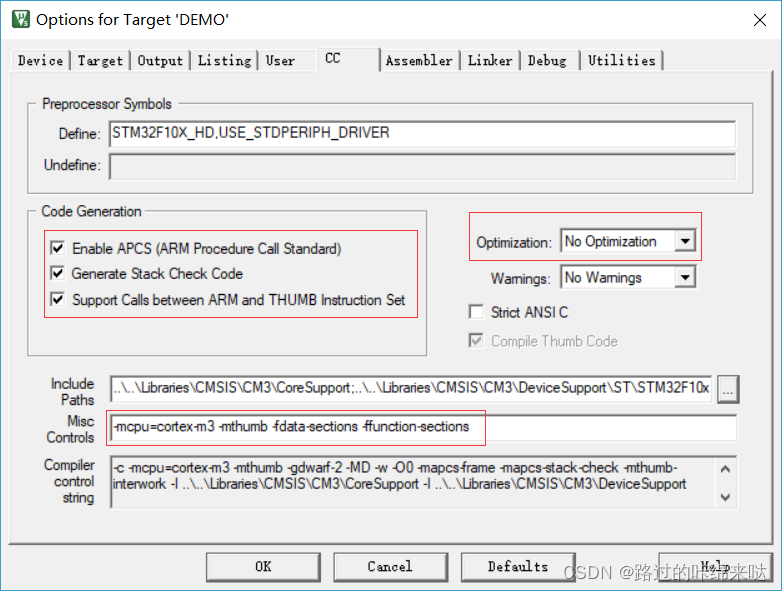
Make sure to check the following options and fill in the rules
Misc Controls : -mcpu=cortex-m3 -mthumb -fdata-sections -ffunction-sectionsNote: 1. I used cortex-m3 here; if you are using the m4 core, change it to 4)
2. The meaning of -mthumb is: the target file generated with this compilation option is Thumb
3. -fdata-sections and -ffunction-sections are discussed together with the connection rules below
2. Configure Assembler Compilation Rules
Similar to the previous item
Misc Controls : -mcpu=cortex-m3 -mthumb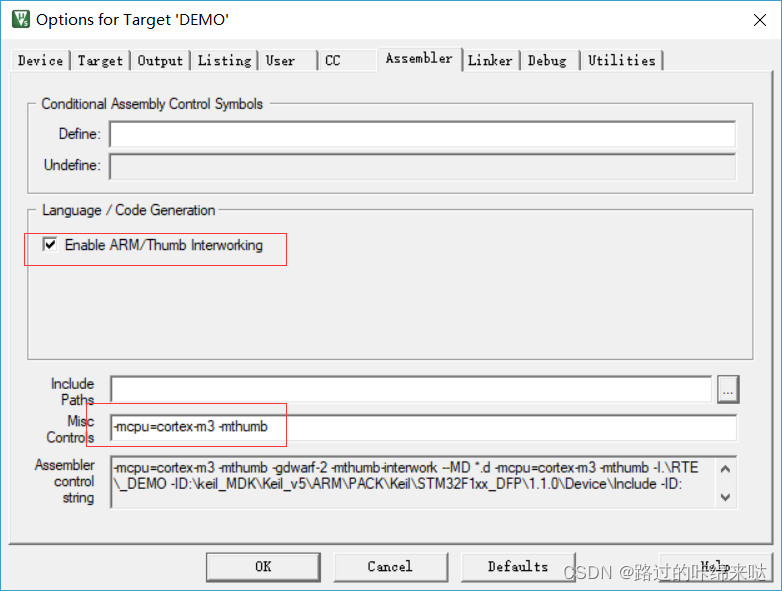
3. Configure Linker Connection Rules
Here you need to add the linker script, which can generally be found in the official firmware library package
Misc Controls : -Wl,–gc-sections
Note: 1. Note that there are two short “–” before gc; copying directly may cause issues due to the blog
2. -wl, indicates that the following parameters –gc-sections are passed to the linker
3. -fdata-sections and -ffunction-sections and –gc-sections are explained below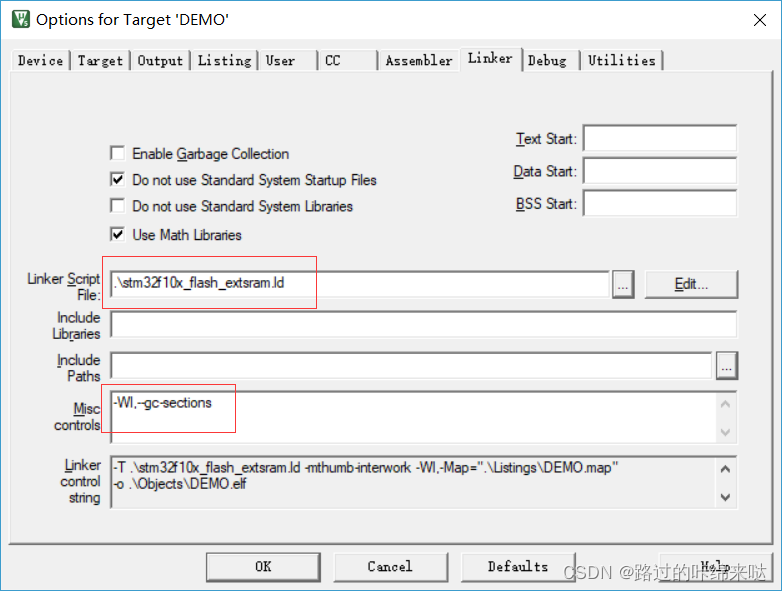
4. stm32f10x_flash_extsram.ld Content
/*
Default linker script for STM32F10x_1024K_1024K
Copyright RAISONANCE S.A.S. 2008
*/

/* include the common STM32F10x sub-script */

/* Common part of the linker scripts for STM32 devices*/

/* default stack sizes.
These are used by the startup in order to allocate stacks for the different modes.
*/

__Stack_Size = 1024 ;

PROVIDE ( _Stack_Size = __Stack_Size ) ;

__Stack_Init = _estack  - __Stack_Size ;

/*"PROVIDE" allows to easily override these values from an object file or the commmand line.*/
PROVIDE ( _Stack_Init = __Stack_Init ) ;

/*
There will be a link error if there is not this amount of RAM free at the end.
*/
_Minimum_Stack_Size = 0x100 ;

/* include the memory spaces definitions sub-script */
/*
Linker subscript for STM32F10x definitions with 1024K Flash and 1024K External SRAM */

/* Memory Spaces Definitions */

MEMORY
{
  RAM (xrw) : ORIGIN = 0x68000000, LENGTH = 1024K
  FLASH (rx) : ORIGIN = 0x8000000, LENGTH = 1024K
  FLASHB1 (rx) : ORIGIN = 0x00000000, LENGTH = 0
  EXTMEMB0 (rx) : ORIGIN = 0x00000000, LENGTH = 0
  EXTMEMB1 (rx) : ORIGIN = 0x00000000, LENGTH = 0
  EXTMEMB2 (rx) : ORIGIN = 0x00000000, LENGTH = 0
  EXTMEMB3 (rx) : ORIGIN = 0x00000000, LENGTH = 0
}

/* higher address of the user mode stack */
_estack = 0x68100000;

/* include the sections management sub-script for FLASH mode */

/* Sections Definitions */

SECTIONS
{
    /* for Cortex devices, the beginning of the startup code is stored in the .isr_vector section, which goes to FLASH */
    .isr_vector :
    {
 . = ALIGN(4);
        KEEP(*(.isr_vector))            /* Startup code */
 . = ALIGN(4);
    } >FLASH

    /* for some STRx devices, the beginning of the startup code is stored in the .flashtext section, which goes to FLASH */
    .flashtext :
    {
 . = ALIGN(4);
        *(.flashtext)            /* Startup code */
 . = ALIGN(4);
    } >FLASH

    /* the program code is stored in the .text section, which goes to Flash */
    .text :
    {
     . = ALIGN(4);

        *(.text)                   /* remaining code */
        *(.text.*)                   /* remaining code */
        *(.rodata)                 /* read-only data (constants) */
        *(.rodata*)
        *(.glue_7)
        *(.glue_7t)

     . = ALIGN(4);
     _etext = .;
     /* This is used by the startup in order to initialize the .data section */
     _sidata = _etext;
    } >FLASH

    /* This is the initialized data section
    The program executes knowing that the data is in the RAM
    but the loader puts the initial values in the FLASH (inidata).
    It is one task of the startup to copy the initial values from FLASH to RAM. */
    .data  : AT ( _sidata )
    {
     . = ALIGN(4);
        /* This is used by the startup in order to initialize the .data section */
        _sdata = . ;

        *(.data)
        *(.data.*)

     . = ALIGN(4);
     /* This is used by the startup in order to initialize the .data section */
     _edata = . ;
    } >RAM

    /* This is the uninitialized data section */
    .bss :
    {
     . = ALIGN(4);
        /* This is used by the startup in order to initialize the .bss section */
        _sbss = .;

        *(.bss)
        *(COMMON)

     . = ALIGN(4);
     /* This is used by the startup in order to initialize the .bss section */
     _ebss = . ;
    } >RAM

    PROVIDE ( end = _ebss );
    PROVIDE ( _end = _ebss );

    /* This is the user stack section
    This is just to check that there is enough RAM left for the User mode stack
    It should generate an error if it's full.
     */
    ._usrstack :
    {
     . = ALIGN(4);
        _susrstack = . ;

        . = . + _Minimum_Stack_Size ;

     . = ALIGN(4);
        _eusrstack = . ;
    } >RAM

    /* this is the FLASH Bank1 */
    /* the C or assembly source must explicitly place the code or data there
    using the "section" attribute */
    .b1text :
    {
        *(.b1text)                   /* remaining code */
        *(.b1rodata)                 /* read-only data (constants) */
        *(.b1rodata*)
    } >FLASHB1

    /* this is the EXTMEM */
    /* the C or assembly source must explicitly place the code or data there
    using the "section" attribute */

    /* EXTMEM Bank0 */
    .eb0text :
    {
        *(.eb0text)                   /* remaining code */
        *(.eb0rodata)                 /* read-only data (constants) */
        *(.eb0rodata*)
    } >EXTMEMB0

    /* EXTMEM Bank1 */
    .eb1text :
    {
        *(.eb1text)                   /* remaining code */
        *(.eb1rodata)                 /* read-only data (constants) */
        *(.eb1rodata*)
    } >EXTMEMB1

    /* EXTMEM Bank2 */
    .eb2text :
    {
        *(.eb2text)                   /* remaining code */
        *(.eb2rodata)                 /* read-only data (constants) */
        *(.eb2rodata*)
    } >EXTMEMB2

    /* EXTMEM Bank0 */
    .eb3text :
    {
        *(.eb3text)                   /* remaining code */
        *(.eb3rodata)                 /* read-only data (constants) */
        *(.eb3rodata*)
    } >EXTMEMB3

    /* after that it's only debugging information. */

    /* remove the debugging information from the standard libraries */
    DISCARD :
    {
     libc.a ( * )
     libm.a ( * )
     libgcc.a ( * )
     }

    /* Stabs debugging sections.  */
    .stab          0 : { *(.stab) }
    .stabstr       0 : { *(.stabstr) }
    .stab.excl     0 : { *(.stab.excl) }
    .stab.exclstr  0 : { *(.stab.exclstr) }
    .stab.index    0 : { *(.stab.index) }
    .stab.indexstr 0 : { *(.stab.indexstr) }
    .comment       0 : { *(.comment) }
    /* DWARF debug sections.
       Symbols in the DWARF debugging sections are relative to the beginning
       of the section so we begin them at 0.  */
    /* DWARF 1 */
    .debug          0 : { *(.debug) }
    .line           0 : { *(.line) }
    /* GNU DWARF 1 extensions */
    .debug_srcinfo  0 : { *(.debug_srcinfo) }
    .debug_sfnames  0 : { *(.debug_sfnames) }
    /* DWARF 1.1 and DWARF 2 */
    .debug_aranges  0 : { *(.debug_aranges) }
    .debug_pubnames 0 : { *(.debug_pubnames) }
    /* DWARF 2 */
    .debug_info     0 : { *(.debug_info .gnu.linkonce.wi.*) }
    .debug_abbrev   0 : { *(.debug_abbrev) }
    .debug_line     0 : { *(.debug_line) }
    .debug_frame    0 : { *(.debug_frame) }
    .debug_str      0 : { *(.debug_str) }
    .debug_loc      0 : { *(.debug_loc) }
    .debug_macinfo  0 : { *(.debug_macinfo) }
    /* SGI/MIPS DWARF 2 extensions */
    .debug_weaknames 0 : { *(.debug_weaknames) }
    .debug_funcnames 0 : { *(.debug_funcnames) }
    .debug_typenames 0 : { *(.debug_typenames) }
    .debug_varnames  0 : { *(.debug_varnames) }
}
5. Startup Code, Use GCC-Specific .S Files
The startup code required for the GCC compiler differs from AMRCC, but the official has provided relevant code, as shown in the figure: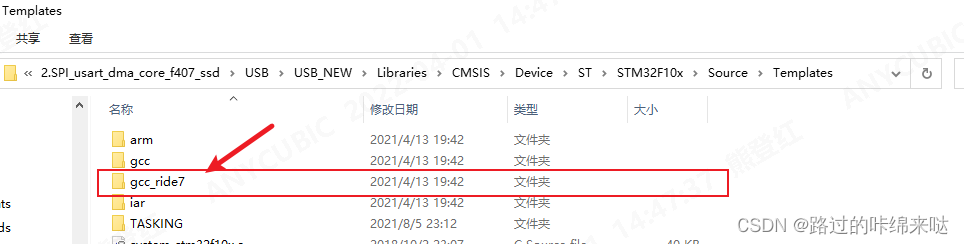
6. Compilation and Execution
1. core_cm3.c Errors

Two errors appeared, and after searching, it was found that the core_cm3.c provided by the official had a bug. Change line 736 to:
__ASM volatile ("strexb %0, %2, [%1]" : "=&r" (result) : "r" (addr), "r" (value) );
Change line 753 to:
__ASM volatile ("strexh %0, %2, [%1]" : "=&r" (result) : "r" (addr), "r" (value) );
Knowledge Supplement
–gnu
Enable GNU Compiler extensions supported by the ARM compiler. Compatible GCC versions can be checked by inspecting predefined macros __GNUC__ and __GNUC_MINOR__. In addition, under GNU mode, the ARMCC compiler simulates GCC to comply with C/C++ standards, regardless of their strictness.
This option can also be combined with other source language command line options. For example, armcc –c90 –gnu.
–C99 and –gnu
Many compilation standards in SOEM code seem to be GNU standards, such as anonymous UNION, array size cannot be 0, etc. Therefore, it is necessary to add --gnu in the Misc Controls of Keil C/C++ 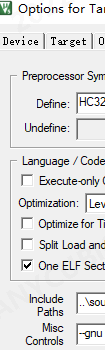 .
.
Referring to other bloggers, it may cause issues with printf; therefore, you need to add the following content in the code:
#ifdef __GNUC__
  /* With GCC/RAISONANCE, small printf (option LD Linker->Libraries->Small printf
     set to 'Yes') calls __io_putchar() */
  //#define PUTCHAR_PROTOTYPE int __io_putchar(int ch)
 //comment_20190422: soem needs --gnu compile option,
 #define PUTCHAR_PROTOTYPE int fputc(int ch, FILE *f)

#else
  #define PUTCHAR_PROTOTYPE int fputc(int ch, FILE *f)
#endif /* __GNUC__ */
/**
  * @brief  Retargets the C library printf function to the USART.
  * @param  None
  * @retval None
  */
PUTCHAR_PROTOTYPE
{
  /* Place your implementation of fputc here */
  /* e.g. write a character to the EVAL_COM1 and Loop until the end of transmission */
  HAL_UART_Transmit(&huart1, (uint8_t *)&ch, 1, 0xFFFF);

  return ch;
}
Copyright Statement:This article is sourced from the internet, free to convey knowledge, copyright belongs to the original author. If there are any copyright issues, please contact me for deletion.
‧‧‧‧‧‧‧‧‧‧‧‧‧‧‧‧ END ‧‧‧‧‧‧‧‧‧‧‧‧‧‧‧
Follow my public WeChat account, reply "Join Group" to follow the rules to join the technical exchange group.
Click "Read the Original" for more sharing, welcome to share, collect, like, and view.