1
The Cortex-M series microcontrollers based on the ARMv8-M architecture (Cortex-M33 and Cortex-M23) introduce TrustZone technology. TrustZone enables two security domains within a single processor, partitioning the execution space into secure and non-secure areas. This enhances security by achieving complete isolation between trusted software running on the secure side and untrusted software running on the non-secure side.
If functions provided by the secure side are allowed to be called by non-secure software, these functions must be placed in a memory region marked as Non-Secure Callable (NSC).
With TrustZone, applications consist of two independent projects:
1. A secure application running on the secure side
2. An application running on the non-secure side
After the ARMv8-M core starts, it defaults to the secure side, with secure software responsible for programming the Secure Attribution Unit (SAU) and the Implementation Defined Attribution Unit (IDAU), partitioning the memory space into secure and non-secure areas. Software on the secure side can access both secure and non-secure memory, while software on the non-secure side can only access non-secure memory.
How to use FreeRTOS on ARMv8-M architecture processors that support TrustZone?
1. FreeRTOS Porting for ARMv8-M
The FreeRTOS kernel provides porting code for ARMv8-M (ARM Cortex-M33 and ARM Cortex-M23):
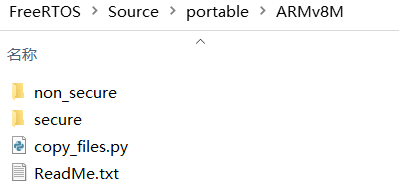
It can run on either the secure or non-secure side. Non-secure tasks (or threads) are allowed to call functions from the secure side.
When the FreeRTOS kernel runs on the non-secure side, TrustZone support is optional. Only the FreeRTOS kernel code is allowed to have elevated privileges.
In applications, FreeRTOS typically runs on the non-secure side, and user tasks can call functions exported by secure side software.
2. FreeRTOS Example Projects
The simplest way to get started is to use the example projects in FreeRTOS/Demo:
🔸 Keil simulator based on Keil uVision IDE
🔸 NXP LPCXpresso55S69 development board example based on MCUXpresso IDE
🔸 Nuvoton NuMaker-PFM-M2351 development board example based on Keil uVision and IAR IDE
These projects can be used directly or serve as reference for source files, configuration options, and compiler settings.
3. FreeRTOS Integration
FreeRTOSConfig.h Configuration
When FreeRTOS runs on the non-secure side, to enable FreeRTOS tasks to call NSC secure functions, TrustZone support must be enabled in FreeRTOSConfig.h:
#define configENABLE_TRUSTZONE 1
Build Project
In addition to the FreeRTOS kernel source code, porting files need to be added to both secure and non-secure projects:
Source files compiled in the secure project: FreeRTOS\Source\portable\[compiler]\[architecture]\secure
Source files compiled in the non-secure project: FreeRTOS\Source\portable\[compiler]\[architecture]\non_secure
Where [architecture] is ARM_CM23 or ARM_CM33, depending on the target hardware.
Define Secure Functions as NSC
Use the macro secureportNON_SECURE_CALLABLE to declare secure functions callable from the non-secure side.
SecureportNON_SECURE_CALLABLE void NSCFunction(void);
The NSC functions must be placed in the NSC memory region in the link descriptor file of the secure project. An example of GCC placement is shown below:
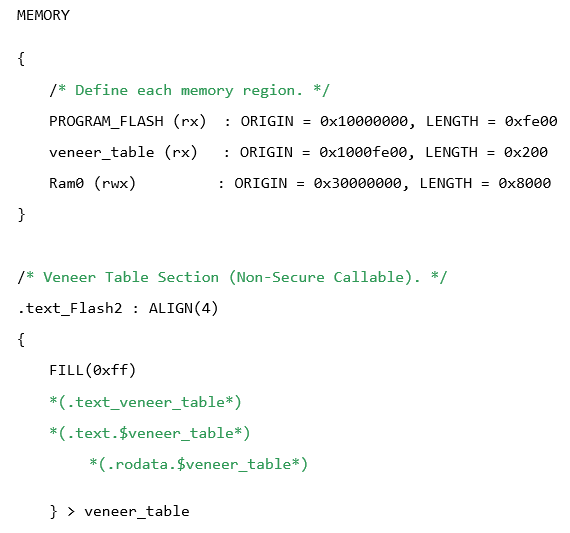
Assign Secure Context for Non-Secure Tasks
FreeRTOS tasks that need to call NSC functions must call the portALLOCATE_SECURE_CONTEXT macro to allocate a secure context:

By following the above steps, FreeRTOS can be easily integrated into TrustZone architecture processors. FreeRTOS has now been certified at Level 2 of the Security Evaluation Standard for IoT Platforms (SESIP™) and Level 1 of the Platform Security Architecture (PSA), better meeting the information security application needs based on TrustZone hardware.
Follow our WeChat public account 【Microtech Technology】, reply with “Join Group” to join the technical exchange group
Product Consultation:
Beijing: 010-62975900
Shanghai: 021-62127690
Shenzhen: 0755-82977971