Source | STM32 The STM32L5 is based on the Cortex-M33 core, which is built on the ARMV8-M architecture and features TrustZone security technology, effectively isolating the secure and non-secure areas from the core to the entire chip system. In terms of debugging port protection, the combination of TrustZone and RDP (Read Protection) can also achieve flexible debugging port access control, effectively blocking access to on-chip code from the debugging port.
TrustZone Protects the Confidentiality of On-Chip Code
-
Controlled Debug Port Connection
Under RDP1 or RDP0.5 conditions, if the chip uses the TrustZone power-on debugging interface, it cannot be connected (similar to the effect of RDP2).
More flexible than RDP2, allowing user code to control subsequent debugging port access permissions, enabling secure debugging while retaining the possibility of modifying option bytes.
-
Further Isolation of User On-Chip Flash
The secure flash area cannot be accessed arbitrarily by the non-secure world.
The non-secure world cannot access the data of the secure world.
The non-secure world cannot access the peripherals of the secure world.
Access to functions in the secure world from the non-secure world must follow certain rules and cannot be called arbitrarily.
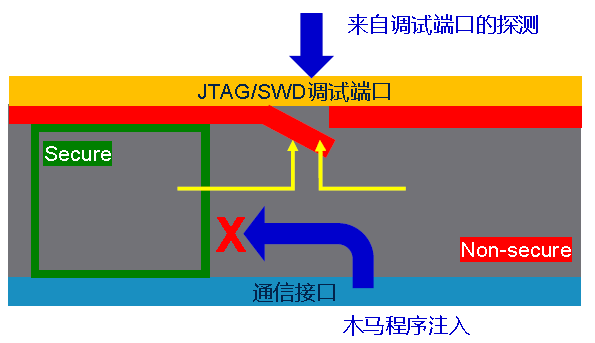
TrustZone Assists in Code Protection Example
-
Resource allocation between the “secure world” and “non-secure world”.
-
Example menu and testing functions.
-
Example running precautions.
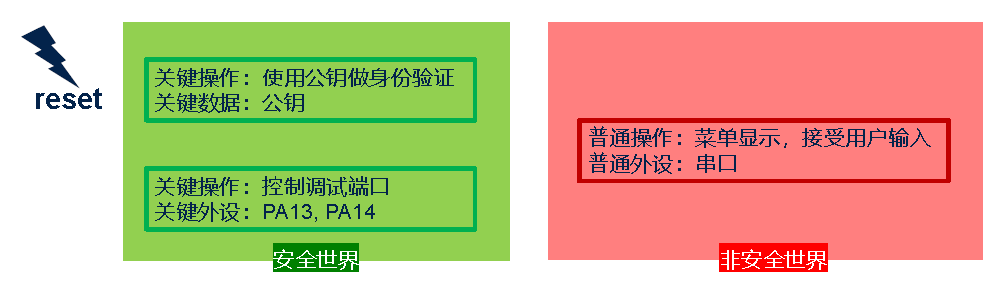
Resource Allocation
-
Run secure world code on power-up to allocate resources.
-
Secure World:
Critical operations, critical data.
Combined with read protection, it can block debugging port connections.
-
Non-Secure World:
Human-machine interaction.
Can enable the debugging port, but cannot access critical data and peripherals of the secure world.
Debug Port Connection Control RDP=0
-
Read protection level is 0 (default state of the chip).
The chip reset can be connected via the debugging port.
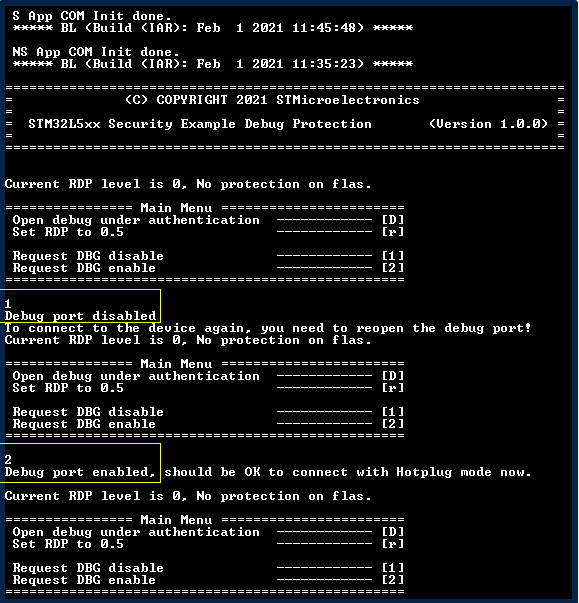
Running Example
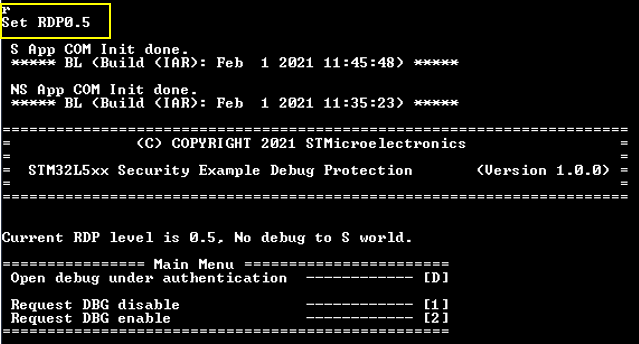
Debug Port Connection Control RDP=0.5
-
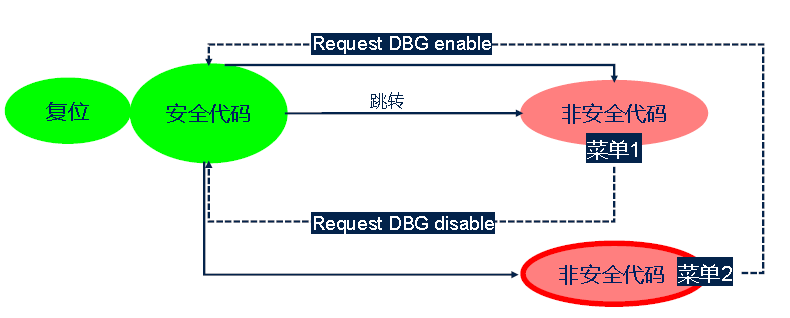
Read protection level is 0.5.
Hardware guarantee: when the CPU is in a secure state, debugging cannot connect; including during reset and when running secure code.
Software operation: secure code must close the debugging port before jumping to the non-secure area.
-
Protection effect:
When the CPU runs in the non-secure area, by default debugging cannot connect; authentication can enable debugging of non-secure code.
Debugging Enabled with Authentication
-
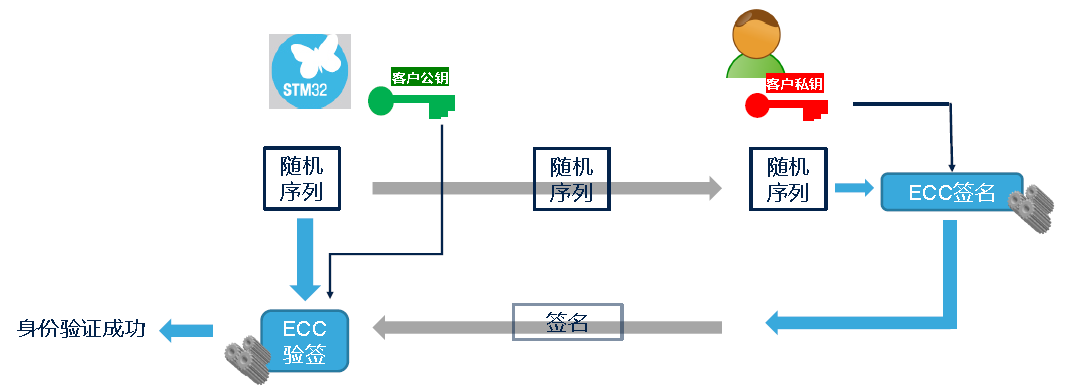
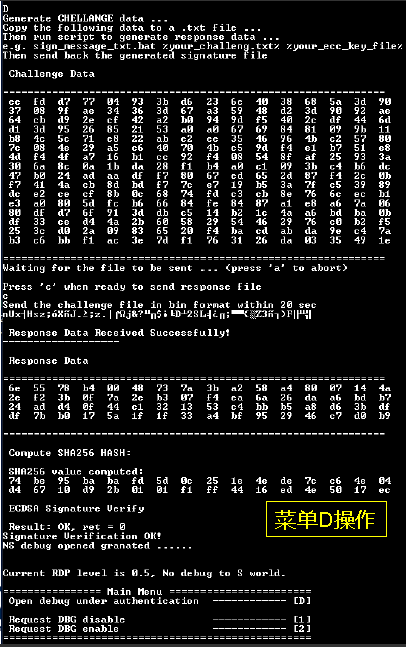
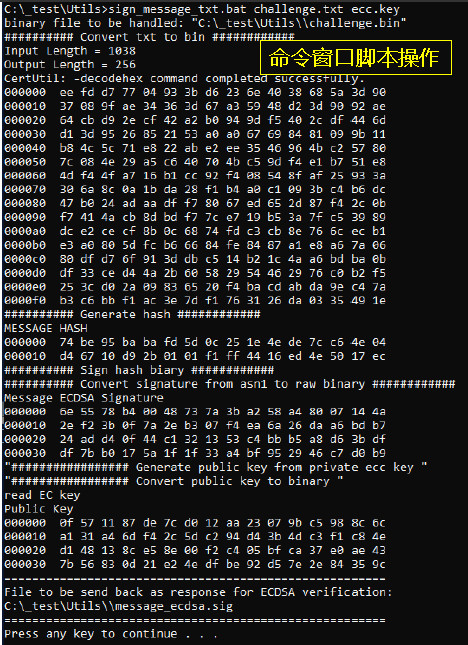
Based on the “Challenge-Response” model.
The chip generates a random sequence, and a legitimate user must hold the matching private key to sign the random sequence to be verified successfully by the chip using the corresponding public key stored in the secure world.
Precautions for Running the Example
- When RDP0.5, the S code automatically closes the debugging port. Using STM32CUbeProgrammer hotplug will also fail to connect; IDE downloading NS code will not succeed either; the user needs to open the debugging port through the menu before STM32CubeProgrammer can connect successfully, and IDE downloading can also succeed.
- When RDP is non-zero, if there is no valid code that can run to the non-secure state in the on-chip Flash, the debugging port will no longer be connectable unless the boot method is changed, starting from the system BL (the system BL code can certainly run to the non-secure state) must ensure that it can boot from the system BL (boot control in option bytes: nSWBOOT0).
- [Q] Why is there no menu provided for RDP fallback in the example? [A] When TrustZone is enabled, RDP fallback can only be completed by the debugging interface or system BL. The example achieves controllable debugging of non-secure code through both hardware and software. Hardware: Read protection level not zero + TZ enabled
During reset + running in the secure code area, debugging cannot connect. Software: Secure area code closes the debugging port before jumping to non-secure area code. Menu [1], [2]: Testing purposes, will not be integrated into the product. Menu [D]: Even if malicious code is injected in the non-secure area through the communication port to call the function to open the debugging port, it cannot be opened due to not knowing the private key required for signature verification.
———— END ———— ● Selected Tutorials from the Embedded Column● Selected Summary | ST Tools, Download Programming Tools● Selected Summary | Embedded Software Design and Development● Selected Summary | STM32, MCU, MicrocontrollerWelcome to follow my public account, reply “Join Group” to join the technical exchange group as per the rules, reply “1024” to see more content.Welcome to follow my video account:

Click “Read Original” to see more shares, and feel free to share, save, like, and view.