The integration of smart home technology in a three-bedroom apartment focuses on “zoning planning, functional interaction, and on-demand selection”—covering the basic needs of core areas such as the living room, bedrooms, kitchen, and bathroom (e.g., lighting, security, comfort control) while avoiding excessive device accumulation that leads to waste. Below, we provide specific, actionable integration ideas from three dimensions: “space zoning solutions,” “core system interaction,” and “pitfall avoidance advice.”
1. Establish the “Basic Framework”: Choose the Right Smart Home System
Before integration, determine the “control protocol” and “core platform” to avoid future device incompatibility and lack of interaction. Beginners should prioritize a solution with “unified ecosystem + open protocol”:
Preferred options include: Xiaomi / Mijia (high cost-performance ratio, rich device options, suitable for users with moderate budgets), Huawei HarmonyOS (suitable for Huawei phone/tablet users, smooth ecosystem interaction), and Apple HomeKit (ideal for Apple ecosystem users, strong privacy, but devices tend to be expensive).
Protocol Compatibility: Prioritize devices that support “Zigbee” (low power consumption, strong stability, requires a gateway) or “Matter” (cross-ecosystem universal protocol, future trend), and avoid devices that only support “infrared remote control” (which cannot actively interact, only passively controlled).Essential Core Devices (Universal for All Spaces):
1 “Smart Gateway”: A “bridge” connecting Zigbee devices, preferably with Bluetooth gateway functionality (to be compatible with Bluetooth devices such as human body sensors, temperature and humidity sensors);
1 “Smart Speaker / Central Control Screen”: Voice control entry (e.g., Xiaomi speaker, Huawei Xiaoyi screen), the central control screen can also visualize control, suitable for the elderly and children.
2. Space Planning: Core Scenario Solutions for a Three-Bedroom Apartment
Prioritize basic functions in each space according to the order of “high-frequency needs > comfort needs > personalized needs,” then add advanced features.
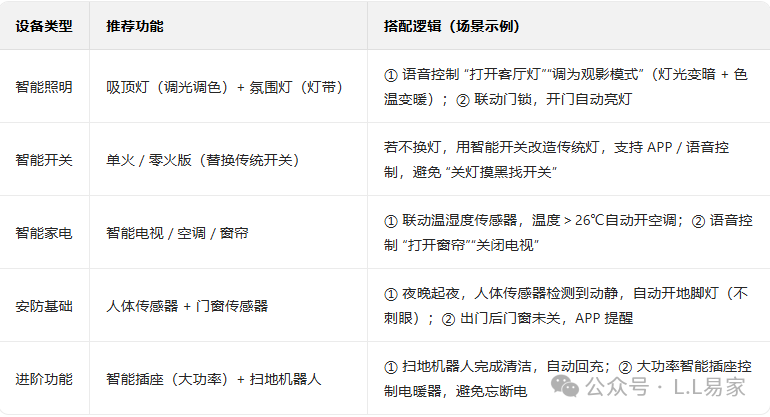
1. Living Room: The Core of Family Interaction, Balancing “Convenience + Atmosphere + Security”
The living room is the area where family members interact the most, focusing on solving issues such as “trouble with turning on/off lights/appliances,” “safety during nighttime trips to the bathroom,” and “forgetting to turn off devices when leaving.”
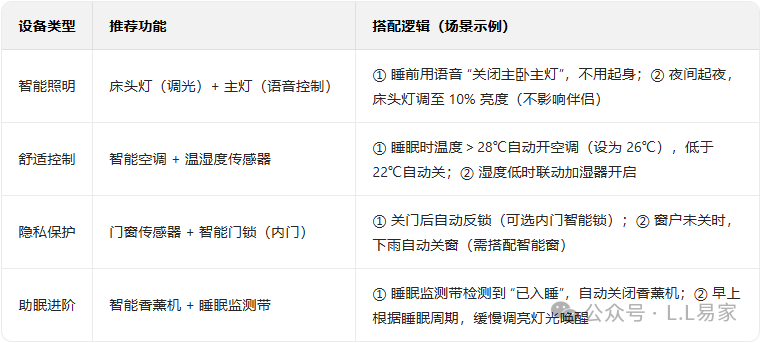
2. Master Bedroom: Emphasizing “Sleep Comfort + Privacy Security”
The core of the master bedroom is “not disturbing sleep,” with functions primarily focused on “automatic adjustment” to reduce manual operations.
3. Secondary Bedroom / Children’s Room: Adapt as Needed, Focusing on “Safety + Convenience”
If the secondary bedroom is a children’s room, the focus is on “safety protection”; if it is a guest room, the emphasis is on “temporary convenience.”

4. Kitchen: Core “Safety + Convenience,” Avoiding Fire / Water Leak Risks
The kitchen is a high-risk area for safety hazards, and smart home technology focuses on solving issues such as “forgetting to turn off the stove, water leaks, and heavy oil smoke.”

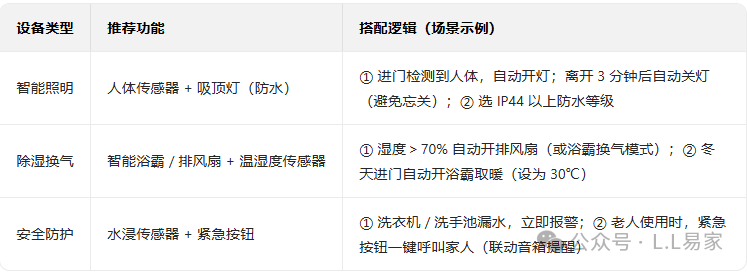
5. Bathroom: Addressing “Humidity + Nighttime Issues,” Focusing on “Automation”
The bathroom is humid and poorly lit, focusing on using sensors to trigger automatic operations, reducing manual contact (to prevent electric shock and dirt).
3. Core System Interaction: Enabling Devices to “Work Together” Rather Than “Controlled Individually”
The essence of smart home technology is “scene interaction”—not having to operate each device individually, but triggering one command that multiple devices respond to automatically. Here are three essential interaction scenes recommended:
1. “Leaving Home Mode”: One-Click Disconnection, Security Activation
- Trigger Conditions Mobile app clicks “Leaving Home Mode,” or smart door lock recognizes “leaving home fingerprint.”
- Linked Devices
- Turn off all lights, air conditioning, TVs, and exhaust fans;
- Smart sockets (non-essential devices, such as humidifiers, table lamps) cut power;
- Window and door sensors activate monitoring, gas/water leak sensors remain alert;
- Robot vacuum automatically starts cleaning.
2. “Returning Home Mode”: Automatic Welcome, No Hands Needed
- Trigger Conditions Smart door lock recognizes “returning home fingerprint,” or mobile GPS locates “within 1 km of home.”
- Linked Devices
- Turn on the main living room light + entrance light, curtains automatically open (if during the day);
- Air conditioning automatically turns on based on current temperature (26°C in summer, 24°C in winter);
- If returning home after 6 PM, automatically turn on the living room ambient light (warm light).
3. “Sleep Mode”: One-Click to Enter “Do Not Disturb” State
- Trigger Conditions Voice command “I am going to sleep,” or bedside button click “Sleep Mode.”
- Linked Devices
- Turn off all lights in the living room and kitchen, turn off the main light in the master bedroom, and set the bedside lamp to 5% brightness (turn off after 30 seconds);
- Turn off the TV, exhaust fan, and set air conditioning to “sleep mode” (temperature fluctuates automatically by 1-2°C);
- Window and door sensors activate, providing a slight reminder if someone opens the door at night (without waking anyone).
4. Pitfall Avoidance Advice: Newcomers Should Avoid These Traps
- Do Not Blindly Pursue “Full Smart” Prioritize transforming “high-frequency pain points” (e.g., living room lights, bedroom air conditioning, kitchen gas), then consider “nice-to-have” devices (e.g., smart aroma diffuser, smart flower pot).
- Pay Attention to “Installation Compatibility”
- For older houses without a neutral wire, choose “single live wire smart switches” (to avoid tripping);
- Choose devices with “waterproof rating IP44 or above” for kitchens and bathrooms (to prevent moisture short circuits);
- Use “16A smart sockets” for high-power devices (air conditioning, electric heaters) (to avoid overload).
5. Budget Reference (Medium Configuration)
- Basic Version (Meets Basic Needs) 5000-8000 RMB (covers lighting, security, core appliance control, such as 1 gateway + 1 speaker + 6 smart switches + 4 sensors + 1 smart door lock + 1 smart air conditioning);
- Advanced Version (Comfort Interaction) 10000-15000 RMB (adds curtains, bathroom heater, sleep monitoring, gas valve, etc., supporting complex scene interactions);
- Luxury Version (Full Scene Coverage) 20000 RMB and above (includes smart windows, whole-house dimming, central air conditioning control, home theater interaction, etc.).
Newcomers are advised to start with the “Basic Version,” first testing 1-2 spaces (e.g., starting with the living room + master bedroom), and gradually expanding after familiarization to avoid excessive initial investment that may not be utilized.