When you wake up in the morning and see the hour and minute hands of the alarm clock stopped between “7” and “12”, you immediately know it is exactly 7 o’clock; you touch your forehead, pick up the thermometer, and see the mercury column stopped at the “38” mark, and you instantly realize you have a fever (just an example, wishing everyone good health).These pieces of information are obtained through your eyes and understood by your brain—you rarely think about how you got them, just like 1+1=2. You need to learn this equation when you are young, but as you grow up, you won’t hesitate to arrive at this conclusion. However, if a computer were to make these judgments, it currently cannot have “awareness”, and thus relies on sensors and data.
A sensor is a type of input device used to read or measure physical properties such as temperature, pressure, acidity, etc.
Data in the real world is essentially an analogue signal, meaning it constantly changes and does not exist as fixed discrete values. Analogue data often requires some interpretation to be understood. For example, the temperature displayed on a mercury thermometer requires people to observe the height of the mercury column to determine the temperature. Depending on the accuracy of measuring the mercury height, the temperature value can vary infinitely. Similarly, an analogue clock requires people to observe the position of the hands on the dial to determine the specific hour and minute. There are many such examples in life.
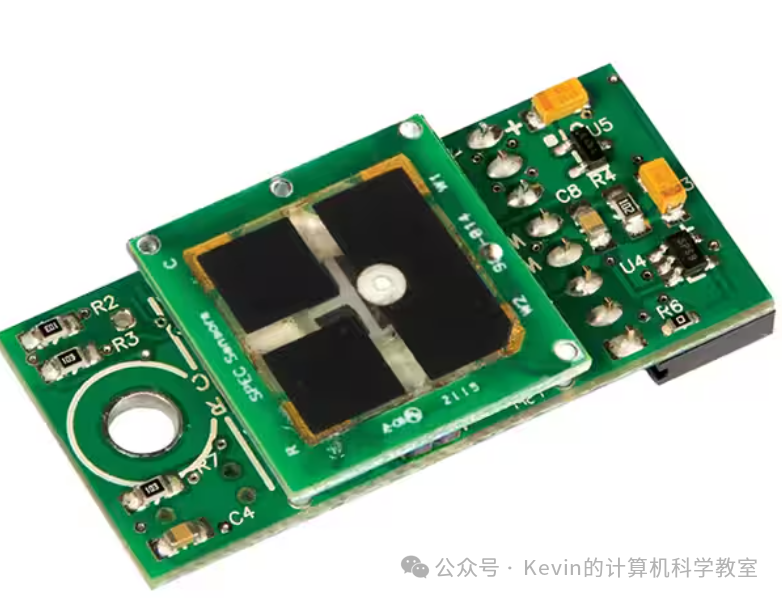
A gas sensor
However, computers cannot directly understand these physical quantities; they must be converted into digital signals to be processed. This process is typically accomplished through an analogue-to-digital converter (ADC). The ADC can convert physical quantities into discrete digital values for storage and processing by the computer.
| Sensor Type | Typical Applications |
|---|---|
| Temperature Sensor | – Control central heating systems– Control/monitor chemical process– Control/monitor temperature in greenhouses |
| Humidity/Moisture Sensor | – Control/monitor soil or air humidity in greenhouses– Monitor humidity levels in industrial environments (e.g., paint booths in car factories) |
| Light Sensor | – Automatically turn on street lights at night and off during the day– Monitor/control light intensity in greenhouses – Automatically turn on car headlights at dusk |
| Infrared/Motion Sensor | – Automatically turn on car wipers when it rains– Detect intruders in security alarm systems – Count the number of people entering or leaving a building |
| Pressure Sensor | – Detect intruders in security alarm systems– Measure weight (e.g., vehicle weight)– Monitor/control pressure in critical industrial processes |
| Acoustic/Sound Sensor | – Pick up sounds in security alarm systems (e.g., footsteps or glass breaking)– Detect sounds of water leaks in pipes |
| Gas Sensors (e.g., O₂ or CO₂) | – Monitor pollution levels in rivers or air– Measure oxygen and carbon dioxide concentrations in greenhouses– Check for CO₂ or NO₂ leaks in power plants |
| pH Sensor | – Monitor/control soil acidity– Monitor water quality pollution in rivers |
| Magnetic Field Sensor | – Detect changes in magnetic fields in devices like mobile phones and CD players– Used in anti-lock braking systems (ABS) for vehicles |
Types and Applications of Sensors
Conversely, when a computer needs to operate external devices:
When a computer is used to control devices such as motors or valves, it often requires a digital-to-analogue converter (DAC) (note the order of the Chinese terms), as these devices often need analogue signals to function properly. In such control applications, actuators are commonly used. Although technically speaking, actuators are output devices, they play a central role in control systems, so they are introduced here as well.
An actuator is an electromechanical device, such as a relay, solenoid, or motor. Among them, the solenoid is a digital actuator, with some components connected to the computer, controlled by the computer to turn the circuit on or off as needed. When powered, the solenoid may push a plunger or armature, thereby controlling certain devices, such as fuel injection systems. Other types of actuators, like motors and valves, may require current signals from a DAC rather than a simple digital signal directly from the computer.
It is particularly important to note the significance of positive feedback. Positive feedback refers to the output of a system affecting the next input. For example, sensor readings may prompt a microprocessor to adjust the valve opening or the speed of a motor, and these adjustments will change the readings collected by the sensor next time. In this way, the output of the microprocessor will, in turn, affect the next input, helping the system gradually reach the preset operating parameters.
As mentioned above, sensors are used for both monitoring and control applications. The working principles of these two modes have subtle differences.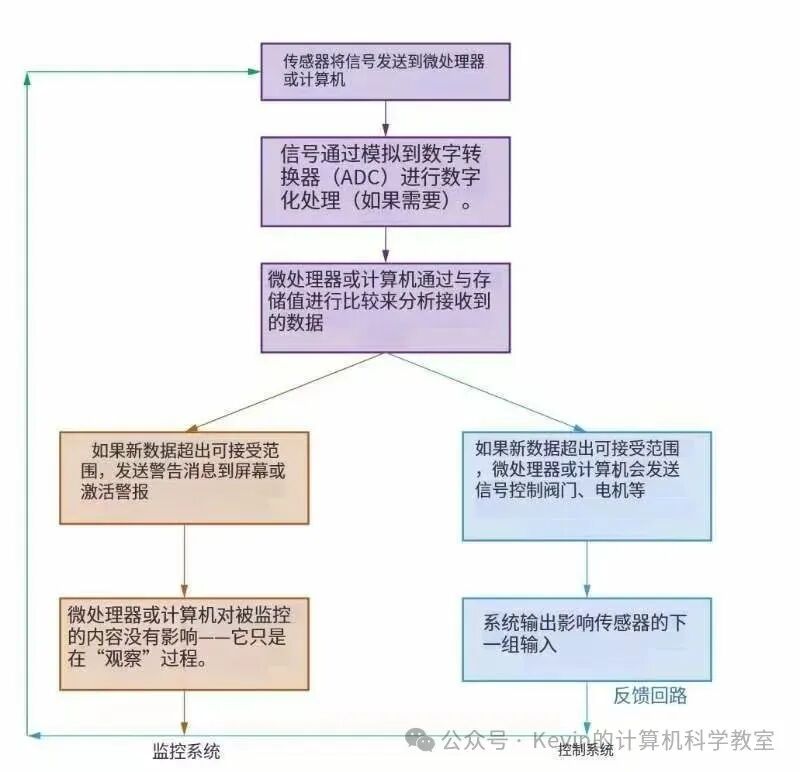 A feedback system for monitoring and control processes
| Monitoring System Examples | Control System Examples |
|---|---|
| Monitoring patients’ vital signs (e.g., heart rate, body temperature) in hospitals | Turning on street lights at night and off during the day |
| Checking for intrusions in security alarm systems | Controlling temperature in central heating/air conditioning systems |
| Checking the temperature level of car engines | Controlling traffic lights at road intersections |
| Monitoring pollution levels in rivers | Activating the anti-lock braking system (ABS) in cars when necessary |
| Controlling the environment in greenhouses (e.g., temperature, humidity, light) |
Sensor technology is now being intensively applied in the field of driving. As I write this article, it coincides with the booming development of intelligent driving. The next article will dedicate a chapter to discuss autonomous driving.This is the 32nd article of my public account. If you found it helpful, don’t forget to follow, like, and bookmark~
I am Kevin, wishing you success in your studies~