You can enter the following command in the command line <span>netsh wlan show drivers</span>
From the output above, you can see that the current Wi-Fi version is Wi-Fi 6.
C:\Users\yhu>netsh wlan show drivers
Interface name: Wi-Fi
    Driver                    : Intel(R) Wi-Fi 6 AX201 160MHz    Vendor                    : Intel Corporation    Provider                  : Intel    Date                      : 1/2/2025    Version                   : 23.110.0.5    INF file                  : oem144.inf    Type                      : Native Wi-Fi Driver    Radio types supported     : 802.11b 802.11g 802.11n 802.11a 802.11ac 802.11ax    FIPS 140 mode supported   : Yes    802.11w Management Frame Protection supported : Yes    Hosted network supported  : No    Authentication and cipher supported in infrastructure mode:                                Open             None                                Open             WEP-40bit                                Open             WEP-104bit                                Open             WEP                                WPA-Enterprise   TKIP                                WPA-Enterprise   CCMP                                WPA-Personal     TKIP                                WPA-Personal     CCMP                                WPA2-Enterprise  TKIP                                WPA2-Enterprise  CCMP                                WPA2-Personal    TKIP                                WPA2-Personal    CCMP                                Open             Vendor defined                                WPA3-Personal    CCMP                                Vendor defined   Vendor defined                                WPA3-Enterprise 192 Bits GCMP-256                                OWE              CCMP                                WPA3-Enterprise  CCMP    Number of supported bands : 2                                2.4 GHz [ 0 MHz - 0 MHz]                                5 GHz [ 0 MHz - 0 MHz]    IHV service present       : Yes    IHV adapter OUI           : [00 00 00], type: [00]    IHV extensibility DLL path: C:\WINDOWS\system32\IntelIHVRouter10.dll    IHV UI extensibility ClSID: {00000000-0000-0000-0000-000000000000}    IHV diagnostics CLSID     : {00000000-0000-0000-0000-000000000000}    Wireless Display Supported: Yes (Graphics Driver: Yes, Wi-Fi Driver: Yes)
Alternatively, you can click the configuration button in the Wi-Fi settings.
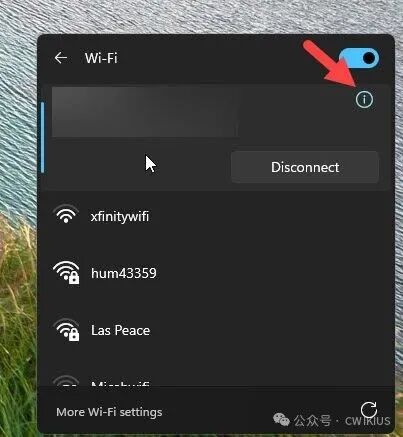
In the interface above, you can view the current Wi-Fi version used by your computer.
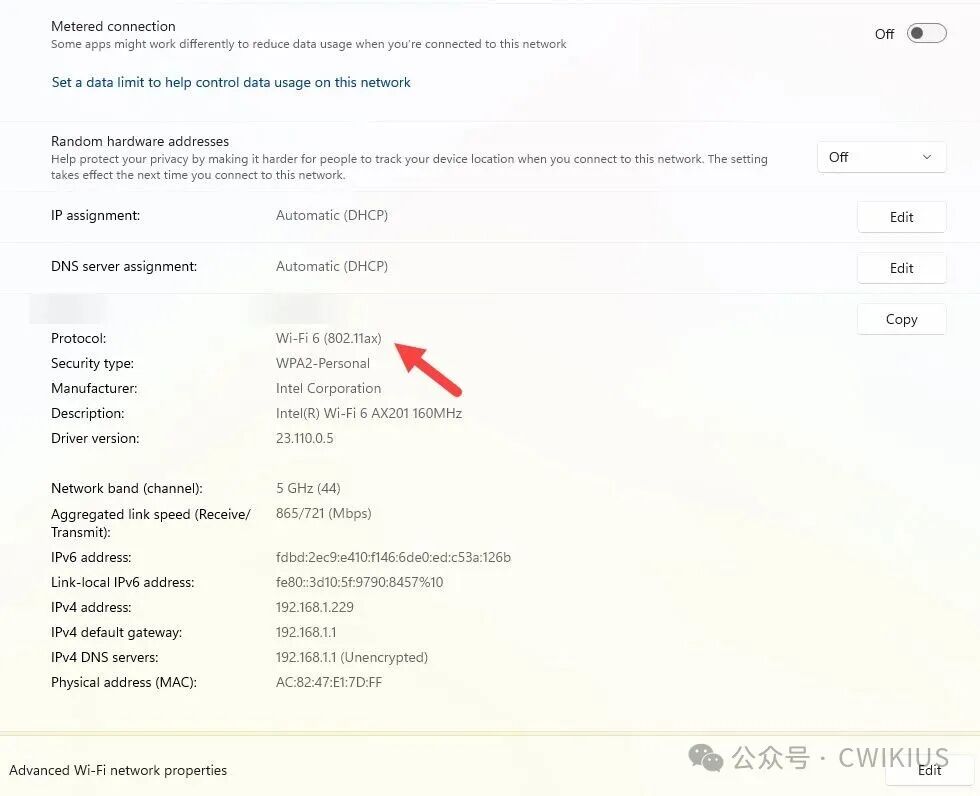
This allows you to determine the maximum Wi-Fi version supported by your computer.