If you are not interested in technical details, you can skip to the end of the article for recommendations. If you are not in a hurry, it is advisable to read the theoretical part first to better understand and avoid pitfalls. To understand the differences between Wi-Fi 6 and Wi-Fi 7, we need to briefly look at the development of the Wi-Fi versions and the 802.11 protocol as shown in the figure below.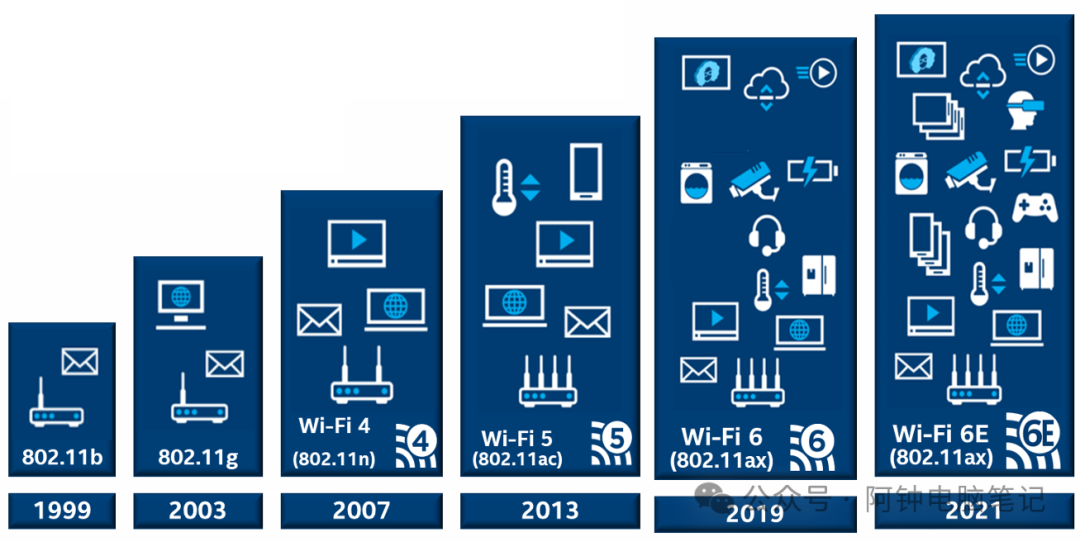 What is the 802.11 protocol?For two people to chat, they need to use a language that both can understand. Similarly, for two devices to communicate, they need a common communication protocol. In the early days, there were various wireless LAN communication protocols, but in 1997, the Institute of Electrical and Electronics Engineers (IEEE) 802.11 protocol defeated other standards to become the industry WLAN standard. The Wi-Fi communication protocol we use today is 802.11. With technological advancements, the Wi-Fi versions have evolved to the latest Wi-Fi 7, and the 802.11 protocol has a series of versions such as a, g, n, ac, ax, etc., as shown in the figure below:The development process from Wi-Fi 4 to Wi-Fi 7
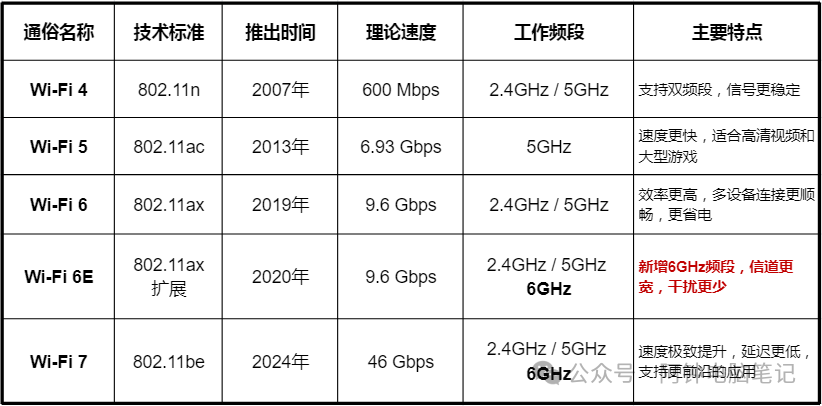 The maximum theoretical values differ from actual applications
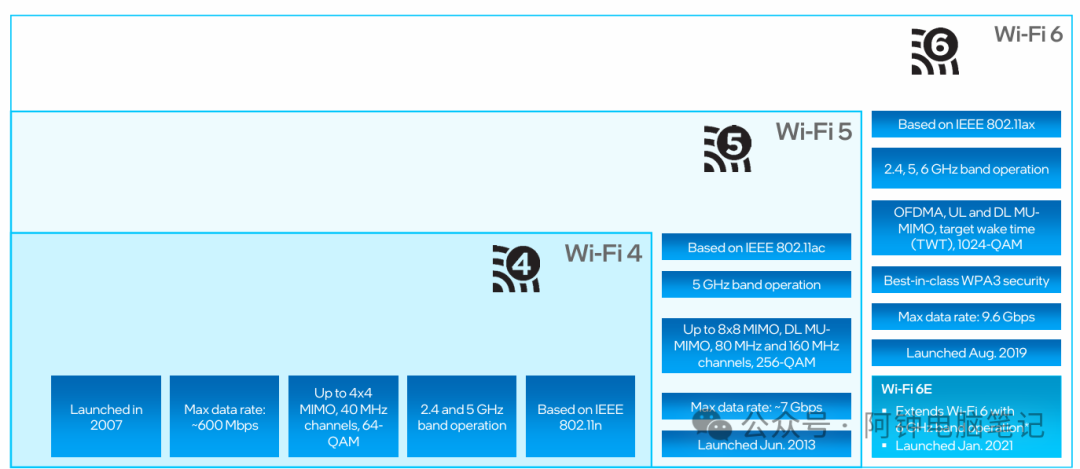 What are the differences between different frequencies?
 Dual-band routers supporting 2.4G and 5G have been popular for many years. When connecting to a wireless router, two SSID names are recognized, one ending with _5G for the 5G frequency network. Which one to connect to depends on the specific scenario. Both frequencies have their strengths, as shown in the figure below: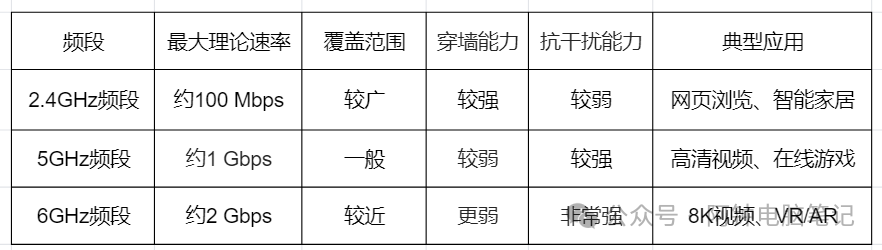
- 2.4GHz Band: It has alarger coverage area,stronger ability to penetrate obstacles (such as walls),but itstransmission speed is relatively slower, and it ismore susceptible to interference. Many household devices, such as Bluetooth devices and microwaves, operate in this frequency range.
- 5GHz Band: It can providefaster transmission speeds andmore stable connections because this frequency range has relatively less interference. The downside is that it has a weaker ability to penetrate obstacles and a smaller coverage area compared to 2.4GHz.
- 6GHz Band: This is a new frequency band introduced by Wi-Fi 6E and Wi-Fi 7, and it is one of the core technologies of Wi-Fi 7, providingextremely high transmission speeds andvery low latency, and currently, it has very little interference. Its coverage area is the smallest among the three, and its ability to penetrate walls is also the weakest. However, in 2023, the 6GHz band was allocated for 5G/6G cellular communication in China, so our home wireless routers cannot use this frequency.In summary, the 802.11be standard used by Wi-Fi 7 operates on three frequencies, but in China, we can only use 5G and 2.4G. Therefore, for daily use, if you are close to the router and there are no obstacles, prefer 5GHz; if you are farther away or there are wall obstacles, then choose 2.4G.
Should you choose a Wi-Fi 7 router?The biggest selling point of Wi-Fi 7 is its theoretical speed of up to 46Gbps, which is four times that of Wi-Fi 6. However, this is a theoretical value; it cannot be achieved in real-world scenarios.In China, the 6GHz frequency is not open: Wi-Fi 7 must operate on the 6GHz band to reach its theoretical values, but in 2023, the 6GHz band was allocated for 5G/6G cellular communication, so all commercially available Wi-Fi 7 routers have removed the 6GHz channel, losing the most critical “high-speed lane,” resulting in a direct halving of the theoretical maximum speed, making it no different from Wi-Fi 6E.Speed is only fast at close range without obstacles: Wi-Fi 7 technologies such as 4K-QAM and 320 MHz require a very strong signal; in unobstructed environments, if you are more than 3 meters away from the router or if there is a wall in between, the negotiated speed drops from 4.3 Gbps to 1.2Gbps, which is almost the same as Wi-Fi 6. In a three-bedroom apartment, if there is only one router in the living room and the room door is closed, 2.4G can be used, but the 5G signal will be very weak, and the 6G will be even worse.Bandwidth and application scenarios currently do not require it: Most households have an incoming bandwidth of less than 1000 M, and Wi-Fi 6 can run at a maximum of 900M–1.2 G, which is sufficient to fully utilize gigabit bandwidth; good Wi-Fi 7 routers are still expensive: The entry-level “Wi-Fi 7” has dropped to 200–300 yuan, but only provides gigabit ports, dual-band, and MLO is virtually useless, resulting in an actual user experience that is no different from Wi-Fi 6 routers.In conclusion, if you are currently using a fully functional Wi-Fi 6 router, it is not recommended to spend money upgrading to Wi-Fi 7. If you are setting up a new network and need to purchase a router, and your budget is high, you can buy a Wi-Fi 7 router with 2.5G or 10G ports. If your budget is limited, it is still recommended to buy a stable Wi-Fi 6 router.