Introduction to C Language Program: Hello World
#include <stdio.h> int main(){/* Enter Hello World between double quotes */ printf("Hello World"); // Print Hello World on the screen return 0; }Note: In the latest C standard, the type before the main function is int instead of void.
Specific Structure of C Language
In simple terms, a C program consists of several header files and functions.
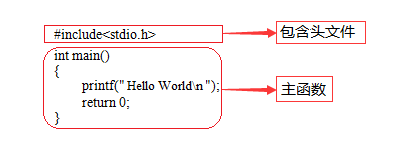
#include <stdio.h> is a preprocessor command that informs the C language compiler to perform some preprocessing work before formally compiling the C program.
A function is a small unit that implements code logic.
Essential Main Function
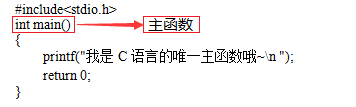
A C program has exactly one main function, which is the main function.
-
The C program executes the code in the main function, which can also be said to be the only entry point in C language.
-
The int before main indicates the type of the main function.
-
printf() is a formatted output function; remember its function is to output specified information on the screen.
-
return is the return value of the function; depending on the function type, the returned value may vary.
-
\n is the newline character in escape sequences. (Note: C programs must start execution from the main function.)
Good Coding Habits
-
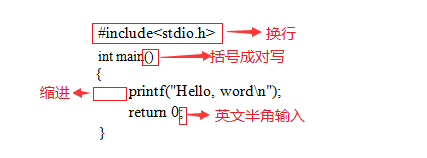
Each statement or comment should occupy one line, for example: including header files or ending an executable statement requires a line break.
-
Statements within a function body should be indented clearly, usually one tab for one indentation.
-
Brackets should be written in pairs; if one needs to be deleted, it should also be deleted in pairs.
-
When an executable statement ends, a semicolon is required at the end.
-
All symbols in the code should be in English half-width symbols.
Program Explanation – Comments
Comments are written for programmers, not for computers.
There are two methods for comments in C language:
Multi-line comment: /* comment content */ Single-line comment: // comment one lineC Identifiers
C language specifies that identifiers can be strings composed of letters (A-Z, a-z), digits (0-9), and underscores (_), and the first character must be a letter or underscore. When using identifiers, pay attention to the following points:
-
The length of identifiers should not exceed 8 characters, as in some versions of C, only the first 8 characters of an identifier are valid; if two identifiers have the same first 8 characters, they are considered the same identifier.
-
Identifiers are case-sensitive. For example, Imooc and imooc are two different identifiers.
-
It is best to choose meaningful English words to form identifiers to achieve “self-explanatory names”; do not use Chinese.
-
Identifiers cannot be C language keywords. To learn more about C language keywords.
Variable Definition and Assignment
A variable is a quantity that can change, and each variable has a name (identifier). Variables occupy a certain storage unit in memory. Variables must be defined before use, and it is important to distinguish between variable names and variable values as two different concepts.
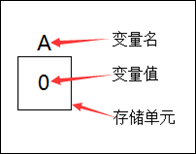
The general form of variable definition and assignment is as follows.
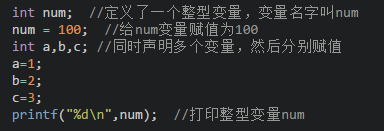
Note: Continuous assignment is not allowed in definitions, as shown in the following illegal operation.
int a=b=c=5; // Illegal assignment operationVariable assignment can be done in two ways:
-
Declare first, then assign
-
Declare and assign at the same time
Basic Data Types
The data types in C language are shown in the following figure.
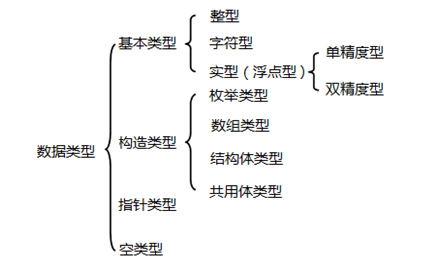
The most commonly used integer, real, and character types (char, int, float, double):

Integer data refers to numbers without decimals (int, short int, long int, unsigned int, unsigned short int, unsigned long int):

Note:
-
int, short int, and long int have different ranges depending on the compilation environment.
-
Among them, short int and long int are at least the ranges specified in the table, but int in the table is written with a 16-bit compilation environment.
-
Additionally, the range of int in C language depends on the number of bytes it occupies; different compilers have different specifications.
-
The ANSI standard defines int as occupying 2 bytes; TC follows the ANSI standard, where its int occupies 2 bytes. However, in VC, an int occupies 4 bytes.
Floating-point data refers to numbers with decimals.
Many pieces of information in life are suitable for representation using floating-point data, such as a person’s weight (in kilograms), product prices, pi, etc.
Due to differences in precision, it is divided into three types (float, double, long double):

Formatted Output Statement
The formatted output statement, also known as placeholder output, displays various types of data according to the formatted type and specified position from the computer. Its format is:
printf("output format specifier", output item);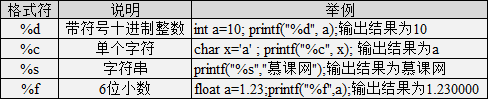
When the output statement contains ordinary characters, the following format can be used:
printf("ordinary character output format specifier", output item);
Note: The number of format specifiers must correspond to the number of variables, constants, or expressions.
Immutable Constants
During program execution, values that do not change are called constants. For example:
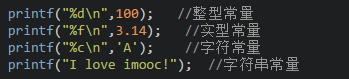
In C language, a constant can be represented by an identifier, and constants must be defined before use. Its general form is:
#include <stdio.h> #define POCKETMONEY 10 // Define constant and constant value int main(){// POCKETMONEY = 12; // Is it right for Xiaoming to increase his pocket money privately? printf("Xiaoming received %d yuan pocket money today\n", POCKETMONEY); return 0; }Symbol constants cannot be changed.
Automatic Type Conversion
Data types can undergo automatic conversion.
Automatic conversion occurs during operations involving different data types and is completed automatically during compilation.
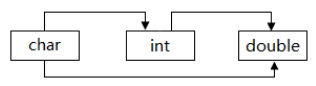
Data of type char is converted to data of type int according to the corresponding value in the ASCII code.
Note:
-
Smaller byte types can be automatically converted to larger byte types, but larger byte types cannot be automatically converted to smaller byte types.
-
char can be converted to int, int can be converted to double, and char can be converted to double.
Forced Type Conversion
Forced type conversion is achieved by defining type conversion operations. Its general form is:
(data type) (expression)Its function is to forcibly convert the result of the expression’s operation into the type indicated by the type specifier. When using forced conversion, pay attention to the following issues:
-
Both the data type and the expression must be enclosed in parentheses; for example, writing (int)(x/2+y) as (int)x/2+y would convert x to int type first, then divide by 2 and add y.
-
The original data type and variable value will not be changed after conversion; it is only a temporary conversion in this operation.
-
The result of the operation after forced conversion does not follow the rounding principle.
C Language Basic Operators
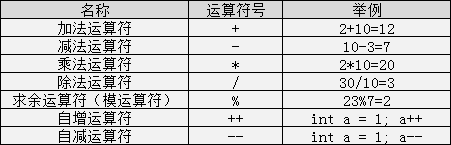
In division operations, note:
-
If both numbers being divided are integers, the result is also an integer, and the decimal part is omitted, e.g., 8/3 = 2.
-
If one of the two numbers is a decimal, the result will be a decimal, e.g., 9.0/2 = 4.500000.
In modulus operations, note:
-
This operation is only suitable for two integers, e.g., 10%3 = 1.
-
The sign of the result depends on the sign of the dividend, e.g., (-10)%3 = -1, while 10%(-3) = 1.
Increment and Decrement Operators
The increment operator is ++, which increases the value of the variable by 1.
The decrement operator is –, which decreases the value of the variable by 1.
They are often used in loops; the increment and decrement operators have the following forms:
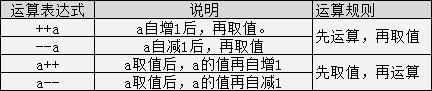
Assignment Operators
In C language, assignment operators are divided into simple assignment operators and compound assignment operators.
For example:
a = 3; // Assign 3 to variable a a += 5; // This expression is equivalent to a = a + 5, adding variable a and 5 and then assigning it to a.Note: There should be no spaces between the operator and the equal sign in compound operators.
Relational Operators
Relational operators in C language:
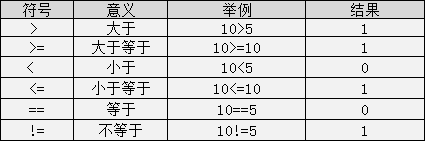
The value of relational expressions is true or false, represented by integers 1 and 0 in C programs.
Note: There should be no spaces between symbols such as >=, <=, ==, !=.
Logical Operators
Logical operators in C language:
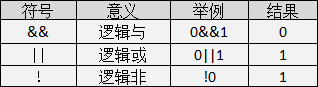
The values of logical operations are also two: true and false, represented by integers 1 and 0 in C language. The evaluation rules are as follows:
-
AND operation &&
The result is true only when both variables involved in the operation are true; otherwise, it is false. For example: 5>=5 && 7>5, the result is true.
-
OR operation ||
The result is true if at least one of the two variables involved in the operation is true. If both are false, the result is false. For example: 5>=5 || 5>8, the result is true.
-
NOT operation !
The result is false when the variable involved in the operation is true; when the variable is false, the result is true. For example: !(5>8), the result is true.
Conditional Operator
The conditional operator in C language has the format:
expression1 ? expression2 : expression3;The execution process of the program is:
Check whether the value of expression1 is true; if true, execute expression2; if false, execute expression3.
Operator Priority Comparison
The order of various operators:
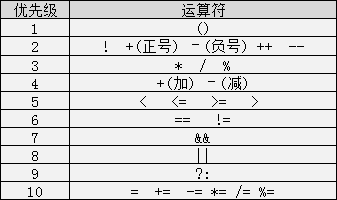
Priority level 1 has the highest priority, while priority level 10 has the lowest priority.
Branch Structure – Simple if Statement
The if conditional statement in the branch structure of C language.
The basic structure of a simple if statement is as follows:
if(expression){ execute code block;}The semantics are: if the value of the expression is true, execute the subsequent statement; otherwise, do not execute that statement.
Note: There is no semicolon after if(); write {} directly.
Branch Structure – Simple if-else Statement
The basic structure of a simple if-else statement:
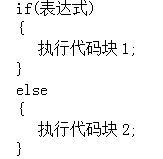
The semantics are: if the value of the expression is true, execute code block 1; otherwise, execute code block 2.
Note: There is no semicolon after if(); write {} directly, and there is also no semicolon after else; write {} directly.
Branch Structure – Multiple if-else Statements
The structure of multiple if-else statements in C language is as follows:
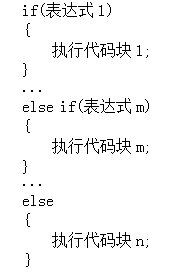
The semantics are: sequentially check the value of the expression; when a certain value is true, execute the corresponding code block; otherwise, execute code block n.
Note: When a certain condition is true, the subsequent statements in that branch structure will not be executed.
Branch Structure – Nested if-else Statements
The nested if-else statement in C language means writing if-else statements within if-else statements. Its general form is:
Loop Structure – while Loop
Repeatedly executing a certain action is known as a loop.
In C language, there are three types of loop structures; first, let’s look at the structure of the while loop:
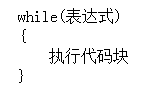
In which the expression represents the loop condition, and the execute code block is the loop body.
The semantics of the while statement are: calculate the value of the expression; when the value is true (non-zero), execute the loop body code block.
-
The expression in the while statement is generally a relational or logical expression; when the value of the expression is false, the loop body is not executed; otherwise, the loop body continues to execute.
-
Always remember to change the value of the loop variable in the loop body; otherwise, a dead loop (endless execution) will occur.
-
If the loop body includes more than one statement, it must be enclosed in {} to form a compound statement.
Loop Structure – do-while Loop
The general form of the do-while loop in C language is as follows:
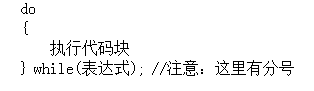
The semantics of the do-while loop statement are:
It first executes the code block in the loop, then checks whether the expression in while is true; if true, it continues the loop; if false, it terminates the loop. Therefore, the do-while loop must execute the loop statement at least once.
Note: When using the do-while structure statement, there must be a semicolon after the while parentheses.
Loop Structure – for Loop
The general form of the for loop in C language is:
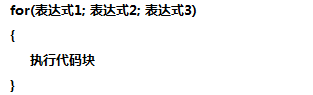
The execution process is as follows:
-
Execute expression 1 to initialize the loop variable.
-
Check expression 2; if its value is true (non-zero), execute the code block in the for loop, then proceed downwards; if its value is false (0), the loop ends.
-
Execute expression 3, which is the statement that operates on the loop variable (i++).
-
After executing the code block in the for loop, go back to step two; the first step of initialization will only be executed once.
-
When the loop ends, the program continues to execute downwards.
Note: The two semicolons in the for loop must be written.
In the for loop:
-
Expression 1 is one or more assignment statements, which control the initial value of the variable.
-
Expression 2 is a relational expression that determines when to exit the loop.
-
Expression 3 is the step value of the loop variable, defining how the loop variable changes after each iteration.
-
These three parts are separated by semicolons.
End Statement – break Statement
To interrupt a loop, the break statement can be used in C language; when using the break statement, pay attention to the following points:
-
Break cannot be used in a standalone if-else statement without a loop structure.
-
In multi-layer loops, a break statement only exits the current loop.
End Statement – continue Statement
The continue statement serves to end the current loop and start the next iteration.
The difference between break and continue statements is:
Break exits the entire current loop, while continue ends the current loop and starts the next iteration.
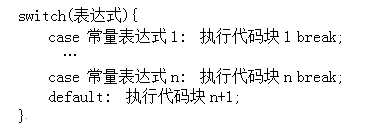
Branch Structure – switch Statement
The structure of the switch statement is as follows:
When using the switch statement, pay attention to the following points:
-
The values of the constant expressions after case cannot be the same; otherwise, an error will occur.
-
If there is no break; after the case clause, it will continue executing until it encounters break; to exit the switch statement.
-
The expression statement after switch can only be of integer or character type.
-
Multiple statements are allowed after case, and they can be written without {}.
-
The order of case and default clauses can be changed without affecting the program execution result.
-
The default clause can be omitted.
Custom Functions
The general form of a custom function is:
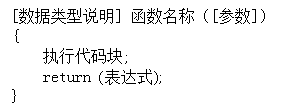
Note:
-
The content in [] can be omitted; if the data type is omitted, the default is an int type function.
-
If parameters are omitted, it indicates that the function is a no-parameter function; if parameters are not omitted, it indicates that the function is a parameterized function.
Function Call
When a custom function is needed, it must be called. In C language, the general form of a function call is:
function_name([parameters]);Note: When calling a no-parameter function, the [] can be omitted.
With and Without Parameters
A function that does not require function parameters is called a no-parameter function, while a function that requires function parameters is called a parameterized function.
The general forms of parameterized and no-parameter functions are as follows:
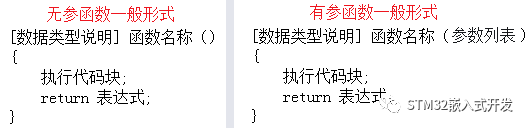
The only difference between parameterized and no-parameter functions is that the function () has an additional parameter list.
Formal Parameters and Actual Parameters
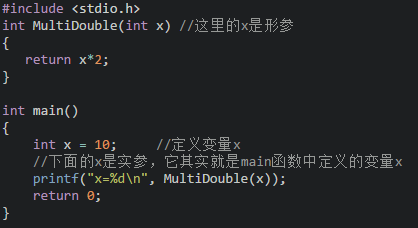
The parameters of a function are divided into formal parameters and actual parameters.
Formal parameters are the parameters used when defining the function name and function body, intended to receive the parameters passed when calling that function.
Actual parameters are the parameters passed to the function during the call.
Formal and actual parameters have the following characteristics:
-
Formal parameters are allocated memory units only when called and are immediately released when the call ends. Therefore, formal parameters are only valid within the function.
-
Actual parameters can be constants, variables, expressions, functions, etc.
-
When passing parameters, the actual and formal parameters must match in number, type, and order; otherwise, a type mismatch error will occur.
Return Value of Functions
The return value of a function refers to the value obtained after the function is called, executing the program segment in the function body and returning it to the calling function.
Pay attention to the following points regarding the return value of functions:
-
The value of the function can only be returned to the calling function through the return statement.
The general form of the return statement is:
return expression;Or:
return (expression);-
The type of the function value must be consistent with the type of the function defined.
If they are inconsistent, the function return type will prevail, and automatic type conversion will occur.
-
Functions without return values have a return type of void.
Recursive Functions
Recursion is when a function calls itself within its function body; a recursive function must have a termination condition.
Executing a recursive function will repeatedly call itself, entering a new layer with each call.
In summary, recursion is: self-calling with a completion state.
Example:
There are 5 people sitting together; when asked how old the 5th person is, he says he is 2 years older than the 4th person. When asked the 4th person’s age, he says he is 2 years older than the 3rd person. The 3rd person says he is 2 years older than the 2nd person. The 2nd person says he is 2 years older than the 1st person. Finally, when asked the 1st person, he says he is 10 years old. How old is the 5th person?
Program Analysis:
Using recursion, recursion is divided into backtracking and forward tracking stages. To know the age of the 5th person, one must know the age of the 4th person, and so on, back to the 1st person (10 years old), and then backtrack.
#include <stdio.h> int dfs(int n) {return n == 1 ? 10 : dfs(n - 1) + 2;} int main(){ printf("The 5th person's age is %d years old", dfs(5)); return 0;}Local and Global Variables
In C language, variables can be divided into two types based on their scope: local variables and global variables.
-
Local variables, also known as internal variables, are defined within a function. Their scope is limited to within the function; using such variables outside the function is illegal. Variables can also be defined within compound statements, and their scope is limited to the range of the compound statement.
-
Global variables, also known as external variables, are defined outside of functions. They do not belong to any function; they belong to a source program file. Their scope is the entire source program.
Variable Storage Classes
In C language, variables can be classified based on their lifespan into static storage and dynamic storage.
Static storage refers to the method of allocating fixed storage space during program execution. The static storage area contains variables that exist throughout the execution of the program, such as global variables.
Dynamic storage refers to the method of dynamically allocating storage space as needed during program execution. The dynamic storage area contains variables that are established and released based on the needs of the program, usually including: function formal parameters; automatic variables; and the protection of the function call context and return address.
In C language, storage classes are further divided into four types:
-
Automatic (auto)
-
Static (static)
-
Register (register)
-
External (extern)
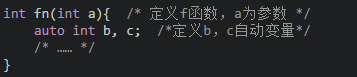
Variables defined with the auto keyword are automatic variables; auto can be omitted, and if not written, it is implicitly defined as “automatic storage class,” belonging to dynamic storage. For example:
Variables modified with static are static variables; if defined inside a function, they are called static local variables; if defined outside a function, they are called static external variables. The following is a static local variable:
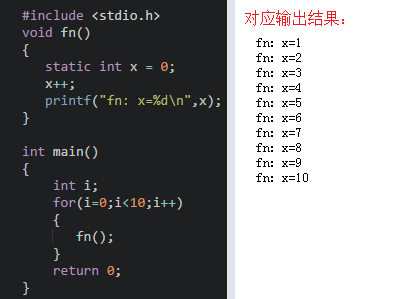
Note: Static local variables belong to the static storage class, allocating storage units in the static storage area, which are not released during the entire program execution; static local variables are initialized at compile time, meaning they are only initialized once; if no initial value is assigned when defining local variables, the compiler automatically assigns an initial value of 0 (for numeric variables) or an empty character (for character variables).
To improve efficiency, C language allows the values of local variables to be stored in CPU registers; these variables are called “register variables,” declared using the register keyword. For example:
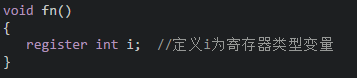
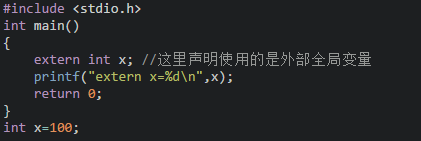
Note: Only local automatic variables and formal parameters can be defined as register variables; the number of registers in a computer system is limited, and arbitrary numbers of register variables cannot be defined; local static variables cannot be defined as register variables.
Variables declared with extern are external variables, meaning that a function can call variables defined after that function. For example:
Internal and External Functions
In C language, functions that cannot be called by other source files are called internal functions, defined using the static keyword, and are therefore also known as static functions, in the form:
static [data type] function_name([parameters])Here, static limits the scope of the function, indicating that the function can only be used within its source file; therefore, having internal functions with the same name in different files is not a problem.
In C language, functions that can be called by other source files are called external functions, defined using the extern keyword, in the form:
extern [data type] function_name([parameters])C language specifies that if the function’s scope is not specified, the system will default to considering it an external function; therefore, extern can also be omitted when defining external functions.
Arrays
Programs also need containers, but these containers are a bit special; they are a contiguous block of memory space of fixed size with consistent data types, and they have a nice name called arrays. An array can be understood as a fixed-size shopping bag containing items of the same type, arranged in a certain order.
Let’s look at how to declare an array:
data type array_name[length];Declaring an array alone is not enough; let’s see how arrays are initialized. There are three forms of array initialization in C language:
data type array_name[length n] = {element1, element2… elementn}; data type array_name[] = {element1, element2… elementn}; data type array_name[length n]; array_name[0] = element1; array_name[1] = element2; array_name[n-1] = elementn;After placing data into the array, how do we retrieve elements from the array?
To retrieve array elements:
array_name[index corresponding to the element];For example, initializing an array int arr[3] = {1,2,3}; then arr[0] is element 1.
Note:
-
Array indices start at 0.
-
The number of elements in the array during initialization cannot exceed the declared array length.
-
If using the first initialization method, if the number of elements is less than the array length, the extra array elements are initialized to 0.
-
When an array is declared without initialization, static (static) and external (extern) type array elements are initialized to 0, while automatic (auto) type array elements have uncertain initialization values.
Array Traversal
Arrays can be traversed using loops to access each element without manually retrieving elements at specific positions; for example, we can use a for loop to traverse an array:
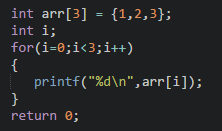
Note the following points:
-
It is best to avoid array out-of-bounds access; the loop variable should not exceed the length of the array.
-
Once declared, the length of an array in C language is fixed and cannot be changed, and C language does not provide a method to calculate the length of an array.
Since C language does not have a mechanism to check for changes in array length or out-of-bounds access, it may compile successfully in the editor, but the result cannot be guaranteed; therefore, it is best to avoid out-of-bounds access or changing the length of the array.
To get the length of an array in C language:
int length = sizeof(arr)/sizeof(arr[0]);Arrays as Function Parameters
Arrays can be passed as function parameters either as the entire array or as a specific element of the array.
Passing the entire array as a function parameter means passing the array name to the function, for example:
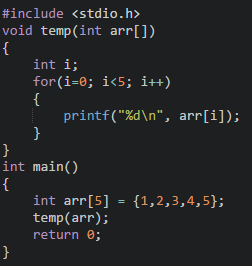
Passing an element of the array as a function parameter means passing the parameter from the array to the function, for example:
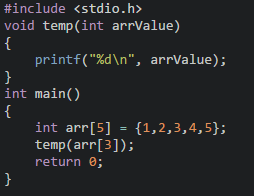
When using arrays as function parameters, pay attention to the following matters:
-
When passing the array name as a function actual parameter, the array type formal parameter in the function definition can specify the length or not.
-
When passing an array element as a function actual parameter, the type of the array element must match the type of the formal parameter.
Array Application – Bubble Sort
Taking ascending order as an example, the idea of bubble sort is to compare adjacent elements in pairs, placing the larger number behind until all numbers are sorted. It is like lining up students by height; one student is pulled out to compare with the one behind; if taller, they are placed behind, continuing until the line is sorted.
#include <stdio.h> int main(){ double arr[]={1.78, 1.77, 1.82, 1.79, 1.85, 1.75, 1.86, 1.77, 1.81, 1.80}; int i,j; printf("\n************Before Sorting*************\n"); for(i=0;i<10;i++) { if(i != 9) printf("%1.2f, ", arr[i]); // %1.2f indicates one digit before the decimal point, two digits after the decimal point else printf("%1.2f", arr[i]); } for(i=8; i>=0; i--) { for(j=0;j<=i;j++) { if( arr[j]>arr[j+1]) { double temp; // Define temporary variable temp temp=arr[j]; // Assign the front number to temp arr[j]=arr[j+1]; // Swap the front and back numbers arr[j+1]=temp; // Place the larger number behind } } } printf("\n************After Sorting*************\n"); for(i=0;i<10;i++) { if(i != 9) printf("%1.2f, ", arr[i]); // %1.2f indicates one digit before the decimal point, two digits after the decimal point else printf("%1.2f", arr[i]); } return 0; }Array Application – Array Search Function
When we go shopping and return home with a shopping bag, we check each item in the bag to see if anything is missing or if all items are what we wanted. This can be applied in programming using an array search function to check if a certain data exists, returning the index of that element if it does.
#include <stdio.h> int getIndex(int arr[5],int value){ int i; int index; for(i=0;i<5;i++) { /* Please complete the array search function */ if(arr[i]==value) { index=i; break; } index=-1; } return index; } int main(){ int arr[5]={3,12,9,8,6}; int value = 8; int index = getIndex(arr,value); // What parameters should be passed here? if(index!=-1) { printf("%d exists in the array, index: %d\n", value, index); } else { printf("%d does not exist in the array.\n", value); } return 0; }Strings and Arrays
In C language, there is no direct way to define a string data type, but we can use arrays to define the strings we want. Generally, there are two formats:
char string_name[length] = "string value"; // The length in [] can be omitted char string_name[length] = {'char1','char2',..., 'charn', '\0'}; // The last element must be '\0', which indicates the end of the stringNote: When outputting strings, the following statements can be used.
printf("%s", character_array_name); puts(character_array_name);String Functions
Common string functions include (strlen, strcmp, strcpy, strcat, atoi):
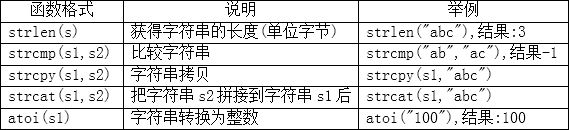
When using string functions, pay attention to the following matters:
strlen() gets the length of the string, which does not include ‘\0’, and the length of Chinese characters and letters is different. For example:

strcmp() compares strings by first converting them to ASCII codes; the result of 0 indicates that s1 and s2 have equal ASCII codes, a result of 1 indicates that s1 is greater than s2 in ASCII code, and a result of -1 indicates that s1 is less than s2 in ASCII code. For example:
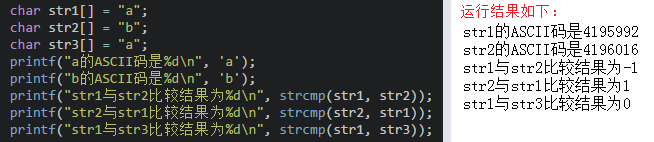
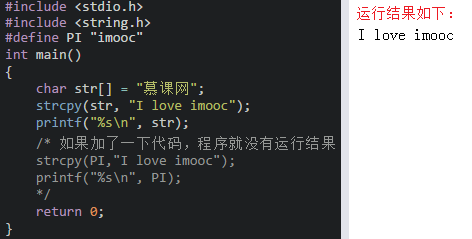
strcpy() will overwrite the original string after copying and cannot copy string constants. For example:
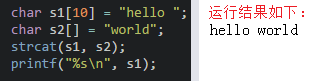
strcat() requires that s1 and s2 point to non-overlapping memory spaces, and s1 must have enough space to accommodate the string being copied. For example:
Multi-dimensional Arrays
The definition format of multi-dimensional arrays is:
data type array_name[constant_expression1][constant_expression2]…[constant_expressionn];
For example, defining a two-dimensional array named num with data type int. The first [3] indicates the length of the first dimension index, like categorizing items in a shopping bag; the second [3] indicates the length of the second dimension index, like the elements in each shopping bag.
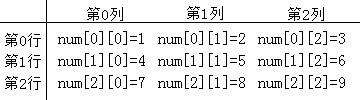
The initialization of multi-dimensional arrays is similar to that of one-dimensional arrays and is also divided into two types:
data type array_name[constant_expression1][constant_expression2]…[constant_expressionn] = {{value1,…, value n},{value1,…, value n},…,{value1,…, value n}}; data type array_name[constant_expression1][constant_expression2]…[constant_expressionn]; array_name[index1][index2]…[indexn] = value;When initializing multi-dimensional arrays, pay attention to the following matters:
-
When using the first initialization method, the number of columns in the array declaration must be specified. This is because the system will allocate space based on the total number of elements in the array; when the total number of elements and the number of columns are known, it can directly calculate the number of rows.
-
When using the second initialization method, both the number of rows and columns must be specified in the array declaration.
When defining a two-dimensional array, the number of rows can be omitted, but the number of columns must be specified.
Traversal of Multi-dimensional Arrays
Multi-dimensional arrays can also be traversed, similar to one-dimensional arrays, but require nested loops.
Note: The index of each dimension of the multi-dimensional array must not go out of bounds.
Example code:
#include <stdio.h> #define N 10 // Print scores void printScore(int score[]){ int i; printf("\n"); for(i=0;i<N;i++) { printf("%d ",score[i]); } printf("\n"); } // Calculate total score int getTotalScore(int score[]){ int sum = 0; int i; for(i=0;i<N;i++) { sum+=score[i]; } return sum; } // Calculate average score int getAvgScore(int score[]){ return getTotalScore(score)/N; } // Calculate highest score int getMax(int score[]){ int max = -1; int i; for(i=0;i<N;i++) { if(score[i]>max) { max = score[i]; } } return max; } // Calculate lowest score int getMin(int score[]){ int min = 100; int i; for(i=0;i<N;i++) { if(score[i]< min) { min = score[i]; } } return min; } // Sort scores in descending order void sort(int score[]){ int i,j; for(i=N-2;i>=0;i--) { for(j=0;j<=i;j++) { if(score[j]<score[j+1]) { int temp; temp = score[j]; score[j] = score[j+1]; score[j+1]=temp; } } } printScore(score); } int main(){ int score[N]={67,98,75,63,82,79,81,91,66,84}; int sum,avg,max,min; sum = getTotalScore(score); avg = getAvgScore(score); max = getMax(score); min = getMin(score); printf("Total score: %d\n",sum); printf("Average score: %d\n",avg); printf("Highest score: %d\n",max); printf("Lowest score: %d\n",min); printf("----------Score Ranking---------\n"); sort(score); return 0; }