How can I access the router settings interface at http://192.168.1.1 using my mobile phone? I only have a mobile phone and no computer; how can I log into the 192.168.1.1 settings page through a mobile client?
Answer: Currently, there are three main brands and one type of device that use 192.168.1.1 as the login password, namely TP-LINK, Mercury, and Fast, as well as optical modems. The first three are common router brands, and most optical modems from the three major telecom operators also have the backend login IP address as 192.168.1.1.
In this article, we will share how to open the 192.168.1.1 login settings page using a mobile phone. Logging into the router’s backend is not difficult; the key is to enter the address correctly and in the right place.
Before logging into the router settings interface, we recommend paying attention to the following points, and then logging into the router backend via 192.168.1.1 will be very simple.
- ① Ensure that you are connected to the WiFi of this router;
- ② Turn off your mobile’s 4G/5G network to resolve issues with WLAN+ automatically switching between WiFi and data;
- ③ Enter the correct login URL (new routers usually have two login addresses: IP and domain name);
- ④ Enter the IP address in the correct browser location—the address bar, not the search box;
- ⑤ Ensure the login method is correct—click the “Access” button on the right side of the browser;
- ⑥ Use the router’s mobile APP client.
After understanding the above six points, take out your phone, open the mobile browser, enter http://192.168.1.1 in the address bar, and click the “Access” button on the right to successfully open the router’s settings interface.
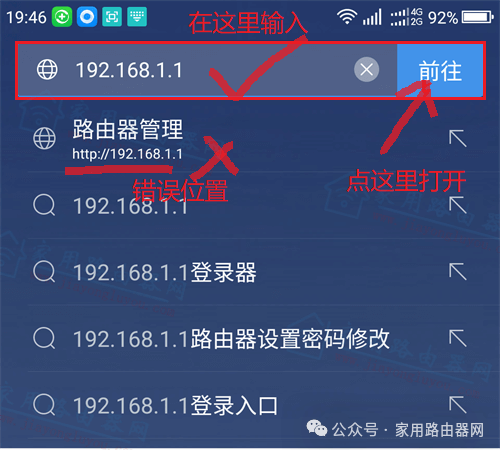
Logging into the router backend at 192.168.1.1
- For routers that have not been set up, there will be a setup guide here;
- If it has already been set up, it will require entering the login password, and only the correct password will allow access to the backend.
Conclusion:
If you cannot open the settings page by entering the IP address or domain name, it is recommended to use the brand’s APP to bind the router, which is simpler; you can log into the router’s backend just by opening the router’s mobile APP.