Home Wi-Fi Performance Enhancement Secrets

Editor’s Note:

In recent years, the development of mobile internet has continuously driven the surge and upgrade of home network devices. In addition to traditional internet devices like smartphones, iPads, and computers, as the dream of smart homes gradually becomes a reality, more and more traditional household appliances such as TVs, refrigerators, and air conditioners are also connecting to the internet. Home networks have become an important foundation for future smart living. How to build a simple, stable, reliable, and high-speed home network system has become a topic of concern for everyone. This article will reveal how to enhance home Wi-Fi performance and enjoy a “smart living” experience at home.

Wireless Local Area Network Makes Your Home Smarter
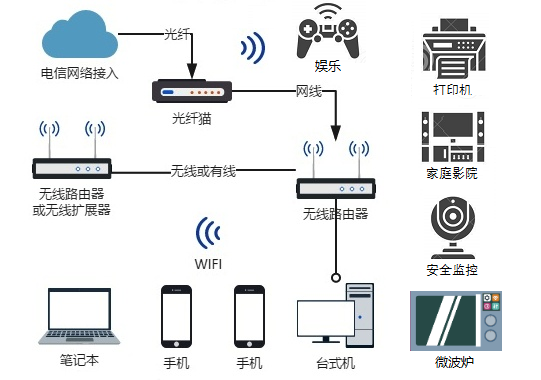
In a home network environment, wired networks have the characteristics of high transmission quality and good stability, but deployment requires physical devices such as cables and network cards, which can be costly and affect the aesthetics of the home, along with limited mobility making their usage scenarios increasingly rare. In contrast, wireless Wi-Fi utilizes electromagnetic wave properties for information transmission, allowing for flexible deployment and efficient transmission, with movable terminals, making it an indispensable part of home life. Therefore, our country’s radio management department has planned frequency bands such as 2.4GHz-2.4835GHz, 5.725GHz-5.85GHz, and 5.15GHz-5.35GHz (indoor) for wireless local area network use, fully ensuring the high speed and large bandwidth requirements of home wireless networks.

Home Wi-Fi Performance Enhancement Secrets

Figure 1 Home Network Deployment Diagram
Statistics show that the average number of devices in Chinese households connected to Wi-Fi networks through routers reaches 6, including TVs, smartphones, iPads, and other smart home devices. With the widespread use of Wi-Fi technology, over 80% of users access the internet and use applications such as streaming high-definition videos via Wi-Fi networks.

How Strong Is Your Home Wi-Fi Signal? One Trick to Measure It Easily
While users enjoy the convenience brought by wireless networks, issues such as slow download speeds, network disconnections, and video buffering during high-definition streaming often occur, severely impacting the user experience.
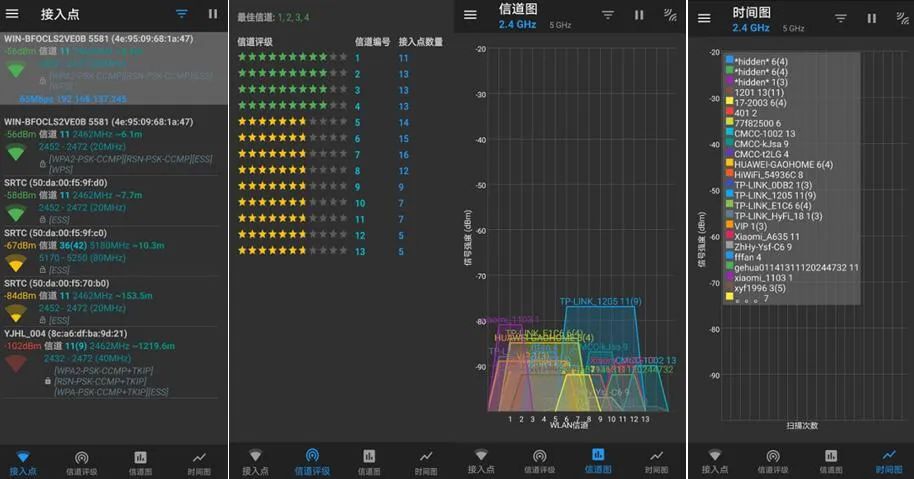
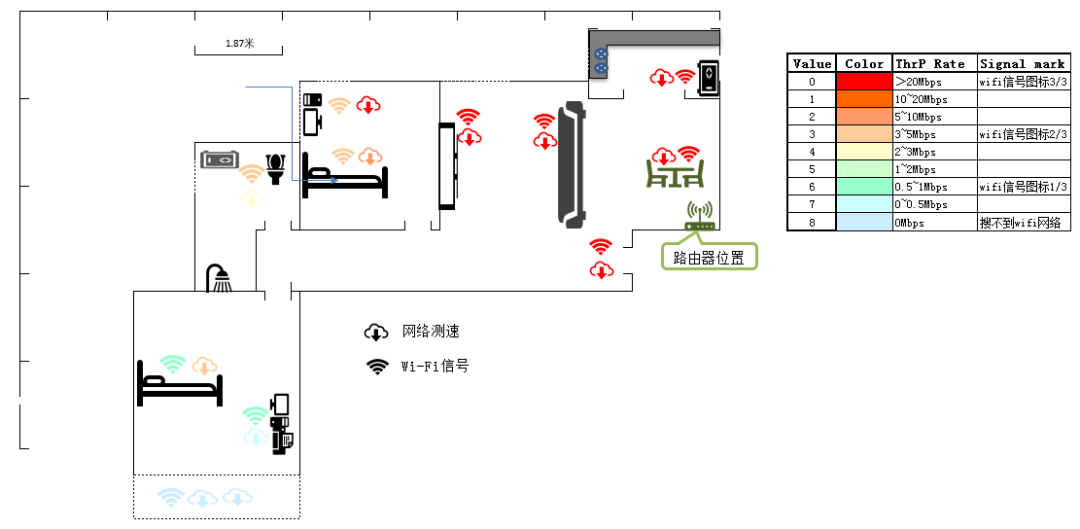
To address the current issues in home wireless networks, the Beijing Dongfang Botai Radio Spectrum Technology Research Institute, a subordinate unit of the National Radio Monitoring Center, has developed a Wi-Fi detection app (download method attached) that can analyze indoor Wi-Fi signal strength and interference conditions. Meanwhile, the National Radio Monitoring Center’s testing center has conducted comprehensive assessments of the field strength coverage performance of wireless routers through on-site testing. Typical scenarios are selected within a 90㎡ two-bedroom apartment, with the wireless router placed against the wall in the living room and configured according to the user manual to enter normal working mode. The testing process selected 11 sampling points for testing in the living room, dining room, master bedroom, secondary bedroom, bathroom, and balcony, with the Wi-Fi signal strength distribution and actual rates at each point shown in Figure 2. The Wi-Fi detection app analyzes the wireless signals within the room, and the results are shown in Figure 3.

Home Wi-Fi Performance Enhancement Secrets

Figure 2 Home Wi-Fi Signal Strength and Rate Test Results

Home Wi-Fi Performance Enhancement Secrets

Figure 3 Wi-Fi Signal Analysis
Analysis of the sampling data shows that in a typical indoor wireless network environment, Wi-Fi signals can easily be affected by the structure of the house and other wireless local area network signals, leading to poor user experience in certain areas. The main reasons for this are as follows:
First, the walls of the house obstruct signal transmission performance.In actual environments, doors, windows, walls, indoor items, and large furniture can adversely affect the transmission of Wi-Fi signals. When the Wi-Fi router and wireless internet devices are located in different rooms, the wireless signal must pass through materials with high transmission loss such as concrete and metal, weakening the signal and causing the data rate to decrease in certain areas of the room, thus affecting the user experience.
Second, external wireless signal interference affects transmission performance.In a home environment, various wireless technology devices such as smartphones, home appliances, and even routers from neighbors can compete for frequency resources, causing wireless network congestion and resulting in slower network speeds. Through the channel and time graphs of the Wi-Fi detection app, one can see that the wireless signals in a typical room are exceptionally complex, with over 10 neighboring routers detectable in the same area, leading to multiple router signals overlapping and causing severe interference on certain channels.

Wi-Fi Router Performance Enhancement Tips
When using routers in a home environment, you can try the following techniques to enhance the transmission performance of Wi-Fi signals:
First, choose an appropriate placement for the wireless router.First, choose a location that can cover the entire indoor environment to minimize signal attenuation caused by physical barriers such as walls. Secondly, placing it in rooms with many doors and windows can effectively reduce penetration difficulties. Additionally, reasonably estimating the reflection effects and penetration levels of the wireless router’s signal can help improve Wi-Fi rates and enhance indoor signal coverage. Based on the characteristics of different frequency bands, the signals emitted by wireless routers have varying penetration difficulties and attenuation levels for different materials, with the penetration performance of Wi-Fi signals approximately as follows (from easiest to hardest): Air < Wood/Glass < Brick Wall/Concrete Wall < Tile Wall/Reinforced Concrete Wall < Metal Plate.
Second, configure the wireless router’s operating frequency appropriately.Wireless routers operating at 2.4GHz or 5GHz bands have different technical characteristics. The 2.4GHz wireless signal has less attenuation in the air and can cover longer distances. The 5GHz wireless signal has less interference and higher transmission rates but covers shorter distances. Therefore, for devices such as smartphones and iPads that need to move around frequently in different rooms, it is recommended to connect to the 2.4GHz network first to take advantage of its wide coverage and ensure mobile devices can access the internet normally in every room; for high-definition TVs and other products with high data throughput, it is recommended to place them in the same room as the router and choose the 5GHz network to leverage its fast speed and low interference, ensuring connected devices receive a faster and more stable user experience.
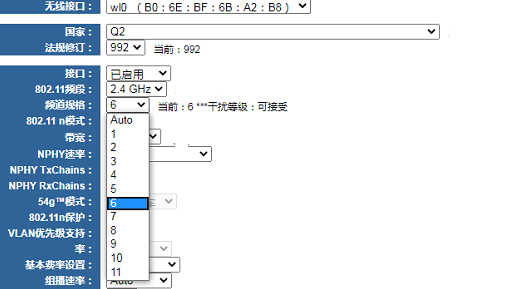
Third, select the appropriate Wi-Fi operating channel.In actual network environments, various wireless devices are present, and when different devices choose the same or overlapping channels for communication, it can severely interfere with network quality. Users can use the Wi-Fi detection app to check the interference conditions of Wi-Fi signals in their homes. By using the router’s built-in optimization software, users can reasonably set the operating channel of the wireless router to effectively reduce interference between signals and improve indoor Wi-Fi network performance (as shown in Figure 3). For example, wireless routers operating in the 2.4GHz band support a total of 14 channels, with channels 1 to 13 available in China. Among them, channels 1, 6, and 11 are non-interfering channels. To reduce the impact of interference, users can configure the channel in the router interface, selecting channel 6 as the preferred channel in Figure 4.

Home Wi-Fi Performance Enhancement Secrets

Figure 4 Typical Router Channel Setting Interface

Postscript

In the face of the current issues with wireless routers in home Wi-Fi, users can choose appropriate placement for the wireless router based on the spatial structure of their homes and the arrangement of built-in entities to reduce the impact of physical barriers on the coverage and transmission rates of home Wi-Fi;based on the analysis results from the Wi-Fi detection app, selecting recommended Wi-Fi operating frequencies and channels can reduce interference and provide a better user experience.
Although wireless routers face many problems and challenges, they also present opportunities for industry development. New systems and technologies such as ultra-high speeds, low latency, adaptive frequency power adjustment, and sleep modes will continue to emerge, and the use of these devices will ultimately revolutionize the home wireless network experience. Stay tuned!

Home Wi-Fi Performance Enhancement Secrets

Tips

The Wi-Fi detection app was designed and developed by Beijing Dongfang Botai Radio Spectrum Technology Research Institute. It is suitable for Wi-Fi signal strength detection, providing different signal viewing modes to intuitively detect the details of each Wi-Fi signal, optimizing your WLAN network by utilizing signal strength and identifying congested channels.

Welcome to scan the QR code to experience it.

Leave a Comment