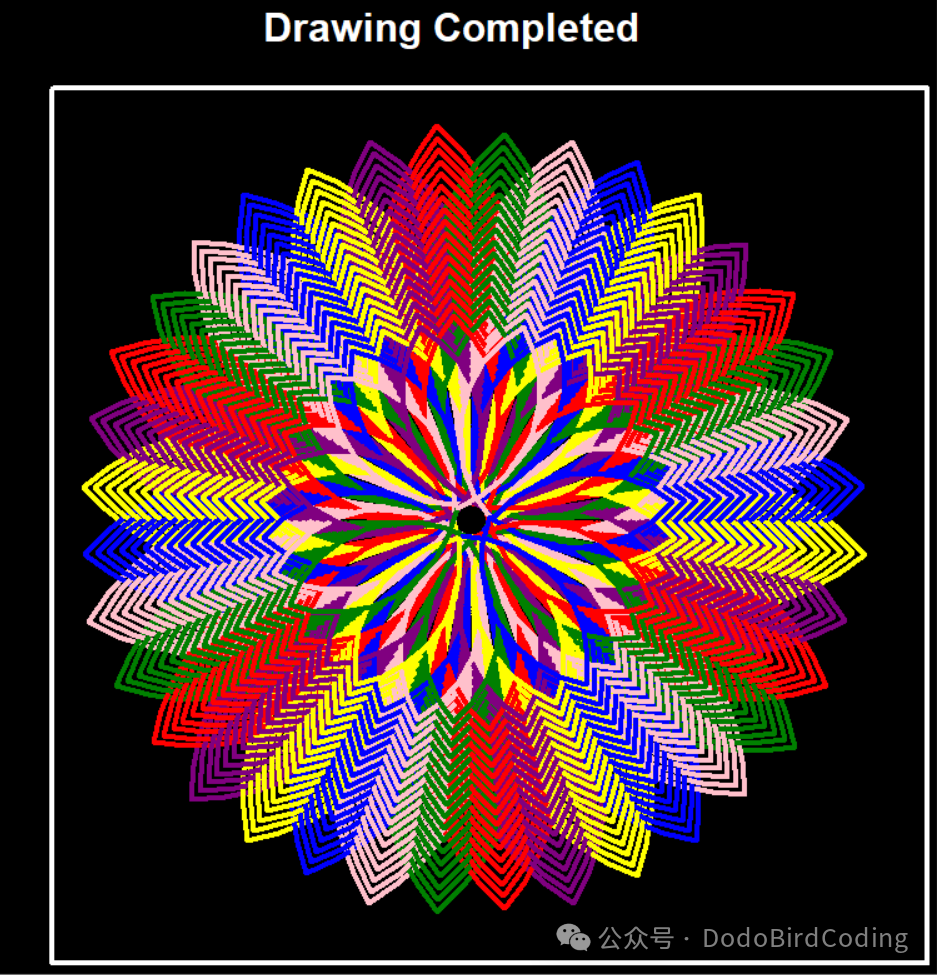
 Programming ≠ boring code! Today, we will use Python to summon the “magic turtle” and draw a glowing rainbow magic array~ Even my mom said it looks like a piece of art!
Step 1: Summon the “Code Turtle”
Python has a super fun <span>turtle</span> library, which is like a obedient little turtle 🐢! Just give it commands, and it can crawl out various patterns on the screen~ First, set the stage for the turtle:
bgcolor("black")  # Change the background to "starry black" for brighter colors~
speed(0)          # Turtle "accelerates"! 0 is the fastest speed, no long waits~
hideturtle()      # Hide the turtle body, only see the lines it draws, making the picture cleaner~
Step 2: Draw a “Border” for the Magic Array
Imagine we are surrounding the magic array with a circle of glowing frames ✨! Use <span>penup()</span> to make the turtle “lift its pen” (otherwise it will leave marks while walking), move to the top left corner <span>goto(-320, 320)</span>, then <span>pendown()</span> to “put the pen down”~ Then select a white pen to draw a square with a side length of 700 pixels:
for _ in range(4):  # A square has 4 sides, repeat 4 times~
    forward(700)    # The turtle "crawls" forward 700 steps, drawing one side~
    right(90)       # Turn right 90°, draw the next right angle~
Step 3: A Collection of Rainbow Colors
The magic array must have rainbow colors 🌈! We prepared a “palette” of 6 colors:
Colors = ["yellow", "purple", "red", "green", "pink", "blue"]Want to change colors? Feel free to modify! For example, replace <span>"pink"</span> with your favorite <span>"orange"</span>, and the magic array will change instantly~
Step 4: Loop to Draw “Rotating Magic”
The most magical part is here! Use two nested loops to make the turtle “spin and draw arcs”~ The outer loop repeats 100 times (<span>x=100</span>), and the inner loop performs actions for each color:
for i in range(x):          # Repeat 100 times, making the pattern "layer upon layer"~
    for col in Colors:      # Change to a different color each time, like changing colored pens~
        color(col)          # Change color!
        circle(200 - i, 100)# Draw an arc: radius gradually decreases (200-i), turn 100°~
        lt(90)              # Turn left 90°, adjust direction~
        circle(200 - i, 100)# Draw another arc, radius continues to decrease~
        rt(60)              # Turn right 60°, prepare for the next color loop~
Secret Decoding:<span>circle(radius, angle)</span> makes the turtle draw “a segment of an arc”. The radius <span>200-i</span> will get smaller, so each layer’s arc is more “compact” than the outer layer; combined with the turning angle, it finally becomes a radiating magic array!
Step 5: Light Up the “Completion Sign”
After finishing the magic drawing, declare victory with text 📢:
penup()
goto(0, 350)       # Move to the center top of the screen for easy visibility~
pendown()color("white")write("Drawing Completed", align="center", font=("Arial", 24, "bold"))
Hands-On Challenge Time 🔔
Now it’s your turn to be the “magician”~ Try these operations and see how the pattern changes:
- Change Color: Replace
<span>"green"</span>with<span>"gold"</span>, and the magic array instantly turns golden! - Change Loop Count: Change
<span>x=100</span>to<span>50</span>, and the pattern becomes simpler; change it to<span>200</span>, and it will be more complex and cool! - Change Border: Adjust the number in
<span>forward(700)</span>to make the border larger or smaller~
Programming is like playing with building blocks; you can create miracles by piecing together commands! Today’s “Rainbow Magic Array” is just the beginning; next time, we can draw moving stars and dancing little people~ Follow me, and unlock more programming magic next week!Complete code attached
from turtle import *

# Set background color, speed, hide pen
bgcolor("black")
speed(0)
hideturtle()

# Draw background
penup()
goto(-320, 320)
pendown()
color("white")
pensize(4)

# Draw a square background
for _ in range(4):
    forward(700)
    right(90)

# Colors used
Colors = ["yellow", "purple", "red", "green", "pink", "blue"]


penup()
goto(0, 0)
pendown()

# Repeat 100 times
x = 100
for i in range(x):
    for col in Colors:
        color(col)
        circle(200 - i, 100)
        lt(90)
        circle(200 - i, 100)
        rt(60)

# Give a completion prompt
penup()
goto(0, 350)
pendown()
color("white")
write("DrawingCompleted",align="center",font=("Arial", 24, "bold"))

done()