1. What Can Multithreading Solve?
First, we need to clarify a concept: Concurrency (并发) ≠ Parallelism (并行).
- Concurrency is “appearing to run simultaneously”. For example, when you listen to music while coding, your brain quickly switches between the two tasks, which is called concurrency.
- Parallelism is “actually running simultaneously”. This requires multiple CPU cores, just like having two hands, where one can type while the other holds coffee, which is parallelism.
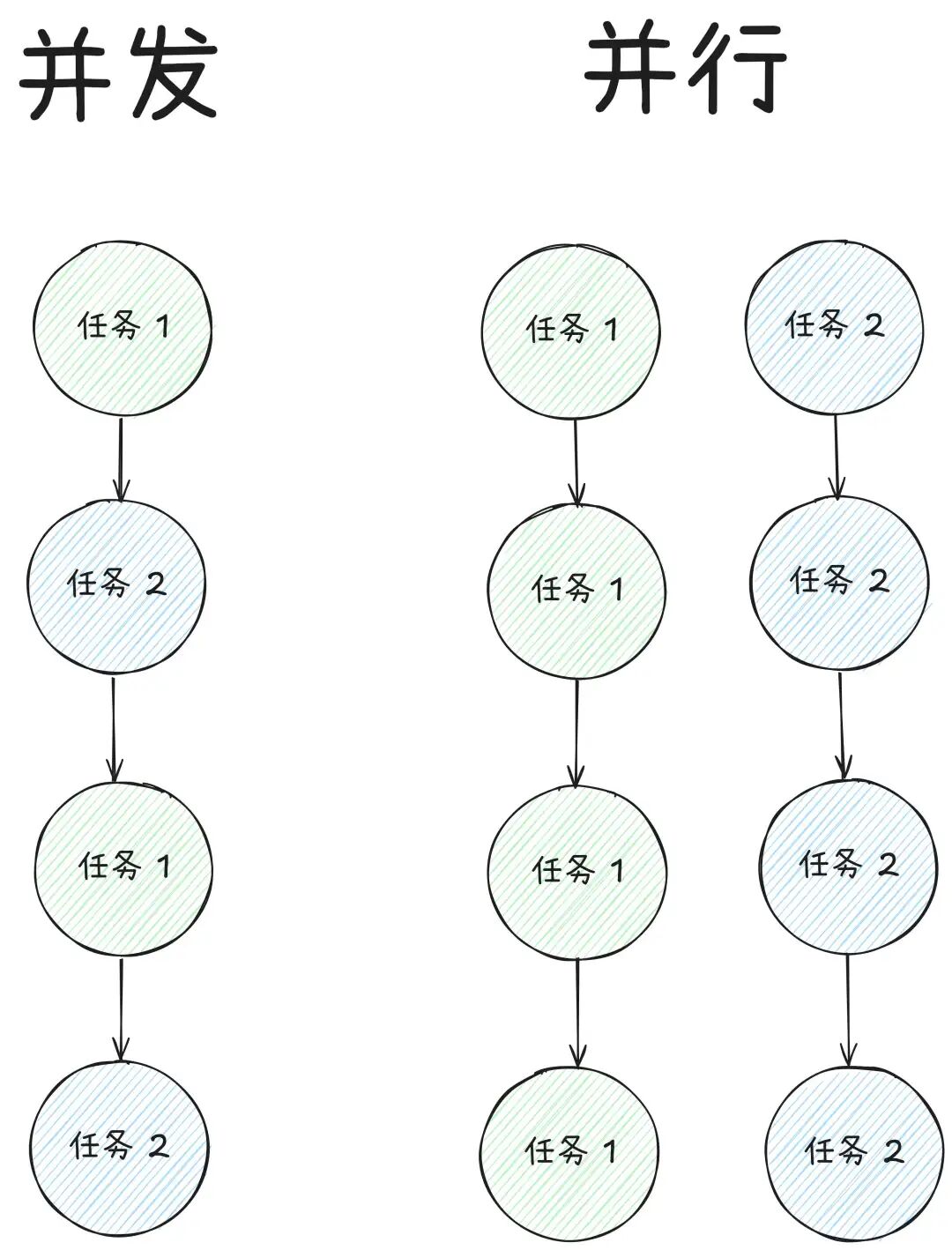
In CPython (the most commonly used Python interpreter), due to the existence of the GIL, a Python process can only execute one thread’s Python bytecode at a time. Therefore, Python’s multithreading is a tool for achieving concurrency, not parallelism.
So, what is the use of this “fake” simultaneous execution? It is very useful, especially when dealing with I/O-bound tasks. These tasks are characterized by the program spending most of its time “waiting” rather than “computing”.
For example:
- Network requests: Batch API calls, web scraping, downloading files. After the program sends a request, it has to wait for the server on the other end to respond.
- File reading and writing: Reading and writing a large number of disk files. The program has to wait for the slow hard drive to seek and read/write data.
- Database operations: Executing SQL queries and waiting for the database to return results.
- GUI response: In graphical interface programs, if a time-consuming operation (like downloading) blocks the main thread, the entire interface freezes. Multithreading can offload time-consuming operations to the background, keeping the interface smooth.
When a thread is “blocked” waiting for I/O, Python’s GIL is released, allowing another thread to start executing. This effectively utilizes CPU idle time, achieving the “simultaneous” advancement of multiple tasks on a macro level, greatly reducing total time.
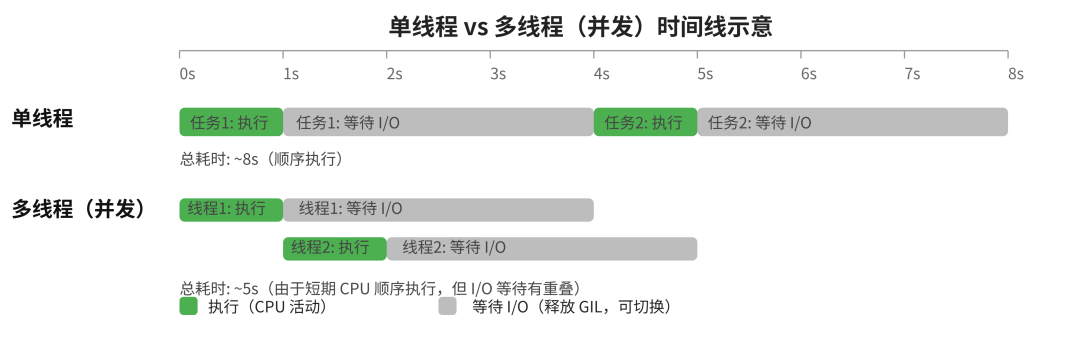
In contrast, for CPU-bound tasks, such as complex mathematical calculations, image processing, and data analysis, threads compete fiercely for CPU. Due to the GIL’s limitations, they cannot run in parallel and must queue up to take turns, which not only does not speed things up but can also slow down due to the overhead of thread creation and context switching.
So, remember this:
Use multiprocessing for CPU-bound tasks, and multithreading for I/O-bound tasks..
2. The Three Essentials of Threads
To master multithreading, you need to understand three basic concepts: the lifecycle of a thread, the difference between the main thread and daemon threads, and the critical issue of thread safety.
Thread Lifecycle: Create → Start → Wait for End
A thread goes through three main stages from birth to death:
- Created: A thread object is created by instantiating the
<span>threading.Thread</span>class. At this point, it is just a Python object, and the operating system has not allocated any resources for it. - Started: The thread object’s
<span>start()</span>method is called. This starts a new operating system-level thread and executes the specified task function (<span>target</span>) in this new thread. Once started, the thread enters the “alive” state. - Waiting for End: In the main thread or another thread, the thread object’s
<span>join()</span>method is called. This “blocks” the current thread until the target thread finishes executing. The<span>join()</span><code><span> method is key to ensuring that the child thread's task is completed and resources are reclaimed.</span>
Main Thread vs. Daemon Thread
When a Python program starts, a main thread is automatically created. The threads we create are by default non-daemon threads (<span>daemon=False</span>).
- Non-daemon threads: The main thread will wait for all non-daemon threads to finish before exiting. This is the default behavior and the safest behavior, ensuring that your tasks can be completed properly.
- Daemon threads (
<span>daemon=True</span>): If a program runs and only daemon threads remain, the program will exit immediately without waiting for the daemon threads to finish. This is like non-critical NPCs in a game; when the main character (main thread) leaves, they disband.
Daemon threads are suitable for some “non-essential” background tasks, such as heartbeat detection and log monitoring. However, be careful, as their sudden interruption may lead to unreleased resources or data corruption. Therefore, unless you are very clear about what you are doing, stick to using non-daemon threads and manage their lifecycle with <span>join()</span>.
Thread Safety Issues with Shared Data
This is the “root of all evil” in multithreaded programming. When multiple threads read and write the same shared variable simultaneously, problems can arise. The classic example is a race condition.
For example, if a bank account balance is <span>balance = 0</span>, and two threads execute <span>balance += 100</span> at the same time. This operation is not completed in one step at the lower level (non-atomic operation) but in three steps:
- Read the current value of
<span>balance</span>. - Calculate the new value.
- Write back the new value.
The following execution order may occur:
- Thread A reads
<span>balance</span>and gets 0. - Thread B also reads
<span>balance</span>and also gets 0. - Thread A calculates
<span>0 + 100 = 100</span>and writes<span>balance</span>back as 100. - Thread B calculates
<span>0 + 100 = 100</span>and writes<span>balance</span>back as 100.
The expected result is 200, but the actual result is 100. Thread B’s operation overwrote Thread A’s operation, and the money is lost! This is a race condition, where the final result of the program depends on the “luck” of thread execution.
To solve this problem, we need to introduce synchronization mechanisms to ensure that only one thread can operate on shared data at a time.
3. The Standard Library threading
There are mainly two standard ways to create and use threads:
Using Functions as Tasks (Recommended)
This is the most direct and commonly used method. You define a function and pass it as the <span>target</span> parameter to the <span>threading.Thread</span> constructor. This method decouples task logic from thread management itself, making the code clearer.
import threading
import time

def worker(name, duration):
    print(f'线程 {name}: 开始工作...')
    time.sleep(duration)
    print(f'线程 {name}: 工作结束。')

# 创建线程
# target: 线程要执行的函数
# args: 以元组形式传递给 target 函数的位置参数
# daemon: 是否设为守护线程
t1 = threading.Thread(target=worker, args=('小明', 2), daemon=False)

# 启动线程
t1.start()

# 等待线程结束,可以设置超时时间(秒)
print('主线程: 等待 t1 结束...')
t1.join(timeout=3)
print('主线程: t1 已结束。')
# 输出
主线程: 等待 t1 结束...
线程 小明: 开始工作...
线程 小明: 工作结束。
主线程: t1 已结束。
Inheriting <span>threading.Thread</span> Class
If you want to create a more “object-oriented” thread, you can define a new class that inherits from <span>threading.Thread</span> and override the parent class’s <span>run()</span> method. <span>run()</span> method contains the code that the thread will execute.
This method encapsulates the thread’s state and task logic in the same object, suitable for handling complex thread tasks that need to maintain their own state.
import threading
import time

class MyThread(threading.Thread):
    def __init__(self, name, duration):
        super().__init__() # 必须调用父类的构造函数
        self.name = name
        self.duration = duration

    def run(self):
        # run() 方法是线程启动后执行的入口点
        print(f'线程 {self.name}: 开始工作...')
        time.sleep(self.duration)
        print(f'线程 {self.name}: 工作结束。')

# 创建实例
t = MyThread(name='小红', duration=2)

# 启动线程,这会自动调用 run() 方法
t.start()

# 等待线程结束
print('主线程: 等待 t 结束...')
t.join()
print('主线程: t 已结束。')
# 输出
主线程: 等待 t 结束...
线程 小红: 开始工作...
线程 小红: 工作结束。
主线程: t 已结束。
Regardless of which method you use, starting a thread is done with the <span>start()</span> method, and waiting for a thread to finish is done with the <span>join()</span> method. <span>start()</span> is responsible for creating a new thread and calling <span>run()</span> (or the <span>target</span> function), while <span>join()</span> blocks the main thread until the child thread finishes executing.
Synchronization Primitives: Intuitive Metaphors and Easy Explanations
<span>threading</span> module provides several “synchronization primitives” that are building blocks for constructing thread-safe programs. We can use some metaphors to understand them:
-
<span>Lock</span>(Lock): Like a remote control for a TV: whoever has it can decide the channel and enjoy the sofa alone, while others can only wait quietly. -
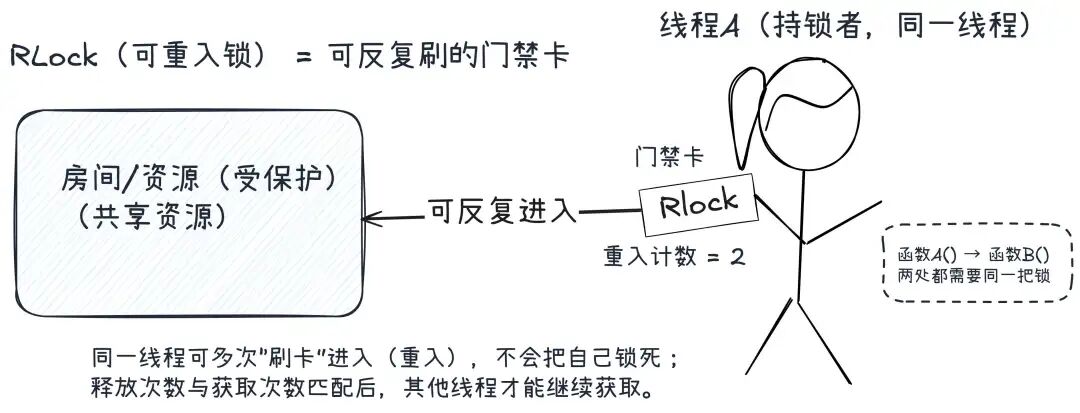
<span>RLock</span>(Reentrant Lock): An upgraded version of<span>Lock</span>. It is like a key card that can be swiped multiple times. The same thread can “acquire” this lock multiple times without locking itself out (deadlock). This is particularly useful in complex function call chains where one function has a lock, and another function it calls also needs that lock.
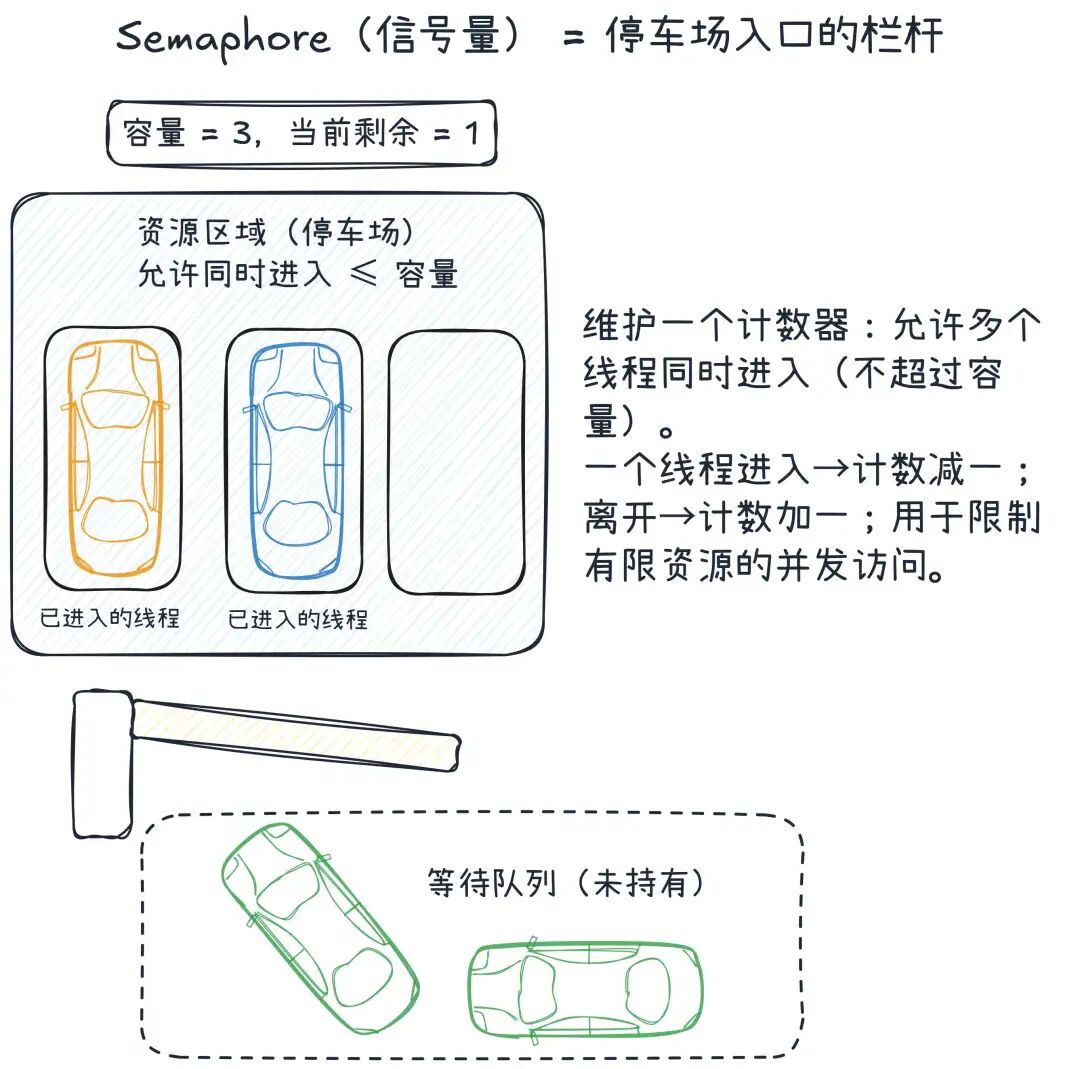
<span>Semaphore</span>(Semaphore): Like a barrier at the entrance of a parking lot with a fixed number of parking spaces. It maintains a counter that allows multiple threads (up to the count value) to enter simultaneously. When a thread enters, the counter decreases; when a thread leaves, the counter increases. It is very suitable for limiting concurrent access to limited resources, such as limiting the number of concurrent downloads.
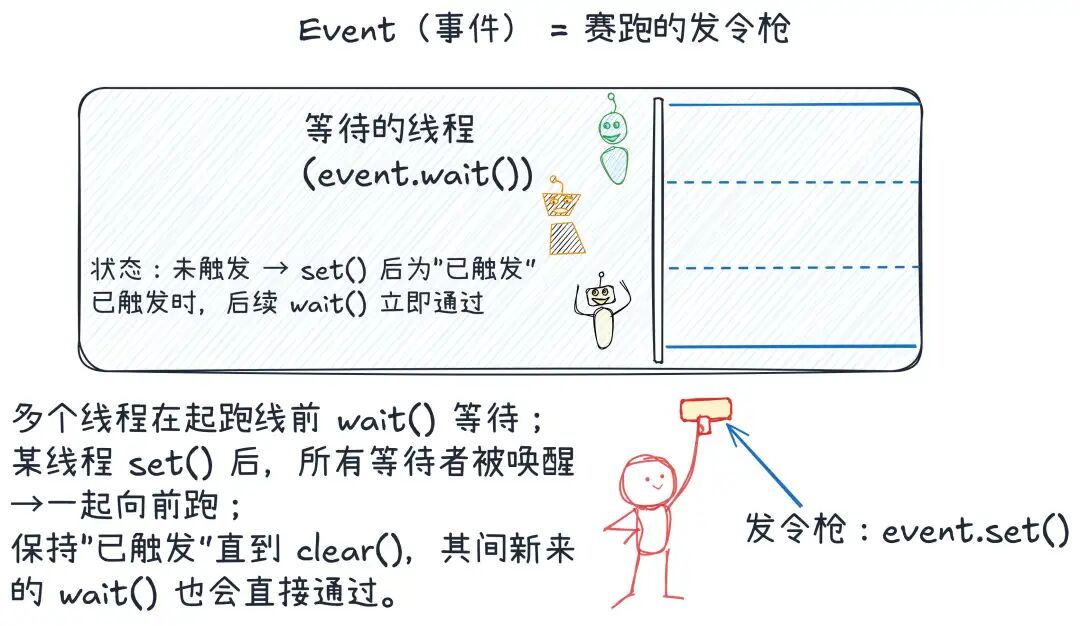
<span>Event</span>(Event): Like the starting gun of a race. Multiple threads can call<span>event.wait()</span>to wait at the starting line, and once a thread calls<span>event.set()</span>, all waiting threads will be “woken up” and rush forward together.
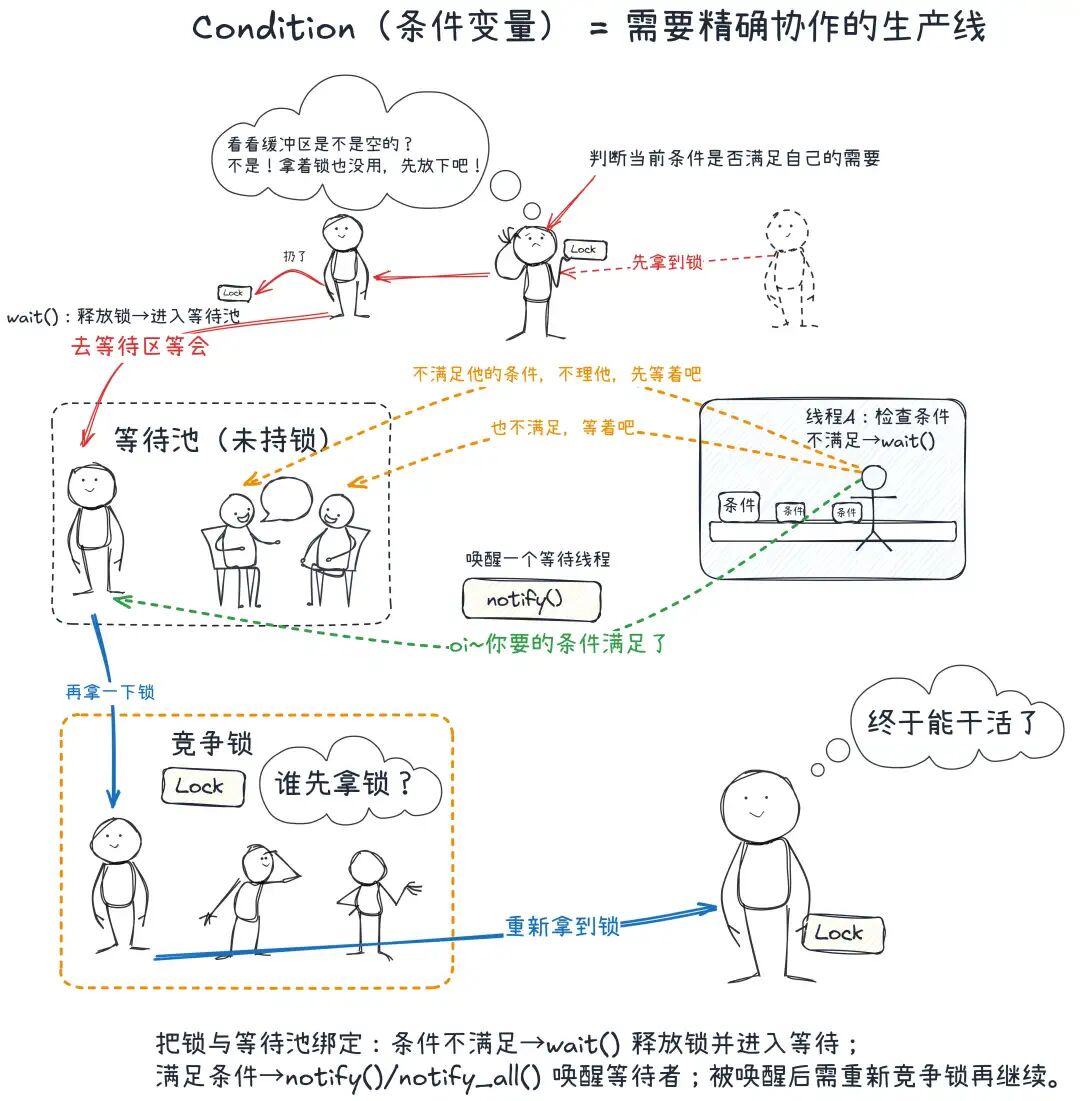
<span>Condition</span>(Condition): This is the most complex primitive, like a production line that requires precise cooperation. It binds a lock and a “waiting pool” together, allowing threads to<span>wait()</span>(give up the lock and wait) under specific conditions until another thread meets the condition and calls<span>notify()</span>(wakes one waiting thread) or<span>notify_all()</span>(wakes all waiting threads). It solves the problem of “call me when there is stock, don’t let me idle” with refined cooperation.
queue.Queue: Thread-Safe Producer-Consumer Pattern
Manually managing locks can be troublesome, and one mistake can lead to deadlocks. A more advanced and recommended pattern is the Producer-Consumer pattern, and <span>queue.Queue</span> is its perfect implementation.
The core idea of this pattern is: Do not communicate through shared memory, but share memory through communication.
- Producer: Responsible for creating tasks or data and then using
<span>queue.put(item)</span>to put them into a shared, thread-safe queue. - Consumer: Takes tasks from the queue using
<span>queue.get()</span>. If the queue is empty, the<span>get()</span>method will automatically block until new tasks arrive. - Queue: It is like a fully automated, locked conveyor belt. Producers put things in from one end, and consumers take things out from the other end. The queue handles all locking and unlocking operations internally, so we don’t have to worry about it.
4. concurrent.futures.ThreadPoolExecutor
Manually creating, starting, and then <span>join()</span><span> each thread is fine when the task volume is low, but once the task volume increases, this </span><strong><span>imperative</span></strong><span> thread management method exposes many problems:</span>
- Resource Overhead: Frequently creating and destroying threads incurs significant system overhead.
- Code Redundancy: The
<span>start()</span>/<span>join()</span>loop, queues for communication, and “sentinel” values for graceful exit are all repetitive template code. - Complex Exception Handling: Exceptions in child threads do not propagate to the main thread by default; you need to manually design a mechanism (usually with the help of queues) to pass exception information.
- Complicated Result Collection: You need a thread-safe shared container (like
<span>queue.Queue</span>) to collect task results, increasing code complexity. - Difficult to Control Concurrency: You may inadvertently create too many threads, exhausting system resources and leading to performance degradation.
To solve these problems, Python 3.2 introduced a more advanced and elegant concurrency library: <span>concurrent.futures</span>. It provides a declarative API that allows us to focus on “what tasks to execute” rather than “how to manage threads”. Among them, <span>ThreadPoolExecutor</span> is specifically designed for multithreading.
You can think of <span>ThreadPoolExecutor</span> as an efficient outsourcing team. You no longer need to hire, manage, and fire a temporary worker for every small task (<span>threading.Thread</span>). Instead, you sign a contract with an outsourcing company (<span>ThreadPoolExecutor</span>) that has a fixed-size professional team (thread pool).
- You: As a client, you only need to hand over the task list and required materials (functions and parameters) to the project manager (Executor) using
<span>submit()</span>or<span>map()</span>methods. - Project Manager (Executor): Responsible for receiving tasks and placing them into an internal task queue.
- Team Members (Worker Threads): Idle employees automatically take tasks from the queue and execute them. After completing the task, they are not fired but return to standby, ready to receive the next task.
- Delivery Note (Future Object): Each time you submit a task, the project manager immediately gives you a “delivery note” (
<span>Future</span>object), which you can use to check the task status or collect results in the future.
This pattern internalizes the heavy lifting of thread lifecycle management, task dispatching, and result collection, allowing us to implement robust concurrency with minimal code.
Core Components: Executor and Future
Executor: Thread Pool Manager
<span>ThreadPoolExecutor</span> is best used in conjunction with the <span>with</span> statement. This not only makes the code concise but also ensures that when the <span>with</span> block ends, it automatically calls <span>executor.shutdown(wait=True)</span>, ensuring that all submitted tasks are completed before the program continues. This perfectly replaces the manual <span>join()</span> loop.
# max_workers defines the maximum number of threads in the pool
# After Python 3.8+, if not specified, it will take min(32, os.cpu_count() + 4)
with concurrent.futures.ThreadPoolExecutor(max_workers=5) as executor:
    # Submit your tasks here
    ...
# When the code reaches here, it can be guaranteed that all tasks in the executor have been completed
Future: The “Delivery Note” of Tasks
When you submit a task using <span>executor.submit(fn, *args, **kwargs)</span>, it does not block waiting for the task to complete but immediately returns a <span>Future</span> object. This object serves as a bridge between your main thread and the background worker threads, representing the result of a task that will be completed in the “future”.
<span>Future</span> objects are very powerful and have several key methods:
<span>result(timeout=None)</span>: Gets the return value of the task. If the task is not yet complete, it will block until it is. Most importantly, if the task raises an exception during execution, calling<span>result()</span>will re-raise that exception here. This is the core of how<span>ThreadPoolExecutor</span>elegantly handles exceptions.<span>exception(timeout=None)</span>: Similar to<span>result()</span>, but it only returns the exception object if the task raised an exception; otherwise, it returns<span>None</span>. It does not actively raise exceptions.<span>done()</span>: Returns<span>True</span>or<span>False</span>, used to check non-blocking whether the task has been completed (whether successfully, failed, or canceled).<span>add_done_callback(fn)</span>: Binds a callback function to the<span>Future</span>. When that<span>Future</span>is completed, this callback function will be automatically called, passing the<span>Future</span>object itself as a parameter. This is very useful for implementing complex, responsive task chains.<span>cancel()</span>: Attempts to cancel the task. If the task has not yet started executing, it will be successfully canceled, and<span>cancel()</span>returns<span>True</span>. If the task is already executing, it cannot be canceled, returning<span>False</span>.
Submitting Tasks: A Showdown of Two Styles
<span>submit()</span> + <span>as_completed()</span>: The King of Flexibility
This is the most commonly used and flexible combination. <span>submit()</span> is responsible for submitting a single task, while <span>as_completed()</span> is a generator that takes an “iterable of Future objects” and yields the corresponding <span>Future</span> object as soon as any task is completed. This means you can process completed tasks in real-time without waiting for all tasks to finish.
import concurrent.futures
import time
import random

def task(name):
    duration = random.uniform(0.5, 3.0)
    print(f"任务 {name}: 开始,预计耗时 {duration:.2f} 秒")
    time.sleep(duration)
    if name == 'B':
        raise ValueError("任务 B 发生致命错误!")
    print(f"任务 {name}: 正常结束")
    return f"结果来自 {name}"

with concurrent.futures.ThreadPoolExecutor(max_workers=3) as executor:
    # 使用字典将 Future 映射回任务名,方便后续处理
    future_to_name = {executor.submit(task, name): name for name in ['A', 'B', 'C', 'D']}

    # as_completed 按完成顺序列出 future
    for future in concurrent.futures.as_completed(future_to_name):
        name = future_to_name[future]
        try:
            # .result() 会获取返回值,或在有异常时重新抛出
            result = future.result()
            print(f"✅ 成功获取到任务 '{name}' 的结果: '{result}'")
        except Exception as e:
            print(f"❌ 任务 '{name}' 执行失败: {e}")
# 输出
任务 A: 开始,预计耗时 0.66 秒
任务 B: 开始,预计耗时 0.93 秒
任务 C: 开始,预计耗时 2.49 秒

任务 A: 正常结束
任务 D: 开始,预计耗时 2.07 秒
✅ 成功获取到任务 'A' 的结果: '结果来自 A'

❌ 任务 'B' 执行失败: 任务 B 发生致命错误!
任务 C: 正常结束
✅ 成功获取到任务 'C' 的结果: '结果来自 C'
任务 D: 正常结束
✅ 成功获取到任务 'D' 的结果: '结果来自 D'
Applicable Scenarios:
- Need to finely handle exceptions for different tasks.
- Want to process the results of completed tasks as soon as possible to reduce overall latency.
- The submitted task functions and parameters are different.
<span>map()</span>: The Representative of Conciseness
If you want to apply the same function to each element of a sequence, <span>executor.map()</span> is an extremely concise choice. It is functionally equivalent to the concurrent version of the built-in <span>map()</span> function.
import concurrent.futures
import time

def simple_task(duration):
    time.sleep(duration)
    return duration * 10

durations = [3, 1, 2]

with concurrent.futures.ThreadPoolExecutor(max_workers=3) as executor:
    # map 会按输入的可迭代对象的顺序,返回结果
    # 它在内部自动处理任务提交和结果收集
    results = executor.map(simple_task, durations)

    # results 是一个生成器,遍历它时会按提交顺序等待每个结果
    for result in results:
        print(f"获取到结果: {result}")
# 输出
获取到结果: 30
获取到结果: 10
获取到结果: 20
<span>map</span> Characteristics:
- Advantages: Extremely concise code.
- Disadvantages:
- Ordered Results: The results of
<span>map</span>strictly follow the order of the input sequence. This means that if the first task takes a long time, you must wait for it to finish before getting the results of the subsequent tasks, even if they have completed, which is called “head-of-line blocking”. - Rough Exception Handling: If any task raises an exception, the exception will be thrown directly when iterating to that result. This may make it difficult for you to obtain the results of subsequent tasks that have already completed successfully.
- Parameter Limitations:
<span>map</span>can only pass a single iterable parameter to the task function.
When to Use <span>map</span>: When you do not care about the completion order of tasks and are confident that tasks are unlikely to throw exceptions that need to be handled separately, <span>map</span> is a good choice for simplifying code.
Graceful Shutdown: The Art of <span>shutdown()</span>
<span>with</span> statement handles the most common shutdown scenarios for us. However, manually calling <span>executor.shutdown()</span> can provide more fine-grained control.
<span>executor.shutdown(wait=True, *, cancel_futures=False)</span>
-
<span>wait=True</span>(default): Blocks the main thread until all submitted tasks in the thread pool (including those running and those waiting in the queue) have completed. This is the safest way to shut down.from concurrent.futures import ThreadPoolExecutor import time def slow(i): time.sleep(1) return i futs = [executor.submit(slow, i) for i in range(5)] # Do something else... print('主线程做别的事') # Block until all submitted tasks are executed executor.shutdown(wait=True) print([f.result() for f in futs]) -
<span>wait=False</span>: Does not block, returns immediately. The thread pool will stop accepting new tasks, but the background threads will continue to execute the remaining tasks in the queue. If the main program exits at this time, these background threads may be forcibly terminated.from concurrent.futures import ThreadPoolExecutor import time def task(i): print('开始', i) time.sleep(2) print('结束', i) ex = ThreadPoolExecutor(max_workers=2) for i in range(4): ex.submit(task, i) ex.shutdown(wait=False) # 不等待 print('主线程立即继续(任务可能仍在后台跑)') time.sleep(3) # 如果主线程很快退出,后台线程也会被强制结束 -
<span>cancel_futures=True</span>(added in Python 3.9): When shutting down the thread pool, it will attempt to cancel all queued tasks that have not yet started executing. This is very useful in scenarios where a quick stop is needed.from concurrent.futures import ThreadPoolExecutor import time def long_job(i): time.sleep(3) return i ex = ThreadPoolExecutor(max_workers=2) futs = [ex.submit(long_job, i) for i in range(6)] # 2 个运行,其余排队 # Only want the already started ones to finish, cancel all those that are still in the queue ex.shutdown(wait=True, cancel_futures=True) for f in futs: if f.cancelled(): print('被取消:', f) else: print('完成结果:', f.result())
<span>ThreadPoolExecutor</span> is the preferred tool for modern Python multithreading programming. It decouples thread management from task execution, provides a powerful asynchronous programming model through <span>Future</span> objects, and has built-in elegant resource management and exception handling mechanisms. For the vast majority of I/O-bound concurrent scenarios, it is simpler, more robust, and more efficient than handwritten <span>threading</span> code. Mastering the differences between <span>submit</span>/<span>as_completed</span> and <span>map</span>, as well as how to handle results and exceptions through <span>Future</span> objects, is key to using this tool effectively.
5. Practical Example
Batch Download/API Concurrent Calls
Let’s write a small tool for batch calling public APIs to intuitively feel the power of multithreading. We will use the <span>requests</span> library, please install it first:<span>pip install requests</span>.
Our task is to fetch data for 20 articles from JSONPlaceholder.
Single-threaded Baseline
First, we write a normal single-threaded version and use <span>time.perf_counter()</span> to measure the time taken as a comparison baseline.
import time
import requests
import logging

# Configure logging for observation
logging.basicConfig(level=logging.INFO, format='%(asctime)s - %(threadName)s - %(message)s')

BASE_URL = "https://jsonplaceholder.typicode.com/posts"
POST_IDS = range(1, 21) # Get articles with IDs from 1 to 20

def fetch_post(post_id: int):
    """Fetch a single article"""
    url = f"{BASE_URL}/{post_id}"
    try:
        response = requests.get(url, timeout=5)
        response.raise_for_status() # Raise an exception if the status code is not 2xx
        return response.json()
    except requests.RequestException as e:
        logging.error(f"获取 post {post_id} 失败: {e}")
        return None

def main_single_thread():
    """Single-threaded version"""
    logging.info("开始单线程获取...")
    start_time = time.perf_counter()
    results = []
    for post_id in POST_IDS:
        result = fetch_post(post_id)
        if result:
            results.append(result)
    end_time = time.perf_counter()
    logging.info(f"单线程获取完成,共获取 {len(results)} 篇文章,耗时: {end_time - start_time:.2f} 秒")

if __name__ == "__main__":
    main_single_thread()
# 输出
2025-08-28 23:44:18,525 - MainThread - 开始单线程获取...
2025-08-28 23:44:40,858 - MainThread - 单线程获取完成,共获取 20 篇文章,耗时: 22.33 秒
<span>threading</span> + <span>Queue</span> Version
Next, we will transform it using the classic producer-consumer pattern.
import threading
import queue
import time
import requests
import logging

#... (Reuse the above logging configuration, BASE_URL, POST_IDS, fetch_post function)...

NUM_WORKERS = 5 # Use 5 consumer threads

def worker(task_queue: queue.Queue, result_queue: queue.Queue):
    """Consumer thread function"""
    while True:
        try:
            # Get post_id from the task queue, set timeout to avoid permanent blocking
            post_id = task_queue.get(timeout=1)
            if post_id is None: # Received sentinel signal, exit loop
                break
            result = fetch_post(post_id)
            if result:
                result_queue.put(result)
        except queue.Empty:
            # Queue is empty and timed out, tasks may have been completed
            break
        finally:
            if 'post_id' in locals() and post_id is not None:
                task_queue.task_done() # Notify the queue that a task has been completed

def main_threading_queue():
    """threading + Queue version"""
    logging.info("开始 threading + Queue 版本获取...")
    start_time = time.perf_counter()

    task_queue = queue.Queue()
    result_queue = queue.Queue()

    # Producer: Put all tasks into the queue
    for post_id in POST_IDS:
        task_queue.put(post_id)

    # Create and start consumer threads
    threads = []
    for _ in range(NUM_WORKERS):
        t = threading.Thread(target=worker, args=(task_queue, result_queue))
        t.start()
        threads.append(t)

    # Wait for all tasks to be processed
    task_queue.join()

    # Send sentinel signals to notify threads to end
    for _ in range(NUM_WORKERS):
        task_queue.put(None)

    # Wait for all threads to truly finish
    for t in threads:
        t.join()

    # Collect results
    results = []
    while not result_queue.empty():
        results.append(result_queue.get())

    end_time = time.perf_counter()
    logging.info(f"threading + Queue 版本获取完成,共获取 {len(results)} 篇文章,耗时: {end_time - start_time:.2f} 秒")

if __name__ == "__main__":
    # main_single_thread()
    main_threading_queue()
# 输出
2025-08-28 23:46:06,729 - MainThread - 开始 threading + Queue 版本获取...
2025-08-28 23:46:11,435 - MainThread - threading + Queue 版本获取完成,共获取 20 篇文章,耗时: 4.70 秒
Code Analysis:
- Design: We created two queues, one
<span>task_queue</span>for storing pending tasks (<span>post_id</span>), and one<span>result_queue</span>for collecting successful results. The producer (main thread) puts all tasks into the<span>task_queue</span>. Multiple consumers (<span>worker</span>threads) concurrently take tasks from the<span>task_queue</span>, execute them, and put the results into the<span>result_queue</span>. - Graceful Exit: When
<span>task_queue.join()</span>returns, it means all tasks put in have a corresponding<span>task_done()</span>call, meaning all tasks have been processed. At this point, we put<span>NUM_WORKERS</span><span>None</span>as “sentinels” or “poison pills” into the queue, and each consumer thread knows to finish when it gets a<span>None</span>, thus exiting gracefully.
<span>ThreadPoolExecutor</span> Version
Now let’s see how concise it is to implement using <span>ThreadPoolExecutor</span>.
import concurrent.futures
import time
import requests
import logging

#... (Reuse the above logging configuration, BASE_URL, POST_IDS, fetch_post function)...

MAX_WORKERS = 5

def main_executor():
    """ThreadPoolExecutor version"""
    logging.info("开始 ThreadPoolExecutor 版本获取...")
    start_time = time.perf_counter()
    results = []
    with concurrent.futures.ThreadPoolExecutor(max_workers=MAX_WORKERS) as executor:
        # map 方法会按顺序返回结果
        future_to_id = {executor.submit(fetch_post, post_id): post_id for post_id in POST_IDS}

        for future in concurrent.futures.as_completed(future_to_id):
            post_id = future_to_id[future]
            try:
                result = future.result() # 获取结果,如果任务有异常会在这里抛出
                if result:
                    results.append(result)
            except Exception as e:
                logging.error(f"任务 {post_id} 执行时产生异常: {e}")

    end_time = time.perf_counter()
    logging.info(f"ThreadPoolExecutor 版本获取完成,共获取 {len(results)} 篇文章,耗时: {end_time - start_time:.2f} 秒")

if __name__ == "__main__":
    # main_single_thread()
    # main_threading_queue()
    main_executor()
# 输出
2025-08-28 23:47:35,096 - MainThread - 开始 ThreadPoolExecutor 版本获取...
2025-08-28 23:47:39,574 - MainThread - ThreadPoolExecutor 版本获取完成,共获取 20 篇文章,耗时: 4.48 秒
Code Analysis:
- Design: We created a thread pool using the
<span>with</span>statement. Through a dictionary comprehension, we submitted all tasks using<span>executor.submit()</span>and established a mapping from<span>Future</span>objects to<span>post_id</span>for easy tracking later. - Result and Exception Handling: We used
<span>as_completed</span>to iterate over<span>Future</span>, processing whichever task completes first. Inside the loop, we wrapped<span>future.result()</span>in a<span>try...except</span>block, which is the standard pattern for capturing and handling any exceptions that occur in child threads. If an error occurs inside<span>fetch_post</span>, this<span>try...except</span>will catch it, preventing the main program from crashing.
Every day, we share Python programming knowledge. Feel free to follow! If you find it helpful, please like and share!