
Test Questions


Previously, we conducted a hands-on teaching of single-cell + spatial transcriptomics using Python. To assess everyone’s learning outcomes, we have provided the following exercises for you to check your understanding of R language.
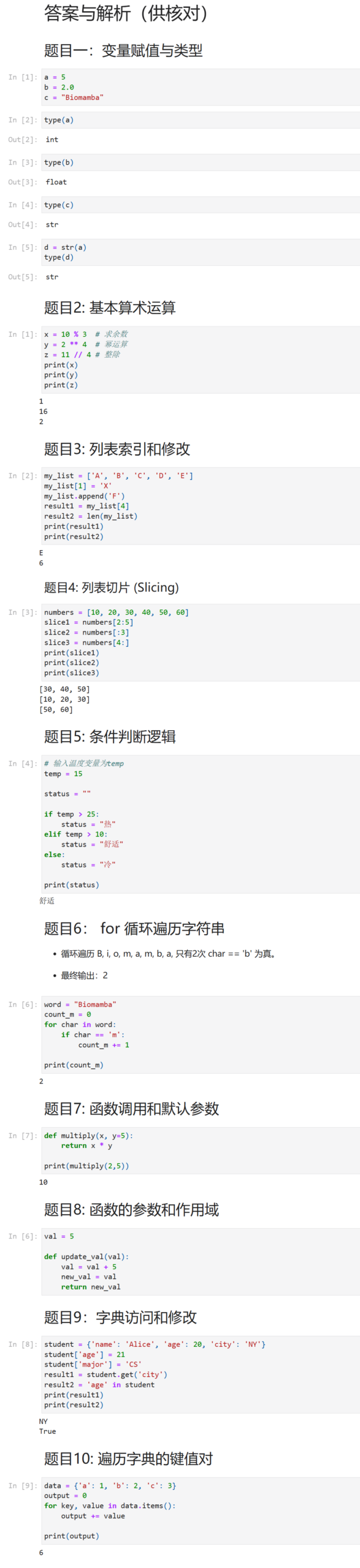
Question 1: Variable Assignment and Types
Complete the following operations using Python code:
– 1. Assign the variable a to 5, assign the variable b to 2.0, and assign the variable c to “Biomamba”
– 2. Use code to determine the data type of each variable
– 3. Convert variable a to a string type
Question 2: Basic Arithmetic Operations
– 1. What is the remainder of 10 divided by 3?
– 2. What is 2 raised to the power of 4?
– 3. What is the integer division of 11 by 4?
Calculate the above problems using Python code
Question 3: List Indexing and Modification
– 1. Given the list my_list = [‘A’, ‘B’, ‘C’, ‘D’, ‘E’], return the element at index 4 of the list.
– 2. Modify the element at index 1 of the list to ‘X’, and add a new element ‘F’ at the end of the list, then return the length of the modified list.
Complete the above tasks using Python code.
Question 4: List Slicing
– 1. Given the list numbers = [10, 20, 30, 40, 50, 60], extract the sublist from index 2 to 4 (including index 2 but excluding index 5).
– 2. Extract the first 3 elements of the list
– 3. Extract the last two elements of the list
Question 5: if Conditional Logic
Write an if loop statement: Given an input temperature, if it is greater than 25°, classify it as hot, if between 10-25° classify it as comfortable, otherwise classify it as cold
Question 6: for Loop to Traverse a String
Using a for loop, for a given string word = “Biomamba”, count the occurrences of the letter m in the string
Question 7: Function Calls and Default Parameters
Write a multiplication function that takes inputs a and b, and outputs the result when a=2 and b=5
Question 8: Function Parameters and Scope
Please define a function namedupdate_val that accepts a numeric variable and adds 5 to the original value, ultimately returning a variable named new_val
Question 9: Dictionary Access and Modification
Given the dictionary student = {‘name’: ‘Alice’, ‘age’: 20, ‘city’: ‘NY’}
– 1. Change the age to 21
– 2. Add a new key-value pair ‘major’: ‘CS’
– 3. Use the get method to retrieve the city information and store it in the variable result1
– 4. Check if the key ‘age’ exists in the dictionary, and store the result in the variable result2
student = {'name': 'Alice', 'age': 20, 'city': 'NY'}Question 10: Traversing Dictionary Key-Value Pairs
Given the dictionary data = {‘a’: 1, ‘b’: 2, ‘c’: 3}
What is the sum of all the keys and values in data?
data = {'a': 1, 'b': 2, 'c': 3}
Answers

Python

 More Python Basics:
Bioinformatics Python Quick Reference Manual
Python Tool: Jupyter NotebookPython Tool: Spyder | Installation, Connection, and UsagePython’s “Rstudio” — PycharmBioinformatics Python Practice:
Single-cell + Spatial Transcriptomics, Full Process Hands-on Teaching!
scRNA-seq Full Stack Teaching (Python)Spatial Transcriptomics Full Stack Teaching (Python)Complete Python Spatial Transcriptomics AnalysisSingle-cell + Spatial Transcriptomics, Full Process Hands-on Teaching!R + Python Combination Might Be the Best Way to Analyze SCENICUnderstanding Single-cell Currency in Python: AnnDataSetting Up Python Single-cell Analysis EnvironmentscRNA-Seq Learning Manual Python Version

Contact Us

 Leave a message to receive materials,ready-to-use single-cell analysis image fromWeChat ID[Biomamba_yunying], making it convenient for everyone to communicate at any time. We have also built a group chat matrix, and everyone is welcome to join the discussion.After reading these articles, you can addtips for beginners in bioinformaticsNo search, no voice
Students who already have the contact information of the bioinformatics basedo not need to add again

 Your every like and view is taken seriously as appreciation