In today’s digital age, virtualization technology has become an important force driving the development of the computer field. Imagine a physical host running multiple isolated virtual machines simultaneously, each appearing to have its own independent hardware resources. How is all this achieved?
Today, let us embark on this mysterious exploration of Linux IO virtualization, where our protagonist—virtio—will unveil this layer of mystery for us. How does it cleverly operate in the world of virtualization, solving many challenges in I/O virtualization? What unique designs and implementations make it so captivating to many developers? Next, let us delve into the wonderful world of virtio and uncover its secrets.
1. Introduction to Linux IO Virtualization
1.1 Overview of Virtualization
In the family of virtualization, Linux IO virtualization occupies an important position. It focuses on solving the input/output (I/O) communication problem between virtual machines and physical hardware, striving to break the I/O performance bottleneck, allowing virtual machines to travel freely on the highway of data transmission. Imagine virtual machines as busy factories, constantly needing raw materials (input data) and producing products (output data), while Linux IO virtualization is the key technology optimizing factory transport routes and loading/unloading processes, ensuring that raw materials and products can enter and exit the factory quickly and efficiently.
As a shining star in the field of Linux IO virtualization, virtio plays a crucial role. It acts as a sturdy bridge connecting virtual machines and physical devices, establishing an efficient and stable channel for communication between the two. Virtio provides a universal I/O device virtualization framework, allowing different hypervisors and device drivers to interact based on a unified standard, greatly improving code reusability and cross-platform compatibility. Whether you’re using KVM, Xen, or other virtualization solutions, virtio can be a reliable partner, providing excellent I/O virtualization support.
Benefits of Virtio:
-
Virtio, as an internal API of Linux, provides various frontend driver modules.
-
The framework is universal, making it easy to simulate various devices.
-
Using paravirtualization can greatly reduce the number of VMEXITs, improving performance.
1.2 Linux IO Virtualization
Before diving into virtio, let’s first review the traditional implementation of Linux IO virtualization and the challenges it faces. In traditional Linux IO virtualization, Qemu plays an important role, simulating I/O devices purely through software, much like a skilled imitator trying to mimic the behavior of various real devices.
When a device driver in the guest initiates an I/O operation request, the entire process resembles a carefully choreographed relay race. The I/O operation capture code in the KVM module first intercepts this I/O request, like the first runner in a relay race quickly taking over the request’s ‘baton’. It then stores the information of this I/O request in an I/O shared page and notifies the user-space Qemu program.
Once the Qemu simulation program receives the specific information about the I/O operation, it hands it over to the hardware simulation code to simulate this I/O operation. After completion, it places the result back into the I/O shared page and notifies the I/O operation capture code in the KVM module. Finally, the capture code in the KVM module reads the operation result from the I/O shared page and returns it to the guest. During this process, the guest, as a Qemu process waiting for I/O, may also be blocked, just like a relay runner might encounter some obstacles while passing the baton.
Although this simulation method has strong flexibility, capable of simulating a wide variety of hardware devices through software, including some rare or very old classic devices, it does not require modification of the guest operating system to make the simulated devices work properly in the guest, providing great help for software development and debugging when sufficient devices are not available. However, its drawbacks are also evident, as the path for each I/O operation is relatively long, with many VMEntry and VMExit occurrences, requiring multiple context switches, just like relay runners frequently passing the baton, consuming a lot of time and energy.
Moreover, it also requires multiple data copies, which undoubtedly further reduces efficiency, leading to poor performance. In some scenarios where high I/O performance is required, such as large-scale data processing and real-time communication, the traditional Qemu simulated I/O device method often fails to meet the demands, like an old car that cannot reach the expected speed on the highway.
As virtualization technology becomes widely used, the demands for I/O performance are increasing, and the limitations of traditional IO virtualization methods are gradually exposed, prompting the emergence of new technology—virtio. What surprises will it bring us? Let’s continue to explore.
2. Unveiling the Mysteries of Virtio
What exactly is virtio, the key technology in the field of Linux IO virtualization? In simple terms, virtio is an I/O virtualization standard for virtualization platforms, acting like an intelligent translator that enables smooth communication between virtual machines and host systems. Developed by Rusty Russell, it was originally designed to support his own virtualization solution, lguest. In the world of paravirtualization, virtio plays a vital role, abstracting a set of common simulated devices, like a universal mold that can shape various virtual devices based on different needs.
In a paravirtualized architecture, the guest operating system (the operating system inside the virtual machine) needs to work closely with the Hypervisor (the virtual machine monitor). Virtio acts as a bridge connecting the guest operating system and the Hypervisor. It provides a set of universal interfaces that allow the guest operating system to interact with the Hypervisor in a standardized manner. This way, different virtualization platforms can achieve unified I/O virtualization based on virtio, greatly improving development efficiency and compatibility. Imagine, with virtio as the bridge, different virtualization platforms can communicate and collaborate easily, like people speaking different languages, achieving efficient I/O virtualization through this translator.
So, how does virtio abstract simulated devices? It does so by defining a set of common device models and interfaces, abstracting the functions of various physical devices. Whether it’s a network adapter, disk driver, or other devices, virtio provides a unified abstract representation for them. In a virtualized environment, network devices in virtual machines can communicate with the network backend in the Hypervisor through the virtio interface without needing to care about what specific physical network devices are. This abstract simulation method gives virtio strong universality and flexibility, adapting to various virtualization scenarios. It’s like a universal remote control that can operate various appliances like TVs, air conditioners, etc., without needing a dedicated remote for each appliance.
2.1 Virtio Data Flow Interaction Mechanism
vring primarily forwards data flows through two ring buffers, as shown in the following diagram:
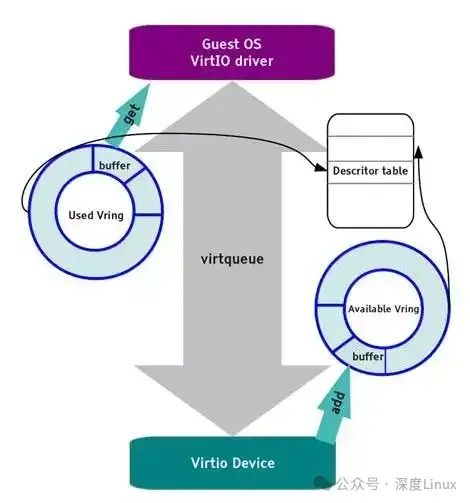
vring consists of three parts: a descriptor array (desc), an available ring, and a used ring.
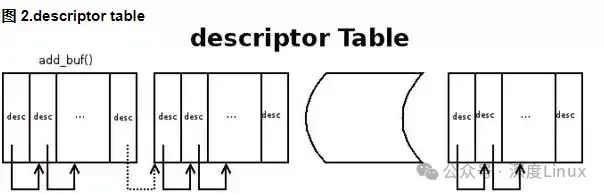
desc is used to store some associated descriptors, each recording a description of a buffer. The available ring indicates which descriptors are currently available on the guest side, while the used ring indicates which descriptors have been used on the host side.
Virtio uses virtqueue to implement the I/O mechanism. Each virtqueue is a queue that carries a large amount of data, and the number of queues used depends on the requirements. For example, the virtio network driver (virtio-net) uses two queues (one for receiving and the other for sending), while the virtio block driver (virtio-blk) uses only one queue.
Specifically, suppose the guest wants to send data to the host. First, the guest adds the buffer containing data to the virtqueue through the function virtqueue_add_buf, then calls the virtqueue_kick function. The virtqueue_kick function calls virtqueue_notify to notify the host by writing to the register. The host then calls virtqueue_get_buf to retrieve the data received in the virtqueue.
The buffer that stores data is a scatter-gather array, carried by the desc structure. Below is a commonly used desc structure:
-
When the guest writes data to the virtqueue, it is actually filling data into the buffer pointed to by the desc structure, after which it updates the available ring and then notifies the host.
-
When the host receives the notification for receiving data, it first finds the buffer added to the available ring from the buffer pointed to by the desc, maps the memory, updates the used ring, and notifies the guest that the data reception is complete.
2.2 Virtio Buffer Pool
The guest operating system (frontend) driver interacts with the hypervisor through the buffer pool. For I/O, the guest operating system provides one or more buffer pools representing requests. For example, you can provide three buffer pools, the first representing a Read request, and the last two representing response data. This configuration is internally represented as a scatter-gather list, where each entry in the list represents an address and a length.
2.3 Core API
Through virtio_device and virtqueue (more common), the guest operating system driver is linked to the hypervisor’s driver. The virtqueue supports its own API consisting of five functions. You can use the first function add_buf to provide requests to the hypervisor. As mentioned earlier, this request exists in the form of a scatter-gather list. For add_buf, the guest operating system provides the virtqueue to add the request to, the scatter-gather list (address and length array), the number of buffer pools used as output entries (targeting the underlying hypervisor), and the number of buffer pools used as input entries (the hypervisor will store data for them and return to the guest operating system). When a request is made to the hypervisor through add_buf, the guest operating system can notify the hypervisor of the new request through the kick function. For optimal performance, the guest operating system should load as many buffer pools into the virtqueue as possible before notifying through kick.
The get_buf function triggers a response from the hypervisor. The guest operating system only needs to call this function or wait for notification through the provided virtqueue callback function to implement polling. When the guest operating system knows that the buffer is available, it calls get_buf to return the completed buffer.
The last two functions of the virtqueue API are enable_cb and disable_cb. You can use these two functions to enable or disable the callback process (through the callback function initialized in the virtqueue). Note that the callback function and hypervisor are located in separate address spaces, so the call is triggered through an indirect hypervisor (like kvm_hypercall).
The format, order, and content of the buffers are only meaningful to the frontend and backend drivers. The internal transfer (the connection point in the current implementation) only moves the buffers and does not know their internal representation.
3. Analyzing the Virtio Architecture
3.1 Overall Architecture Overview
The architecture of virtio is intricate and complex, like a carefully designed building, primarily composed of four layers, each bearing a unique and important mission, working together to build an efficient I/O virtualization bridge.
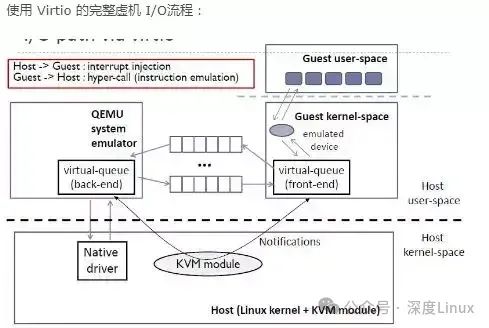
The top layer is the frontend driver, acting like the ‘butler’ inside the virtual machine, running within the virtual machine and having different drivers for different types of devices, such as block devices (like disks), network devices, PCI simulated devices, balloon drivers (for dynamic management of guest memory usage), and console drivers, but the interface interacting with the backend driver is unified. These frontend drivers primarily receive requests from the user space, like a butler receiving various needs from family members, and then package these requests according to the transmission protocol to ensure smooth transmission in the virtualized environment, finally writing to the I/O port and sending a notification to the backend device of Qemu, informing that there are tasks to be processed.
The bottom layer is the backend processing program, located in the Qemu of the host machine, acting as the ‘executor’ for operating hardware devices. When it receives I/O requests sent by the frontend driver, it parses the received data according to the format of the transmission protocol to understand the specific content of the request. For requests that require interaction with actual physical devices, such as network cards, the backend driver will operate on the physical device, such as sending a network packet to the kernel protocol stack to complete the virtual machine’s network operation, thus completing the request and notifying the frontend driver through an interrupt, informing that the task is completed.
The middle two layers are the virtio layer and the virtio-ring layer, which are the key links for communication between the frontend and backend. The virtio layer implements the virtual queue interface, acting as the ‘bridge designer’ for communication between the frontend and backend, conceptually attaching the frontend driver to the backend driver. Different types of devices use different numbers of virtual queues; for example, the virtio network driver uses two virtual queues, one for receiving and one for sending, while the virtio block driver uses only one queue. The virtual queue is actually implemented as a junction point between the guest operating system and the hypervisor. As long as both the guest operating system and the virtio backend program follow a certain standard to implement it in a mutually compatible manner, efficient communication can be achieved.
The virtio-ring layer acts as the ‘construction worker’ of this bridge, implementing a ring buffer to store information about the execution of the frontend driver and backend processing program. It can save multiple I/O requests from the frontend driver at once and hand them over to the backend for batch processing, ultimately calling the device driver in the host to perform physical I/O operations. This way, batch processing can be achieved according to the agreement, rather than processing each I/O request from the guest every time, greatly improving the efficiency of information exchange between the guest and hypervisor.
3.2 Key Component Analysis
In the architecture of virtio, the virtual queue interface and ring buffer are crucial components, like the nervous system and blood circulation system of the human body, ensuring the efficient transmission of data and the normal operation of the system.
The virtual queue interface is one of the core mechanisms for implementing communication between the frontend and backend in virtio. It defines a set of standard interfaces that allow the frontend driver and backend processing program to interact effectively. Each frontend driver can use zero or more virtual queues based on their requirements, and these queues are like highways for data transmission, with different types of devices selecting an appropriate number of queues based on their characteristics. The virtio network driver needs to handle both data reception and transmission, so it uses two virtual queues, one dedicated to receiving data and the other for sending data, which can improve data processing efficiency and avoid conflicts when receiving and sending data.
The ring buffer is the specific implementation of the virtual queue. It is a segment of shared memory divided into three main parts: the descriptor table (Descriptor Table), available descriptor table (Available Ring), and used descriptor table (Used Ring). The descriptor table is used to store some associated descriptors, each recording a description of a buffer, like a cargo list detailing the location, size, and other information of the data; the available descriptor table saves descriptors provided by the frontend driver that can be used by the backend device, like a ‘pending task list’ from which the backend device can obtain the data to be processed; the used descriptor table saves descriptors that have been processed by the backend processing program and have not yet been fed back to the frontend driver, like a ‘completed task list’ from which the frontend driver can learn which data has been processed.
When the virtual machine needs to send a request to the backend device, the frontend driver adds the buffer containing the data to the virtqueue, then updates the available descriptor table, marking the corresponding descriptor as available, and notifies the backend device by writing to the register, like adding a task to the ‘pending task list’ and notifying backend staff. After receiving the notification, the backend device reads the request information from the available descriptor table, retrieves the data from shared memory according to the information in the descriptor table for processing. Once completed, the backend device stores the response status in the used descriptor table and notifies the frontend driver, like recording the completed task in the ‘completed task list’ and notifying the frontend staff. The frontend driver retrieves the request completion information from the used descriptor table and obtains the request data, completing a data transmission process.
3.3 Initialization
(1) Frontend Initialization
Virtio devices follow the general device model of the Linux kernel, with the bus type being virtio_bus, and understanding it can be likened to a PCI device. The implementation of the device model mainly occurs in the driver/virtio/virtio.c file.
-
Device Registration
int register_virtio_device(struct virtio_device *dev)
-> dev->dev.bus = &virtio_bus; // Fill in bus type
-> err = ida_simple_get(&virtio_index_ida, 0, 0, GFP_KERNEL); // Allocate a unique device index identifier
-> dev->config->reset(dev); // Reset config
-> err = device_register(&dev->dev); // Register device in the system-
Driver Registration
int register_virtio_driver(struct virtio_driver *driver)
-> driver->driver.bus = &virtio_bus; // Fill in bus type
-> driver_register(&driver->driver); // Register driver in the system-
Device Matching
virtio_bus.match = virtio_dev_match
// Used to identify whether the device on the bus matches the corresponding virtio device
// The method is to check whether the device id matches any id in the driver's id_table.-
Device Discovery
virtio_bus.probe = virtio_dev_probe
// The virtio_dev_probe function first
-> device_features = dev->config->get_features(dev); // Obtain device configuration information
-> // Find the features supported by both device and driver, set dev->features
-> dev->config->finalize_features(dev); // Confirm the features to be used
-> drv->probe(dev); // Call the driver's probe function, usually to initialize the specific device,
for example, in the virtio_blk driver, it is used to initialize the queue, create the disk device, and initialize some necessary data structures.
When the virtio backend simulates the virtio_blk device, the guest OS scans this virtio device and then calls the virtio_pci_driver’s virtio_pci_probe function to complete the PCI device startup.
A virtio_bus is registered, and at the same time, devices are registered in the virtio bus. When the virtio bus registers a device using register_virtio_device, it will call the virtio bus’s probe function: virtio_dev_probe(). This function traverses drivers, finds the supported drivers associated with the device, and calls the virtio_driver probe.
The virtblk_probe function call flow is as follows:
-
virtio_config_val: Get how many segments the hardware supports (since they are all scatter-gather I/O, the segment should refer to the maximum number of entries in the scatter-gather list); note that an extra segment is required for both the header and tail.
-
init_vq: Call the init_vq function to perform relevant initialization settings for virtqueue, vring, etc.
-
alloc_disk: Call alloc_disk to allocate a gendisk type object for this virtual disk.
-
blk_init_queue: Register the processing function for the queue as do_virtblk_request.
static int __devinit virtblk_probe(struct virtio_device *vdev)
{
	...
	/* Get how many segments the hardware supports
	   (since they are all scatter-gather I/O, this segment should refer to the maximum number of entries in the scatter-gather list),
	   note that an extra segment is required for both the header and tail */
	err = virtio_config_val(vdev, VIRTIO_BLK_F_SEG_MAX, offsetof(struct virtio_blk_config, seg_max), &sg_elems);
	...
	/* Allocate vq, call virtio_find_single_vq(vdev, blk_done, "requests");
	   Allocate a single vq, the name is "request", register the notification function as blk_done */
	err = init_vq(vblk);
	/* Call alloc_disk to allocate a gendisk type object for this virtual disk,
	   the object pointer is stored in the virtio_blk structure's disk */
	vblk->disk = alloc_disk(1 << PART_BITS);
	/* Allocate request_queue structure, belonging to the virtio-blk gendisk structure
	   Initialize gendisk and disk queue, register the processing function for the queue as do_virtblk_request,
	   where queuedata is also set to the virtio_blk structure. */
	q = vblk->disk->queue = blk_init_queue(do_virtblk_request, NULL);
	...
	add_disk(vblk->disk); // Make the device effective externally
}
The init_vq function completes the allocation of virtqueue and vring, setting the queue’s callback function, interrupt handling function, and the flow is as follows:
-->init_vq
	-->virtio_find_single_vq
		-->vp_find_vqs
			-->vp_try_to_find_vqs
				-->setup_vq
					-->vring_new_virtqueue
The function for allocating vq is init_vq:
static int init_vq(struct virtio_blk *vblk)
{
	...
	vblk->vq = virtio_find_single_vq(vblk->vdev, blk_done, "requests");
	...
}
struct virtqueue *virtio_find_single_vq(struct virtio_device *vdev, vq_callback_t *c, const char *n)
{
vq_callback_t *callbacks[] = { c };
const char *names[] = { n };
struct virtqueue *vq;
/* Call find_vqs callback function (corresponding to vp_find_vqs function,
set in virtio_pci_probe) to complete specific settings.
The corresponding virtqueue object pointer will be stored in the temporary pointer array vqs. */
int err = vdev->config->find_vqs(vdev, 1, &vq, callbacks, names);
if (err < 0)
return ERR_PTR(err);
return vq;
}static int vp_find_vqs(struct virtio_device *vdev, unsigned nvqs,
struct virtqueue *vqs[],
vq_callback_t *callbacks[],
const char *names[])
{
int err;
/* This function just calls vp_try_to_find_vqs three times to complete operations,
just with slightly different parameters each time. The last two parameters:
use_msix indicates whether to use MSI-X mechanism for interrupts, per_vq_vectors indicates whether to use one interrupt vector for each virtqueue. */
/* Try MSI-X with one vector per queue. */
err = vp_try_to_find_vqs(vdev, nvqs, vqs, callbacks, true, true);
if (!err)
return 0;
err = vp_try_to_find_vqs(vdev, nvqs, vqs, callbacks, true, false);
if (!err)
return 0;
return vp_try_to_find_vqs(vdev, nvqs, vqs, callbacks, false, false);
}Virtio device interrupts can occur in two situations:
-
When the device’s configuration information changes (config changed), an interrupt (called a change interrupt) occurs, and the interrupt handler needs to call the corresponding processing function (defined by the driver).
-
When the device writes information to the queue, an interrupt (called a vq interrupt) occurs, and the interrupt handling function needs to call the corresponding callback function for that queue (defined by the driver).
Three interrupt handling methods:
1). Without msix interrupts, both change interrupts and all vq interrupts share a single interrupt irq.
Interrupt handling function: vp_interrupt.
The vp_interrupt function includes handling for both change interrupts and vq interrupts.
2). Using msix interrupts, but only two vectors; one corresponds to the change interrupt, the other corresponds to all queues’ vq interrupts.
Change interrupt handling function: vp_config_changed
vq interrupt handling function: vp_vring_interrupt
3). Using msix interrupts, with n+1 vectors; one corresponds to the change interrupt, n correspond to n queues’ vq interrupts. Each vq gets a vector.
static int vp_try_to_find_vqs(struct virtio_device *vdev, unsigned nvqs,
			struct virtqueue *vqs[],
			vq_callback_t *callbacks[],
			const char *names[],
			bool use_msix,
			bool per_vq_vectors)
{
	struct virtio_pci_device *vp_dev = to_vp_device(vdev);
	u16 msix_vec;
	int i, err, nvectors, allocated_vectors;

	if (!use_msix) {
		/* Without msix, all vqs share a single irq, set the interrupt handling function vp_interrupt */
		err = vp_request_intx(vdev);
	} else {
		if (per_vq_vectors) {
			nvectors = 1;
			for (i = 0; i < nvqs; ++i)
				if (callbacks[i])
					++nvectors;
		} else {
			/* Second best: one for change, shared for all vqs. */
			nvectors = 2;
		}
		/* per_vq_vectors is 0, set the handling function vp_vring_interrupt */
		err = vp_request_msix_vectors(vdev, nvectors, per_vq_vectors);
	}
	for (i = 0; i < nvqs; ++i) {
		if (!callbacks[i] || !vp_dev->msix_enabled)
			msix_vec = VIRTIO_MSI_NO_VECTOR;
		else if (vp_dev->per_vq_vectors)
			msix_vec = allocated_vectors++;
		else
			msix_vec = VP_MSIX_VQ_VECTOR;
		vqs[i] = setup_vq(vdev, i, callbacks[i], names[i], msix_vec);
		...
		/* If per_vq_vectors is 1, specify a vector for each queue,
		   the vq interrupt handling function is vring_interrupt */
		err = request_irq(vp_dev->msix_entries[msix_vec].vector,
			vring_interrupt, 0,
			vp_dev->msix_names[msix_vec],
			vqs[i]);
	}
	return 0;
}
The setup_vq function completes the allocation and initialization tasks for virtqueue (mainly for data operations) and vring (used for data storage):
static struct virtqueue *setup_vq(struct virtio_device *vdev, unsigned index,
			void (*callback)(struct virtqueue *vq),
			const char *name, u16 msix_vec)
{
	struct virtqueue *vq;
	/* Write register to exit guest, set the device's queue number,
	   for block devices, it's 0 (maximum can only be VIRTIO_PCI_QUEUE_MAX 64) */
	iowrite16(index, vp_dev->ioaddr + VIRTIO_PCI_QUEUE_SEL);
	/* Get the hardware queue depth num */
	num = ioread16(vp_dev->ioaddr + VIRTIO_PCI_QUEUE_NUM);
	...
	/* IO synchronization information, such as the virtual queue address, will be processed by virtio_queue_set_addr */
	iowrite32(virt_to_phys(info->queue) >> VIRTIO_PCI_QUEUE_ADDR_SHIFT,
			vp_dev->ioaddr + VIRTIO_PCI_QUEUE_PFN);
	...
	/* Call this function to allocate vring_virtqueue object,
	   which contains both vring and virtqueue, and return virtqueue object pointer */
	vq = vring_new_virtqueue(info->num, VIRTIO_PCI_VRING_ALIGN,
			vdev, info->queue, vp_notify, callback, name);
	...
	return &vq->vq;
}
IO synchronization information, such as the virtual queue address, will be processed by the virtio_queue_set_addr:
virtio_queue_set_addr(vdev, vdev->queue_sel, addr);
--> vdev->vq[n].pa = addr; // n=vdev->queue_sel, i.e., synchronizing queue address
--> virtqueue_init(&vdev->vq[n]); // Initialize the backend's virtual queue
--> target_phys_addr_t pa = vq->pa; // Host vring virtual base address
--> vq->vring.desc = pa; // Synchronize desc address
--> vq->vring.avail = pa + vq->vring.num * sizeof(VRingDesc); // Synchronize avail address
--> vq->vring.used = vring_align(vq->vring.avail +
							offsetof(VRingAvail, ring[vq->vring.num]),
							VIRTIO_PCI_VRING_ALIGN); // Synchronize used address
Among them, pa is the physical page address sent by the guest, which in the host is the host’s virtual page address, assigned to the corresponding vq in the host, thus synchronizing the virtual queue address between the guest and host. After that, the current available buffer descriptors avail and used in vring are also synchronized.
The allocation of the vring_virtqueue object is completed by the vring_new_virtqueue function:
struct virtqueue *vring_new_virtqueue(unsigned int num, unsigned int vring_align,
							struct virtio_device *vdev,
							void *pages,
							void (*notify)(struct virtqueue *),
							void (*callback)(struct virtqueue *),
							const char *name)
{
	struct vring_virtqueue *vq;
	unsigned int i;
	/* We assume num is a power of 2. */
	if (num && (num - 1)) {
		dev_warn(&vdev->dev, "Bad virtqueue length %u
", num);
		return NULL;
	}
	/* Call vring_init function to initialize vring object,
	   its desc, avail, used three fields divide the memory page allocated in the first step of setup_vp */
	vring_init(&vq->vring, num, pages, vring_align);
	/* Initialize virtqueue object (note its callback will be set to virtblk_done function) */
	vq->vq.callback = callback;
	vq->vq.vdev = vdev;
	vq->vq.name = name;
	vq->notify = notify;
	vq->broken = false;
	vq->last_used_idx = 0;
	vq->num_added = 0;
	list_add_tail(&vq->vq.list, &vdev->vqs);
	/* No callback? Tell the other side not to bother us. */
	if (!callback)
		vq->vring.avail->flags |= VRING_AVAIL_F_NO_INTERRUPT;
	/* Put everything in free lists. */
	vq->num_free = num;
	vq->free_head = 0;
	for (i = 0; i < num - 1; i++) {
		vq->vring.desc[i].next = i + 1;
		vq->data[i] = NULL;
	}
	vq->data[i] = NULL;
	/* Return virtqueue object pointer */
	return &vq->vq;
}
Calling the vring_init function initializes the vring object:
static inline void vring_init(struct vring *vr, unsigned int num, void *p,
							unsigned long align)
{
	vr->num = num;
	vr->desc = p;
	vr->avail = p + num * sizeof(struct vring_desc);
	vr->used = (void *)(((unsigned long)&vr->avail->ring[num] + align - 1) & ~(align - 1));
}
(2) Backend Initialization
The initialization process for the backend driver is essentially the initialization of the backend driver’s data structures, setting the PCI device information, and binding it to the virtio device, setting the host state, configuring and initializing the virtual queue, binding a virtual queue and queue processing function for each block device, and binding the device processing function to handle I/O requests. The virtio-block backend initialization process:
type_init(virtio_pci_register_types)
--> type_register_static(&virtio_blk_info) // Register a device structure for PCI sub-devices
	--> class_init = virtio_blk_class_init,
	--> k->init = virtio_blk_init_pci;
static int virtio_blk_init_pci(PCIDevice *pci_dev)
{
VirtIOPCIProxy *proxy = DO_UPCAST(VirtIOPCIProxy, pci_dev, pci_dev);
VirtIODevice *vdev;
...
vdev = virtio_blk_init(&pci_dev->qdev, &proxy->blk);
...
virtio_init_pci(proxy, vdev);
/* Make the actual value visible */
proxy->nvectors = vdev->nvectors;
return 0;
}Calling virtio_blk_init initializes the virtio-blk device, and the code for virtio_blk_init is as follows:
VirtIODevice *virtio_blk_init(DeviceState *dev, VirtIOBlkConf *blk)
{
	VirtIOBlock *s;
	static int virtio_blk_id;
	...
	/* virtio_common_init initializes a VirtIOBlock structure,
	   mainly allocating a VirtIODevice structure and assigning values to it,
	   the VirtIODevice structure mainly describes some configuration interfaces and attributes of the IO device.
	   The VirtIOBlock structure's first field is the VirtIODevice structure, and it also includes other block device properties and status parameters. */
	s = (VirtIOBlock *)virtio_common_init("virtio-blk", VIRTIO_ID_BLOCK,
							sizeof(struct virtio_blk_config),
							sizeof(VirtIOBlock));
	/* Assign values to the fields in the VirtIOBlock structure,
	   among which it is particularly important to assign some virtio common configuration interfaces
	   (get_config, set_config, get_features, set_status, reset),
	   thus, virtio_blk has its custom configuration. */
	s->vdev.get_config = virtio_blk_update_config;
	s->vdev.set_config = virtio_blk_set_config;
	s->vdev.get_features = virtio_blk_get_features;
	s->vdev.set_status = virtio_blk_set_status;
	s->vdev.reset = virtio_blk_reset;
	s->bs = blk->conf.bs;
	s->conf = &blk->conf;
	s->blk = blk;
	s->rq = NULL;
	s->sector_mask = (s->conf->logical_block_size / BDRV_SECTOR_SIZE) - 1;
	/* Initialize vq, virtio_add_queue sets the maximum number of vring processing for vq to 128,
	   registers handle_output function as virtio_blk_handle_output (host-side processing function) */
	s->vq = virtio_add_queue(&s->vdev, 128, virtio_blk_handle_output);
	/* qemu_add_vm_change_state_handler(virtio_blk_dma_restart_cb, s);
	   Set the VM state change handling function as virtio_blk_dma_restart_cb */
	s->qdev = dev;
	/* register_savevm registers virtual machine save and load functions (live migration) */
	register_savevm(dev, "virtio-blk", virtio_blk_id++, 2,
			virtio_blk_save, virtio_blk_load, s);
	...
	return &s->vdev;
}
// Initialize vq, calling virtio_add_queue:
VirtQueue *virtio_add_queue(VirtIODevice *vdev, int queue_size,
							void (*handle_output)(VirtIODevice *, VirtQueue *))
{
	...
	vdev->vq[i].vring.num = queue_size; // Set queue depth
	vdev->vq[i].handle_output = handle_output; // Register queue processing function
	return &vdev->vq[i];
}
Initialize virtio-PCI information, allocate bar, register interfaces and interface processing functions; bind the virtio-pci ops to the device proxy, set host features, and call the function virtio_init_pci to initialize virtio-blk PCI-related information:
void virtio_init_pci(VirtIOPCIProxy *proxy, VirtIODevice *vdev)
{
	uint8_t *config;
	uint32_t size;
	...
	/* memory_region_init_io(): Initialize IO memory,
	   and set IO memory operations and memory read/write functions virtio_pci_config_ops */
	memory_region_init_io(&proxy->bar, &virtio_pci_config_ops, proxy, "virtio-pci", size);
	/* Bind IO memory to the PCI device, i.e., initialize bar, register pci address to bar */
	pci_register_bar(&proxy->pci_dev, 0, PCI_BASE_ADDRESS_SPACE_IO,
							&proxy->bar);
	if (!kvm_has_many_ioeventfds()) {
		proxy->flags &= ~VIRTIO_PCI_FLAG_USE_IOEVENTFD;
	}
	/* Bind the virtio-pci bus ops and point to the device proxy */
	virtio_bind_device(vdev, &virtio_pci_bindings, proxy);
	proxy->host_features |= 0x1 << VIRTIO_F_NOTIFY_ON_EMPTY;
	proxy->host_features |= 0x1 << VIRTIO_F_BAD_FEATURE;
	proxy->host_features = vdev->get_features(vdev, proxy->host_features);
}
Among them, the virtio-pci read and write operations are virtio_pci_config_ops:
static const MemoryRegionPortio virtio_portio[] = {
	{ 0, 0x10000, 2, .write = virtio_pci_config_writew, },
	...
	{ 0, 0x10000, 2, .read = virtio_pci_config_readw, },
};
After device registration is complete, Qemu calls io_region_add for I/O port registration:
static void io_region_add(MemoryListener *listener, MemoryRegionSection *section)
{
	...
	/* Initialize io port information */
	iorange_init(&mrio->iorange, &memory_region_iorange_ops,
							section->offset_within_address_space, section->size);
	/* Register io port */
	ioport_register(&mrio->iorange);
}
ioport_register calls register_ioport_read and register_ioport_write to save the corresponding callback functions to the ioport_write_table array:
int register_ioport_write(pio_addr_t start, int length, int size, IOPortWriteFunc *func, void *opaque)
{
	...
	for(i = start; i < start + length; ++i) {
		/* Set the corresponding port's callback function */
		ioport_write_table[bsize][i] = func;
		...
	}
	return 0;
}
4. In-Depth Exploration of Virtio Code
4.1 Exploring Data Structures
In the world of virtio code, vring and virtqueue are the most critical data structures, supporting the entire functionality of virtio like the foundation of a building.
vring is the core carrier for data transmission between the virtio frontend driver and the backend Hypervisor virtual device. It mainly consists of three parts: the descriptor table (Descriptor Table), the available descriptor table (Available Ring), and the used descriptor table (Used Ring). In earlier versions of virtio 1.0 and before, these three parts were separate, forming what is known as Split Virtqueue. In this mode, each part has its specific read-write permissions and describes an I/O request by linking multiple descriptors into a descriptor chain through the next field. Although this method can achieve basic data transmission functionality, it has certain limitations in data management and processing efficiency.
With technological advancements, virtio version 1.1 introduced Packed Virtqueue, which combines the descriptor table, available descriptor table, and used descriptor table into a more compact structure. In this structure, Flag-related markers are added, the next field is removed, and Buffer ID is increased, enhancing support for entries. This design makes data management more efficient and facilitates better hardware affinity and cache utilization. It’s like reorganizing a warehouse layout, making the storage and retrieval of goods more convenient and faster.
Virtqueue is a further encapsulation and management of vring. It contains vring and other information and operation functions related to the queue. In actual operation, the Client inserts Buffers into the virtqueue, and the queue arranges different numbers based on different devices. Network devices usually have two queues, one for receiving data and the other for sending data, thus achieving efficient data processing and avoiding conflicts during data reception and transmission. Virtqueue also provides some functions for operating on vring, such as add_buf for adding data buffers to the queue, get_buf for retrieving data buffers from the queue, and kick for notifying the other side of new data arrival. These functions are like tools for warehouse managers, helping them efficiently manage the goods in the warehouse.
4.2 Core Process Interpretation
Taking network devices as an example, the data sending and receiving process of virtio is a concrete embodiment of its core functionality, resembling a tense and orderly relay race, with each link closely cooperating to ensure efficient data transmission.
When a network device sends data, the frontend driver first starts the journey of data transmission through the start_xmit function. In this function, the xmit_skb function will be called to handle the specific data sending. The xmit_skb function first uses sg_init_table to initialize the sg list, which is like a cargo list recording the relevant information of the data to be sent. Then, sg_set_buf points the sg to a specific buffer, and skb_to_sgvec fills the data from the socket buffer into the sg, just like loading goods onto a transport vehicle.
Next, virtqueue_add_outbuf adds the sg to the Virtqueue and updates the index of the descriptor in the Avail queue. This step is akin to placing the transport vehicle filled with goods into the warehouse’s shipping area and recording the location of the goods. Finally, virtqueue_notify informs the Device that it can come to pick up the data, like notifying the courier to pick up the goods.
In terms of data reception, when Qemu receives a data packet sent by tap, it copies the data into the virtual machine’s virtio network card receive queue in the virtio_net_receive function. This process is like the courier delivering packages to the warehouse’s receiving area. Then, it injects an interrupt into the virtual machine, allowing the virtual machine to sense the arrival of network data packets. Inside the virtual machine, the data reception process starts from the napi_gro_receive function, which transfers the received data to the network layer. Then, the netif_receive_skb function passes the skb (socket buffer) to the network layer for processing. In the driver’s poll method, the napi_poll function is called, specifically in virtio_net.c, it is the virtnet_poll function.
In this function, the receive_buf function will be called to convert the received data into skb, and depending on the reception type (such as XDP_PASS, XDP_TX, etc.), different processing will be performed on the data in the virtqueue. If it detects that the current interrupt reception of data is complete, it will re-enable the interrupt, waiting for the next interrupt to receive data. Throughout this process, other functions and operations are also involved, such as the skb_recv_done function for handling callbacks after data reception is complete, and the virtqueue_napi_schedule function for scheduling NAPI (Network Interface Polling), etc. These functions and operations work together to ensure efficient and stable data reception.