The content is compiled from the internet.
1. Virtualization
Definition: Virtualization is a broad term that usually refers to the operation of computing components on a virtual basis rather than a real basis in computing. Virtualization technology can expand hardware capacity and simplify the software reconfiguration process. CPU virtualization technology can simulate multiple CPUs in parallel on a single CPU, allowing a platform to run multiple operating systems simultaneously, with applications running in mutually independent spaces without interference, significantly improving computer work efficiency.
1.1 Full Virtualization Full virtualization technology, also known as hardware-assisted virtualization technology, is the virtualization technology originally used, which adds a software layer—Hypervisor, or Virtual Machine Monitor (VMM)—between the virtual machine (VM) and the hardware. Hypervisors can be divided into two main categories: (1). Running on top of physical machines; physical machine –> hypervisor, for example: kvm (2). Running on top of the operating system; physical machine –> OS –> Hypervisor, for example: QEMU, WINE
Since the operating system running on the virtual machine ultimately shares hardware through the Hypervisor, the instructions issued by the virtual machine must be captured and processed by the Hypervisor. Therefore, each guest operating system’s (Guest OS) instructions must be translated into a format recognizable by the CPU. The guest operating system here refers to the operating system running on the virtual machine, so the workload of the Hypervisor can be quite heavy, thus consuming certain resources, making performance not as good as bare metal. However, it is faster than hardware emulation. The greatest advantage of full virtualization is that the operating system running on the virtual machine does not require any modification; the only limitation is that the operating system must be able to support the underlying hardware. However, most current operating systems can generally support the underlying hardware, so this limitation becomes negligible.
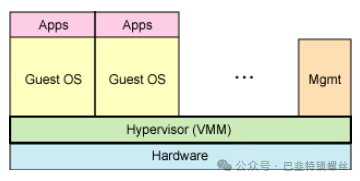 Figure 1: Full Virtualization Technology
1.2 Paravirtualization Technology
Paravirtualization technology is a later development, known in English as paravirtualization, and is currently quite popular. It modifies the guest operating system on the basis of full virtualization and adds a dedicated API to optimize the instructions issued by the guest operating system, which means that the Hypervisor does not need to spend resources on translation operations. Therefore, the workload of the Hypervisor becomes very small, leading to a significant overall performance improvement. However, the downside is that the operating system containing this API must be modified, which means that some operating systems that do not contain this API (mainly Windows) cannot use this method.
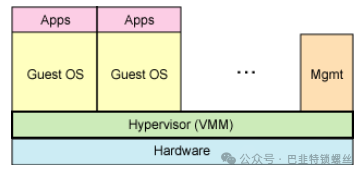
Figure 2: Para/Quasi-Virtualization Technology
2. CPU Operating Modes under Virtualization
Ring 0 refers to the CPU operating level, with ring 0 being the highest level, ring 1 next, and so on… For Linux + x86, the code of the operating system (kernel) runs at the highest operating level, ring 0, allowing the use of privileged instructions, controlling interrupts, modifying page tables, accessing devices, etc. The application code runs at the lowest operating level, ring 3, and cannot perform controlled operations. If it needs to, for example, access the disk or write files, it must do so by executing a system call (function). When executing a system call, the CPU’s operating level switches from ring 3 to ring 0 and jumps to the corresponding kernel code location for execution. This way, the kernel completes the device access for you, and after that, it returns from ring 0 to ring 3. This process is also known as switching between user mode and kernel mode.
Now, virtualization encounters a problem here because the host operating system operates at ring 0, and the guest operating system cannot also run at ring 0, but it does not know this. It still tries to execute the same instructions as before, which obviously won’t work due to lack of permissions. So, the Virtual Machine Monitor (VMM) must prevent this from happening. (The VMM operates at ring 0, generally manifested as a driver, which must work at ring 0 to drive devices.) Generally, when the guest operating system executes privileged instructions, it triggers an exception (CPU mechanism, instructions without permission trigger an exception), and then the VMM captures this exception, translates it within the exception, simulates it, and finally returns to the guest operating system, which believes its privileged instructions are working normally and continues running. However, this performance loss is significant; think about it, originally, a simple instruction executes and is done, but now it must go through a complex exception handling process.
At this point, paravirtualization comes into play. The idea of paravirtualization is to let the guest operating system know that it is running on a virtual machine and operating in a non-ring 0 state. Therefore, some privileged instructions it used to execute on the physical machine will be modified in a way that is agreed upon with the VMM, which is equivalent to customizing the operating system by modifying the code to port it to a new architecture. Therefore, technologies like XEN, which are paravirtualization, have a specially customized kernel version for the guest operating system, equivalent to x86, mips, arm, and other kernel versions. This way, there is no need for exception capture, translation, or simulation, resulting in very low performance loss. This is the advantage of XEN’s paravirtualization architecture. This is also why XEN only supports virtualization of Linux and cannot virtualize Windows, as Microsoft does not modify the code.
Later, CPU manufacturers began to support virtualization, changing the situation. For example, X86 CPUs introduced Intel-VT technology, supporting two modes: VMX root operation and VMX non-root operation, both of which support the four operating levels from Ring 0 to Ring 3. Now, the VMM can run in VMX root operation mode while the guest OS runs in VMX non-root operation mode. This means that the hardware layer has made some distinctions, and thus, under full virtualization, some implementations relying on “exception capture – translation – simulation” are no longer needed. Moreover, CPU manufacturers are increasingly supporting virtualization, and the performance of hardware-assisted full virtualization technologies is gradually approaching that of paravirtualization. Coupled with the advantage of full virtualization not requiring modifications to the guest operating system, full virtualization technology should be the trend of future development.
XEN is the most typical paravirtualization, but now XEN also supports hardware-assisted full virtualization; trends cannot be resisted… KVM and VMARE have always been full virtualization.

Copyright Statement: The content of this article comes from Blog Garden: hukey, following the CC 4.0 BY-SA copyright agreement. The original text and this statement are included. This work is licensed under the Creative Commons Attribution-NonCommercial-NoDerivatives 2.5 China Mainland License. Original link: https://www.cnblogs.com/hukey/p/6395313.html If any infringement is involved, please contact us, and it will be deleted immediately. Special thanks to the original author for their creation. All copyrights of this article belong to the original author and are unrelated to this public account. For commercial reprints, please contact the original author; for non-commercial reprints, please indicate the source.