Good afternoon, everyone.
This article is quite long because Linux kernel virtualization is indeed a challenging concept that took me a lot of time to research. The main purpose of learning this knowledge point is still related to my DPU PhD project.
While reading literature today, I came across a conference paper on “DPU Virtualization Network Functions,” which piqued my interest regarding the concepts of Hypervisor and KVM-Qemu under the Linux system. The four topics of kernel virtualization networks, user-space DPDK virtualization networks, high-performance SR-IOV networks, and Virtio hardware-accelerated virtualization networks are all somewhat related to my project.
Since there is a connection, I must learn it no matter how difficult it is. So, I summarized my learning process, and this article was born.
Before diving into the main text, you might as well read the Lu Xun-style narrative retold by DeepSeek, which indeed has a strong “Xun” flavor:
Everyone is probably still not at rest. The night is deep, and the moonlight outside the window slants onto the desk, making one think of the scenes in the iron house. Originally, I wanted to tell you about the study of this virtualized illusion earlier, but the mechanisms in the Linux kernel are truly tricky, resembling the winding alleys in Lu Xun’s works, making one go around in circles and lose direction. These days, I have flipped through many foreign books until my eyes are dizzy, only to realize that this troublesome DPU PhD endeavor is indeed about risking one’s life in a pile of code. Today, while reviewing Western literature, I happened to stumble upon the conference article on “DPU Virtualization Network Functions,” where the gaps between the words are crawling with the sorcery of Hypervisor, the charms of Linux, and the strange beings of KVM-Qemu. The kernel virtualization network, user-space DPDK, the efficient path of SR-IOV, and the hardware methods of Virtio—these four matters are like the four concubines of the Zhao family in Weizhuang, each with their own hidden agendas yet blood-related. Since this entangled fate has been established, it is like a madman suffering from hysteria; even if the road ahead is fraught with dangers, one must take the journey. At this moment, the clock strikes midnight; let me dip into the moonlight and draw the path to this illusory world for you, the audience.
1. Introduction
Virtualization Technology (VT) is a resource management technology. In traditional non-virtualized systems, a single operating system monopolizes hardware resources. In a virtualized system, hardware resources are abstracted and divided into multiple virtual entities, allowing multiple operating systems to share physical resources and optimizing resource utilization.
Virtualization technology not only expands hardware capacity but also simplifies the process of software reconfiguration. Through CPU virtualization technology, multiple virtual CPUs can be simulated on the same platform, allowing multiple operating systems to run simultaneously, with applications in each operating system operating independently in their own spaces, significantly improving system efficiency.
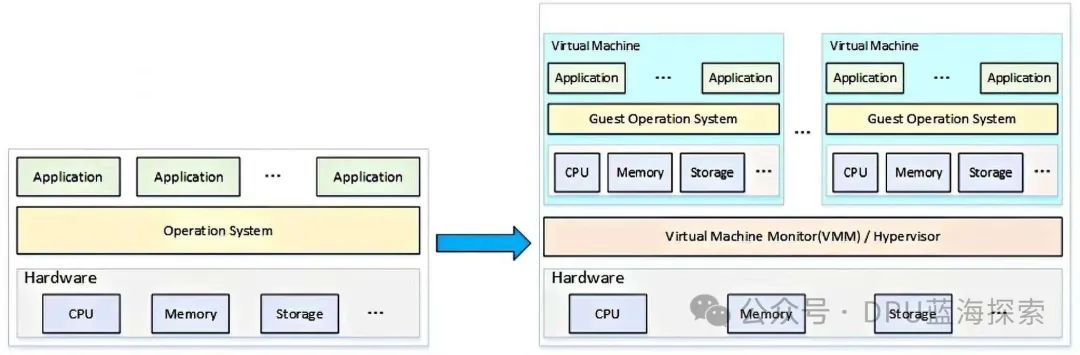
First, let’s clarify a concept that can easily confuse people. I had doubts about virtualization technology when I first learned about it.
What is the difference between Hypervisor and Virtual Machine Monitor?
The professional explanations of both are:
-
Hypervisor: is a technology used for virtualization that allocates physical hardware resources (such as CPU, memory, storage, and network) to multiple virtual machines (VMs). It is responsible for managing virtual machines and ensuring their isolation from each other while managing access to physical hardware resources. The Hypervisor is a core component of the virtualization environment and can run directly on physical hardware (Type 1) or on an existing operating system (Type 2).
-
Virtual Machine Monitor: is another term that describes virtualization technology, essentially referring to the component that manages the interaction between virtual machines and hardware. VMM is sometimes used synonymously with Hypervisor, but may also carry more specific contextual meanings. VMM is primarily responsible for virtualization management, including managing the lifecycle of virtual machines, resource allocation, and the translation of virtualization instructions. It ensures that virtual machines can effectively interact with the virtualization resources in the host system.
The main differences between the two are:
-
Hypervisor emphasizes virtualization technology, meaning it provides resource isolation and scheduling for multiple virtual machines through virtualized hardware. It can be understood as a higher-level manager that may run directly on hardware (Type 1) or on top of an operating system (Type 2).
-
VMM focuses more on virtual machine management and monitoring, acting as an intermediary between the operating system and hardware. It ensures that the interaction between virtual machines and physical hardware is correct, especially in cases where there is no hardware virtualization support; VMM may be more complex as it needs to handle more instruction translations and management tasks.
Finally, the conclusion is:
-
In most modern virtualization platforms, Hypervisor and VMM are often used interchangeably, especially in the implementation of Type 1 Hypervisor, where VMM is part of the Hypervisor.
-
Hypervisor is a broader and more modern term, widely adopted in data center and cloud computing environments. In contrast, VMM is an older term that was used to describe systems that manage the interaction between virtual machines and hardware. In some academic literature and traditional virtualization implementations, VMM is used to describe the virtualization management program.
2. Type 1 Virtualization and Type 2 Virtualization
2.1 Type 1 Virtualization (Bare-Metal Virtualization)
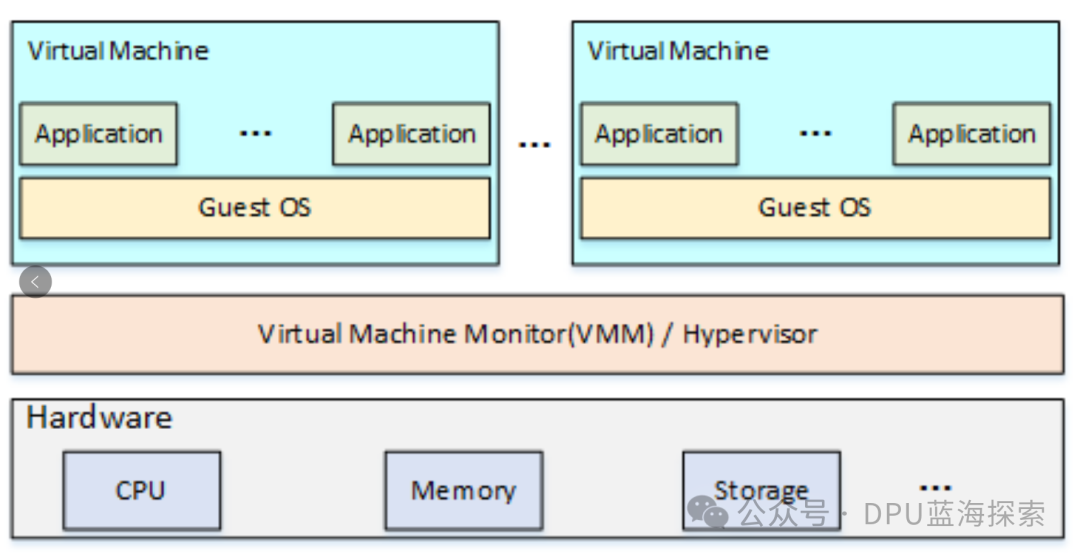
Type 1 virtualization, native/bare-metal Hypervisor, also known as bare-metal virtualization, refers to Hypervisor running directly on physical hardware without relying on an operating system.
It manages hardware resources and starts and manages multiple virtual machines using these resources. Since there is no host operating system intervention, Type 1 virtualization typically provides higher performance and stronger resource isolation.
Key features:
- Runs directly on physical hardware: The Hypervisor runs directly on the physical server without relying on a host operating system.
- Efficiency: With no host operating system intervention, resource consumption is lower, and performance is better, especially in I/O-intensive and high-load applications.
- Strong resource isolation: Since there is no intermediary operating system between virtual machines and physical hardware, the isolation between virtual machines is stronger, leading to higher security.
- Reliability and stability: With no host operating system, there are fewer points of failure, leading to higher overall system reliability and stability.
- Requires specialized hardware support: Modern Type 1 virtualization platforms typically require hardware support for virtualization technologies (such as Intel VT-x or AMD-V) to enhance performance and isolation.
Examples:
- VMware ESXi: is the most commonly used Type 1 virtualization platform, installed directly on physical servers to manage multiple virtual machines.
- Microsoft Hyper-V: is also a representative of Type 1 virtualization, specifically designed for server virtualization.
- Xen: can be configured as Type 1 virtualization, running directly on hardware to provide efficient resource management and virtual machine management.
- KVM (Kernel-based Virtual Machine): although it can run as Type 2 on Linux, when running as Type 1 on bare metal, it can also provide similar performance to Type 1.
2.2 Type 2 Virtualization (Hosted Virtualization)
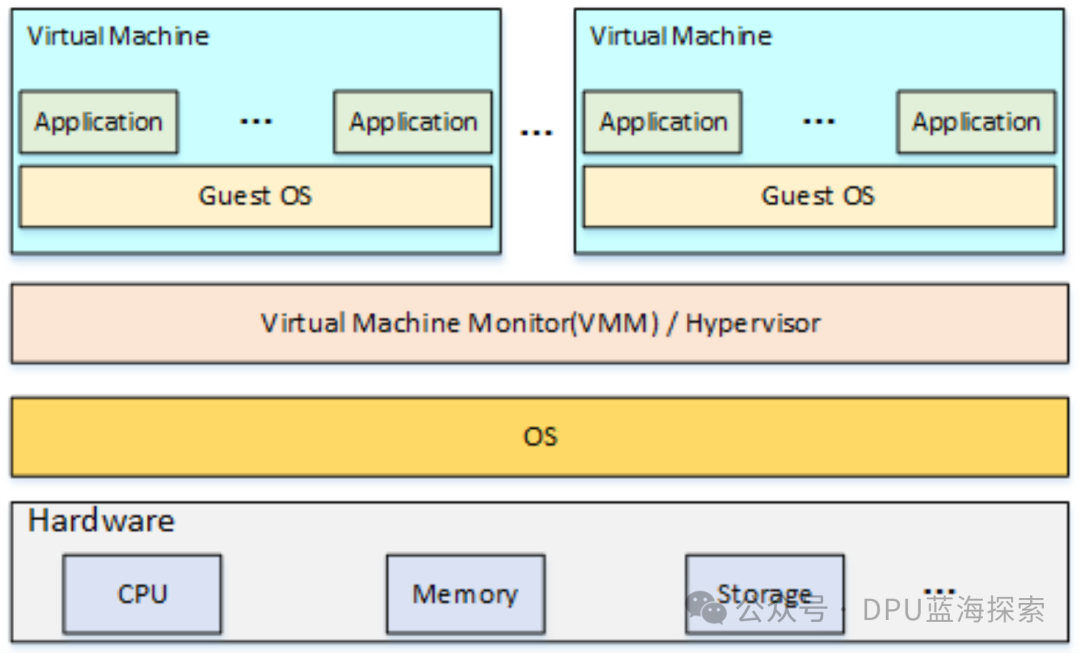
Type 2 virtualization, also known as hosted virtualization, refers to the virtualization monitor Hypervisor running on an existing operating system, i.e., it runs as an application within the host operating system.
Virtual machines access hardware resources through the host operating system, so Type 2 virtualization typically requires more resources and usually has lower performance compared to Type 1 virtualization.
Key features:
- Runs on the host operating system: Type 2 Hypervisor runs as an application on top of an existing operating system, such as Windows, Linux, or macOS.
- Ease of deployment and use: Since it does not need to interact directly with hardware, the deployment and configuration of Type 2 virtualization platforms are generally simpler, suitable for developers and desktop environments.
- Higher performance overhead: Due to the presence of the host operating system, the performance of virtual machines is limited by the scheduling and resource management of the host operating system.
- Not suitable for high-load environments: Due to higher performance overhead, Type 2 virtualization is usually not suitable for scenarios requiring large-scale virtualization in production environments.
Examples:
- VMware Workstation: is a Type 2 virtualization platform that runs on the host operating system (such as Windows or Linux), allowing users to create and manage virtual machines in a desktop environment.
- Oracle VirtualBox: is also a Type 2 virtualization tool that allows virtual machines to run on various operating systems, widely used for development and testing.
- Parallels Desktop: runs on macOS, allowing users to create virtual machines and run Windows or other operating systems.
In summary, Type 1 virtualization is suitable for data centers, large-scale virtualization, and high-performance demanding scenarios, providing higher performance, stability, and resource isolation. It runs directly on physical hardware, usually requiring hardware support, and is suitable for production environments.
On the other hand, Type 2 virtualization is suitable for individual users, developers, and testers, facilitating quick deployment and use in desktop systems. Its performance is lower, suitable for lightweight virtualization needs.
3. Paravirtualization and Full Virtualization
3.1 Paravirtualization
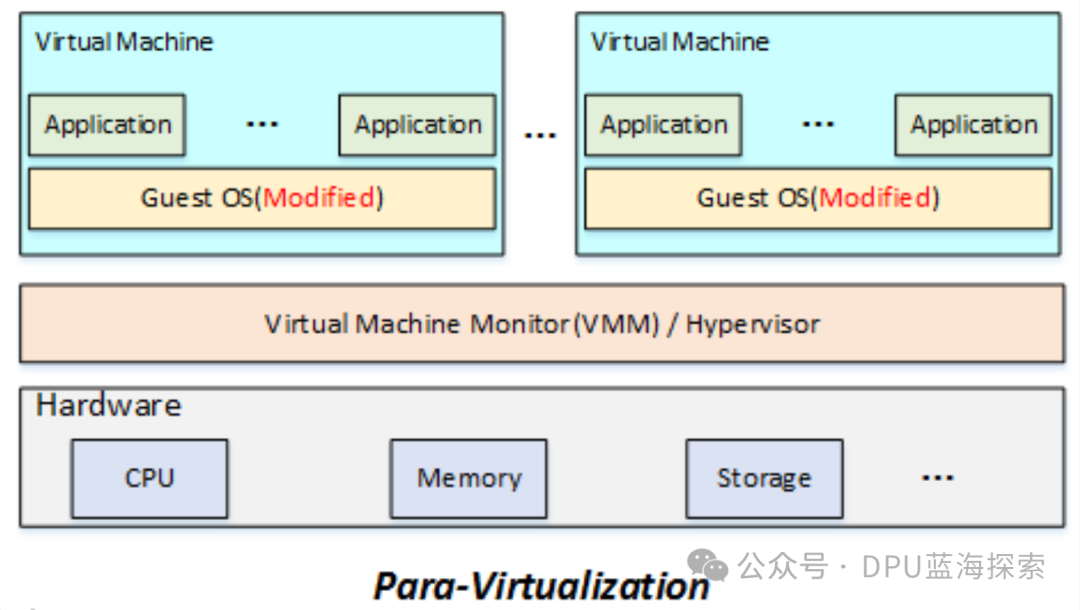
Paravirtualization is a virtualization technology that improves virtualization performance through close interaction with the Hypervisor. In a paravirtualization environment, the operating system of the virtual machine is not completely isolated but collaborates with the virtualization platform through special modifications to achieve efficient interaction with the host operating system.
Working principle:
- In full virtualization, the virtual machine operating system requires no modifications, and the virtual hardware platform fully simulates physical hardware. However, in paravirtualization, the operating system of the virtual machine collaborates with the Hypervisor through calls to the virtualization interface for resource management and scheduling, rather than simulating hardware. This method typically provides higher performance than full virtualization because it avoids complete hardware simulation.
Key features:
- Operating system modification: Paravirtualization requires modifications at the kernel level of the virtual machine operating system to cooperate with the virtualization platform, thus enhancing performance.
- Virtualization API: The operating system makes system calls and manages resources through the interfaces provided by the virtualization platform, rather than interacting directly with the hardware.
- Efficiency: Since the operating system and Hypervisor can communicate directly and manage hardware resources collaboratively, paravirtualization typically provides superior performance in I/O performance and context switching compared to full virtualization.
Advantages and disadvantages:
- Advantages: First, due to the direct interaction between the operating system and the virtualization platform, hardware simulation and virtualization overhead are reduced, typically providing higher performance. Second, collaborative virtualization platforms effectively reduce the complexity of resource management.
- Disadvantages: The operating system must be modified, which means it cannot support unmodified native operating systems and can only run operating systems that have been adjusted for paravirtualization.
3.2 Full Virtualization
Full virtualization is a virtualization technology that allows virtual machines to run their operating systems independently without any modifications or special support, as if they were running on physical hardware.
Through the Hypervisor, full virtualization simulates a complete hardware environment, supporting multiple virtual machines to run in parallel on the same physical host, with each virtual machine believing it has independent hardware resources.
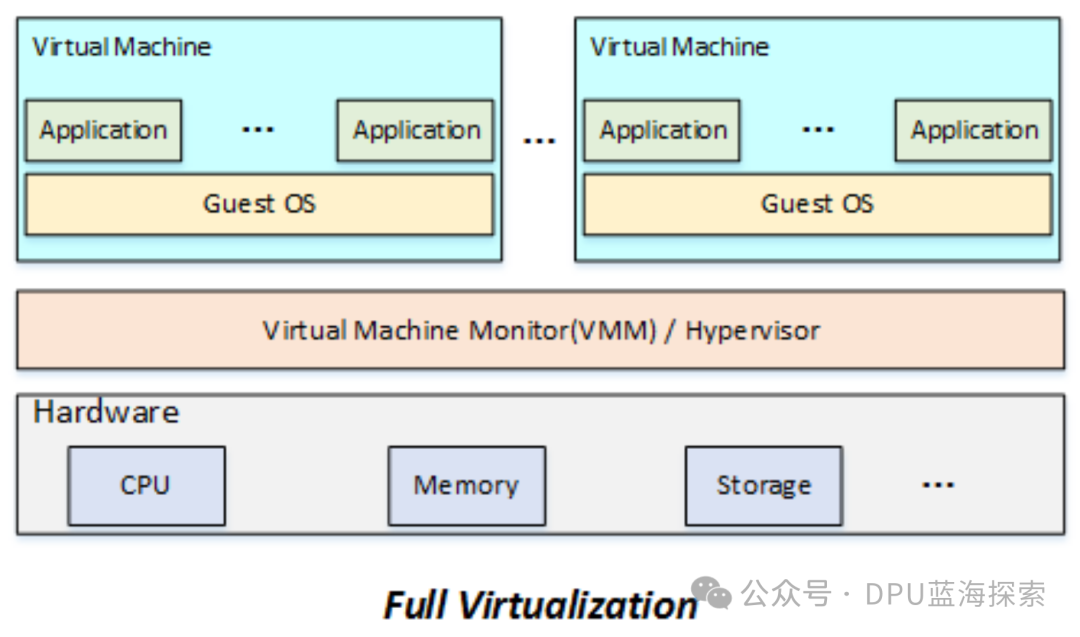
The working principle of full virtualization:
Full virtualization completely simulates physical hardware through the Hypervisor, isolating the operating system of the virtual machine from the physical hardware. The operating system of the virtual machine does not need to be aware of its running environment and interacts with the hardware through the virtualization platform’s virtualization layer, with all hardware resource management handled by the virtualization platform.
Hypervisor: Unlike paravirtualization, full virtualization relies on the Hypervisor to manage the interaction between virtual machines and physical hardware. The Hypervisor is software running on physical hardware, providing virtual hardware and resource support.
- Type 1 Hypervisor: runs directly on physical hardware without relying on an operating system. For example: VMware ESXi, Microsoft Hyper-V, and Xen.
- Type 2 Hypervisor: runs on top of an existing operating system, such as VMware Workstation and VirtualBox.
The workflow of virtualization:
- Virtual machine creation: A virtual machine is created in the Hypervisor, and virtual hardware resources (such as virtual CPUs, memory, and storage) are allocated. Each virtual machine runs its own operating system (such as Windows, Linux, etc.).
- Resource allocation: The Hypervisor divides physical hardware resources into multiple virtual resources, allocating them to different virtual machines as needed. Each virtual machine believes it has exclusive hardware resources.
- Hardware simulation: The virtualization platform handles the interaction between virtual machines and hardware by simulating the hardware layer. For example, when a virtual machine accesses disks, networks, or CPUs, the operations are forwarded to the actual hardware devices.
- Virtual machine operation: Each virtual machine runs an independent operating system, and the operating system in the virtual machine is unaware of its virtualization environment, as if it were running on physical hardware.
Full virtualization and hardware virtualization support: Hardware virtualization technologies (such as Intel VT-x and AMD-V) optimize the virtualization process through hardware-level support, improving performance and reducing overhead. The hardware support provided by modern processors gives full virtualization a performance advantage and enhances the isolation of virtual machines.
- Intel VT-x and AMD-V enhance the efficiency of the Hypervisor in managing virtual machines, improving performance and isolation.
- Without hardware virtualization support, virtualization performance will significantly decline, and some advanced features may also be disabled.
4. Software Virtualization and Hardware Virtualization
4.1 Software Virtualization
Software virtualization is a virtualization technology that manages hardware resources through a software layer, typically not relying on or only partially relying on hardware virtualization capabilities. It simulates a hardware environment through the operating system or Hypervisor, allowing multiple virtual machines to share physical hardware resources.
Working principle:
- Software virtualization simulates the hardware layer through the Hypervisor or virtual machine monitor.
The operating system of the virtual machine believes it is running on a physical machine, but it is actually running in a virtualized environment where the interaction between the operating system and hardware is taken over by the virtualization program and translated into instructions or calls of the host operating system.
Features:
-
Does not rely on hardware virtualization support: Software virtualization can run on machines without hardware virtualization support, but performance is typically lower.
-
Higher overhead: Due to the overhead of hardware simulation, especially under compute-intensive or I/O-intensive loads, performance consumption is high.
-
Suitable for scenarios with high compatibility requirements: Software virtualization can run on various operating systems and hardware platforms, offering high compatibility, suitable for environments that require cross-platform support.
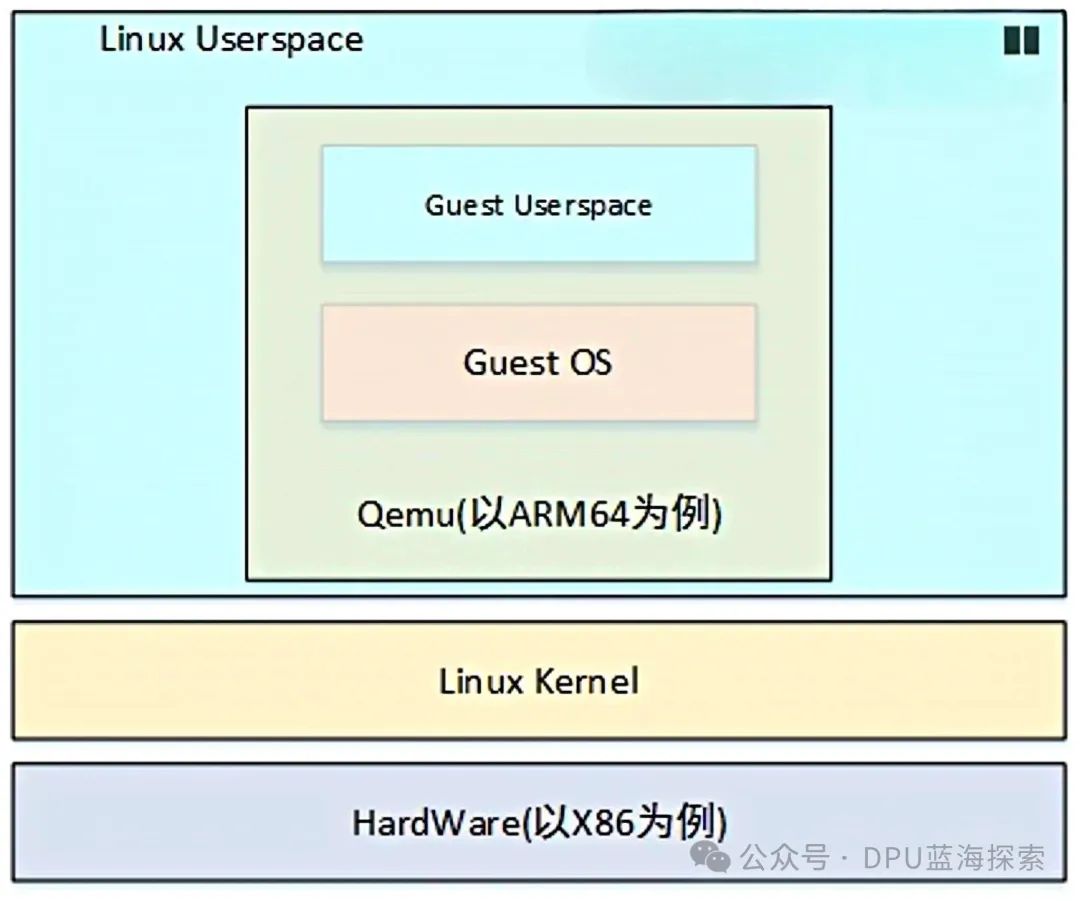
For example, QEMU is a widely used open-source software virtualization tool that can achieve virtualization by simulating the hardware of the virtual machine in environments without hardware virtualization support.
-
Typical application scenario: For example, in an ARM+Linux simulation environment, QEMU can simulate an ARM64 processor on a PC running Ubuntu and run a Guest OS under that architecture. Assuming the Guest OS is also a Linux system, QEMU will enable the Ubuntu system to simulate and run a virtual environment of the ARM64 architecture.
-
In the absence of hardware virtualization support: Under the premise of no hardware virtualization support, the core technology that QEMU uses to achieve virtualization is through binary translation. Specifically, although the Guest OS and its running applications (APP) believe they are running in an ARM64 environment, and the applications are executable files generated for that architecture by a cross-compiler, the differences in instruction sets between different architectures will lead to direct execution being impossible on different architectures. QEMU solves this problem through its translation mechanism, successfully achieving binary code conversion across architectures.
-
The translation process of QEMU: The working principle of QEMU is to first translate the
Guest OS's code instructionsintoTCG (Tiny Code Generator) intermediate code, and then convert this intermediate code into instructions compatible with theHost architecture. Through this series of conversions, QEMU achieves cross-architecture code execution, thus enabling virtualization.
In addition to QEMU, virtualization platforms such as VMware Workstation and VirtualBox also run as Type 2 Hypervisors on host operating systems, typically relying on software emulation to provide virtualization functionality.
4.2 Hardware Virtualization
Compared to the inefficiency of pure software translation of instructions, hardware virtualization significantly enhances performance by utilizing virtualization extensions provided by the processor itself. Hardware virtualization allows client instructions to run independently at the hardware level, thereby improving virtualization efficiency.
-
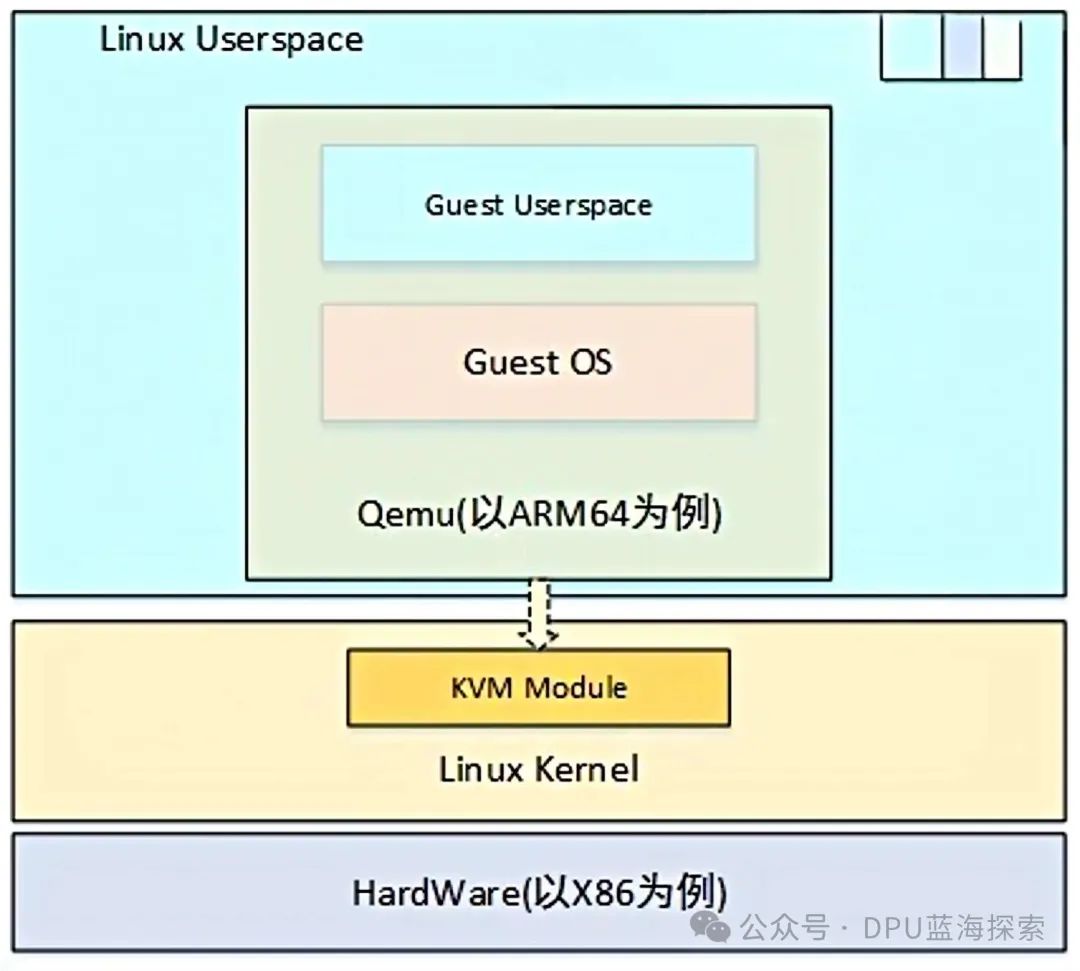
KVM (Kernel-Based Virtual Machine) is a kernel-based virtualization technology that implements virtualization of CPU, memory, and hardware I/O.
-
KVM intercepts I/O requests from virtual machines and hands them over to QEMU for processing. As a module of the Linux kernel, KVM allows Linux to act as a Hypervisor.
-
KVM requires the host processor to support hardware virtualization extensions, such as Intel’s VT-x or AMD’s AMD-V, to fully leverage its virtualization performance.
5. KVM: Kernel-Based Virtual Machine
KVM (Kernel-based Virtual Machine) is a Type 1 Hypervisor (bare-metal virtualization technology) that integrates VMM (Virtual Machine Monitor) with Host OS, running directly on the host hardware, providing complete management of hardware resources (such as CPU and memory) and intercepting hardware I/O virtualization.
The three typical features of KVM are:
- Depends on CPU hardware virtualization extensions: such as Intel VT-x or AMD-V.
- Integration of VMM and Host OS: tightly combining the virtual machine monitor with the operating system to enhance efficiency.
- High running efficiency: By fully leveraging hardware virtualization capabilities, most virtual machine instructions can be executed directly by the host hardware, reducing virtualization overhead.
5.1 The Core Structure of KVM
KVM is essentially a Linux Kernel Module, usually named kvm.ko (for Intel processors, it is kvm-intel.ko, and for AMD processors, it is kvm-amd.ko). It extends the operating system capabilities of the Linux kernel (such as memory management, process management, hardware device management), providing the following three key virtualization capabilities:
- Resource Control: VMM must effectively manage all resources of the system.
- Equivalence: Under VMM management, the Host OS and Guest OS should maintain consistent behavior, except for CPU timing and the availability of hardware resources.
- Efficiency: Most virtual machine instructions should be executed directly by the host hardware, avoiding excessive reliance on VMM and binary translation.
5.2 KVM Feature List
Since its first integration into the Linux Kernel version 2.6.20 in 2007, KVM has developed a rich set of features, including but not limited to:
- Support for SMP (Symmetric Multi-Processing) and NUMA (Non-Uniform Memory Access) multi-core processor architectures.
- Support for CPU affinity and CPU, Memory overcommit.
- Support for VirtIO devices and drivers to optimize I/O performance.
- Support for PCI device pass-through and SR-IOV (Single Root I/O Virtualization).
- Support for hot-plugging of CPU, disks, NICs, and other devices.
- Support for Live Migration, allowing virtual machines to migrate without interrupting services.
- Support for KSM (Kernel Same-page Merging) to reduce redundant memory usage in virtual machines.
5.3 KVM Startup Process
When starting the Linux operating system and loading the kvm.ko module, KVM performs the following initialization operations:
- Initialize the data structures of
kvm.ko. - Detect the host CPU architecture, read the virtualization mode switch of the CR4 register, and execute the Intel VT-x VMXON instruction to set the virtual machine monitor to Root Mode.
- Create the device interface file /dev/kvm, exposing it for user-space applications (such as QEMU) to use.
6. Conclusion
This is roughly where we will stop discussing virtualization.
This article has become quite long. We will talk about the KVM-QEMU framework next time.