Exploring a Low-Cost Network Optimization Tool: NEO3 and R2S Bypass Router Configuration Guide Based on OpenWrt
Overview
When it comes to selecting network devices, professional hardware routers often come with a hefty price tag. However, soft routers and bypass routers based on the OpenWrt system have gradually become popular choices for network enthusiasts due to their lower cost, excellent operability, and flexibility. This article will focus on the configuration methods for bypass routers based on NEO3 and R2S, guiding you on a journey to explore efficient networks at a low cost.
In-Depth Analysis of Bypass Router Principles
A bypass router does not replace the main router but cleverly takes over some key functions of the main router. In this way, it can provide downstream devices with services such as DHCP, dynamically assigning IP addresses to ensure devices can quickly connect to the network. Additionally, it can offer network proxy services, providing more strategies and optimization options for devices accessing the external network. This model greatly enriches the network application scenarios, meeting different users’ needs for customized network functions. From a theoretical perspective, a bypass router acts as a capable assistant to the main router, injecting more vitality and possibilities into the entire network ecosystem without affecting the core functions of the main router.
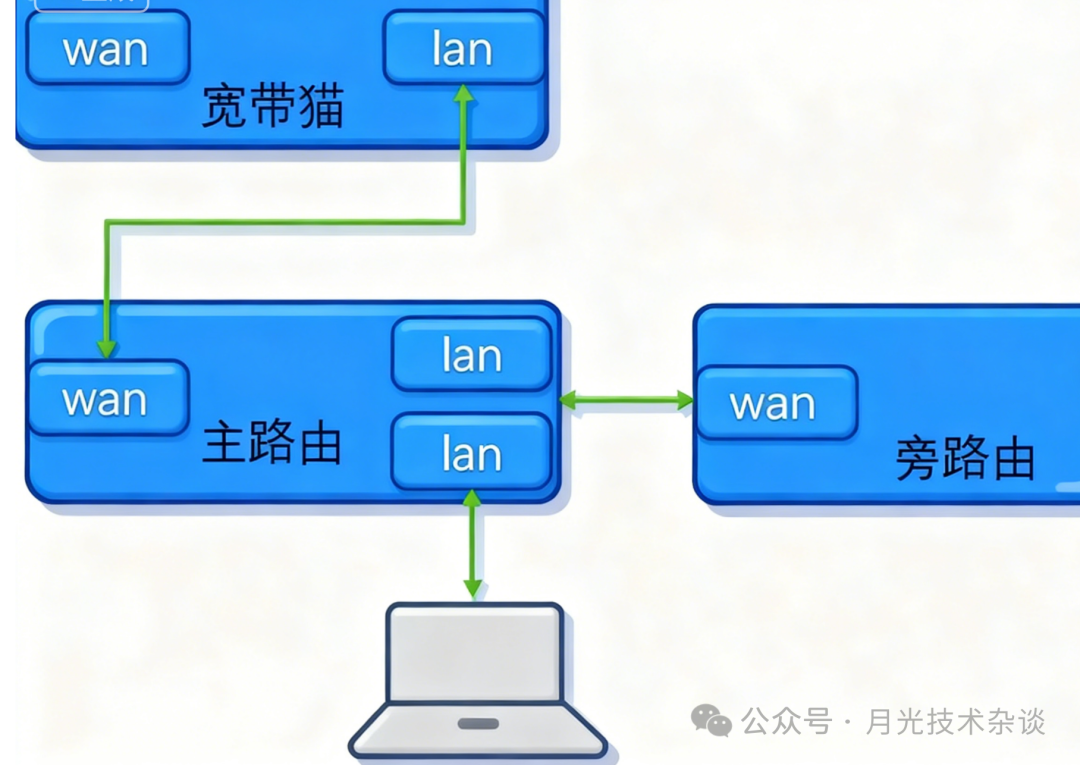
Complete Configuration Process for NEO3 Bypass Router
Main Router Adjustment
In this configuration, a Huawei router is selected as the main router. First, we need to disable its DHCP function. The purpose of this step is to transfer the control of IP address allocation to the bypass router, avoiding address allocation conflicts. At the same time, record the LAN port IP of the main router as 192.168.3.1, which will serve as the basis for subsequent configurations.
NEO3 Device Configuration
- 1. DHCP and IP Settings: Enable the DHCP function on the NEO3 to ensure it can assign IP addresses to downstream devices. Set the NEO3’s LAN address to be in the same subnet as the main router, specifically 192.168.3.9, and set the gateway to 192.168.3.1. This way, the NEO3 can integrate into the existing network architecture while taking on the responsibility of providing network services to downstream devices.
- 2. Key Points for DNS Configuration: It is particularly important to note that DNS configuration on the NEO3 is crucial. Without proper DNS configuration, devices will be unable to access the external network. DNS acts as a navigator in the network world, responsible for converting the URLs we input into IP addresses that computers can recognize, thus enabling network access. Therefore, it is essential to correctly configure the DNS server address according to the actual network environment.
R2S Configuration Reference
For the R2S device, the bypass router configuration is essentially the same as that of the NEO3. Simply use one of its network ports as the LAN port and follow the configuration steps outlined for the NEO3 to complete the R2S bypass router configuration. This similarity allows network enthusiasts to quickly get started with bypass router setups on different devices, reducing the learning curve.
Downstream Device Access Settings
When downstream devices connect to the network, set their network settings to automatically obtain an IP address. This way, the bypass router will automatically assign IP addresses to these devices, and the gateway will also be configured to the LAN port address of the bypass router. This process enables quick and automatic access for network devices without requiring users to manually perform complex IP address and gateway settings, greatly enhancing the user experience.
Conclusion: The Value and Application Expansion of Bypass Routers
By configuring bypass routers based on NEO3 and R2S, the data traffic of downstream devices will pass through the bypass router. This feature grants us the ability to perform rich network operations on the bypass router, such as traffic control, reasonably allocating network bandwidth according to the needs of different devices and applications to ensure smooth operation of critical applications; and proxy settings, which can enable scientific internet access and access to resources in specific regions. The emergence of bypass routers not only provides us with a low-cost network optimization solution but also offers an excellent platform for learning and practicing network technology. I hope this article helps everyone successfully set up a bypass router and embark on a new chapter of efficient and flexible network life.
Related Tags: #Openwrt #SoftRouter #BypassRouter #NEO3 #R2S #NetworkConfiguration