Click the blue text above to follow us.

By configuring NAT and policy routing functions, campus network users can access the Internet in different ways.
Networking Requirements
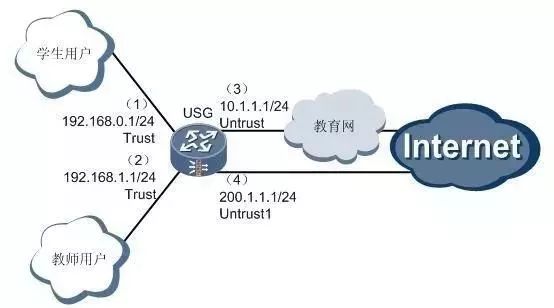
Student users at a certain school can access the Internet through the education network, while teacher users can access the Internet directly. The IP address allocated to the school by the education network is 10.1.1.1, and the IP address applied for by the school from the operator is 200.1.1.1.
Configuration Ideas
1. Deploy student users and teacher users in the Trust zone, add the interface connecting to the education network to the Untrust zone, and add the interface directly connected to the Internet to the Untrust1 zone.
2. To enable school users to access the Internet, the private IP addresses of the campus network need to be converted to public IP addresses through NAT configuration. Specifically, configure NAT outbound between the Trust and Untrust domains, and between the Trust and Untrust1 domains, using the IP address of the outbound interface as the NAT address pool address.
3. To allow different users to access the Internet through different interfaces, policy routing needs to be configured. Packets from student users (192.168.0.0/24 segment) should be forwarded through the E1 3/0/0 interface to the education network, while packets from teacher users (192.168.1.0/24 segment) should be forwarded directly to the Internet through the GigabitEthernet 0/0/3 interface.
Operation Steps
1. Configure the IP addresses of each interface on the USG, add the interfaces to the corresponding security zones, and configure inter-zone packet filtering rules.
Configure the IP address of the GigabitEthernet 0/0/1 interface
<USG> system-view[USG] interface GigabitEthernet 0/0/1[USG-GigabitEthernet0/0/1] ip address 192.168.0.1 24[USG-GigabitEthernet0/0/1] quit
Configure the IP address of the GigabitEthernet 0/0/2 interface
[USG] interface GigabitEthernet 0/0/2[USG-GigabitEthernet0/0/2] ip address 192.168.1.1 24[USG-GigabitEthernet0/0/2] quit
Configure the IP address of the GigabitEthernet 0/0/3 interface
[USG] interface GigabitEthernet 0/0/3[USG-GigabitEthernet0/0/3] ip address 200.1.1.1 24[USG-GigabitEthernet0/0/3] quit
Bundle the E1/CE1 interface E1 3/0/0 into a serial interface Serial 3/0/0:0, and configure the IP address of the Serial 3/0/0:0 interface
[USG] controller E1 3/0/0[USG-E1 3/0/0] channel-set 0 timeslot-list 1-10[USG-E1 3/0/0] quit[USG] interface Serial 3/0/0:0[USG-Serial3/0/0:0] ip address 10.1.1.1 24[USG-Serial3/0/0:0] quit
Add the interfaces connecting to the internal network to the Trust security zone, the interface connecting to the education network to the Untrust security zone, and the interface directly connected to the Internet to the Untrust1 security zone.
[USG] firewall zone trust[USG-zone-trust] add interface GigabitEthernet 0/0/1[USG-zone-trust] add interface GigabitEthernet 0/0/2[USG-zone-trust] quit[USG] firewall zone untrust[USG-zone-untrust] add interface Serial 3/0/0:0[USG-zone-untrust] quit[USG] firewall zone name untrust1[USG-zone-untrust1] set priority 10[USG-zone-untrust1] add interface GigabitEthernet 0/0/3[USG-zone-untrust1] quit
Enable inter-zone packet filtering to ensure smooth operation of various services.
[USG] firewall packet-filter default permit all
2. Configure NAT functionality to convert the private IP addresses of the campus network to public IP addresses.
Create a global NAT address pool 0
[USG] nat address-group 0 10.1.1.1 10.1.1.1
Configure NAT functionality between Trust and Untrust domains to convert the private IP addresses of internal users to the public IP address provided by the education network, 10.1.1.1.
[USG] nat-policy interzone trust untrust outbound[USG-nat-policy-interzone-trust-untrust-outbound] policy 1[USG-nat-policy-interzone-trust-untrust-outbound-1] policy source 192.168.0.0 0.0.255.255[USG-nat-policy-interzone-trust-untrust-outbound-1] action source-nat[USG-nat-policy-interzone-trust-untrust-outbound-1] address-group 0[USG-nat-policy-interzone-trust-untrust-outbound-1] quit[USG-nat-policy-interzone-trust-untrust-outbound] quit
Create a global NAT address pool 1
[USG] nat address-group 1 200.1.1.1 200.1.1.1
Configure NAT functionality between Trust and Untrust1 domains to convert the private IP addresses of internal users to the public IP address provided by the operator, 200.1.1.1.
[USG] nat-policy interzone trust untrust1 outbound[USG-nat-policy-interzone-trust-untrust1-outbound] policy 1[USG-nat-policy-interzone-trust-untrust1-outbound-1] policy source 192.168.0.0 0.0.255.255[USG-nat-policy-interzone-trust-untrust1-outbound-1] action source-nat[USG-nat-policy-interzone-trust-untrust1-outbound-1] address-group 1[USG-nat-policy-interzone-trust-untrust1-outbound-1] quit[USG-nat-policy-interzone-trust-untrust1-outbound] quit
3. Configure policy routing functionality to forward packets from different users through different interfaces.
Define ACL2001 to match packets with source address 192.168.0.0/24, and ACL2002 to match packets with source address 192.168.1.0/24.
[USG] acl number 2001[USG-acl-basic-2001] rule permit source 192.168.0.0 0.0.0.255[USG-acl-basic-2001] quit[USG] acl number 2002[USG-acl-basic-2002] rule permit source 192.168.1.0 0.0.0.255[USG-acl-basic-2002] quit
Define the 5th node of policy routing abc to forward packets with source address 192.168.0.0/24 from the Serial 3/0/0:0 interface.
[USG] policy-based-route abc permit node 5[USG-policy-based-route-abc-5] if-match acl 2001[USG-policy-based-route-abc-5] apply output-interface Serial 3/0/0:0[USG-policy-based-route-abc-5] quit
Define the 10th node of policy routing abc to forward packets with source address 192.168.1.0/24 from the GigabitEthernet 0/0/3 interface.
[USG] policy-based-route abc permit node 10[USG-policy-based-route-abc-10] if-match acl 2002[USG-policy-based-route-abc-10] apply ip-address next-hop 200.1.1.2[USG-policy-based-route-abc-10] quit
Apply the defined policy abc on the GigabitEthernet 0/0/1 interface to process packets received on this interface.
[USG] interface GigabitEthernet 0/0/1[USG-GigabitEthernet0/0/1] ip policy-based-route abc[USG-GigabitEthernet0/0/1] quit
Apply the defined policy abc on the GigabitEthernet 0/0/2 interface to process packets received on this interface.
[USG] interface GigabitEthernet 0/0/2[USG-GigabitEthernet0/0/2] ip policy-based-route abc[USG-GigabitEthernet0/0/2] quit

Scan to follow us