In Linux systems, we often need to create scripts, upload them to production servers, deploy the scripts, grant permissions, and then create jobs. If the company has deployed Ansible automation tools, batch deployment can be handled. If there are no automation tools like Ansible, we can package/install/deploy scripts through scripts to avoid manual handling on each server. Below is a simple introduction through an example.
Packaging Script
Upload the scripts mysql_log_maint_monitor/install.sh and package.sh along with the configuration file db_monitor.json to the specified directory. Use the script package.sh for packaging.
The script package.sh is as follows:
#!/bin/bash

#########################################################################################
#                                                                                       #
# This script is a packaging script that generates a distributable installation package.  #
#                                                                                       #
#########################################################################################
#                                                                                       #
# ScriptName            :    package.sh                                                 #
# Author                :    潇湘隐者                                                      #
# CreateDate            :    2026-08-15                                                 #
# Email                 :    [email protected]                                       #
#***************************************************************************************#
# Parameter Configuration                                                                  #
#---------------------------------------------------------------------------------------#
# Note: This script can be used as a general packaging script, just modify the variables below. #
#---------------------------------------------------------------------------------------#
# PACKAGE_NAME    Package file name                                                      #
# VERSION         Script version                                                          #
# SCRIPT_NAME     Script name                                                              #
# INSTALL_SCRIPT  Installation script name (install.sh)                                  #
# Version        Modified Date            Description                                     #
#***************************************************************************************#
# V.1.0          2025-08-15              Created this script                             #
#########################################################################################

# Define package name and version
PACKAGE_NAME="mysql_log_maint_monitor"
VERSION="2.1"
OUTPUT_FILE="${PACKAGE_NAME}-${VERSION}.tar.gz"
SCRIPT_NAME="mysql_log_maint_monitor"
CONF_FILE="db_monitor.json"
INS_SCRIPT_NAME="install.sh"
readonly SUCCESS=0
readonly FAILURE=1


# Check if necessary files exist (can be customized/rewritten)
if [ ! -f ${SCRIPT_NAME} ] || [ ! -f ${INS_SCRIPT_NAME} ]  || [ ! -f ${CONF_FILE} ] ; then
    echo "warning: Missing necessary files, please ensure ${SCRIPT_NAME}, ${INS_SCRIPT_NAME}, ${CONF_FILE} exist!"
    exit $FAILURE
fi

# Create temporary directory
TMP_DIR=$(mktemp -d)
mkdir -p $TMP_DIR/$PACKAGE_NAME

# Copy files to temporary directory
cp ${SCRIPT_NAME} $TMP_DIR/$PACKAGE_NAME/
cp ${INS_SCRIPT_NAME} $TMP_DIR/$PACKAGE_NAME/
cp ${CONF_FILE} $TMP_DIR/$PACKAGE_NAME/

# Package
echo "Creating installation package: $OUTPUT_FILE"
if tar -czf $OUTPUT_FILE -C $TMP_DIR $PACKAGE_NAME ;
then
    echo "Installation package created successfully: $OUTPUT_FILE"
else
    echo "Installation package creation failed, please check and confirm"
fi

# Clean up temporary files
rm -rf $TMP_DIR

# Display results
if [ -f "$OUTPUT_FILE" ]; then
    echo "File size: $(du -h $OUTPUT_FILE | awk '{print $1}')"
else
    echo "Installation package creation failed"
    exit $FAILURE
fi
Check the variables in the script <strong>package.sh</strong> for correctness (pre-process, generally there should be no issues), execute the script <strong>package.sh</strong> to package the file, as shown below:

```bash
$ sh package.sh
Creating installation package: mysql_log_maint_monitor-2.1.tar.gz
Installation package created successfully: mysql_log_maint_monitor-2.1.tar.gz
File size: 40K
```
Automatic Deployment Script
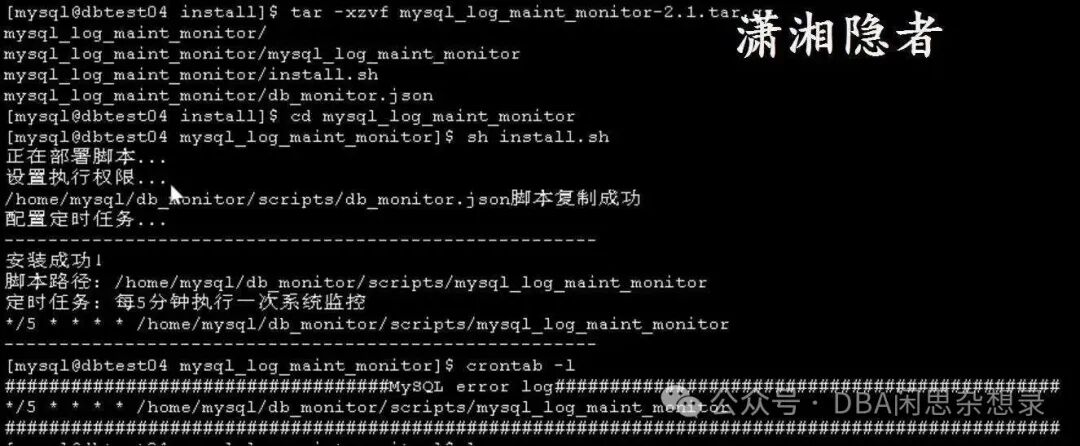
After uploading the file mysql_log_maint_monitor-2.1.tar.gz, follow the steps below to copy the scripts and configuration files to the specified directory, grant relevant permissions, and then configure the crontab job. The details are as follows:
[mysql@dbtest04 install]$ pwd
/data/install
[mysql@dbtest04 install]$ ls
mysql_log_maint_monitor-2.1.tar.gz
[mysql@dbtest04 install]$ pwd
/data/install
[mysql@dbtest04 install]$ tar -xzvf mysql_log_maint_monitor-2.1.tar.gz
mysql_log_maint_monitor/
mysql_log_maint_monitor/mysql_log_maint_monitor
mysql_log_maint_monitor/install.sh
mysql_log_maint_monitor/db_monitor.json
[mysql@dbtest04 install]$ cd mysql_log_maint_monitor
[mysql@dbtest04 mysql_log_maint_monitor]$ sh install.sh
Deploying script...
Setting execution permissions...
/home/mysql/db_monitor/scripts/db_monitor.json script copied successfully
Configuring scheduled tasks...
------------------------------------------------------
Installation successful!
Script path: /home/mysql/db_monitor/scripts/mysql_log_maint_monitor
Scheduled task: Execute system monitoring every 5 minutes
*/5 * * * * /home/mysql/db_monitor/scripts/mysql_log_maint_monitor
------------------------------------------------------
[mysql@dbtest04 mysql_log_maint_monitor]$ crontab -l
###################################MySQL error log##############################################
*/5 * * * * /home/mysql/db_monitor/scripts/mysql_log_maint_monitor
################################################################################################
[mysql@dbtest04 mysql_log_maint_monitor]$
The definition of the script install.sh is as follows:
#!/bin/bash

readonly SUCCESS=0
readonly FAILURE=1


# Define variables
DEST_DIR="/home/mysql/db_monitor/scripts"
LOG_DIR="/home/mysql/db_monitor/logs"
# This parameter is assigned the incoming variable.
SRC_SCRIPT_FILE="mysql_log_maint_monitor"
SRC_CONF_FILE="db_monitor.json"
DST_SCRIPT_FILE="${DEST_DIR}/${SRC_SCRIPT_FILE}"
DST_CONF_FILE="${DEST_DIR}/${SRC_CONF_FILE}"

# Check if the script is run by the mysql user
if [ "$(whoami)" != "mysql" ]; then
    echo "Error: Please run the installer as the mysql user (sh install.sh xxx)"
    exit $FAILURE
fi

CURR_PATH=$(cd $(dirname $0) && pwd)

if [ ! -f "${CURR_PATH}/${SRC_SCRIPT_FILE}" ];
then
    echo "File ${CURR_PATH}/${SRC_SCRIPT_FILE} does not exist, please check and confirm"
    exit $FAILURE
fi

if [ ! -f "${CURR_PATH}/${SRC_CONF_FILE}" ];
then
    echo "File ${CURR_PATH}/${SRC_CONF_FILE} does not exist, please check and confirm"
    exit $FAILURE
fi


# Create deployment installation directory (if it does not exist)
if [ ! -d ${DEST_DIR} ]; then
    if mkdir -p ${DEST_DIR} ; then
       echo "Directory ${DEST_DIR} created successfully"
    else
       echo "Error: Directory ${DEST_DIR} creation failed"
       exit $FAILURE
    fi
fi

if [ ! -d ${LOG_DIR} ]; then
    if mkdir -p ${LOG_DIR} ;
    then
        echo "Directory ${LOG_DIR} created successfully"
    else
        echo "Error: Directory ${LOG_DIR} creation failed"
        exit $FAILURE
    fi
fi

# Copy scripts to the target directory
echo "Deploying script..."


# Check if the copy was successful
if cp $SRC_SCRIPT_FILE $DST_SCRIPT_FILE ;
then
    # Grant execution permissions
    echo "Setting execution permissions..."
    chmod +x $DST_SCRIPT_FILE
else
    echo "Error: Script copy failed"
    exit $FAILURE
fi

if cp "$SRC_CONF_FILE" "$DST_CONF_FILE" ;
then
    echo "${DST_CONF_FILE} script copied successfully"
else
    echo "Error: Script copy failed"
    exit $FAILURE
fi


# Configure scheduled tasks
echo "Configuring scheduled tasks..."
(crontab -l 2>/dev/null | grep -v -F "$DST_SCRIPT_FILE"; \
echo "###################################MySQL error log##############################################"; \
echo "*/5 * * * * $DST_SCRIPT_FILE" ;\
echo "################################################################################################" \
) | crontab -

# Verify installation
if [ -f "$DST_SCRIPT_FILE" ] && [ -x "$DST_SCRIPT_FILE" ]; then
    echo "------------------------------------------------------"
    echo "Installation successful!"
    echo "Script path: $DST_SCRIPT_FILE"
    echo "Scheduled task: Execute system monitoring every 5 minutes"
    crontab -l | grep "$DST_SCRIPT_FILE"
    echo "------------------------------------------------------"

else
    echo "Installation deployment failed, please check error messages"
    exit $FAILURE
fi
Notes:
- If this script is executed repeatedly, there is a small bug, as shown below, an extra line of comments is added to the job, and a good solution has not yet been thought of. Avoiding comments can circumvent this issue, but I do not want to operate this way.
[mysql@dbtest04 mysql_log_maint_monitor]$ sh install.sh
Deploying script...
Setting execution permissions...
/home/mysql/db_monitor/scripts/db_monitor.json script copied successfully
Configuring scheduled tasks...
------------------------------------------------------
Installation successful!
Script path: /home/mysql/db_monitor/scripts/mysql_log_maint_monitor
Scheduled task: Execute system monitoring every 5 minutes
*/5 * * * * /home/mysql/db_monitor/scripts/mysql_log_maint_monitor
------------------------------------------------------
[mysql@dbtest04 mysql_log_maint_monitor]$ crontab -l
###################################MySQL error log##############################################
################################################################################################
###################################MySQL error log##############################################
*/5 * * * * /home/mysql/db_monitor/scripts/mysql_log_maint_monitor
################################################################################################
When saving from WeChat public account, some spaces in the code may be deleted (the specific reason is currently unclear), and you will see that there are no spaces between some words in the code, which cannot be corrected one by one. For the complete code, please refer to the original text or obtain it from Baidu Netdisk:
Link: https://pan.baidu.com/s/1L7LKQFT0CmCaEIqFgAbBtA
Extraction code: 9q3b