Authentication is an essential part of building web applications or web servers. Below is a brief introduction to various common methods of HTTP Authentication.
Overview
•Basic: RFC 2617 (1999) → RFC 7617 (2015)•Digest: RFC 2069 (1997) → RFC 2617 (1999) → RFC 7617 (2015)•OAuth 1.0 (Twitter, 2007)•OAuth 2.0 (2012)
•Bearer (OAuth 2.0): RFC 6750 (2012)
•JSON Web Tokens (JWT): RFC 7519 (2015)
Reference: MDN – HTTP Authentication.
Industry Standards
The W3C defined the authentication methods for the HTTP architecture in RFC 1945: HTTP/1.0 (1996).
Server – Authentication Challenge
If the client sends an unauthenticated request, the server will return:
HTTP 401 UnauthorizedWWW-Authenticate: <type> realm="xxx" ...For example:
WWW-Authenticate: Basic realm="User-visible scope"Client – Authentication
The client will add the following information in the request header for authentication:
Authorization: <type> <credentials>•<span>type</span>: Authentication method, such as Basic, Digest, etc.•<span>credentials</span>: Credential information corresponding to type
For example:
Authorization: Basic YWxpY2U6c3VwZXJtYW4=I. Basic Authentication
Uses a username and password as the authentication credential, for example:
•Username: alice, Password: superman•Concatenated as:<span>alice:superman</span>•Base64 encoded:<span>YWxpY2U6c3VwZXJtYW4=</span>•HTTP request header:
Authorization: Basic YWxpY2U6c3VwZXJtYW4=As the name suggests, “Basic Authentication” is the simplest and quickest authentication method, allowing users to authenticate without going through a login page.
Existing Issues
•The server can only verify the username and password, and cannot control the validity period of the login state (such as session timeout), relying solely on the browser’s cookie expiration mechanism.•Attackers can decode the request header to directly obtain the plaintext username and password.•There is a risk of replay attacks.
Therefore, more complex solutions emerged later: Digest Authentication.
II. Digest Authentication
Below is the key generation method in Digest Authentication:
HA1 = MD5(username:realm:password)HA2 = MD5(request_method:request_URI)response = MD5(HA1:nonce:HA2)Actual Usage Process
The server returns a<span>401 Unauthorized</span> response:
HTTP/1.0 401 UnauthorizedWWW-Authenticate: Digest realm="[email protected]", qop="auth,auth-int", nonce="dcd98b7102dd2f0e8b11d0f600bfb0c093", opaque="5ccc069c403ebaf9f0171e9517f40e41"Then the user calculates the response value of the digest and sends it to the server:
Authorization: Digest username="Mufasa", realm="[email protected]", nonce="dcd98b7102dd2f0e8b11d0f600bfb0c093", uri="/dir/index.html", qop=auth, nc=00000001, cnonce="0a4f113b", response="6629fae49393a05397450978507c4ef1", opaque="5ccc069c403ebaf9f0171e9517f40e41"Reference: Wikipedia – Digest Authentication
Advantages
•Can include URI and other information to achieve file-level access control.•Introduces a nonce, effectively preventing plaintext attacks and replay attacks.
Existing Issues
•Requires obtaining a nonce from the server first, thus needing an additional request.•The server still cannot actively control the user’s session state (such as forced logout).
III. OAuth 1.0
Basic and Digest Authentication directly use the user’s account password as credentials for authentication. However, with the popularity of platforms like Google, Facebook, and Twitter, websites want:
•To facilitate user login to their websites using these major platforms (i.e., “third-party login”)•To perform certain operations on these platforms on behalf of the user (such as posting updates)
Thus, the OAuth architecture was born. The core difference between OAuth and Basic and Digest is:separating the user credentials (such as username and password) used for authentication from the access token used to perform operations. This design concept makes applications like “Login with Facebook” possible and secure.
Authentication Process
The OAuth process involves three parties:
•User•Client
•Typically the website or app you want to use
•Service Provider
•Such as platforms like Facebook, Twitter, etc.
OAuth uses the so-called “three-legged OAuth” and is divided into three stages. Below is an example using Twitter:
1.Preparation
•The website has registered as a client with Twitter.
2.Obtain Temporary Credentials
•The website requests an unauthenticated request token from Twitter.
3.User Authorization
•Redirect the user to Twitter’s login page.•The user logs in and authorizes the request token.•After authorization, the user is redirected back to the original website.
4.Exchange for Access Token
•The website sends the request token to Twitter.•Successfully exchanges for a long-term valid access token.
Flowchart Reference: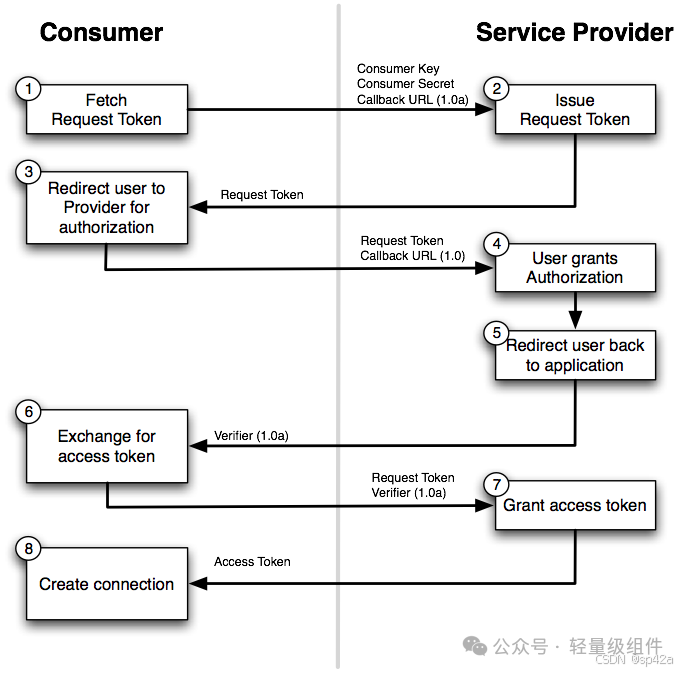
•Implement Login with Twitter•Twitter API Authentication – OAuth 1.0•What is OAuth and How It Works
IV. OAuth 2.0
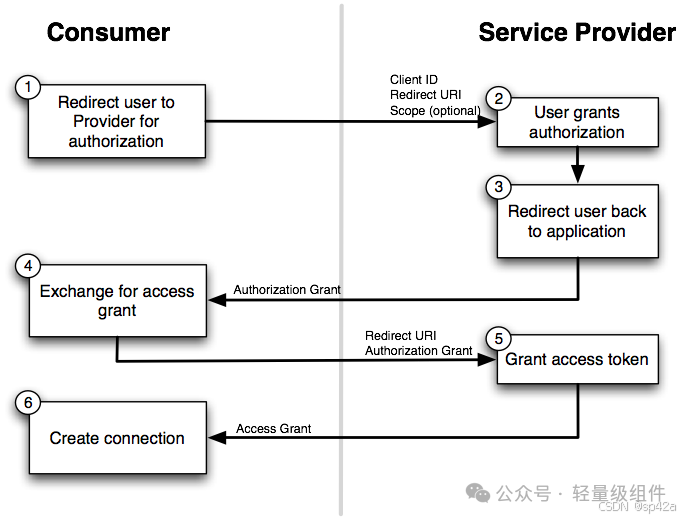
OAuth 2.0 simplifies and optimizes the process based on 1.0, and better supports the development of mobile applications and single-page applications (SPA).
Authentication Process
The “three-legged authorization” is simplified to “two-legged authorization”, and the client no longer needs to obtain a request token in advance.
Flowchart Reference:
Bearer Token
OAuth 2.0 uses Bearer Token as the access token after authentication, greatly simplifying the structure of the request header.
OAuth 1.0 Example:
Authorization: OAuth oauth_consumer_key="cChZNFj6T5R0TigYB9yd1w", oauth_nonce="a9900fe68e2573b27a37f10fbad6a755", oauth_signature="39cipBtIOHEEnybAR4sATQTpl2I%3D", oauth_signature_method="HMAC-SHA1", oauth_timestamp="1318467427", oauth_token="NPcudxy0yU5T3tBzho7iCotZ3cnetKwcTIRlX0iwRl0", oauth_version="1.0"Isn’t it complicated?
OAuth 2.0 Example:
Authorization: Bearer cn389ncoiwuencrSimple and clear, easy to understand. Unlike Basic and Digest, Bearer Token does not specify a specific generation algorithm, as long as the server can verify it.
Reference: Introduction to OAuth 2.0
V. JSON Web Tokens (JWT)
Basic and Digest Authentication tokens consist of username, password, and other information, while JWT operates similarly but has the following key differences:
•JWT can carry more (arbitrary) user information (claims).•Uses hashing and digital signatures for verification.•Includes a server secret, with the server issuing the token, making it impossible for the client to forge.
Token Composition
JWT consists of three parts, connected by <span>.</span>:
1.Header: Describes the metadata of the JWT (such as signing algorithm).2.Payload: Stores user information (such as user ID, roles, etc.).3.Signature: Signs the first two parts to ensure integrity.
Generation process:
signature_data = base64UrlEncode(header) + "." + base64UrlEncode(payload)signature = HMACSHA256(signature_data, secret)final_token = signature_data + "." + base64UrlEncode(signature)Reference: JWT Official Documentation
Example
Header:
{ "alg": "HS256", "typ": "JWT"}Payload:
{ "sub": "1234567890", "name": "John Doe", "admin": true, "iat": 1516239022}Secret:
KKF2QT4fwpMeJf36POk6yJV_adQssw5cGenerated JWT:
eyJhbGciOiJIUzI1NiIsInR5cCI6IkpXVCJ9.eyJzdWIiOiIxMjM0NTY3ODkwIiwibmFtZSI6IkpvaG4gRG9lIiwiaWF0IjoxNTE2MjM5MDIyfQ.tImCzvIkqaNmGB5mMAG1DZRnZO56sjoYO5nU2YUdRK4Note: Bearer Token does not mandate a specific algorithm, and JWT is a common implementation of Bearer Token, usually prefixed with
<span>Bearer</span>.
Authentication Process
The process is very simple: after the user logs in, the server returns a JWT. For each subsequent request, the client only needs to carry this token in the <span>Authorization</span> header. The server, upon receiving it, simply recalculates the signature with its own secret and verifies it to confirm the token’s validity. This method is very suitable for stateless distributed systems and mobile applications.
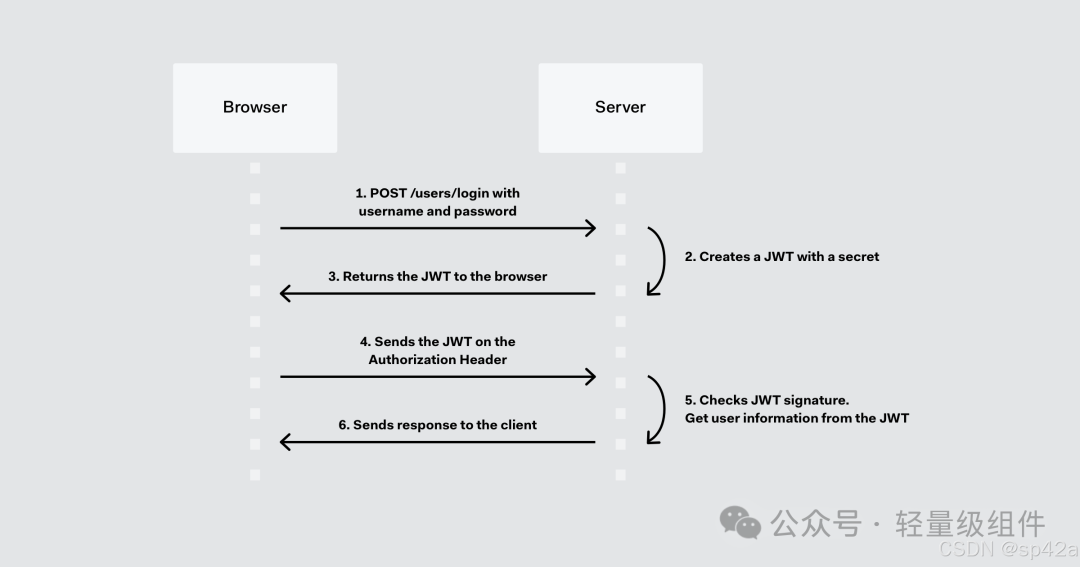
Potential Issue: Replay Attack
JWT itself does not contain a nonce, allowing attackers to intercept and resend the same request, which the server will still consider a legitimate request.
Solutions:
•Use JWT ID (JTI) with a blacklist mechanism (but this undermines the stateless principle).•Add a nonce or timestamp mechanism externally to the JWT.
Recommended Reading: Auth0’s in-depth article on JWT attacks and prevention.
Other Token-Based Authentication Methods
JWT is a type of token-based authentication, and there are many similar schemes, such as TokenAuthentication in Django REST Framework, which follow the basic process: user logs in → server returns access token → subsequent requests carry the token.
Conclusion
This article briefly introduced the following HTTP authentication methods:
•Basic•Digest•OAuth 1.0•OAuth 2.0•JWT
The entire development process can be summarized as:
From relying on browser functionality and RFC standards, gradually evolving into simpler methods that adhere to the principle of “separation of concerns” (one request + one token), better supporting the development of mobile applications and single-page applications (SPA).
References
<span>[1]</span> MDN – HTTP Authentication: https://developer.mozilla.org/en-US/docs/Web/HTTP/Authentication<span>[2]</span> RFC 1945: HTTP/1.0 (1996): https://tools.ietf.org/html/rfc1945<span>[3]</span> Wikipedia – Digest Authentication: https://zh.wikipedia.org/wiki/摘要认证<span>[4]</span> Implement Login with Twitter: https://developer.twitter.com/en/docs/twitter-for-websites/log-in-with-twitter/guides/implementing-sign-in-with-twitter.html<span>[5]</span> Twitter API Authentication – OAuth 1.0: https://developer.twitter.com/en/docs/basics/authentication/guides/authorizing-a-request.html<span>[6]</span> What is OAuth and How It Works: https://oauth.net/1/<span>[7]</span> Introduction to OAuth 2.0: https://www.digitalocean.com/community/tutorials/an-introduction-to-oauth-2<span>[8]</span> JWT Official Documentation: https://jwt.io/<span>[9]</span> Auth0’s in-depth article on JWT attacks and prevention: https://auth0.com/blog/cookie-vs-token-based-authentication/