Introduction
This article discusses the issues encountered when using fetch for HTTP streaming—everything works fine with cURL and Postman, but both the browser and node-fetch fail to stream the response. The problem was ultimately found to be related to response compression: the browser sends Accept-Encoding by default, and the server returns compressed content, which causes streaming to fail. Disabling compression in Cloudflare completely resolved the issue. Today’s article is shared by @Nick Khami and compiled by @Piao Piao.
The translation starts here~~
Problem Description
Recently, we encountered a very tricky HTTP response streaming issue at Mintlify. Our system uses the AI SDK along with Node’s stream API to forward data streams, but suddenly, it stopped working. The symptoms were strange: everything worked fine with cURL and Postman, but it completely failed when using <span>node-fetch</span> and the native <span>fetch</span> in the browser.
【Issue #3063】Best Practices for JavaScript Bundling and Downloading: StreamSaver.js + zip-stream.js for Streaming Downloads
Initial Investigation
We initially suspected it was a compatibility issue with the streams. We guessed it might be related to whether the AI SDK was using Web streams or Node streams, especially concerning HTTP/2 compatibility. This is because there are known issues between Web streams and HTTP/2, while Node streams are compatible.
Note: Differences Between Node Stream and Web Stream
- Node Streams are the native stream API of Node.js, used for handling files, network requests, etc., with good compatibility and high performance.
- Web Streams are the stream interface supported by browsers and some edge environments (like Cloudflare Workers), designed to be more modern.
Although these two are structurally similar, they differ in underlying implementation and standard compatibility, which can easily lead to cross-environment issues, especially in the context of HTTP/2.
Temporary Solution with Cloudflare Worker
During our investigation, we discovered a strange workaround: we set up a Cloudflare Worker as an intermediary layer between the server and the client:
【Issue #3414】New Features to Enhance ServiceWorker Performance
 // A streaming proxy Cloudflare Worker with CORS enabled
 export default {
   async fetch(request, env, ctx) {
     // Handle CORS preflight requests
     // ....

     // Extract request body if not a GET request
     const body = ["GET", "HEAD"].includes(request.method) ? null : request.body;

     // Construct headers to simulate browser requests
     // ....

     // Forward the request to the target address
     const response = await fetch(request.url, {
       method: request.method,
       headers: proxyHeaders,
       body: body,
     });

     // Copy response headers and enable CORS
     const responseHeaders = new Headers(response.headers);
     responseHeaders.set("Access-Control-Allow-Origin", "*");

     // Create a streaming response to handle large data content
     const { readable, writable } = new TransformStream();
     response.body?.pipeTo(writable);

     return new Response(readable, {
       status: response.status,
       statusText: response.statusText,
       headers: responseHeaders,
     });
   },
 };
The purpose of this Worker is simple: to receive the data stream and return it as is. Strangely, this perfectly resolved the issue.
Excluding HTTP Version Issues
We quickly ruled out issues with HTTP/1 and HTTP/2. By using cURL with the <span>--http1.1</span> parameter to explicitly specify the use of the HTTP/1 protocol, the data stream still worked normally. Throughout the investigation, cURL consistently streamed data without issues.
【Issue #3512】A Cool HTTP Feature for Simple Real-Time Updates
Suspecting Modified Response Headers
One detail that caught our attention was that our outbound systems (ALB and Cloudflare) would remove the following response headers:
<span>Transfer-Encoding: chunked</span><span>Connection: keep-alive</span><span>Content-Encoding: none</span>
Since browsers often have compatibility issues with these headers, and while Postman and cURL worked fine, <span>fetch</span> did not, we began to suspect the problem lay here.
Understanding Dynamic Response Mechanisms
During the investigation, I learned more about “dynamic responses” and HTTP streams. We suspected that the outbound proxy was buffering the entire response to generate the <span>Content-Length</span> header, but ultimately ruled this out. Nevertheless, this process helped me better understand what true HTTP streaming is.
Key Breakthrough
After more than three hours of fruitless investigation, only Lucas made progress. He had prior experience with Cloudflare and intuitively thought to try using a Worker, which indeed worked.
We applied a temporary patch and went to lunch. However, upon returning, we encountered a new issue: switching the IP to the Cloudflare Worker triggered our IP-based rate-limiting strategy. After fixing this, we finally wrapped up around eight in the evening.
That night, Lucas had a lightbulb moment. He pondered why cURL worked fine while <span>fetch</span> did not, and then consulted Claude about the differences between the two tools. Claude provided him with a crucial hint: Lucas discovered that cURL does not send the <span>Accept-Encoding</span> header by default, while browsers always do.
“cURL does not accept compressed responses by default unless you explicitly use the
<span>--compressed</span>parameter.”
In other words:
- Browser requests will by default include
<span>Accept-Encoding: gzip, deflate, br</span> - cURL does not include this header unless the
<span>--compressed</span>parameter is added - If the request does not include
<span>Accept-Encoding</span>, the server will not compress the response - fetch and the browser cannot stream decode compressed response bodies, causing
<span>.body.getReader()</span>to fail to read data in chunks.
Bingo! The root cause of the problem was: compression.
【Issue #3559】In-Depth Analysis of await fetch() Performance Issues and Optimization Methods
Final Solution
Lucas entered the Cloudflare console and disabled the compression option, and the problem was immediately resolved. This simple setting fixed the request latency issue that had troubled us for a long time (sometimes even exceeding 10 seconds).
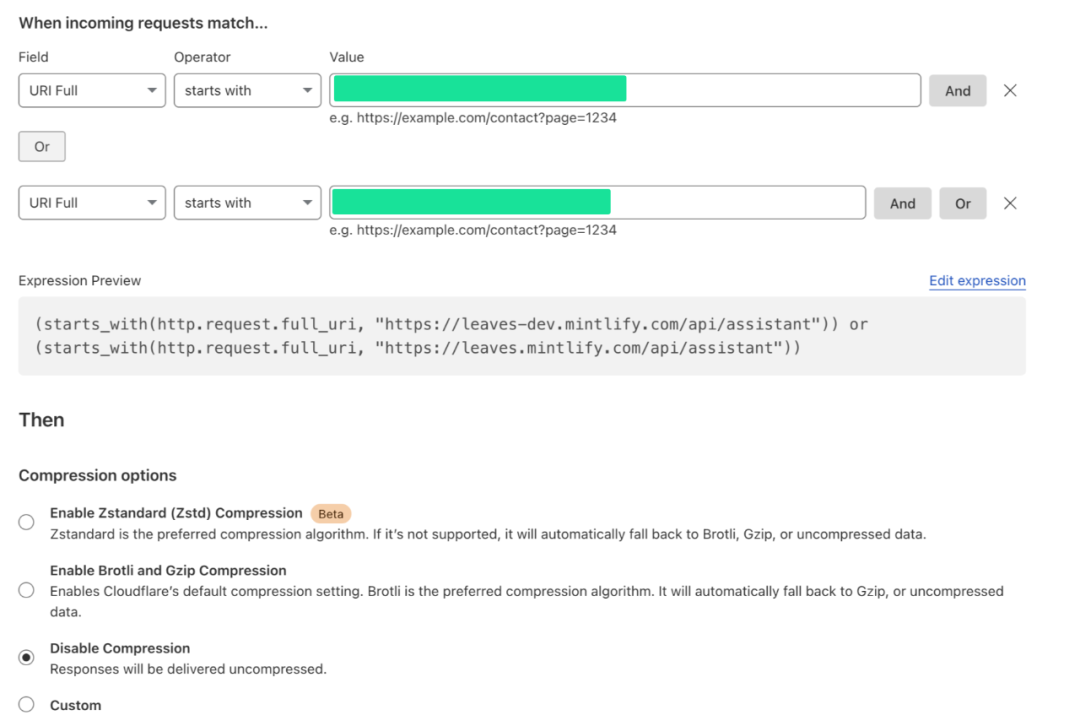
Screenshot of the Cloudflare Console
Awkward Discovery: A Familiar Problem in Disguise
In fact, we had encountered this problem before. At Trieve, we fixed a similar issue in PR #2002 by disabling compression on the chat interface. I didn’t recognize the problem immediately because I referred to it as “magical disguise”: you encounter it before, but in a different context, you fail to recognize it.
In fact, our team member Mayank had also encountered a similar issue on the Trieve client side; he messaged:
“Hey everyone! Did the message API change yesterday? Streaming seems to be having issues, possibly due to this PR?”
At that time, since Trieve was open-source, Mayank could view the recent commits and quickly identified the problem. However, this time at Mintlify, we couldn’t see the change logs, making the investigation process very difficult.
Cloudflare’s “Magic” Turned into a “Nightmare”
The strangest part was that streaming worked fine one day and suddenly failed the next—without us making any changes. The ALB configuration remained unchanged, Cloudflare did not change, and the code was completely the same. Yet, for some reason, Cloudflare quietly enabled compression, and we had no way of knowing why.
This exposed a core issue with Cloudflare’s infrastructure management. Their “smart defaults” and automatic optimizations may help simple projects, but they can be a disaster for production systems that require stable and controllable environments. Critical configuration items like “compression” can be changed without any explicit modifications, making troubleshooting a nightmare.
If we were using Infrastructure as Code to manage this, such issues would be immediately apparent—one Git diff would reveal who, when, and why the settings were changed. However, Cloudflare’s “console configuration” mode makes all changes seem obscured, with no tracking records.
【Issue #3519】Push an Entire Branch Stack with a Single Git Command
This is not just a compression issue, but a larger hidden danger: those seemingly “thoughtful” automated settings actually strip engineering teams of visibility and control. When dealing with production failures, the worst thing is not knowing what the current configuration of the system is.
Experience & Lessons
- Compression can break HTTP streaming—this is something I will remember well
- Differences in behavior between cURL and fetch—cURL does not support compressed responses by default unless you add
<span>--compressed</span> - Cloudflare Worker is a debugging tool—sometimes adding a middleware can help isolate issues
- Source visibility is crucial—being able to see commit records greatly increases troubleshooting efficiency
- Team experience sharing is indispensable—Lucas’s experience with Cloudflare was vital throughout the process
If I participate in any future projects using Cloudflare, the first thing I will do is: disable compression on all interfaces using HTTP streams.
About this articleTranslator: @Piao PiaoAuthor: @Nick KhamiOriginal: https://mintlify.com/blog/debugging-a-mysterious-http-streaming-issue-when-cloudflare-compression-breaks-everything
If this issue of the Frontend Morning Reading Class helped you, please give it a “like,” and we look forward to the next issue, please give it a “look.”