1. Basic Methods: Used in 80% of Scenarios
1. GET – Retrieve Resource
Purpose: Request a specified resource, used only for data retrievalCharacteristics:
-
Parameters are passed via URL (query string)
-
Can be cached, can be bookmarked
-
Has length limitations (varies by browser)
-
Should not modify server data
# Example: Retrieve user information
GET /api/users/123 HTTP/1.1
Host: example.com
2. POST – Create Resource
Purpose: Submit data to a specified resource, usually resulting in a state changeCharacteristics:
-
Data is transmitted via the request body, more secure
-
No length limitations
-
Cannot be cached, cannot be bookmarked
-
Non-idempotent (multiple calls produce different results)
# Example: Create a new user
POST /api/users HTTP/1.1
Host: example.com
Content-Type: application/json
{
  "name": "Zhang San",
  "email": "[email protected]"
}
3. PUT – Update Complete Resource
Purpose: Replace the entire content of a specified resourceCharacteristics:
-
Idempotent (multiple calls have the same effect)
-
Requires complete resource information to be passed
-
Client specifies the resource identifier
# Example: Fully update user information
PUT /api/users/123 HTTP/1.1
Host: example.com
Content-Type: application/json
{
  "name": "Zhang San",
  "email": "[email protected]",
  "age": 30
}
4. DELETE – Delete Resource
Purpose: Delete a specified resourceCharacteristics:
-
Idempotent
-
Returns 200 or 204 status code on success
-
Usually returns 404 when the resource does not exist
# Example: Delete user
DELETE /api/users/123 HTTP/1.1
Host: example.com
2. Advanced Methods: 20% of Special Scenarios
5. PATCH – Partially Update Resource
Purpose: Make partial modifications to a resourceCharacteristics:
-
Non-idempotent (depends on implementation)
-
Only the fields that need to be modified are passed
-
More bandwidth-efficient than PUT
# Example: Only update user email
PATCH /api/users/123 HTTP/1.1
Host: example.com
Content-Type: application/json
{
  "email": "[email protected]"
}
6. HEAD – Retrieve Response Headers
Purpose: Same as GET, but does not return the response bodyCharacteristics:
-
Check if the resource exists
-
Verify if the resource has been modified
-
Saves bandwidth, improves performance
# Example: Check if user exists
HEAD /api/users/123 HTTP/1.1
Host: example.com
7. OPTIONS – Query Supported Methods
Purpose: Query the HTTP methods supported by the serverCharacteristics:
-
Used for CORS preflight requests
-
Returns Allow header listing supported methods
# Example: Query supported operations
OPTIONS /api/users/123 HTTP/1.1
Host: example.com
# Response header includes:
# Allow: GET, POST, PUT, DELETE, OPTIONS
3. Special Purpose Methods: Used in Specific Scenarios
8. TRACE – Echo Request
Purpose: Echo the request received by the server, used for testing or diagnosticsCharacteristics:
-
May pose security risks (XST attacks)
-
Usually disabled in production environments
-
Mainly used for debugging
# Example: Trace request path
TRACE /api/users HTTP/1.1
Host: example.com
9. CONNECT – Establish Tunnel
Purpose: Establish a tunnel with a proxy server for SSL encrypted communicationCharacteristics:
-
Used for HTTPS proxies
-
Establishes a bidirectional connection
-
Proxy server relays encrypted data
# Example: Connect to HTTPS site through proxy
CONNECT example.com:443 HTTP/1.1
Host: example.com
4. Method Comparison and Selection Guide
Safety vs Idempotency
| Method | Safety | Idempotency | Cacheability |
|---|---|---|---|
| GET | Safe | Idempotent | Cacheable |
| POST | Unsafe | Non-idempotent | Non-cacheable |
| PUT | Unsafe | Idempotent | Non-cacheable |
| DELETE | Unsafe | Idempotent | Non-cacheable |
| PATCH | Unsafe | Usually non-idempotent | Non-cacheable |
RESTful API Design Principles
-
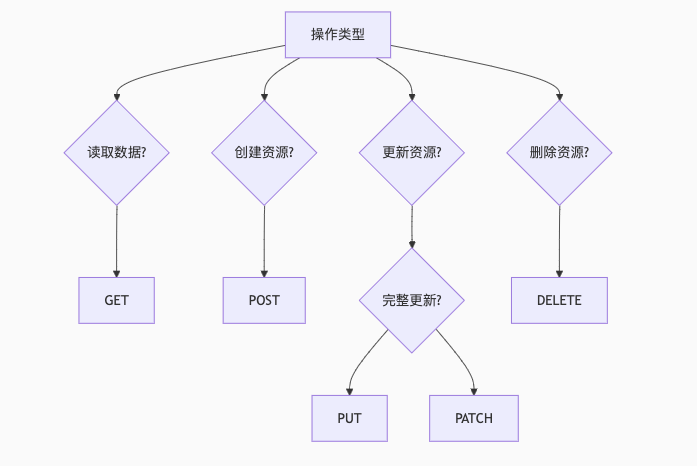
Create Resource → POST
-
Read Resource → GET
-
Complete Update → PUT
-
Partial Update → PATCH
-
Delete Resource → DELETE
-
Query Capabilities → OPTIONS
Common Misconceptions and Corrections
Misconception 1: Using GET to perform update operations
# Incorrect: GET should not have side effects
GET /api/users/delete/123 HTTP/1.1
# Correct: Use DELETE method
DELETE /api/users/123 HTTP/1.1
Misconception 2: Using POST for all operations
# Incorrect: POST misuse
POST /api/users/update/123 HTTP/1.1
# Correct: Use PUT or PATCH
PUT /api/users/123 HTTP/1.1
Misconception 3: Ignoring idempotency design
# Incorrect: Non-idempotent PUT operation
PUT /api/users/123/increment-count HTTP/1.1
# Correct: Use POST or design to be idempotent
POST /api/users/123/increment-count HTTP/1.1
5. Best Practices in Actual Development
1. Method Override
Some older clients (like browser forms) only support GET and POST, can override via Header:
# Form that does not natively support PUT
POST /api/users/123 HTTP/1.1
X-HTTP-Method-Override: PUT
2. Proper Use of 405 Status Code
When the request method is not supported, return 405 Method Not Allowed, and list supported methods in the Allow header:
HTTP/1.1 405 Method Not Allowed
Allow: GET, POST, PUT, DELETE
3. Preflight Request Handling
Correctly handle OPTIONS requests to support CORS:
OPTIONS /api/users HTTP/1.1
Origin: https://example.com
Access-Control-Request-Method: PUT
HTTP/1.1 200 OK
Access-Control-Allow-Methods: GET, POST, PUT, DELETE
Access-Control-Allow-Origin: https://example.com
6. Extended Knowledge: Other Less Common Methods
In addition to the standard nine methods, there are some extended methods:
1. PURGE
Purpose: Clear cache (e.g., Varnish, Nginx cache)
PURGE /api/users/123 HTTP/1.12. LINK / UNLINK
Purpose: Establish or remove relationships between resources (deprecated)
3. QUERY
Purpose: Alternative to GET for complex queries (experimental)


Share

Bookmark

Like

View