Every evening at 18:00, let's grow together!
Source: sf.gg/a/1190000014044351
Introduction
As developers, we often hear terms like <span>HTTP protocol, TCP/IP protocol, UDP protocol, Socket, Socket long connection, Socket connection pool</span>. However, not everyone can clearly understand their relationships, differences, and principles. This article will explain their relationships step by step, starting from the basics of network protocols to Socket connection pools.
Seven-Layer Network Model
Let’s start with the layered model of network communication: the seven-layer model, also known as the <span>OSI (Open System Interconnection)</span> model. From bottom to top, it consists of: Physical Layer, Data Link Layer, Network Layer, Transport Layer, Session Layer, Presentation Layer, and Application Layer. All communication-related aspects are based on this model. The following image introduces some protocols and hardware corresponding to each layer.
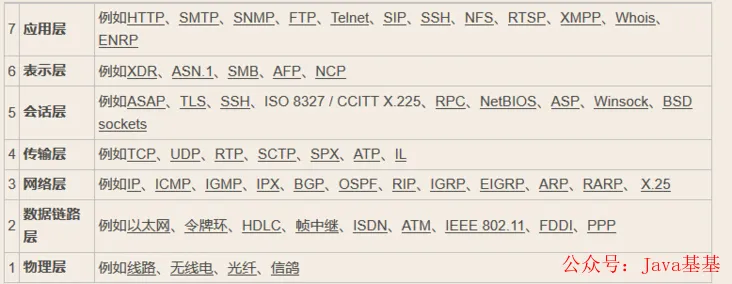
From the above image, we know that the IP protocol corresponds to the Network Layer, the TCP and UDP protocols correspond to the Transport Layer, while the HTTP protocol corresponds to the Application Layer. The OSI model does not include Socket; so what is a Socket? We will introduce it in detail with code later.
TCP and UDP Connections
Regarding the Transport Layer, we may encounter TCP and UDP protocols more frequently. Some say TCP is secure while UDP is not, and that UDP transmission is faster than TCP. Why is that? Let’s first analyze the process of establishing a TCP connection, then explain the differences between UDP and TCP.
TCP’s Three-Way Handshake and Four-Way Teardown
We know that establishing a TCP connection requires three-way handshake, while disconnecting requires a four-way teardown. What do the three-way handshake and four-way teardown do, and how are they performed?
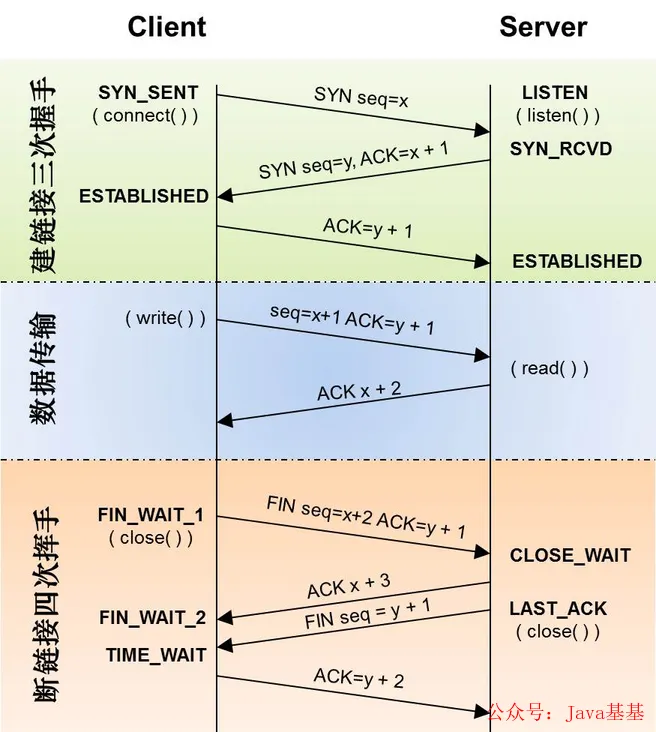
First Handshake: Establishing a connection. The client sends a connection request segment, setting SYN to 1 and Sequence Number to x; then, the client enters <span>SYN_SEND</span> state, waiting for the server’s confirmation;Second Handshake: The server receives the client’s SYN segment and needs to confirm this SYN segment, setting the Acknowledgment Number to x+1 (Sequence Number+1); at the same time, it also sends a SYN request, setting SYN to 1 and Sequence Number to y; the server puts all the above information into a segment (i.e., SYN+ACK segment) and sends it to the client, at which point the server enters <span>SYN_RECV</span> state;Third Handshake: The client receives the server’s <span>SYN+ACK</span> segment. Then it sets the Acknowledgment Number to y+1 and sends an ACK segment to the server. After this segment is sent, both the client and server enter <span>ESTABLISHED</span> state, completing the TCP three-way handshake.
After completing the three-way handshake, the client and server can start transmitting data. This is an overview of the TCP three-way handshake. When communication ends, the client and server disconnect, which requires a four-way teardown confirmation.
First Teardown: Host 1 (which can be either the client or the server) sets the Sequence Number and Acknowledgment Number and sends a FIN segment to Host 2; at this point, Host 1 enters <span>FIN_WAIT_1</span> state; this indicates that Host 1 has no data to send to Host 2;Second Teardown: Host 2 receives the FIN segment sent by Host 1 and sends an ACK segment back to Host 1, with the Acknowledgment Number being the Sequence Number plus 1; Host 1 enters <span>FIN_WAIT_2</span> state; Host 2 tells Host 1, “I agree to your close request”;Third Teardown: Host 2 sends a FIN segment to Host 1, requesting to close the connection, while Host 2 enters <span>LAST_ACK</span> state;Fourth Teardown: Host 1 receives the FIN segment sent by Host 2 and sends an ACK segment back to Host 2, then Host 1 enters <span>TIME_WAIT</span> state; after Host 2 receives Host 1’s ACK segment, it closes the connection; at this point, Host 1 waits for 2MSL, and if it still does not receive a reply, it proves that the server has closed normally, and then Host 1 can also close the connection.
It can be seen that establishing and closing a TCP request involves at least 7 communications, not including data transmission, while UDP does not require three-way handshake and four-way teardown.
Differences Between TCP and UDP
1. TCP is connection-oriented. Although the insecure and unstable nature of the network determines that no number of handshakes can guarantee the reliability of the connection, TCP’s three-way handshake at least ensures (and largely guarantees) the reliability of the connection; while UDP is connectionless, it does not establish a connection with the other party before transmitting data, nor does it send acknowledgment signals for received data, meaning the sender does not know whether the data will be received correctly, and naturally does not need to retransmit. Therefore, UDP is a connectionless and unreliable data transmission protocol. 2. Due to the characteristics mentioned in point 1, UDP has lower overhead and higher data transmission rates because it does not require acknowledgment for sending and receiving data, thus providing better real-time performance. Knowing the differences between TCP and UDP makes it easy to understand why file transfers using the TCP protocol in MSN are slower than those using UDP in QQ. However, this does not mean that QQ’s communication is insecure, as programmers can manually verify the sending and receiving of UDP data, for example, by numbering each data packet sent and having the receiver verify it. Even so, UDP achieves transmission efficiency that TCP cannot reach because it does not use a similar “three-way handshake” in the underlying protocol encapsulation.
Questions
We often hear some questions about the Transport Layer.
1. What is the maximum number of concurrent connections for a TCP server?
There is a common misconception that “because the port number limit is 65535, the theoretical maximum number of concurrent connections a TCP server can handle is also 65535.” First, it is important to understand the components of a TCP connection:Client IP, Client Port, Server IP, Server Port. Therefore, for a TCP server process, the number of clients it can connect to simultaneously is not limited by the available port numbers. Theoretically, the number of connections that a server can establish on one port is <span>the global number of IPs * the number of ports per machine</span>. The actual number of concurrent connections is limited by the number of open files in Linux, which can be configured to be very large, so it is actually limited by system performance. You can check the maximum number of file handles for the service using <span>#ulimit -n</span>, and modify it using <span>ulimit -n xxx</span>, where xxx is the number you want to be able to open. You can also modify system parameters:
#vi /etc/security/limits.conf
*  soft  nofile  65536
*  hard  nofile  65536
2. Why does the <span>TIME_WAIT</span> state need to wait for <span>2MSL</span> before returning to <span>CLOSED</span> state?
This is because, although both parties agree to close the connection, and the four handshake messages have been coordinated and sent, it seems that we can directly return to the CLOSED state (just like from <span>SYN_SEND</span> state to <span>ESTABLISHED</span> state); however, we must assume that the network is unreliable, and you cannot guarantee that the last ACK message you sent will definitely be received by the other party. Therefore, the Socket on the other party, which is in <span>LAST_ACK</span> state, may resend the <span>FIN</span> message due to a timeout if it does not receive the <span>ACK</span> message. Thus, the purpose of the <span>TIME_WAIT</span> state is to resend any potentially lost <span>ACK</span> messages.
3. What problems can arise from the <span>TIME_WAIT</span> state needing to wait for 2MSL before returning to the <span>CLOSED</span> state?
After both parties establish a TCP connection, the party that actively closes the connection enters the <span>TIME_WAIT</span> state. The duration of the <span>TIME_WAIT</span> state is two MSL time lengths, which is 1-4 minutes; Windows operating systems typically use 4 minutes. Generally, the client enters the <span>TIME_WAIT</span> state, and a connection in the <span>TIME_WAIT</span> state occupies a local port. The maximum number of port numbers on a machine is 65536. If a stress test is conducted on the same machine simulating thousands of client requests, and short connections are continuously established with the server, this machine will generate around 4000 <span>TIME_WAIT</span> Sockets. Subsequent short connections will produce an <span>address already in use: connect</span> exception. If using <span>Nginx</span> as a reverse proxy, it is also necessary to consider the <span>TIME_WAIT</span> state. If a large number of <span>TIME_WAIT</span> connections are found in the system, the issue can be resolved by adjusting kernel parameters.
vi /etc/sysctl.confEdit the file and add the following content:
net.ipv4.tcp_syncookies = 1
net.ipv4.tcp_tw_reuse = 1
net.ipv4.tcp_tw_recycle = 1
net.ipv4.tcp_fin_timeout = 30
Then execute <span>/sbin/sysctl -p</span> to make the parameters take effect.
net.ipv4.tcp_syncookies = 1 indicates that SYN Cookies are enabled. When the SYN wait queue overflows, cookies are used to handle it, which can prevent a small number of SYN attacks; the default is 0, indicating it is disabled; net.ipv4.tcp_tw_reuse = 1 indicates that reuse is enabled. It allows TIME-WAIT sockets to be reused for new TCP connections; the default is 0, indicating it is disabled; net.ipv4.tcp_tw_recycle = 1 indicates that fast recycling of TIME-WAIT sockets in TCP connections is enabled; the default is 0, indicating it is disabled. net.ipv4.tcp_fin_timeout modifies the system’s default <span>TIMEOUT</span> time.
HTTP Protocol
Regarding the relationship between TCP/IP and HTTP protocols, there is a relatively easy-to-understand introduction on the internet: “When transmitting data, we can only use the (Transport Layer) TCP/IP protocol, but without the Application Layer, the data content cannot be recognized. If we want the transmitted data to be meaningful, we must use application layer protocols. There are many application layer protocols, such as HTTP, FTP, TELNET, etc., and we can also define our own application layer protocols. The HTTP protocol, which stands for Hypertext Transfer Protocol, is the foundation of web networking and one of the commonly used protocols for mobile networking. The web uses the HTTP protocol as the application layer protocol to encapsulate HTTP text information, and then uses TCP/IP as the transport layer protocol to send it over the network. Since HTTP actively releases connections after each request, HTTP connections are considered “short connections.” To keep the client program online, it needs to continuously send connection requests to the server. The usual practice is that even if no data needs to be obtained, the client still maintains a request to the server every fixed period to send a “keep-alive” request. After receiving this request, the server replies to the client, indicating that it knows the client is “online.” If the server does not receive a request from the client for a long time, it considers the client “offline.” If the client does not receive a reply from the server for a long time, it considers the network to be disconnected. Below is a simple HTTP POST request with application/json data content:
POST  HTTP/1.1
Host: 127.0.0.1:9017
Content-Type: application/json
Cache-Control: no-cache

{"a":"a"}
About Socket
Now we understand that TCP/IP is just a protocol stack, similar to the operating system’s operating mechanism, which must be specifically implemented and also provide external operation interfaces. Just as operating systems provide standard programming interfaces, such as the Win32 programming interface, TCP/IP must also provide programming interfaces, which are called Sockets. Now we know that Sockets are not necessarily tied to TCP/IP. The Socket programming interface was designed to also adapt to other network protocols. Therefore, the emergence of Sockets is merely to facilitate the use of the TCP/IP protocol stack, abstracting it into several basic function interfaces, such as create, listen, accept, connect, read, and write, etc. Different languages have corresponding libraries for establishing Socket servers and clients. Below is an example of how to create a server and client in Node.js:Server:
const net = require('net');
const server = net.createServer();
server.on('connection', (client) => {
  client.write('Hi!\n'); // Server sends information to the client using the write() method
  client.write('Bye!\n');
  //client.end(); // Server ends this session
});
server.listen(9000);
The server listens on port 9000. Below is how to send HTTP requests and telnet using the command line.
$ curl http://127.0.0.1:9000
Bye!

$ telnet 127.0.0.1 9000
Trying 192.168.1.21...
Connected to 192.168.1.21.
Escape character is '^]'.
Hi!
Bye!
Connection closed by foreign host.
Note that curl only processed one message.
Client:
const client = new net.Socket();
client.connect(9000, '127.0.0.1', function () {
});
client.on('data', (chunk) => {
  console.log('data', chunk.toString())
  //data Hi!
  //Bye!
});
Socket Long Connection
A long connection refers to the ability to continuously send multiple data packets over a single TCP connection. During the period that the TCP connection is maintained, if no data packets are sent, both parties need to send detection packets to maintain this connection (heartbeat packets), which generally need to be implemented manually. A short connection means that when both parties have data interaction, a TCP connection is established, and after the data is sent, the TCP connection is disconnected. For example, HTTP connections are just connection, request, and close, with a short process time. If the server does not receive a request within a certain period, it can close the connection. In fact, a long connection is said in contrast to the usual short connection, which means maintaining the connection state between the client and server for a long time. The usual short connection operation steps are: connection → data transmission → close connection;
While a long connection typically involves: connection → data transmission → maintain connection (heartbeat) → data transmission → maintain connection (heartbeat) → … → close connection;
When to use long connections and short connections? Long connections are often used in scenarios with frequent operations and point-to-point communication, where the number of connections cannot be too high. Each TCP connection requires three-way handshake, which takes time. If each operation involves connecting and then operating, the processing speed will be significantly reduced. Therefore, after each operation, the connection is not closed, and the next processing can directly send data packets without establishing a TCP connection. For example, database connections use long connections; if short connections are used for frequent communication, it can cause Socket errors, and frequent Socket creation is also a waste of resources.
What is a Heartbeat Packet and Why is it Needed: A heartbeat packet is a self-defined command sent periodically between the client and server to notify each other of their status, sent at regular intervals, similar to a heartbeat, hence the name. Data transmission and reception in the network are implemented using Sockets. However, if this socket has been disconnected (for example, if one party loses network connection), there will definitely be issues when sending and receiving data. But how can we determine whether this socket is still usable? This requires creating a heartbeat mechanism in the system. In fact, TCP has already implemented a mechanism called heartbeat for us. If you set a heartbeat, TCP will send the specified number of heartbeats (for example, 2 times) within a certain time (for example, every 3 seconds), and this information will not affect your self-defined protocol. You can also define it yourself; the so-called “heartbeat” is to periodically send a custom structure (heartbeat packet or heartbeat frame) to let the other party know that you are “online” to ensure the validity of the link.
Implementation: Server:
const net = require('net');

let clientList = [];
const heartbeat = 'HEARTBEAT'; // Define heartbeat packet content to ensure it does not conflict with normal data sent

const server = net.createServer();
server.on('connection', (client) => {
  console.log('Client connected:', client.remoteAddress + ':' + client.remotePort);
  clientList.push(client);
  client.on('data', (chunk) => {
    let content = chunk.toString();
    if (content === heartbeat) {
      console.log('Received a heartbeat packet from the client');
    } else {
      console.log('Received data from the client:', content);
      client.write('Server data: ' + content);
    }
  });
  client.on('end', () => {
    console.log('Received client end');
    clientList.splice(clientList.indexOf(client), 1);
  });
  client.on('error', () => {
    clientList.splice(clientList.indexOf(client), 1);
  })
});
server.listen(9000);
setInterval(broadcast, 10000); // Periodically send heartbeat packets
function broadcast() {
  console.log('Broadcast heartbeat', clientList.length);
  let cleanup = []
for (let i=0;i<clientList.length;i+=1) {
    if (clientList[i].writable) { // Check if sockets are writable
      clientList[i].write(heartbeat);
    } else {
      console.log('An invalid client');
      cleanup.push(clientList[i]); // If not writable, collect for destruction. Destroy using the API method.
      clientList[i].destroy();
    }
  }
// Remove dead nodes out of write loop to avoid trashing loop index
for (let i=0; i<cleanup.length; i+=1) {
    console.log('Removing invalid client:', cleanup[i].name);
    clientList.splice(clientList.indexOf(cleanup[i]), 1);
  }
}
Server output results:
Client connected: ::ffff:127.0.0.1:57125
Broadcast heartbeat 1
Received data from the client: Thu, 29 Mar 201803:45:15 GMT
Received a heartbeat packet from the client
Received data from the client: Thu, 29 Mar 201803:45:20 GMT
Broadcast heartbeat 1
Received data from the client: Thu, 29 Mar 201803:45:25 GMT
Received a heartbeat packet
Client connected: ::ffff:127.0.0.1:57129
Received a heartbeat packet from the client
Received data from the client: Thu, 29 Mar 201803:46:00 GMT
Received data from the client: Thu, 29 Mar 201803:46:04 GMT
Broadcast heartbeat 2
Received data from the client: Thu, 29 Mar 201803:46:05 GMT
Received a heartbeat packet
Client code:
const net = require('net');

const heartbeat = 'HEARTBEAT';
const client = new net.Socket();
client.connect(9000, '127.0.0.1', () => {});
client.on('data', (chunk) => {
  let content = chunk.toString();
  console.log('content:', content);
  if (content === heartbeat) {
    console.log('Received heartbeat packet:', content);
  } else {
    console.log('Received data:', content);
  }
});

// Periodically send data
setInterval(() => {
  console.log('Sending data', new Date().toUTCString());
  client.write(new Date().toUTCString());
}, 5000);

// Periodically send heartbeat packets
setInterval(function () {
  client.write(heartbeat);
}, 10000);
Client output results:
Sending data Thu, 29 Mar 201803:46:04 GMT
Received data: Server data: Thu, 29 Mar 201803:46:04 GMT
Received heartbeat packet: HEARTBEAT
Sending data Thu, 29 Mar 201803:46:09 GMT
Received data: Server data: Thu, 29 Mar 201803:46:09 GMT
Sending data Thu, 29 Mar 201803:46:14 GMT
Received data: Server data: Thu, 29 Mar 201803:46:14 GMT
Received heartbeat packet: HEARTBEAT
Sending data Thu, 29 Mar 201803:46:19 GMT
Received data: Server data: Thu, 29 Mar 201803:46:19 GMT
Sending data Thu, 29 Mar 201803:46:24 GMT
Received data: Server data: Thu, 29 Mar 201803:46:24 GMT
Received heartbeat packet: HEARTBEAT
Defining Your Own Protocol
If you want the transmitted data to be meaningful, you must use application layer protocols such as HTTP, MQTT, Dubbo, etc. Defining your own application layer protocol based on TCP requires solving several issues:
- Definition and handling of heartbeat packet format
- Definition of message headers, which means you need to send a message header before sending data, allowing you to parse the length of the data you are about to send
- Format of the data packet you are sending, whether it is JSON or another serialization method
Now let’s define our own protocol and write the server and client for invocation: Define the message header format: <span>length:000000000xxxx</span>; xxxx represents the length of the data, with a total length of 20, the example is not rigorous. The data table format: JSON Server:
const net = require('net');
const server = net.createServer();
let clientList = [];
const heartBeat = 'HeartBeat'; // Define heartbeat packet content to ensure it does not conflict with normal data sent
const getHeader = (num) => {
return 'length:' + (Array(13).join(0) + num).slice(-13);
}
server.on('connection', (client) => {
  client.name = client.remoteAddress + ':' + client.remotePort
  // client.write('Hi ' + client.name + '!
');
  console.log('Client connected', client.name);

  clientList.push(client)
  let chunks = [];
  let length = 0;
  client.on('data', (chunk) => {
    let content = chunk.toString();
    console.log("content:", content, content.length);
    if (content === heartBeat) {
      console.log('Received a heartbeat packet from the client');
    } else {
      if (content.indexOf('length:') === 0) {
        length = parseInt(content.substring(7, 20));
        console.log('length', length);
        chunks = [chunk.slice(20, chunk.length)];
      } else {
        chunks.push(chunk);
      }
      let heap = Buffer.concat(chunks);
      console.log('heap.length', heap.length);
      if (heap.length >= length) {
        try {
          console.log('Received data', JSON.parse(heap.toString()));
          let data = 'Server data: ' + heap.toString();;
          let dataBuff = Buffer.from(JSON.stringify(data));
          let header = getHeader(dataBuff.length);
          client.write(header);
          client.write(dataBuff);
        } catch (err) {
          console.log('Data parsing failed');
        }
      }
    }
  })

  client.on('end', () => {
    console.log('Received client end');
    clientList.splice(clientList.indexOf(client), 1);
  });
  client.on('error', () => {
    clientList.splice(clientList.indexOf(client), 1);
  })
});
server.listen(9000);
setInterval(broadcast, 10000); // Periodically check clients and send heartbeat packets
function broadcast() {
  console.log('Broadcast heartbeat', clientList.length);
  let cleanup = []
for (var i=0;i<clientList.length;i+=1) {
    if (clientList[i].writable) { // Check if sockets are writable
      // clientList[i].write(heartBeat); // Send heartbeat data
    } else {
      console.log('An invalid client');
      cleanup.push(clientList[i]); // If not writable, collect for destruction. Destroy using the API method.
      clientList[i].destroy();
    }
  }
// Remove invalid clients
for (i=0; i<cleanup.length; i+=1) {
    console.log('Removing invalid client:', cleanup[i].name);
    clientList.splice(clientList.indexOf(cleanup[i]), 1);
  }
}
Log output:
Client connected ::ffff:127.0.0.1:50178
content: length:000000000003120
length 31
heap.length 0
content: "Tue, 03 Apr 2018 06:12:37 GMT"31
heap.length 31
Received data Tue, 03 Apr 201806:12:37 GMT
Broadcast heartbeat 1
content: HeartBeat 9
Received a heartbeat packet from the client
content: length:0000000000031"Tue, 03 Apr 2018 06:12:42 GMT"51
length 31
heap.length 31
Received data Tue, 03 Apr 201806:12:42 GMT
Client:
const net = require('net');
const client = new net.Socket();
const heartBeat = 'HeartBeat'; // Define heartbeat packet content to ensure it does not conflict with normal data sent
const getHeader = (num) => {
return 'length:' + (Array(13).join(0) + num).slice(-13);
}
client.connect(9000, '127.0.0.1', function () {
});
let chunks = [];
let length = 0;
client.on('data', (chunk) => {
  let content = chunk.toString();
  console.log("content:", content, content.length);
  if (content === heartBeat) {
    console.log('Received a heartbeat packet from the server');
  } else {
    if (content.indexOf('length:') === 0) {
      length = parseInt(content.substring(7, 20));
      console.log('length', length);
      chunks = [chunk.slice(20, chunk.length)];
    } else {
      chunks.push(chunk);
    }
    let heap = Buffer.concat(chunks);
    console.log('heap.length', heap.length);
    if (heap.length >= length) {
      try {
        console.log('Received data', JSON.parse(heap.toString()));
      } catch (err) {
        console.log('Data parsing failed');
      }
    }
  }
});
// Periodically send data
setInterval(function () {
  let data = new Date().toUTCString();
  let dataBuff = Buffer.from(JSON.stringify(data));
  let header = getHeader(dataBuff.length);
  client.write(header);
  client.write(dataBuff);
}, 5000);
// Periodically send heartbeat packets
setInterval(function () {
  client.write(heartBeat);
}, 10000);
Log output:
content: length:0000000000060 20
length 60
heap.length 0
content: "Server data: Tue, 03 Apr 2018 06:12:37 GMT" 44
heap.length 60
Received data Server data: Tue, 03 Apr 201806:12:37 GMT
content: length:0000000000060"Server data: Tue, 03 Apr 2018 06:12:42 GMT" 64
length 60
heap.length 60
Received data Server data: Tue, 03 Apr 201806:12:42 GMT
The client periodically sends custom protocol data to the server, first sending header data, then sending content data. Another timer sends heartbeat data. The server determines whether it is heartbeat data, then checks if it is header data, and then content data, parses it, and sends data back to the client. From the log output, it can be seen that the client sequentially calls <span>write</span> header and <span>data</span> data, and the server may receive them in a single <span>data</span> event. Here we can see that a client can handle a request well at the same time, but imagine a scenario where the same client makes multiple requests to the server at the same time, sending multiple header and content data. The data received by the server’s data event will be difficult to distinguish which data corresponds to which request. For example, if two header data arrive at the server simultaneously, the server will ignore one of them, and the subsequent content data may not correspond to this header. Therefore, to reuse long connections and handle server requests well under high concurrency, a connection pool approach is needed.
Socket Connection Pool
What is a Socket connection pool? The concept of a pool can be thought of as a collection of resources, so a Socket connection pool maintains a collection of a certain number of Socket long connections. It can automatically detect the validity of Socket long connections, remove invalid connections, and replenish the number of long connections in the connection pool. From a code perspective, this is a class that implements this functionality. Generally, a connection pool includes the following attributes:
- Queue of idle available long connections
- Queue of long connections currently in communication
- Queue of requests waiting to acquire an idle long connection
- Functionality to remove invalid long connections
- Configuration of the number of long connection resources in the pool
- Functionality to create new long connection resources
Scenario: When a request comes in, it first requests a long connection resource from the resource pool. If there is an idle long connection in the idle queue, it acquires this Socket and moves it to the queue of long connections currently in communication. If there is no idle connection and the length of the running queue is less than the configured number of connection pool resources, a new long connection is created in the running queue. If the number of running connections is equal to or greater than the configured resource pool length, the request enters the waiting queue. When a running Socket completes a request, it moves from the running queue to the idle queue and triggers the waiting request queue to acquire idle resources if there are any waiting requests.
Here is a brief introduction to the source code of the Socket connection pool generic-pool module.Main File Directory Structure
.
|————lib  ------------------------- Code library
| |————DefaultEvictor.js ----------
| |————Deferred.js ----------------
| |————Deque.js -------------------
| |————DequeIterator.js -----------
| |————DoublyLinkedList.js --------
| |————DoublyLinkedListIterator.js-
| |————factoryValidator.js --------
| |————Pool.js -------------------- Main connection pool code
| |————PoolDefaults.js ------------
| |————PooledResource.js ----------
| |————Queue.js ------------------- Queue
| |————ResourceLoan.js ------------
| |————ResourceRequest.js ---------
| |————utils.js ------------------- Utilities
|————test ------------------------- Test directory
|————README.md  ------------------- Project description file
|————.eslintrc  ------------------- ESLint static check configuration file
|————.eslintignore --------------- ESLint static check ignore files
|————package.json ----------------- NPM package dependency configuration
Below is the usage of the library:
Initializing the Connection Pool
'use strict';
const net = require('net');
const genericPool = require('generic-pool');

function createPool(config) {
  let options = Object.assign({
    fifo: true,                             // Whether to prioritize using older resources
    priorityRange: 1,                       // Priority
    testOnBorrow: true,                     // Whether to enable validation on acquisition
    // acquireTimeoutMillis: 10 * 1000,     // Timeout for acquisition
    autostart: true,                        // Automatically initialize and release scheduling enabled
    min: 10,                                // Minimum number of long connections to maintain in the connection pool
    max: 0,                                 // Maximum number of long connections to maintain in the connection pool
    evictionRunIntervalMillis: 0,           // Resource release check interval settings take effect only when the following parameters are set
    numTestsPerEvictionRun: 3,              // Number of resources to release each time
    softIdleTimeoutMillis: -1,              // If available exceeds the minimum min and idle time reaches release
    idleTimeoutMillis: 30000                // Force release
    // maxWaitingClients: 50                // Maximum waiting
  }, config.options);
const factory = {
    create: function () {
      return new Promise((resolve, reject) => {
        let socket = new net.Socket();
        socket.setKeepAlive(true);
        socket.connect(config.port, config.host);
        // TODO Heartbeat packet handling logic
        socket.on('connect', () => {
          console.log('socket_pool', config.host, config.port, 'connect' );
          resolve(socket);
        });
        socket.on('close', (err) => { // close event after end event
          console.log('socket_pool', config.host, config.port, 'close', err);
        });
        socket.on('error', (err) => {
          console.log('socket_pool', config.host, config.port, 'error', err);
          reject(err);
        });
      });
    },
    // Destroy connection
    destroy: function (socket) {
      return new Promise((resolve) => {
        socket.destroy(); // Will not trigger end event, the first time will trigger close event, if there is a message, it will trigger error event
        resolve();
      });
    },
    validate: function (socket) { // Validate resource effectiveness when acquiring from the pool
      return new Promise((resolve) => {
        // console.log('socket.destroyed:', socket.destroyed, 'socket.readable:', socket.readable, 'socket.writable:', socket.writable);
        if (socket.destroyed || !socket.readable || !socket.writable) {
          return resolve(false);
        } else {
          return resolve(true);
        }
      });
    }
  };
const pool = genericPool.createPool(factory, options);
  pool.on('factoryCreateError', (err) => { // Listen for errors when creating long connections, let requests return errors directly
    const clientResourceRequest = pool._waitingClientsQueue.dequeue();
    if (clientResourceRequest) {
      clientResourceRequest.reject(err);
    }
  });
return pool;
};

let pool = createPool({
  port: 9000,
  host: '127.0.0.1',
  options: {min: 0, max: 10}
});
Using the Connection Pool
Below is the usage of the connection pool, using the protocol we defined earlier.
let pool = createPool({
  port: 9000,
  host: '127.0.0.1',
  options: {min: 0, max: 10}
});
const getHeader = (num) => {
return 'length:' + (Array(13).join(0) + num).slice(-13);
}
const request = async (requestDataBuff) => {
  let client;
try {
    client = await pool.acquire();
  } catch (e) {
    console.log('Acquire socket client failed: ', e);
    throw e;
  }
  let timeout = 10000;
return new Promise((resolve, reject) => {
    let chunks = [];
    let length = 0;
    client.setTimeout(timeout);
    client.removeAllListeners('error');
    client.on('error', (err) => {
      client.removeAllListeners('error');
      client.removeAllListeners('data');
      client.removeAllListeners('timeout');
      pool.destroy(client);
      reject(err);
    });
    client.on('timeout', () => {
      client.removeAllListeners('error');
      client.removeAllListeners('data');
      client.removeAllListeners('timeout');
      // Should destroy to prevent the next req's data event listener from returning data
      pool.destroy(client);
      // pool.release(client);
      reject(`Socket connect timeout set ${timeout}`);
    });
    let header = getHeader(requestDataBuff.length);
    client.write(header);
    client.write(requestDataBuff);
    client.on('data', (chunk) => {
      let content = chunk.toString();
      console.log('content', content, content.length);
      // TODO Filter heartbeat packets
      if (content.indexOf('length:') === 0) {
        length = parseInt(content.substring(7, 20));
        console.log('length', length);
        chunks = [chunk.slice(20, chunk.length)];
      } else {
        chunks.push(chunk);
      }
      let heap = Buffer.concat(chunks);
      console.log('heap.length', heap.length);
      if (heap.length >= length) {
        pool.release(client);
        client.removeAllListeners('error');
        client.removeAllListeners('data');
        client.removeAllListeners('timeout');
        try {
          // console.log('Received data', JSON.parse(heap.toString()));
          resolve(JSON.parse(heap.toString()));
        } catch (err) {
          reject(err);
          console.log('Data parsing failed');
        }
      }
    });
  });
}
request(Buffer.from(JSON.stringify({a: 'a'})))
  .then((data) => {
    console.log('Received server data', data);
  }).catch(err => {
    console.log(err);
  });

request(Buffer.from(JSON.stringify({b: 'b'})))
  .then((data) => {
    console.log('Received server data', data);
  }).catch(err => {
    console.log(err);
  });

setTimeout(function () { // Check if it will reuse Socket and not establish new connections
  request(Buffer.from(JSON.stringify({c: 'c'})))
    .then((data) => {
      console.log('Received server data', data);
    }).catch(err => {
      console.log(err);
    });

  request(Buffer.from(JSON.stringify({d: 'd'})))
    .then((data) => {
      console.log('Received server data', data);
    }).catch(err => {
      console.log(err);
    });
}, 1000);
Log output:
socket_pool 127.0.0.1 9000 connect
socket_pool 127.0.0.1 9000 connect
content length:0000000000040"Server data: {\"a\":\"a\"}"44
length 40
heap.length 40
Received server data Server data: {"a":"a"}
content length:0000000000040"Server data: {\"b\":\"b\"}"44
length 40
heap.length 40
Received server data Server data: {"b":"b"}
content length:000000000004020
length 40
heap.length 0
content "Server data: {\"c\":\"c\"}"24
heap.length 40
Received server data Server data: {"c":"c"}
content length:0000000000040"Server data: {\"d\":\"d\"}"44
length 40
heap.length 40
Received server data Server data: {"d":"d"}
Here we see that the first two requests established new Socket connections<span>socket_pool 127.0.0.1 9000 connect</span>, and after the timer ends, the subsequent two requests did not establish new Socket connections, but directly obtained Socket connection resources from the connection pool.
Source Code Analysis
The main code is located in the Pool.js constructor in the lib folder:<span>lib/Pool.js</span>
  /**
   * Generate an Object pool with a specified `factory` and `config`.
   *
   * @param {typeof DefaultEvictor} Evictor
   * @param {typeof Deque} Deque
   * @param {typeof PriorityQueue} PriorityQueue
   * @param {Object} factory
   *   Factory to be used for generating and destroying the items.
   * @param {Function} factory.create
   *   Should create the item to be acquired,
   *   and call its first callback argument with the generated item as its argument.
   * @param {Function} factory.destroy
   *   Should gently close any resources that the item is using.
   *   Called before the items is destroyed.
   * @param {Function} factory.validate
   *   Test if a resource is still valid. Should return a promise that resolves to a boolean, true if resource is still valid and false
   *   If it should be removed from the pool.
   * @param {Object} options
   */
  constructor(Evictor, Deque, PriorityQueue, factory, options) {
    super();
    factoryValidator(factory); // Validate the effectiveness of the defined factory
    this._config = new PoolOptions(options); // Connection pool configuration
    // TODO: fix up this ugly glue-ing
    this._Promise = this._config.Promise;

    this._factory = factory;
    this._draining = false;
    this._started = false;
    /**
     * Holds waiting clients
     * @type {PriorityQueue}
     */
    this._waitingClientsQueue = new PriorityQueue(this._config.priorityRange); // Management queue for waiting requests
    /**
     * Collection of promises for resource creation calls made by the pool to factory.create
     * @type {Set}
     */
    this._factoryCreateOperations = new Set(); // Long connections being created

    /**
     * Collection of promises for resource destruction calls made by the pool to factory.destroy
     * @type {Set}
     */
    this._factoryDestroyOperations = new Set(); // Long connections being destroyed

    /**
     * A queue/stack of pooledResources awaiting acquisition
     * TODO: replace with LinkedList backed array
     * @type {Deque}
     */
    this._availableObjects = new Deque(); // Idle resources

    /**
     * Collection of references for any resource that are undergoing validation before being acquired
     * @type {Set}
     */
    this._testOnBorrowResources = new Set(); // Resources being validated

    /**
     * Collection of references for any resource that are undergoing validation before being returned
     * @type {Set}
     */
    this._testOnReturnResources = new Set();

    /**
     * Collection of promises for any validations currently in process
     * @type {Set}
     */
    this._validationOperations = new Set();

    /**
     * All objects associated with this pool in any state (except destroyed)
     * @type {Set}
     */
    this._allObjects = new Set();

    /**
     * Loans keyed by the borrowed resource
     * @type {Map}
     */
    this._resourceLoans = new Map();

    /**
     * Infinitely looping iterator over available object
     * @type {DequeIterator}
     */
    this._evictionIterator = this._availableObjects.iterator();

    this._evictor = new Evictor();

    /**
     * handle for setTimeout for next eviction run
     * @type {(number|null)}
     */
    this._scheduledEviction = null;

    // create initial resources (if factory.min > 0)
    if (this._config.autostart === true) { // Initialize the minimum number of connections
      this.start();
    }
  }
It can be seen that it includes the idle resource queue, the queue of resources currently being requested, the queue of waiting requests, etc. Next, let’s look at the Pool.acquire method.<span>lib/Pool.js</span>
/**
   * Request a new resource. The callback will be called,
   * when a new resource is available, passing the resource to the callback.
   * TODO: should we add a separate "acquireWithPriority" function
   *
   * @param {Number} [priority=0]
   *   Optional. Integer between 0 and (priorityRange - 1). Specifies the priority
   *   of the caller if there are no available resources. Lower numbers mean higher
   *   priority.
   *
   * @returns {Promise}
   */
  acquire(priority) { // Resources in the idle queue have priority
    if (this._started === false && this._config.autostart === false) {
      this.start(); // Will add min connection objects to this._allObjects
    }
    if (this._draining) { // Cannot request resources during the resource release phase
      return this._Promise.reject(
        new Error("pool is draining and cannot accept work")
      );
    }
    // If the maximum waiting queue length is set and waiting, if exceeded, return resource unavailable
    // TODO: should we defer this check till after this event loop in case "the situation" changes in the meantime
    if (
      this._config.maxWaitingClients !== undefined &&
      this._waitingClientsQueue.length >= this._config.maxWaitingClients
    ) {
      return this._Promise.reject(
        new Error("max waitingClients count exceeded")
      );
    }

    const resourceRequest = new ResourceRequest(
      this._config.acquireTimeoutMillis, // Timeout configuration for the object, indicating waiting time, will start a timer, if timeout, it will trigger resourceRequest.promise's reject
      this._Promise
    );
    // console.log(resourceRequest)
    this._waitingClientsQueue.enqueue(resourceRequest, priority); // Request enters the waiting request queue
    this._dispense(); // Distribute resources, eventually triggering resourceRequest.promise's resolve(client)

    return resourceRequest.promise; // Returns a promise object, resolve is triggered elsewhere
  }
/**
   * Attempt to resolve an outstanding resource request using an available resource from
   * the pool, or creating new ones
   *
   * @private
   */
  _dispense() {
    /**
     * Local variables for ease of reading/writing
     * these don't (shouldn't) change across the execution of this fn
     */
    const numWaitingClients = this._waitingClientsQueue.length; // Length of the waiting request queue, total of all priorities
    console.log('numWaitingClients', numWaitingClients)  // 1

    // If there aren't any waiting requests then there is nothing to do
    // so lets short-circuit
    if (numWaitingClients < 1) {
      return;
    }
    //  max: 10, min: 4
    console.log('_potentiallyAllocableResourceCount', this._potentiallyAllocableResourceCount) // Current number of potentially allocable connections
    const resourceShortfall =
      numWaitingClients - this._potentiallyAllocableResourceCount; // How many allocable are still needed, less than zero means no need, greater than zero means need to create new connections
    console.log('spareResourceCapacity', this.spareResourceCapacity) // How many more have not been created to reach max
    const actualNumberOfResourcesToCreate = Math.min(
      this.spareResourceCapacity, // -6
      resourceShortfall // This is -3
    ); // If resourceShortfall>0, it indicates that new connections need to be created, but the number cannot exceed spareResourceCapacity
    console.log('actualNumberOfResourcesToCreate', actualNumberOfResourcesToCreate) // If actualNumberOfResourcesToCreate >0, it indicates that connections need to be created
    for (let i = 0; actualNumberOfResourcesToCreate > i; i++) {
      this._createResource(); // Create new long connections
    }

    // If we are doing test-on-borrow see how many more resources need to be moved into test
    // to help satisfy waitingClients
    if (this._config.testOnBorrow === true) { // If validation on borrow is enabled
      // how many available resources do we need to shift into test
      const desiredNumberOfResourcesToMoveIntoTest =
        numWaitingClients - this._testOnBorrowResources.size;// 1
      const actualNumberOfResourcesToMoveIntoTest = Math.min(
        this._availableObjects.length, // 3
        desiredNumberOfResourcesToMoveIntoTest // 1
      );
      for (let i = 0; actualNumberOfResourcesToMoveIntoTest > i; i++) { // Number of resources needing validation, at least meet the minimum waiting client
        this._testOnBorrow(); // Validate resource effectiveness before distribution
      }
    }

    // if we aren't testing-on-borrow then lets try to allocate what we can
    if (this._config.testOnBorrow === false) { // If validation on borrow is not enabled, start distributing available resources
      const actualNumberOfResourcesToDispatch = Math.min(
        this._availableObjects.length,
        numWaitingClients
      );
      for (let i = 0; actualNumberOfResourcesToDispatch > i; i++) { // Start distributing resources
        this._dispatchResource();
      }
    }
  }
/**
   * Attempt to move an available resource to a waiting client
   * @return {Boolean} [description]
   */
  _dispatchResource() {
    if (this._availableObjects.length < 1) {
      return false;
    }

    const pooledResource = this._availableObjects.shift(); // Take one from the available resource pool
    this._dispatchPooledResourceToNextWaitingClient(pooledResource); // Distribute
    return false;
  }
/**
   * Dispatches a pooledResource to the next waiting client (if any) else
   * puts the PooledResource back on the available list
   * @param  {PooledResource} pooledResource [description]
   * @return {Boolean}                [description]
   */
  _dispatchPooledResourceToNextWaitingClient(pooledResource) {
    const clientResourceRequest = this._waitingClientsQueue.dequeue(); // May be undefined, take one from the waiting queue
    console.log('clientResourceRequest.state', clientResourceRequest.state);
    if (clientResourceRequest === undefined ||
      clientResourceRequest.state !== Deferred.PENDING) {
      console.log('No waiting clients');
      // While we were away either all the waiting clients timed out
      // or were somehow fulfilled. put our pooledResource back.
      this._addPooledResourceToAvailableObjects(pooledResource); // Add one back to the available resources
      // TODO: do need to trigger anything before we leave?
      return false;
    }
    // TODO clientResourceRequest's state needs to be checked, if it has already been resolved, it has timed out and returned, is there a problem?
    const loan = new ResourceLoan(pooledResource, this._Promise);
    this._resourceLoans.set(pooledResource.obj, loan); // _resourceLoans is a map k=>value, pooledResource.obj is the socket itself
    pooledResource.allocate(); // Mark the resource state as being used
    clientResourceRequest.resolve(pooledResource.obj); // The promise object returned by the acquire method is resolved here
    return true;
  }
The above code continues to execute until it ultimately acquires the long connection resource. For more code, you can explore it yourself.