Click on the above “Motion Assistant“, and stay updated with the latest news!
This section mainly explains linear interpolation through several parts, including an introduction to EtherCAT bus motion controllers, the principles, functions, and implementation methods of linear interpolation in motion controllers, as well as simulation demonstrations of examples.
01Introduction to XPLC864E2
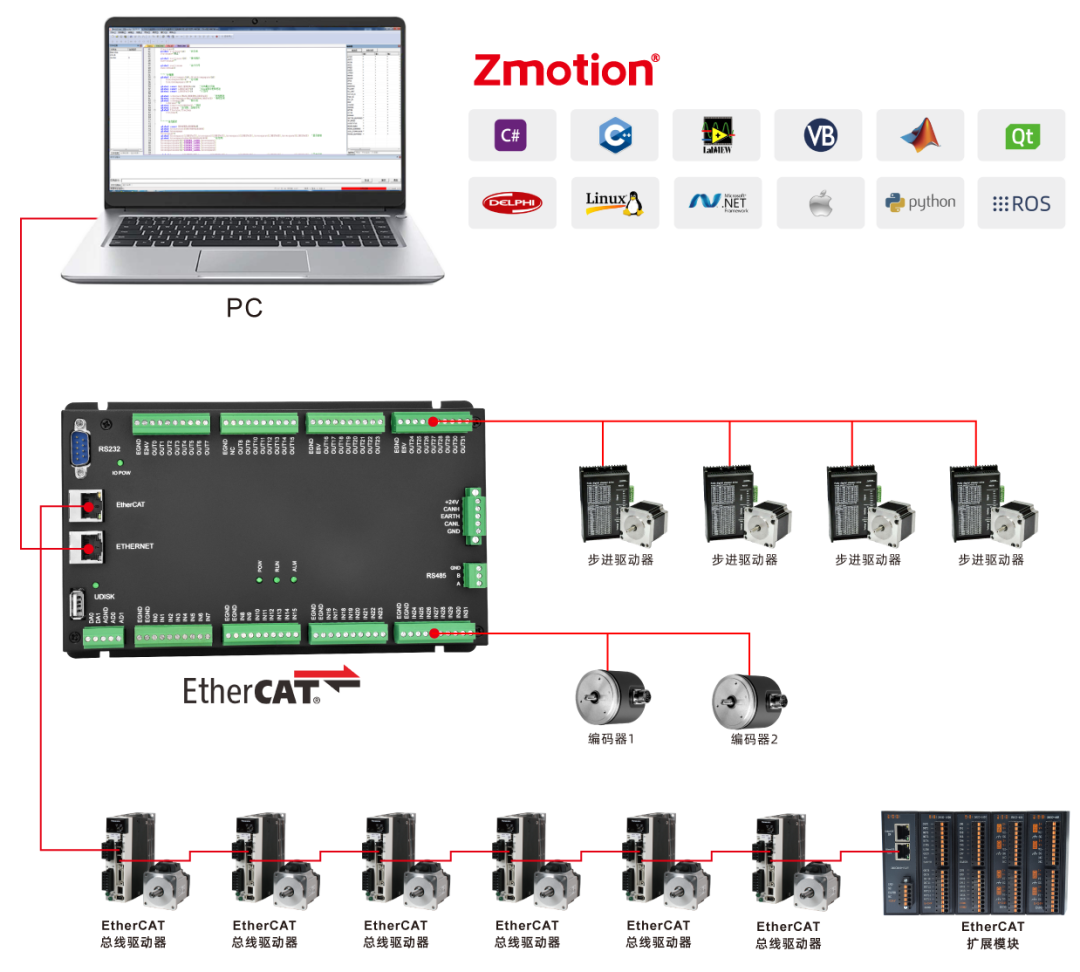
The XPLC864E2 is a multi-axis economical EtherCAT bus motion controller launched by Zheng Motion Technology. The XPLC series motion controllers can be applied in various scenarios requiring offline or online operation.
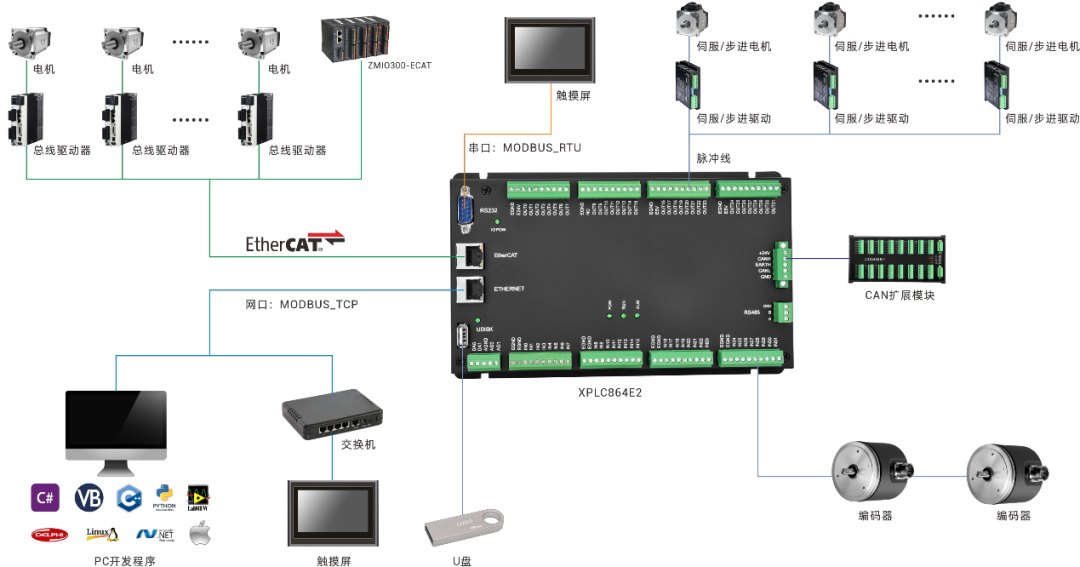
It is compact, fully equipped with communication functions, supports RS232 serial port, RS485 serial port, Ethernet, CAN bus, and EtherCAT bus connections to peripherals, with multiple network ports expanded through switches.
The XPLC864E2 supports mixed use of pulse axes and bus axes, with a total of 8 axes. In addition to the EtherCAT interface, the output ports can be configured for 8 pulse signal outputs, and there are two encoder inputs configurable from the input ports.
It supports up to 12 axes for linear interpolation, electronic cam, electronic gear, synchronous following, virtual axis settings, and other functions through expansion.
 02Principle of Linear Interpolation
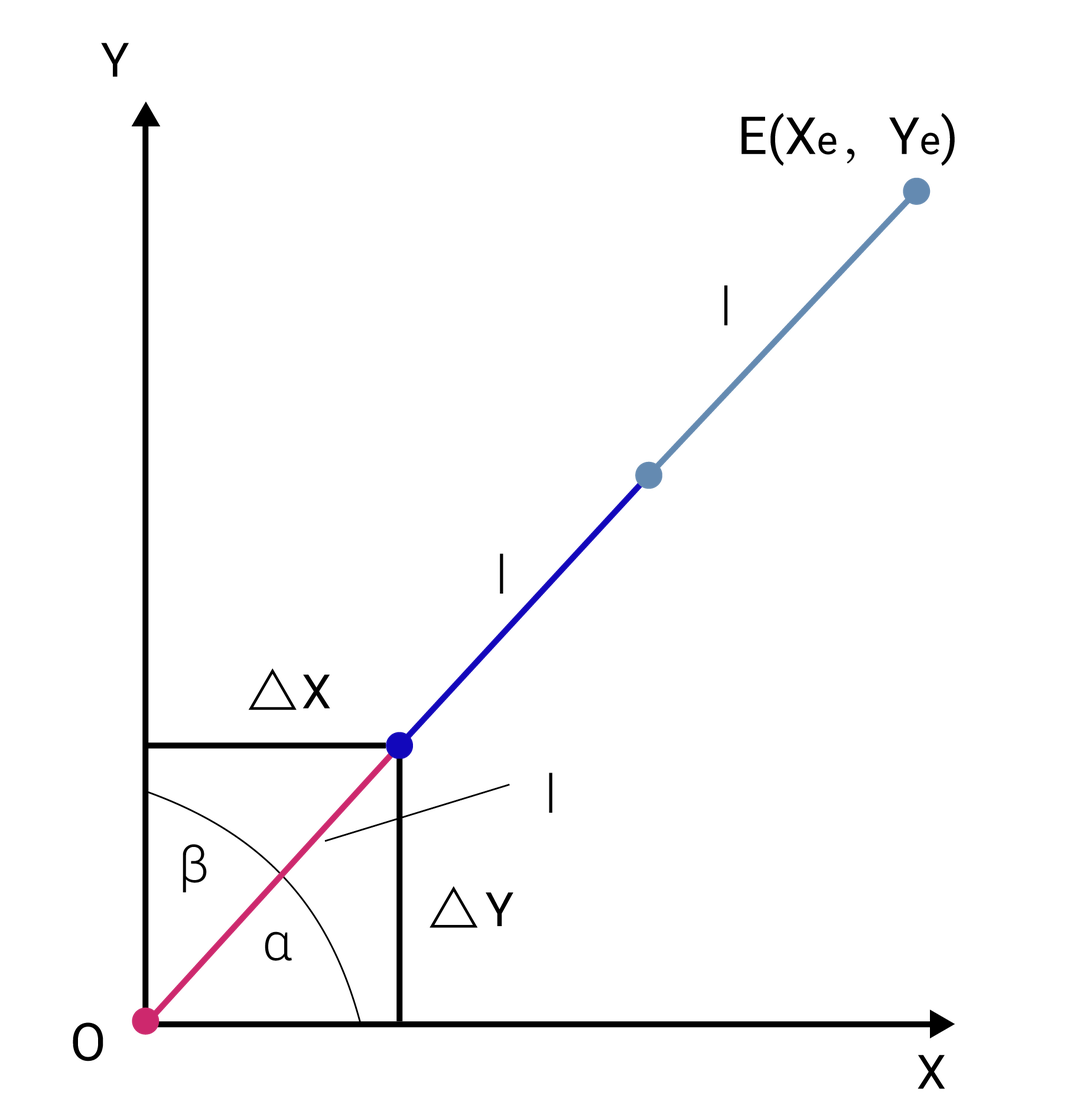
The linear interpolation algorithm uses a data sampling method, approximating the given trajectory with small segments of straight lines. The interpolation output is the distance each axis needs to move in the next interpolation cycle, allowing for high feed rates without needing to interpolate for every pulse equivalent.
The data sampling method principle employs a time division concept, dividing the contour curve into segments of contour step length l, where l=ft, based on the feed speed f and interpolation period t, and then calculating the coordinate increments for each axis participating in the interpolation motion for each interpolation cycle.
 03Linear Interpolation Functionality
1. Characteristics of Linear Interpolation
Linear interpolation motion is controlled by selecting axis numbers/axis groups through the BASE command, enabling multi-axis linkage to complete linear motion.
The main axis is the first axis selected by BASE, and the interpolation motion axis parameters such as UNITS, SPEED, etc., all adopt the parameters of the main axis. The MOVE command sends the linear interpolation motion instruction, and the interpolation motion is executed sequentially in the motion buffer of the main axis. The CANCEL command can cancel the interpolation motion, achieving an emergency stop.
1. Supports linear interpolation motion for 16 axes
base(0,1,2,3,4,5,6,7,8,9,10,11,12,13,14,15)2. Supports simultaneous interpolation across multiple channels
BASE(0,1)MOVE(100,200)BASE(2,3,4)MOVE(30,40,50)2. Calculation of Interpolation Motion Parameters
Taking two-axis linear interpolation as an example: Axes 0 and 1 participate in the linear interpolation motion, as shown in the figure below.
The two-axis linear interpolation motion moves from point A on the plane to point B, with the XY axes starting simultaneously and reaching the endpoint at the same time. The motion distance for axis 0 is set to ∆X, and for axis 1, it is ∆Y, with the main axis being the first axis of BASE (in this case, the main axis is axis 0), and the interpolation motion parameters adopting those of the main axis.
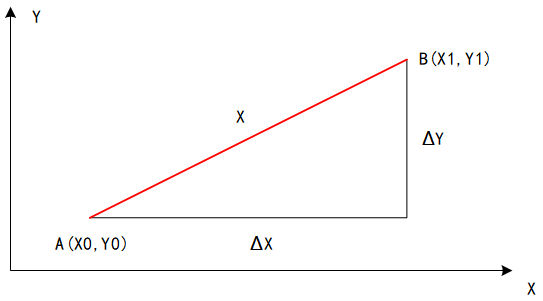
If the speed of the main axis is S (the set speed of main axis 0), the actual speeds of each axis are the sub-speeds of the main axis, which are not equal to S. At this time:
- Distance of interpolation motion: X=[(∆X)2+(∆Y)2]½
- Actual speed of axis 0: S0=S×∆X/X
- Actual speed of axis 1: S1=S×∆Y/X
04Implementation of Linear InterpolationThe XPLC864E2 has a built-in linear interpolation algorithm that supports joint linear interpolation for 8 EtherCAT bus axes and can be expanded to support 12 axes of interpolation. By using the MOVE linear interpolation command, interpolation motion can be easily and efficiently completed.
1. Commands Related to Linear Interpolation
1. MOVE sends pulses to the driver to achieve linear interpolation motion.
Syntax:
-
MOVE(distance1 [,distance2[,distance3 [,distance4…]]])
-
MOVEABS(distance1 [,distance2 [,distance3 [,distance4…]]])
-
MOVESP(distance1 [,distance2 [,distance3 [,distance4…]]])
- MOVEABSSP(distance1 [,distance2 [,distance3 [,distance4…]]])
2. The BASE command selects the axis numbers participating in the interpolation, i.e., which axes the MOVE motion is sent to.
Syntax:BASE(axis1 [,axis 2 [,axis 3 [,axis 4…]]])
3. The speed of linear interpolation motion can be freely controlled by the speed ratio, where the current speed = SPEED*SPEED_RATIO.
Syntax:SPEED_RATIO(axis number) = value
4. Motion pause and resume, MOVE_PAUSE pauses, MOVE_RESUME resumes motion.
Syntax:MOVE_PAUSE(mode)
5. Motion cancellation, axes/axis groups decelerate and stop, CANCEL(2) is an emergency stop, RAPIDSTOP(2) is an emergency stop for all axes.
Syntax:CANCEL(mode) AXIS(main axis), RAPIDSTOP(mode)
2. Types of Linear Interpolation
1. There are three forms of linear interpolation to choose from:
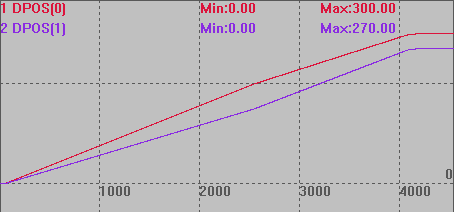
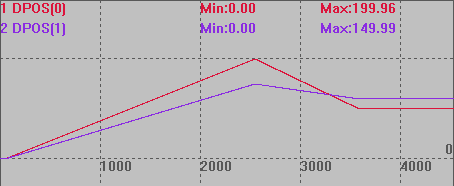
(1) MOVE relative motion command The distance parameter for interpolation motion is the relative distance from the current interpolation starting point, using SPEED for speed.(2) MOVEABS absolute motion command The distance parameter for interpolation motion is the absolute distance from the origin, adding the ABS suffix after the relative motion command, using SPEED for speed.(3) MOVESP/MOVEABSSP motion command The commands with SP use the FORCE_SPEED parameter for motion speed instead of the SPEED parameter, simply adding the SP suffix after the relative or absolute motion command. The FORCE_SPEED parameter can enter the motion buffer, facilitating dynamic speed changes.2. The differences among the three types of motion forms are explained in the examples below:(1) Relative motion example
RAPIDSTOP(2)WAIT IDLE(0)WAIT IDLE(1)BASE(0,1)DPOS=0,0ATYPE=1,1UNITS=100,100SPEED=100,100 'Motion speedACCEL=1000,1000DECEL=1000,1000FORCE_SPEED=150,150 'SP command speedSRAMP=100,100 'S curveTRIGGER 'Auto trigger oscilloscopeMOVE(200,150) 'First segment endpoint(200,150)MOVE(100,120) 'Second segment endpoint(300,270)END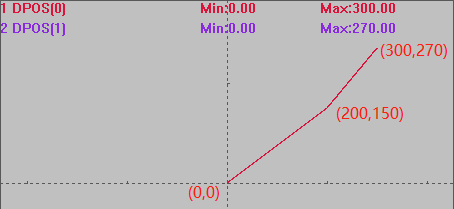
(2) Absolute motion example
RAPIDSTOP(2)WAIT IDLE(0)WAIT IDLE(1)BASE(0,1)DPOS=0,0ATYPE=1,1UNITS=100,100SPEED=100,100 'Motion speedACCEL=1000,1000DECEL=1000,1000SRAMP=100,100 'S curveTRIGGER 'Auto trigger oscilloscopeMOVEABS(200,150) 'First segmentMOVEABS(100,120) 'Second segment to absolute position(100,120)END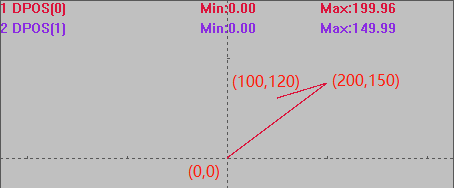
(3) SP motion command example
RAPIDSTOP(2)WAIT IDLE(0)WAIT IDLE(1)BASE(0,1)DPOS=0,0ATYPE=1,1UNITS=100,100SPEED=100,100 'Motion speedACCEL=1000,1000DECEL=1000,1000FORCE_SPEED=150,150 'SP command speedSRAMP=100,100 'S curveTRIGGER 'Auto trigger oscilloscopeMOVE(200,150) 'First segment relative motion, speed 100MOVESP(100,120) 'Second segment SP relative motion, speed 150END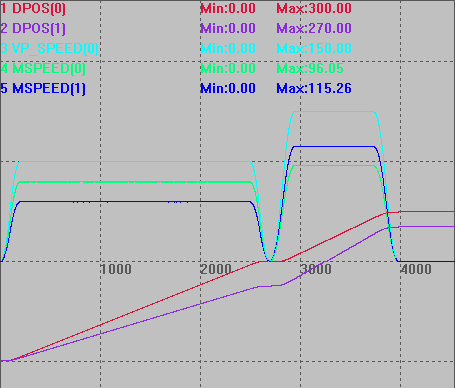
3. MOVESP Dynamic Speed Change
The MOVESP linear interpolation motion uses the speed set by FORCE_SPEED for motion and supports STARTMOVE_SPEED to customize the starting speed for each segment of SP motion, and ENDMOVE_SPEED to customize the ending speed for each segment of SP motion. If these two parameters are not used, please set them to a large value.
Example:
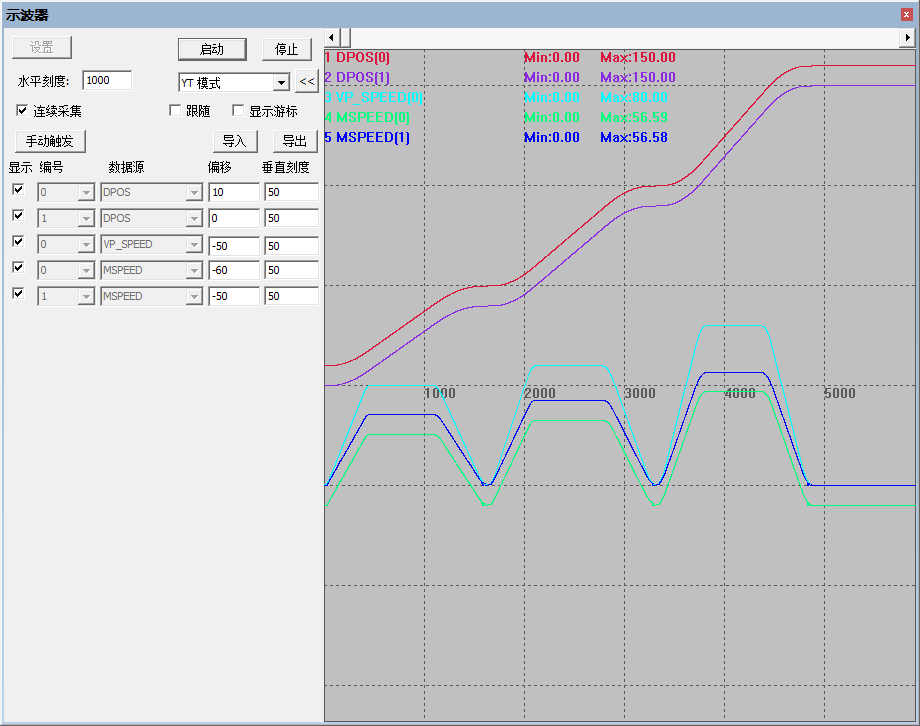
RAPIDSTOP(2)WAIT IDLE(0)WAIT IDLE(1)BASE(0,1) 'Select XYDPOS = 0,0MPOS = 0,0ATYPE=1,1 'Pulse mode step or servoUNITS = 100,100 'Pulse equivalentSPEED = 100,100ACCEL = 200,200DECEL = 200,200SRAMP=100,100 'S curveTRIGGER'First segmentFORCE_SPEED = 50 'First segment speed 50MOVESP(40,40)'Second segmentFORCE_SPEED = 60 'Second segment speed 60MOVESP(50,50)'Third segmentFORCE_SPEED = 80 'Third segment speed 80MOVESP(60,60)ENDSpeed change curve: Starting from a speed of 0, completing three segments of linear interpolation motion, with the first segment speed of 50, the second segment speed of 60, and the third segment speed of 80.
4. Speed Ratio Control of Linear Interpolation
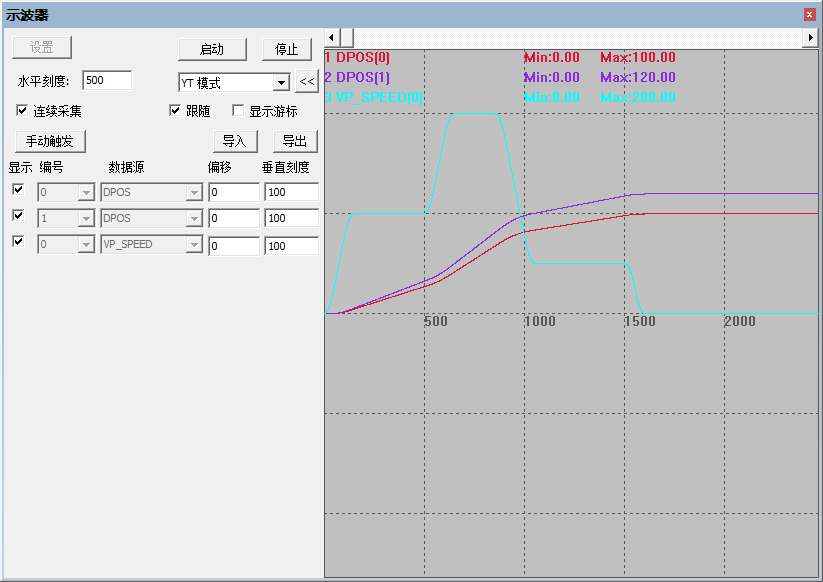
Linear interpolation motion supports setting the SPEED_RATIO to control the proportion of the current motion speed, making the current motion speed = SPEED * SPEED_RATIO. The command takes effect immediately, thus enabling dynamic speed changes.
Example:
RAPIDSTOP(2)WAIT IDLEBASE(0,1) 'Select axes 0, 1DPOS=0,0UNITS=1000,1000SPEED = 100,100 'Speed 100 units/sACCEL = 1000,1000DECEL = 1000,1000SRAMP = 50,50TRIGGERSPEED_RATIO = 1 'Speed ratio is 1, speed 100MOVE(100,120) 'Linear interpolationDELAY(500) 'Wait 0.5sSPEED_RATIO = 2 'Speed 200WAIT UNTIL REMAIN<50 'Wait until remaining distance is less than 50SPEED_RATIO = 0.5 'Speed reduced to 50WAIT IDLESPEED_RATIO=1ENDSpeed change curve:
5. Pausing and Resuming Linear Interpolation Motion
The MOVE_PAUSE command is suitable for interpolation motion and has several modes:
|
0 (default) |
Pause the current motion. |
|
1 |
Pause after the current motion is completed and before executing the next motion instruction |
|
2 |
Pause after the current motion is completed and before executing the next motion instruction, and the MARK identifiers of the two instructions are different |
|
3 |
Forced pause, can enter pause state even in IDLE mode This function was added in firmware version 20170513 |
Example:
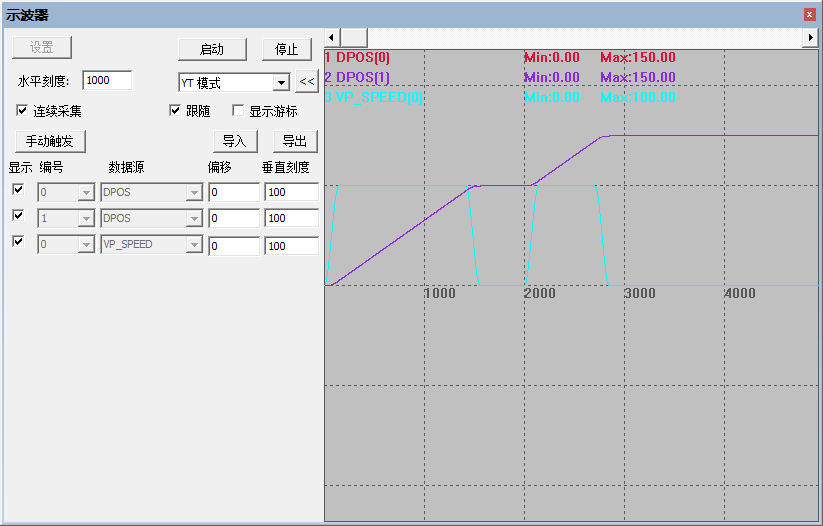
BASE(0,1) 'Select axes 0, 1DPOS=0,0UNITS=1000,1000SPEED = 100,100 'Speed 100 units/sACCEL = 1000,1000DECEL = 1000,1000SRAMP = 50,50TRIGGERMOVE(100,100) 'Current motionMOVE(50,50) 'Buffered motionMOVE_PAUSE(1) 'Mode 1, pause after current motion is completed DELAY(2000)MOVE_RESUME 'Resume motion, buffered motion starts executingENDThe motion curve is shown in the figure below:
05Linear Interpolation Example1. Continuous Interpolation of Two Axes to Complete a Star Trajectory
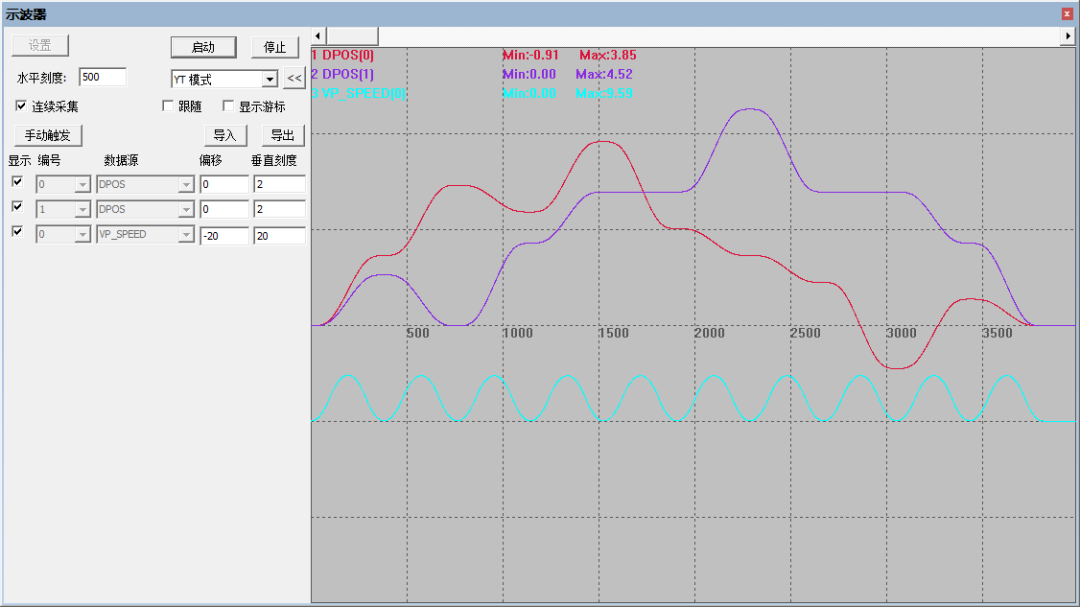
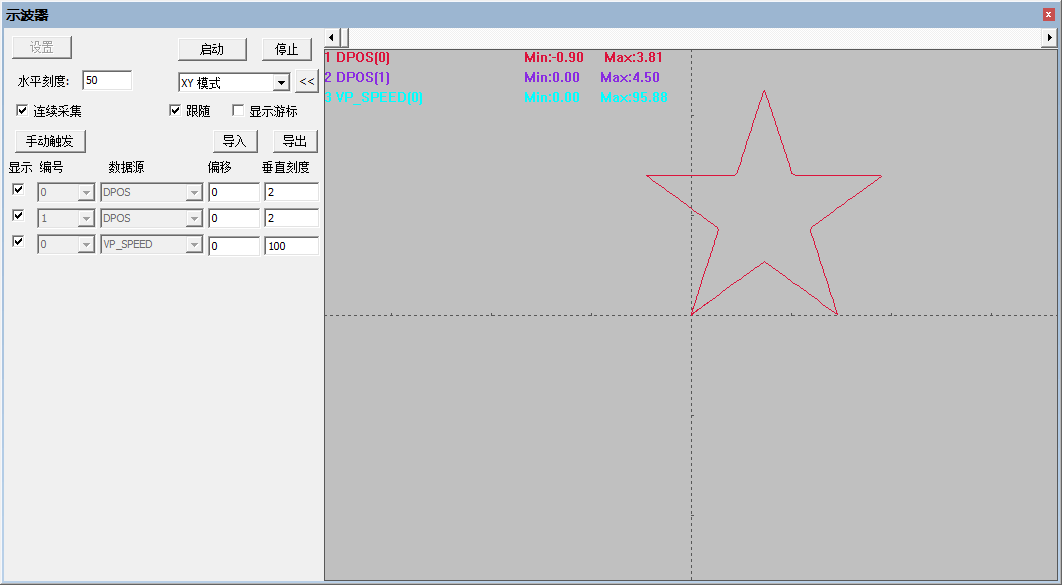
'Bus initialization enables EtherCAT bus drivers, pulse-type drivers OP open enable. BASE(0,1)UNITS=10000,10000SPEED=100,100ACCEL=1000,1000DECEL=1000,1000SRAMP=100,100DPOS=0,0MPOS=0,0TRIGGER 'Auto trigger oscilloscope'Star trajectoryMOVEABS(1.4695, 1.0676)MOVEABS(2.9389, 0.0000)MOVEABS(2.3776, 1.7275)MOVEABS(3.8471, 2.7951)MOVEABS(2.0307, 2.7951)MOVEABS(1.4695, 4.5225)MOVEABS(0.9082, 2.7951)MOVEABS(-0.9082, 2.7951)MOVEABS(0.5613, 1.7275)MOVEABS(0.0000, 0.0000)ENDOscilloscope sampling of motion waveform over time:
Oscilloscope sampling of two-axis interpolation trajectory:
2. Star Video Demonstration
This concludes the discussion on the easy-to-use linear interpolation in EtherCAT bus motion controllers by Zheng Motion Technology.
For more exciting content, please follow the “Motion Assistant” public account. For related development environments and example codes, please consult Zheng Motion Technology sales engineers: 400-089-8936.
This article is original by Zheng Motion Technology. Everyone is welcome to reprint it for mutual learning and improvement of China’s intelligent manufacturing level. The copyright of this article belongs to Zheng Motion Technology. Please indicate the source when reprinting.
Review Previous Content
Open Laser Galvo Motion Controller (V): ZMC408SCAN Energy Control of Fiber Laser
Open Laser Galvo Motion Controller (IV): ZMC408SCAN Galvo Control for Fiber Laser Processing
Open Laser Galvo Motion Controller (III): ZMC408SCAN Axis Control for Fiber Laser Processing
Open Laser Galvo Motion Controller (II): ZMC408SCAN Laser Interface and Control
Open Laser Galvo Motion Controller (I): ZMC408SCAN Interface and Functions
Motion Controller PSO Position Synchronous Output (III): High-Precision Equidistant 2D and 3D PSO Output
Motion Controller PSO Position Synchronous Output (II): Detailed Explanation of PSO Mode
Motion Controller PSO Position Synchronous Output (I): Hardware Platform and Introduction to PSO Commands
Economical EtherCAT Motion Controller (X): Quick Start for EtherCAT Bus
Economical EtherCAT Motion Controller (IX): Oscilloscope Usage
Economical EtherCAT Motion Controller (VIII): Axis Parameters and Motion Commands
Economical EtherCAT Motion Controller (VII): Motion Buffering
Economical EtherCAT Motion Controller (VI): Data Storage
Economical EtherCAT Motion Controller (V): Multi-Task Operation
Economical EtherCAT Motion Controller (IV): ModbusRTU or ModbusTcp Communication with Touch Screen
Economical EtherCAT Motion Controller (III): PLC Implementation of Multi-Axis Linear Interpolation and Electronic Cam
Economical EtherCAT Motion Controller (II): ZBasic Implementation of Multi-Axis Linear Interpolation Motion
Economical EtherCAT Motion Controller (I): Function Introduction and Application Scenarios
Motion Control + Machine Vision Demo Software Framework (III): Vision Correction + Continuous Interpolation Recipe Editing
Motion Control + Machine Vision Demo Software Framework (II): Mobile Calibration and Shape Matching
Motion Control + Machine Vision Demo Software Framework (I): Management of Mechanical Parameters and Recipe Files
Overview of Motion Control + Machine Vision Demo Software Framework System
Open Laser Galvo + Motion Controller (VI): Dual Galvo Motion
Open Laser Galvo + Motion Controller (V): ZMC408SCAN Controller Hardware Introduction
Open Laser Galvo + Motion Controller (IV): Application of PSO Position Synchronous Output in Laser Galvo Processing
Open Laser Galvo + Motion Controller (III): Galvo Correction
Open Laser Galvo + Motion Controller (II): Galvo Filling
Open Laser Galvo + Motion Controller (I): Hardware Interface
Application of EtherCAT Axis Expansion Module EIO16084 in Motion Control Systems
Usage of EtherCAT Motion Controller ZMIO300 Module
PLC Programming of EtherCAT Motion Controller (IV): Electronic Cam
PLC Programming of EtherCAT Motion Controller (III): Electronic Gear
PLC Programming of EtherCAT Motion Controller (II): Arc Interpolation
PLC Programming of EtherCAT Motion Controller (I): Linear Interpolation
Quick Start | Article 21: Introduction to Motion Controller ZHMI Configuration Programming Part 1
Quick Start | Article 21: Custom Communication of Zheng Motion Technology Motion Controller
Quick Start | Article 20: Modbus Communication of Zheng Motion Technology Motion Controller
Quick Start | Article 19: Introduction to Multi-Axis Synchronization and Electronic Cam Commands of Zheng Motion Technology Motion Controller
Quick Start | Article 18: Usage of Zheng Motion Technology Pulse Motion Controller
Quick Start | Article 17: Usage of Multi-Axis Interpolation Motion Commands of Zheng Motion Technology Motion Controller
Quick Start | Article 16: Quick Start for Zheng Motion Controller EtherCAT Bus
Quick Start | Article 15: Introduction to Motion Buffering of Motion Controller
Quick Start | Article 14: Basic Axis Parameters and Basic Motion Control Commands of Motion Controller
Quick Start | Article 13: Usage of Zheng Motion Technology Motion Controller ZDevelop Programming Software
Quick Start | Article 12: Usage of Zheng Motion Technology Motion Controller USB Interface
Quick Start | Article 11: Application of Interrupts in Zheng Motion Technology Motion Controller
Quick Start | Article 10: Characteristics of Multi-Task Operation of Motion Controller
Quick Start | Article 9: How to Apply Oscilloscope in Motion Controller?
Quick Start | Article 8: How to Use EtherCAT Bus of Motion Controller?
Quick Start | Article 7: How to Use ZCAN Bus Expansion Module of Motion Controller?
Quick Start | Article 6: How to Apply Data and Storage of Motion Controller?
Quick Start | Article 5: How to Apply Input/Output IO of Motion Controller?
Quick Start | Article 4: How to Communicate Motion Controller with Touch Screen?
Quick Start | Article 3: How to Develop ZPLC Program for Motion Controller?
Quick Start | Article 2: How to Develop ZBasic Program for Motion Controller?
Quick Start | Article 1: How to Upgrade Firmware of Motion Controller?
Application of G-code on Motion Controller
Custom G-code Programming Application of Motion Controller
Offline Simulation Debugging to Accelerate Project Progress!
Usage of 8-Axis EtherCAT Axis Expansion Module EIO24088
Demo of Motion Controller Tracking and Cutting Application
Laser Galvo Control by Motion Controller
Quick Start for ZMC Motion Controller SCARA Robot Application
Quick Start for RTEX Bus Usage of Motion Controller
Usage of Zheng Motion Technology CAD Mapping Software with Controller
Advanced Applications of EtherCAT Bus Motion Controller
Development Tutorial of EtherCAT Motion Control Card with Qt (Middle): Continuous Trajectory Processing, Pause and Resume
Development Tutorial of EtherCAT Motion Control Card with Qt (Upper): Development Environment Configuration and Simple Motion Control Application
Custom Motion Curves of EtherCAT Motion Control Card
Development Tutorial of EtherCAT Motion Control Card with Python
Application of SCARA and Other Robots with EtherCAT Motion Control Card
Synchronization of PWM and Analog Output with Motion Speed of EtherCAT Motion Control Card
Comparison of EtherCAT Motion Control Card Hardware Output and Encoder Latching
Synchronization of IO Actions and Motion Control with EtherCAT Motion Control Card
Running and Read/Write Control of Real-Time Programs of EtherCAT Motion Control Card
Pausing, Resuming, and System Safety Settings of EtherCAT Motion Control Card
Continuous Interpolation Motion with Small Segments of EtherCAT Motion Control Card
Multi-Axis Interpolation Motion and Handwheel Motion of EtherCAT Motion Control Card
Introduction to Auxiliary Debugging Tools and Methods of EtherCAT Motion Control Card
Axis Parameter Settings and Axis Motion of EtherCAT Motion Control Card
Wiring of EtherCAT Motion Control Card Hardware and Read/Write of Hardware Peripherals with C# and Zeroing Motion
Wiring of EtherCAT Motion Control Card Hardware and Single-Axis Motion Control with C#
Simple and Easy-to-Use Motion Control Card (XVI): Pitch Compensation and Backlash Compensation
Simple and Easy-to-Use Motion Control Card (XV): Real-Time Program of PC Start-Stop Controller
Simple and Easy-to-Use Motion Control Card (XIV): Synchronization of PWM, Analog Output, and Motion Control
Simple and Easy-to-Use Motion Control Card (XIII): Synchronization of IO Actions and Motion Control
Simple and Easy-to-Use Motion Control Card (XII): Safety Settings of Motion Control System
Simple and Easy-to-Use Motion Control Card (XI): Motion Pause, Resume, and Speed Ratio Settings
Simple and Easy-to-Use Motion Control Card (X): Continuous Interpolation and Small Segment Prediction
Simple and Easy-to-Use Motion Control Card (IX): Arc Interpolation and Spiral Interpolation
Simple and Easy-to-Use Motion Control Card (VIII): Linear Interpolation and Handwheel Motion
Simple and Easy-to-Use Motion Control Card (VII): One-Time Loading of Multiple Continuous Small Segment Data
Simple and Easy-to-Use Motion Control Card (VI): Basic File Download and Continuous Trajectory Processing
Simple and Easy-to-Use Motion Control Card (V): IO Configuration and Zeroing Motion
Simple and Easy-to-Use Motion Control Card (IV): Function Library Encapsulation
Simple and Easy-to-Use Motion Control Card (III): Axis Parameter Configuration and Single-Axis Motion Control
Simple and Easy-to-Use Motion Control Card (II): Peripheral Read/Write and ZDevelop Diagnosis
Simple and Easy-to-Use Motion Control Card (I): Hardware Wiring and Upper Computer Development
Application of Motion Control Card in ROS (Lower)
Application of Motion Control Card in ROS (Upper)
Building Intelligent Equipment with EtherCAT Motion Control Card and LabVIEW (V)
Building Intelligent Equipment with EtherCAT Motion Control Card and LabVIEW (IV)
Building Intelligent Equipment with EtherCAT Motion Control Card and LabVIEW (III)
Building Intelligent Equipment with EtherCAT Motion Control Card and LabVIEW (II)
Building Intelligent Equipment with EtherCAT Motion Control Card and LabVIEW (I)
Motion Control and Data Acquisition with EtherCAT Motion Control Card in LabVIEW
Application Development Tutorial of Motion Control Card with MATLAB
Application Development Tutorial of Motion Control Card with C++
Application Development Tutorial of Motion Control Card with Python
Application Development Tutorial of Motion Control Card with C#
Application Development Tutorial of Motion Control Card with Linux
Application Development Tutorial of Motion Control Card with VB.NET
Application Development Tutorial of Motion Control Card with VB6.0
Application Development Tutorial of Motion Control Card with VC6.0
Application Development Tutorial of Motion Control Card using Qt
Application Development Tutorial of Motion Control Card for Laser Galvo Control
Application Development Tutorial of Motion Control Card for Hardware Comparison Output
About Zheng Motion Technology
Zheng Motion Technology focuses on research in motion control technology and the development of general motion control software and hardware products, and is a national high-tech enterprise. Its main products include motion controllers, motion control cards, visual motion control integrated machines, human-machine interfaces, and expansion modules.
Zheng Motion Technology gathers outstanding talents from companies like Huawei and ZTE, actively collaborating with major universities to research the foundational technologies of motion control while adhering to independent innovation. It is one of the fastest-growing companies in the domestic industrial control field and one of the few companies that fully master core motion control technologies and real-time industrial control software platform technologies.
Backed by the thriving manufacturing industry, Zheng Motion Technology keeps pace with the times, is innovative, and is committed to continuously improving the technical applications and manufacturing levels of intelligent manufacturing equipment suppliers and end users. After years of application development with numerous partners, its products are widely used in domestic and international fields such as 3C electronics, semiconductors, printing and packaging, textiles and garments, laser processing, mechanical processing, robotics, new energy, healthcare, and stage entertainment.