1. Introduction to WiFi Modes
The ESP32 has two main WiFi modes: STA and AP modes.
AP mode refers to Access Point mode, which can be connected by other devices;
STA mode refers to Station mode, which can connect to hotspots.
The ESP32S3 supports the coexistence of both STA and AP modes, for example, a mobile phone can act as a hotspot while also connecting to another hotspot.
The ESP32-S3 supports the following Wi-Fi features:
-
Supports 4 virtual interfaces: STA, AP, Sniffer, and reserved.
-
Supports only station mode, only AP mode, and station/AP coexistence mode.
-
Supports configuration using IEEE 802.11b, IEEE 802.11g, IEEE 802.11n, and API configuration protocol modes.
-
Supports WPA/WPA2/WPA3/WPA2-Enterprise/WPA3-Enterprise/WAPI/WPS and DPP.
-
Supports AMSDU, AMPDU, HT40, QoS, and other major features.
-
Supports Modem-sleep.
-
Supports Espressif’s proprietary protocol, enabling 1 km of data communication.
-
Air data transmission can reach up to 20 MBit/s TCP throughput and 30 MBit/s UDP throughput.
-
Supports Sniffer mode.
-
Supports fast scanning and full channel scanning.
-
Supports multiple antennas.
-
Supports obtaining channel status information.
2. WiFi STA Mode
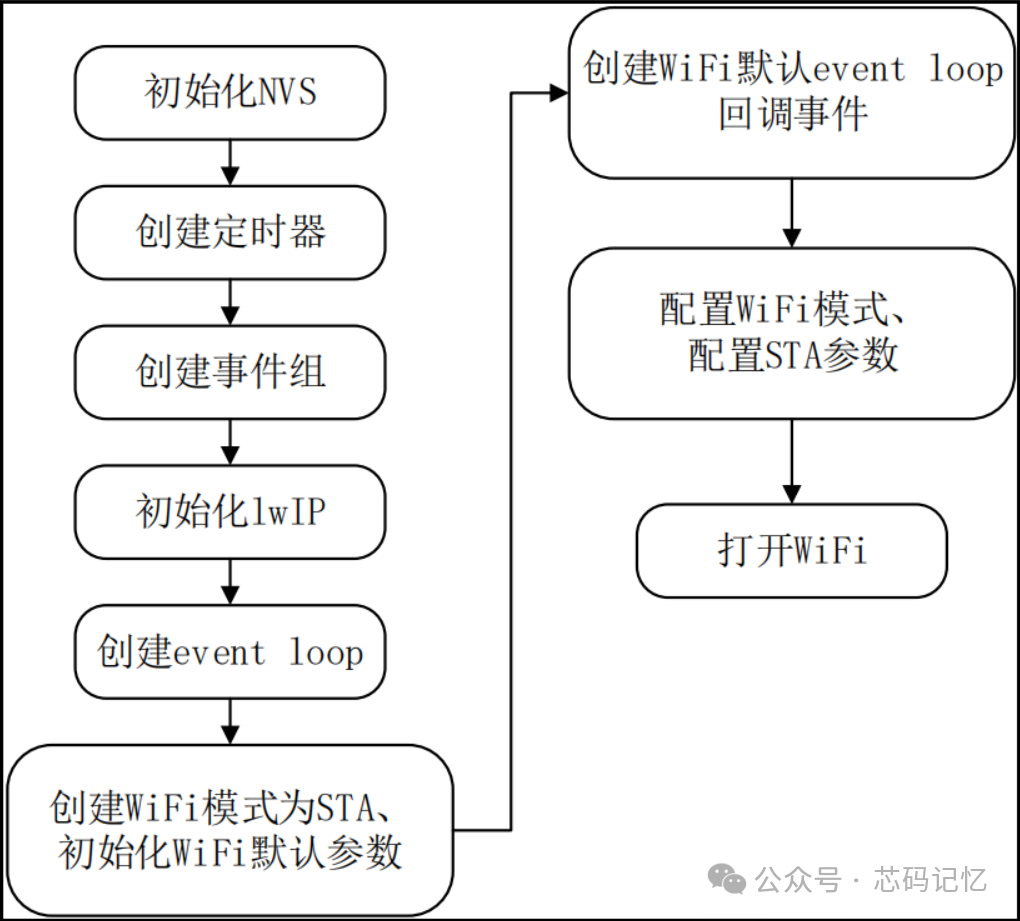
The startup process in STA mode is shown in the figure below:
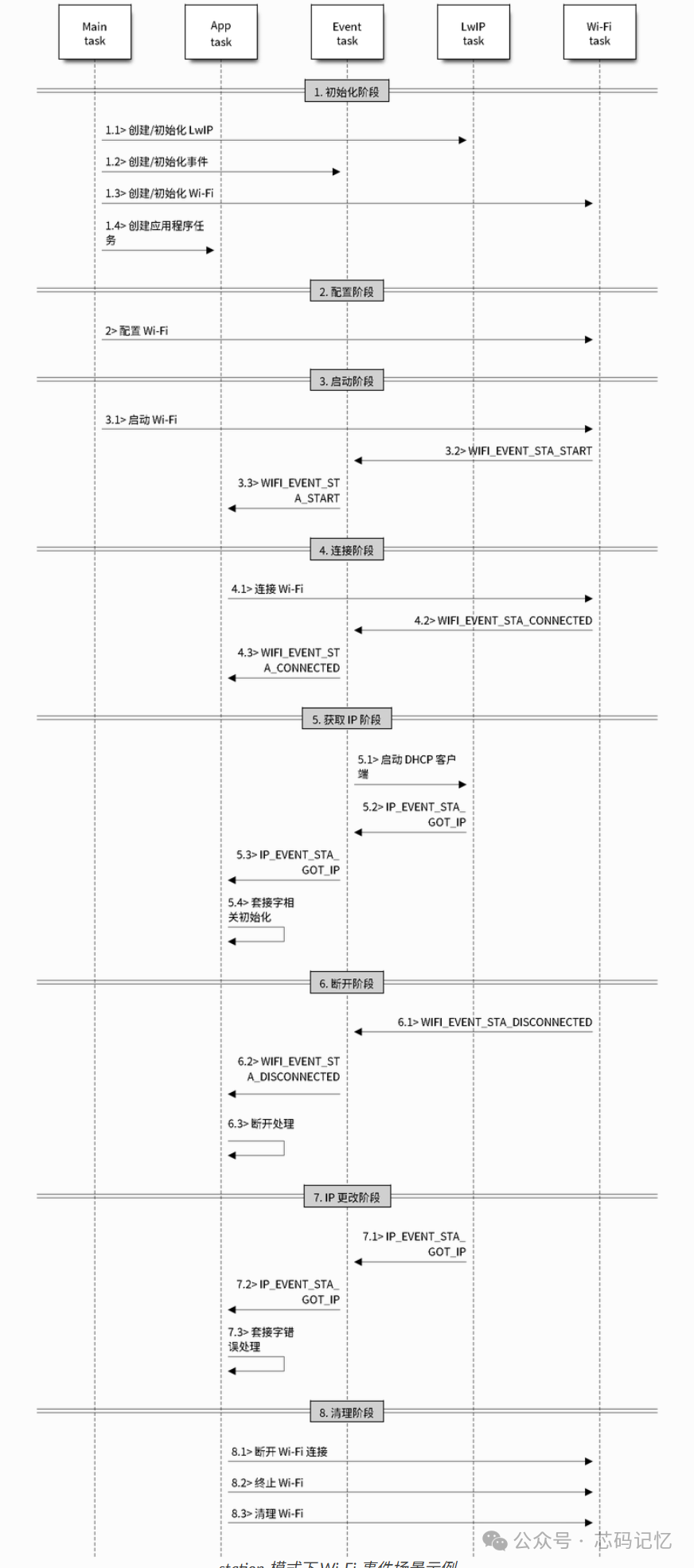
 Examples of Wi-Fi event scenarios in STA mode are shown in the figure below:
 STA initialization code is as follows:
void wifi_init_sta(void){ wifi_event_group = xEventGroupCreate(); // Create event group for synchronizing WiFi connection status between tasks ESP_ERROR_CHECK(esp_netif_init()); // Initialize the underlying TCP/IP stack ESP_ERROR_CHECK(esp_event_loop_create_default()); // Create default event loop for handling system events esp_netif_create_default_wifi_sta(); // Create default WiFi STA network interface wifi_init_config_t cfg = WIFI_INIT_CONFIG_DEFAULT(); // Get default WiFi initialization configuration ESP_ERROR_CHECK(esp_wifi_init(&cfg)); // Initialize WiFi driver esp_event_handler_instance_t instance_any_id; esp_event_handler_instance_t instance_got_ip; ESP_ERROR_CHECK(esp_event_handler_instance_register(WIFI_EVENT, ESP_EVENT_ANY_ID, &wifi_event_handler, NULL, &instance_any_id)); // Register WiFi event handler to listen for all WiFi events ESP_ERROR_CHECK(esp_event_handler_instance_register(IP_EVENT, IP_EVENT_STA_GOT_IP, &wifi_event_handler, NULL, &instance_got_ip)); // Register IP event handler to specifically listen for IP address acquisition events wifi_config_t wifi_config = { .sta = { .ssid = STA_WIFI_SSID, // SSID of the WiFi to connect to .password = STA_WIFI_PASS, // Password of the WiFi to connect to /* Authentication mode threshold: If the password meets WPA2 standards (length >=8), it defaults to WPA2 * To connect to deprecated WEP/WPA networks, set the threshold to WIFI_AUTH_WEP/WIFI_AUTH_WPA_PSK * and set the password length and format to meet WIFI_AUTH_WEP/WIFI_AUTH_WPA_PSK standards */ .threshold.authmode = WIFI_AUTH_WPA2_PSK, // .sae_pwe_h2e = WPA3_SAE_PWE_UNSPECIFIED, .sae_h2e_identifier = "", }, }; ESP_ERROR_CHECK(esp_wifi_set_mode(WIFI_MODE_STA) ); ESP_ERROR_CHECK(esp_wifi_set_config(WIFI_IF_STA, &wifi_config) ); ESP_ERROR_CHECK(esp_wifi_start() ); ESP_LOGI(TAG, "wifi_init_sta finished."); /* Waiting until either the connection is established (WIFI_CONNECTED_BIT) or connection failed for the maximum * number of retries (WIFI_FAIL_BIT). The bits are set by event_handler() (see above) */ EventBits_t bits = xEventGroupWaitBits(wifi_event_group, WIFI_CONNECTED_BIT | WIFI_FAIL_BIT, pdFALSE, pdFALSE, portMAX_DELAY); /* xEventGroupWaitBits() returns the bits before the call returned, hence we can test which event actually * happened. */ if (bits & WIFI_CONNECTED_BIT) { ESP_LOGI(TAG, "connected to ap SSID:%s password:%s", STA_WIFI_SSID, STA_WIFI_PASS); } else if (bits & WIFI_FAIL_BIT) { ESP_LOGI(TAG, "Failed to connect to SSID:%s, password:%s", STA_WIFI_SSID, STA_WIFI_PASS); } else { ESP_LOGE(TAG, "UNEXPECTED EVENT"); }}wifi event handler function is as follows:
static void wifi_event_handler(void* arg, esp_event_base_t event_base, int32_t event_id, void* event_data){ if(event_base == WIFI_EVENT && event_id == WIFI_EVENT_STA_START) // Start WiFi in STA mode { esp_wifi_connect(); // Connect to WiFi }else if((event_base == WIFI_EVENT)&&(event_id == WIFI_EVENT_STA_DISCONNECTED)) // WiFi disconnection event { if(conn_retry_num < ESP_MAXIMUM_RETRY) { esp_wifi_connect(); conn_retry_num++; ESP_LOGI(TAG, "retry to connect to the AP"); }else{ xEventGroupSetBits(wifi_event_group, WIFI_FAIL_BIT); } ESP_LOGI(TAG,"connect to the AP fail"); }else if ((event_base == IP_EVENT) && (event_id == IP_EVENT_STA_GOT_IP)) { ip_event_got_ip_t* event = (ip_event_got_ip_t*) event_data; ESP_LOGI(TAG, "got ip:" IPSTR, IP2STR(&event->ip_info.ip)); conn_retry_num = 0; xEventGroupSetBits(wifi_event_group, WIFI_CONNECTED_BIT); }}Debug print log is shown in the figure below: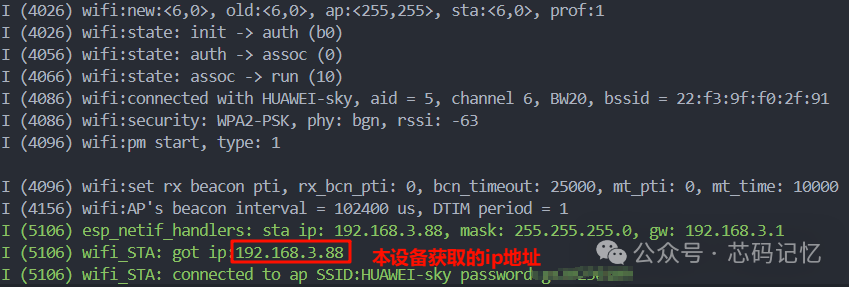 3. WiFi AP ModeThe startup process in AP mode is shown in the figure below:
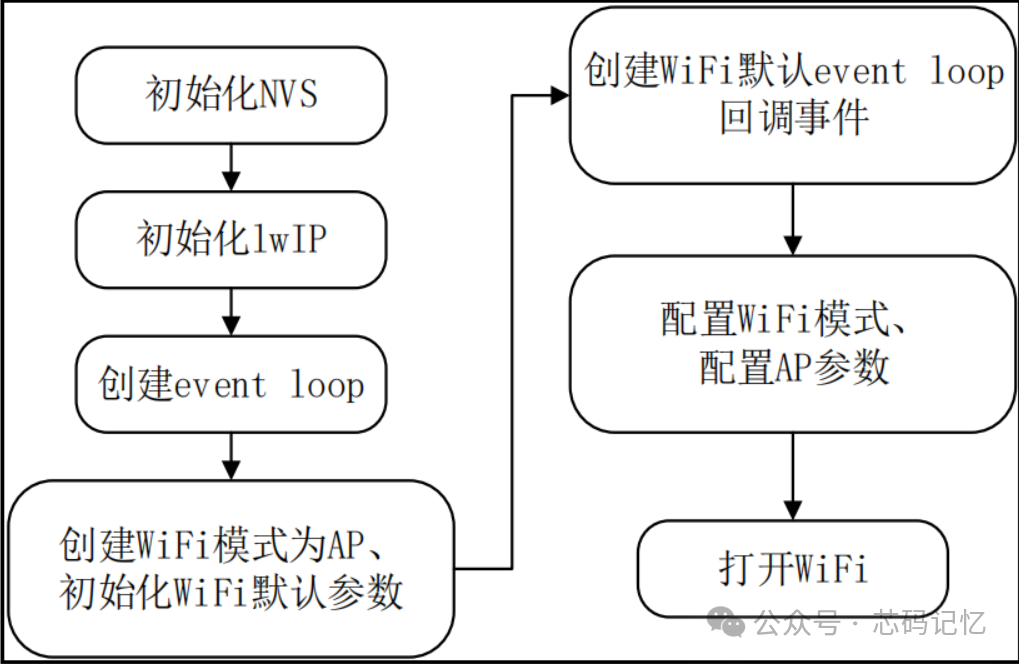 Examples of Wi-Fi event scenarios in AP mode are shown in the figure below:
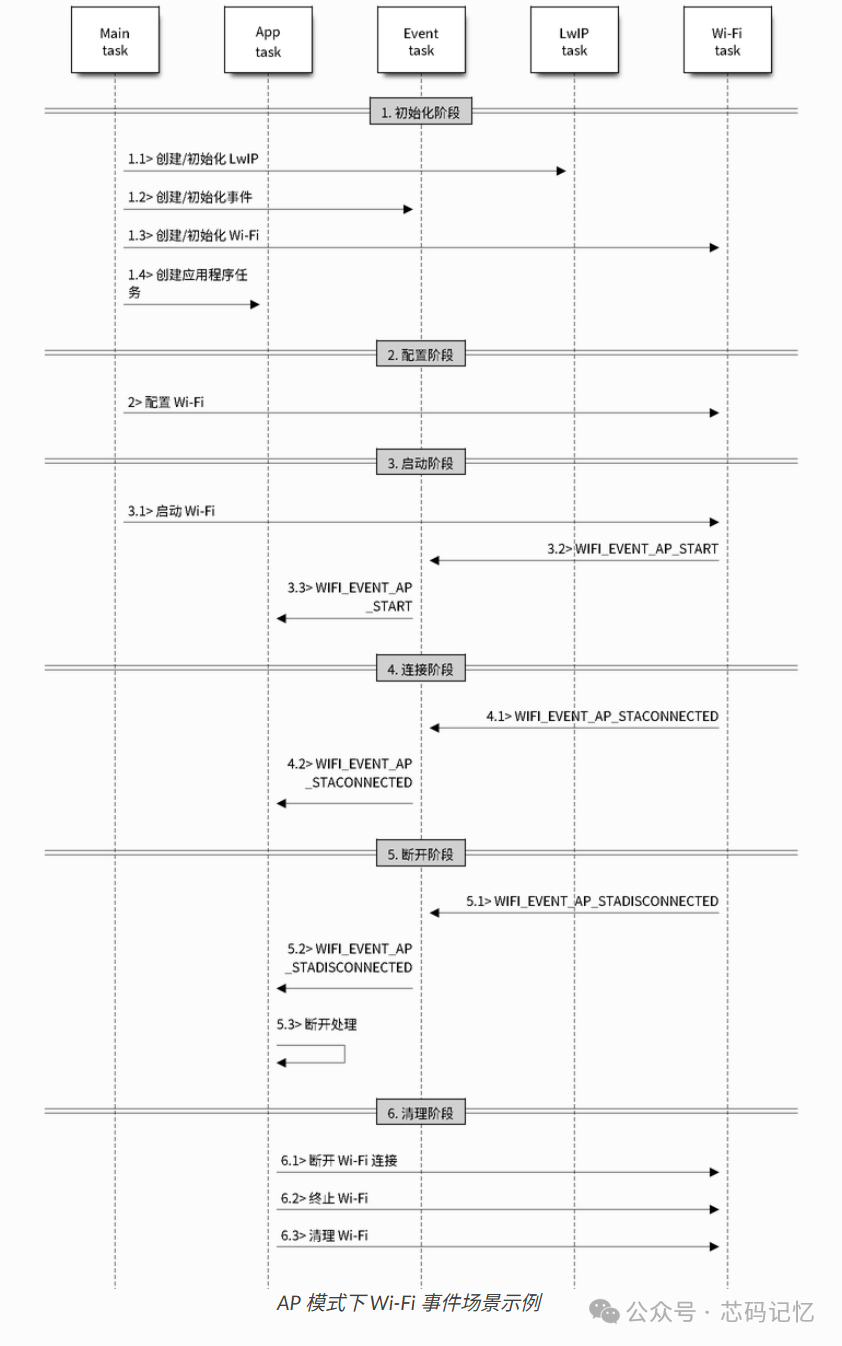 The WiFi initialization function in AP mode is as follows:
void wifi_init_softap(void){ ESP_ERROR_CHECK(esp_netif_init()); // Initialize the underlying TCP/IP stack ESP_ERROR_CHECK(esp_event_loop_create_default()); // Create default event loop for handling system events esp_netif_create_default_wifi_ap(); // Create default WiFi AP network interface wifi_init_config_t cfg = WIFI_INIT_CONFIG_DEFAULT(); // Get default WiFi initialization configuration ESP_ERROR_CHECK(esp_wifi_init(&cfg)); // Initialize WiFi driver ESP_ERROR_CHECK(esp_event_handler_instance_register(WIFI_EVENT, ESP_EVENT_ANY_ID, &wifi_event_handler, NULL, NULL)); // Register WiFi event handler to listen for all WiFi events wifi_config_t wifi_config = { .ap = { .ssid = AP_WIFI_SSID, // Set the SSID name of the AP .ssid_len = strlen(AP_WIFI_SSID), // Calculate SSID length .channel = AP_WIFI_CHANNEL, // Set WiFi channel .password = AP_WIFI_PASS, // Set connection password .max_connection = AP_WIFI_MAX_STA_CONN, // Set maximum number of client connections .authmode = WIFI_AUTH_WPA2_PSK, // Set authentication mode to WPA2 .pmf_cfg = { .required = true, // Enable Protected Management Frames (security feature) }, }, }; if (strlen(AP_WIFI_PASS) == 0) { wifi_config.ap.authmode = WIFI_AUTH_OPEN; // If password string is empty, use open mode (no password) } ESP_ERROR_CHECK(esp_wifi_set_mode(WIFI_MODE_AP)); // Set WiFi working mode to AP mode ESP_ERROR_CHECK(esp_wifi_set_config(WIFI_IF_AP, &wifi_config)); // Enable AP configuration ESP_ERROR_CHECK(esp_wifi_start()); // Start WiFi ESP_LOGI(TAG, "wifi_init_softap finished. SSID:%s password:%s channel:%d", AP_WIFI_SSID, AP_WIFI_PASS, AP_WIFI_CHANNEL);}The WiFi event handler function in AP mode is as follows:
static void wifi_event_handler(void* arg, esp_event_base_t event_base, int32_t event_id, void* event_data){ if (event_id == WIFI_EVENT_AP_STACONNECTED) { wifi_event_ap_staconnected_t* event = (wifi_event_ap_staconnected_t*) event_data; ESP_LOGI(TAG, "station "MACSTR" join, AID=%d", MAC2STR(event->mac), event->aid); } else if (event_id == WIFI_EVENT_AP_STADISCONNECTED) { wifi_event_ap_stadisconnected_t* event = (wifi_event_ap_stadisconnected_t*) event_data; ESP_LOGI(TAG, "station "MACSTR" leave, AID=%d", MAC2STR(event->mac), event->aid); }}Debug print log is shown in the figure below: The official documentation for the ESP32S3 Wi-Fi driver can be found at:
Wi-Fi Driver – ESP32-S3 – — ESP-IDF Programming Guide v5.1 Documentation
The code repository path mentioned above:
sky丶日暮途远/ESP32 Chip: Contains personal learning demo code related to all ESP32 chips and related open-source project code.