
This article is a featured article from the Kanxue Forum
Kanxue Forum AuthorID: KenLi
0x0 Introduction
We obtained a device firmware of 6M, and found no articles analyzing this firmware online, so we decided to perform reverse analysis on the firmware according to the general approach of firmware analysis for practical learning. The main tools used are binwalk, IDA Pro 7.5, and Ghidra. First, we use binwalk to obtain basic information about the firmware and check if we can extract files: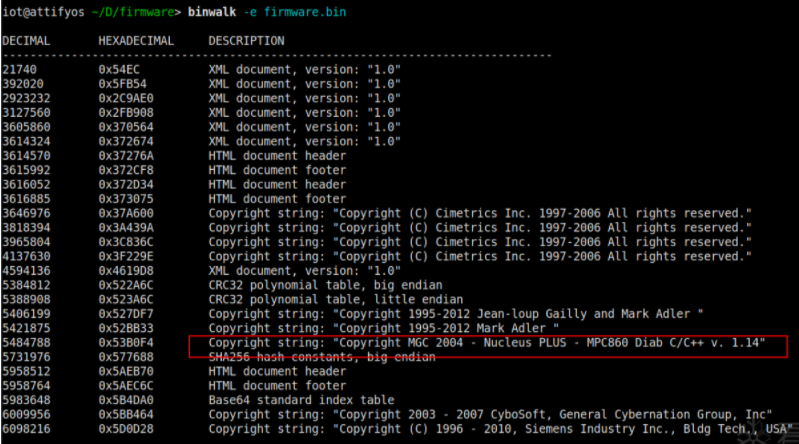
Failed, suspected to be a single-file firmware or possibly an encrypted firmware, but the plaintext string information is distributed quite evenly, so it should not be an encrypted firmware. Let’s try using the -A option to see the bytecode information in the firmware.
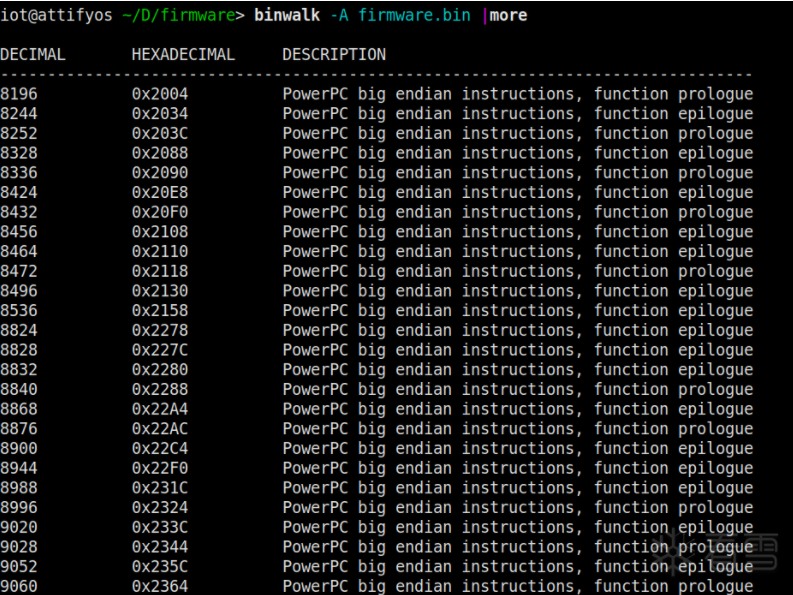 It is clear that the scan results show all PowerPC big-endian instructions, including function start prologue and end epilogue related instructions.
0x01 Determine Load Base Address
First, use 32-bit IDA Pro to disassemble the firmware, but you need to set the processor type first, selecting PowerPC big-endian.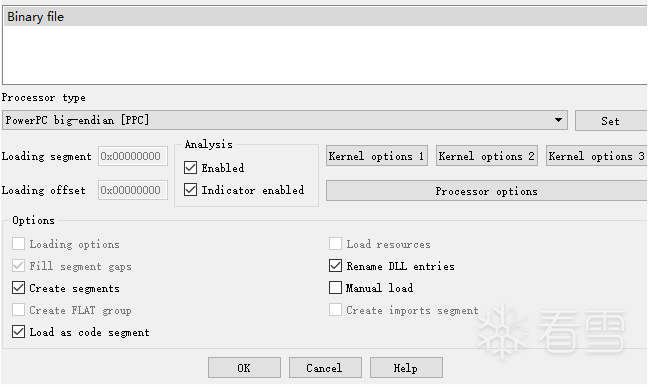 Then keep clicking OK, unfortunately, IDA Pro did not perform automatic analysis, and no functions were recognized. Let’s try the function prologue address 0x2004 scanned by binwalk, jump to this address and press C to disassemble, which can automatically recognize some associated functions. The string window also cannot show references to the strings, suspecting two reasons:(1) IDA Pro currently recognizes too few functions, many functions have not been recognized, leading to no references.(2) Incorrect load base address, leading to incorrect reference addresses, which cannot form cross-references.Too few recognized functions, we can write a script to identify function heads based on function prologue characteristics, the feature code is 94 21 FF ?? 7C 08 02 A6, the recognition code in binwalk is 0x7C0802A6 (mflr r0), while Ghidra can analyze automatically.
ROM:000020EC 94 21 FF F8 stwu r1, back_chain(r1) // allocate stack spaceROM:000020F0 7C 08 02 A6 mflr r0 //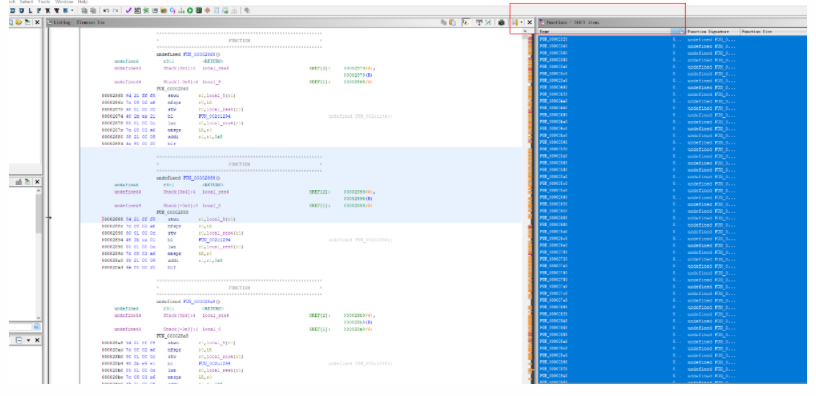 Ghidra recognized a total of over 26,000 functions, it should be nearly complete, but strings still cannot form references, otherwise, it would be incorrect, and the base address problem must be resolved.
Method 1: Determine Base Address by Jump Table Features
Searching for PowerPC firmware load base addresses can yield some information, ppc_rebase:
https://github.com/ilovepp/ppc_rebaseRunning can yield a base address, but upon verification, it was found to be incorrect.
Referring to other materials, there are currently four main methods for identifying firmware base addresses, for specific reference see Research on ARM Device Firmware Load Base Address Positioning by Zhu Ruijin, and by learning the PowerPC instruction set PowerPC C Reverse Engineering Guide, it was found that there is a jump table in the assembly implementation of the PowerPC switch statement, through the relationship between the jump table and function statement addresses, the PowerPC firmware base address can be calculated, specific reference to the script.
#coding=utf-8import osimport sysimport reimport struct'''get powerpc big endin base addr by switch case jmp_tableROM:0000FAF4 28 03 00 07 cmplwi r3, 7ROM:0000FAF8 54 63 10 3A slwi r3, r3, 2ROM:0000FAFC 3D 83 00 07 addis r12, r3, 7ROM:0000FB00 41 81 01 D0 bgt loc_FCD0ROM:0000FB04 81 6C FB 10 lwz r11, -0x4F0(r12)ROM:0000FB08 7D 69 03 A6 mtctr r11ROM:0000FB0C 4E 80 04 20 bctrROM:0000FB0C # ---------------------------------------------------------------------------ROM:0000FB10 00 06 FB 30 .long unk_6FB30ROM:0000FB14 00 06 FB 54 .long unk_6FB54ROM:0000FB18 00 06 FB 70 .long unk_6FB70ROM:0000FB1C 00 06 FB A8 .long unk_6FBA8ROM:0000FB20 00 06 FB C4 .long unk_6FBC4ROM:0000FB24 00 06 FC 18 .long unk_6FC18ROM:0000FB28 00 06 FC 34 .long unk_6FC34ROM:0000FB2C 00 06 FC B8 .long unk_6FCB8ROM:0000FB30 # ---------------------------------------------------------------------------ROM:0000FB30 80 7F 01 68 lwz r3, 0x168(r31)ROM:0000FB34 48 01 D3 85 bl sub_2CEB8ROM:0000FB38 38 83 00 00 addi r4, r3, 0ROM:0000FB3C 38 7F 00 00 addi r3, r31, 0 ida pro crtl+B "7D ?? 03 A6 4E 80 04 20" match find similar codeMethod 1: bctr based on ctr register value jumpmtctr r11 indicates loading the value of r11 into the ctr registerr11 = 0x70000+r3*4-0x4F0, can calculate when r3 is 0, r11 is 0x6FB10 then the ctr register value is also 0x6FB10 thus the first jump address table actual address should be 0x6FB10, 0x6FB10 = base_addr + file_offset(0xFB10) can calculate base_addr = 0x6FB10 - 0xFB10 Method 2: the last jump address should be the first case statement jump address, here the file offset is 0xFB30 find the smallest address in the jump address table, here is 0x6FB30 the actual these two addresses should be equal, thus base_addr = 0x6FB30 - 0xFB30 script implementation method 2, but in some firmware the jump address in the jump address table is not absolute address but relative address, the script cannot calculate by method two needs to manually calculate according to method one''' def get_ppc_base_by_switch_table(image_data, start_addr, max_gap=1<<16): ''' Get the jump address table and the first case statement address by the jump table start address The addresses in the jump address table should be compact, with a maximum gap of max_gap, through this condition can obtain all jump addresses The first case statement address adjacent to the last jump address, if the base address is correct, this address should be equal to the minimum address in the jump address table Here set the base address to 0, then the difference between these two addresses is the base address ''' offset = start_addr gap = 0 jmp_table_addr = struct.unpack_from(">i", image_data, offset)[0] if jmp_table_addr == 0: return -1 jmp_table_addrs = [] while gap < max_gap: jmp_table_addrs.append(jmp_table_addr) offset = offset + 4 addr = struct.unpack_from(">i", image_data, offset)[0] gap = abs(addr - jmp_table_addr) jmp_table_addr = addr jmp_table_addrs.sort() file_loc1_addr = offset true_loc1_addr = jmp_table_addrs[0] ppc_base = true_loc1_addr - file_loc1_addr return ppc_base def get_switch_code_addrs(image_data): ''' #ida 7D ?? 03 A6 4E 80 04 20 7D ?? 03 A6 mtctr rS 4E 80 04 20 bctr through switch statement bytecode matching find the first case statement jump table address in the firmware ''' re_switch_opcode = b"\x7d.{1}\x03\xA6\x4E\x80\x04\x20" bytes_data = bytearray(image_data) re_pattern = re.compile(re_switch_opcode) addrs = [] for match_obj in re_pattern.finditer(bytes_data): addrs.append(match_obj.start()+8) #7D ?? 03 A6 4E 80 04 20 len = 8 return addrs def ppc_base_count(ppc_bases): freq_dict = {} for ppc_base in ppc_bases: freq_dict[ppc_base] = freq_dict.get(ppc_base, 0) +1 return freq_dict def print_success(ppc_bases): ppc_base_freq = ppc_base_count(ppc_bases) ppc_base_freq = sorted(ppc_base_freq.items(), key = lambda kv:(kv[0], kv[1])) for base in ppc_base_freq: print('%#x:%d'%(base[0], base[1])) print("The rebase address is:%#x"%ppc_base_freq[0][0]) def find_ppc_rebase(firmware_path): f = open(firmware_path, "rb") image_data = f.read() f.close() addrs = get_switch_code_addrs(image_data) if len(addrs) == 0: print("[-] error find switch table addrs") return ppc_bases = [] for addr in addrs: ppc_base = get_ppc_base_by_switch_table(image_data, addr) if ppc_base < 0: continue ppc_bases.append(ppc_base) if len(ppc_bases) > 0: print(firmware_path + " firmware base addr:\n") print_success(ppc_bases) else: print("find rebase address failed, you can see the follow addr use ida pro:") for inx, val in enumerate(addrs): if inx > 5: break print("%#x"%(val-16)) print("press key C, find addi ra,rb, eg:addi r9, r11, 0x71A4 # 0x271A4") print("base = \"0x271A4\" - %#x" %addrs[0]) def usage(): print("ppc_rebase.py firmware_path") def main(): if len(sys.argv) < 2: usage() else: firmware_path = sys.argv[1] if not os.path.exists(firmware_path): usage() else: find_ppc_rebase(firmware_path) if __name__ == "__main__": main()
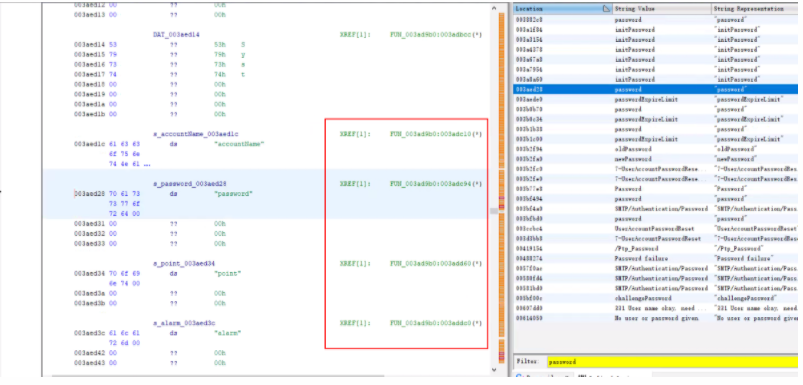
The key is to obtain the switch statement address through the feature code 7D ?? 03 A6 4E 80 04 20, and then based on the address relationship, we can calculate the firmware base address as 0x60000. After setting the base address, the strings can be referenced normally.
Method 2: Determine Base Address by Brute Force Search of String References
The general principle is to first obtain the string addresses in the firmware, and then test different base addresses to see how many times the strings are referenced under that base address; the higher the reference count, the greater the probability that the address is the base address, which has certain universality.According to the readme, it works better for ARM firmware, I tested two PowerPC firmware and was able to correctly obtain the base address, but parameters need to be set correctly, especially endianness and string length range. Since it’s a brute force search calculation, it’s CPU intensive, taking at least half an hour for one calculation, project address:https://github.com/sgayou/rbasefind 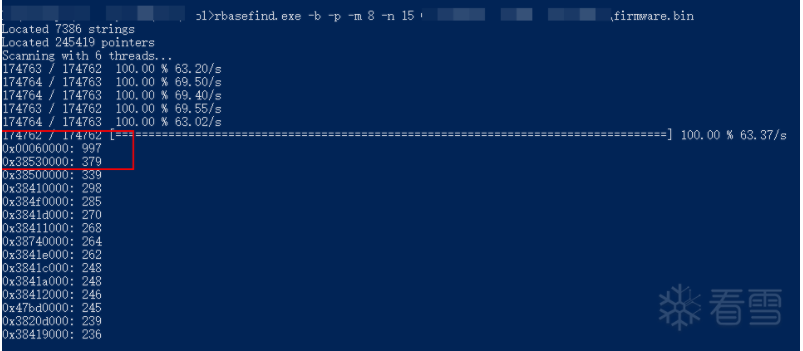
0x02 IDA Pro Decompilation Functions
After setting the correct base address, Ghidra can basically perform static disassembly analysis normally, and also has pseudocode functionality, but I am not familiar with it, and there seem to be few plugins. I still prefer IDA Pro, but IDA cannot automatically disassemble, manual make code is required. Below are two methods to make IDA decompile functions:
Method 1: Borrow Disassembly Results from Ghidra
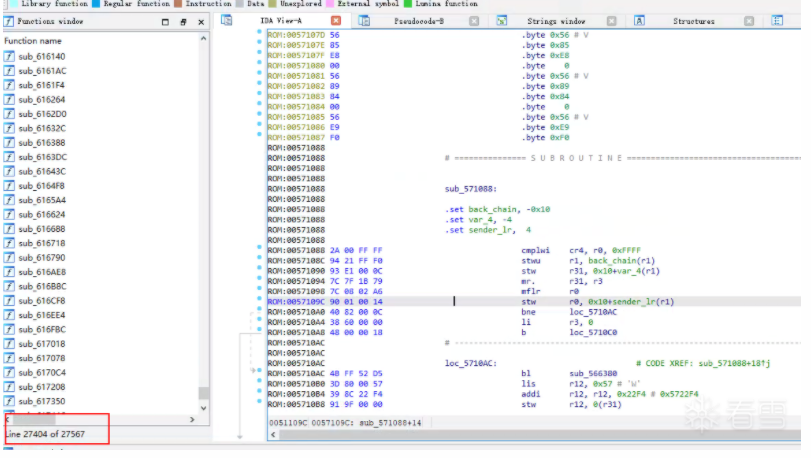
You can export the function address information disassembled by Ghidra, and then use a script to import it into IDA to make code.Method to export function list in Ghidra: Window->Functions right-click in Functions window Export->Export to CSV to save.The script to import Ghidra functions into IDA is as follows:
#coding=utf-8import csvimport ida_funcsimport ida_kernwin '''ida pro 7.5 python3''' def get_funcs_addr(csv_path): starts = [] with open(csv_path, 'r') as file: reader = csv.DictReader(file) for row in reader: start = int(row['Location'], 16) starts.append(start) return starts def add_ida_funcs(starts): for index, start in enumerate(starts): ida_funcs.add_func(start) def main(): file_path=ida_kernwin.ask_file(1, "*", "ghidra export functions csv file path") starts = get_funcs_addr(file_path) add_ida_funcs(starts) print("[+] done") if __name__ == "__main__": main()Just fill in the path of the CSV file exported from Ghidra.
Method 2: Use PowerPC Function Prologue Feature Codes
Most functions generated by compilers may have some fixed instructions in the function header, such as the x86 platform’s mov edi, edi; push ebp, this situation also exists in PowerPC. The feature code for PowerPC is stwu rS, rD(n); mflr r0, we can use this feature to write IDA Python scripts to make IDA automatically disassemble the firmware to generate functions.
#coding=utf-8import reimport ida_kernwinimport ida_funcsimport ida_ida '''ida pro 7.5 python3''' def find_func_prologue(file_path, pattern): f = open(file_path, "rb") image_data = f.read() f.close() bytes_data = bytearray(image_data) re_pattern = re.compile(pattern) addrs = [] for match_obj in re_pattern.finditer(bytes_data): addrs.append(match_obj.start()) return addrs def auto_make_function(prolog_addrs): for addr in prolog_addrs: ida_funcs.add_func(ida_ida.inf_get_min_ea() + addr) def main(): ppc_prologue = b"\x94.{2}\xF8\x7C\x08\x02\xA6" file_path=ida_kernwin.ask_file(1, "*", "firmware path") addrs = find_func_prologue(file_path, ppc_prologue) print("[+] find %d func prologue"%len(addrs)) auto_make_function(addrs) print("[+] done") if __name__ == "__main__": main()Actually, I found a similar script on GitHub:(https://github.com/maddiestone/IDAPythonEmbeddedToolkit/blob/master/define_code_functions.py)But this was written for IDA 7.0, I originally wanted to port it over, but after some effort, I decided to write a simpler one myself.
0x03 Optimize Library Function Recognition through Signature
Since firmware files do not have import tables like PE or ELF files, IDA also does not have built-in sig files, all functions must be manually identified, which is too much work. However, the powerful IDA Pro can create sig files by itself. After some effort, I was able to recognize some string processing functions in libc, here are the methods I tried.(1) Search for PowerPC related sig libraries:https://github.com/IridiumXOR/uclibc-sig(2) Install Linux PowerPC cross-compilation libraries, extract lib.(3) Based on the string Copyright string: “Copyright MGC 2004 – Nucleus PLUS – MPC860 Diab C/C++ v. 1.14” in the firmware, install the VxWorks Tornado development environment and extract lib.In the end, the sig made from the lib extracted from the Tornado development environment was effective. Here is the download address for Tornado.V2.2.POWERPC:https://pan.baidu.com/s/17ulZN#list/path=%2FI successfully installed and ran it in an XP environment, the extraction path is as follows C:\Tornado\host\diab\PPCCSThe effect is as follows: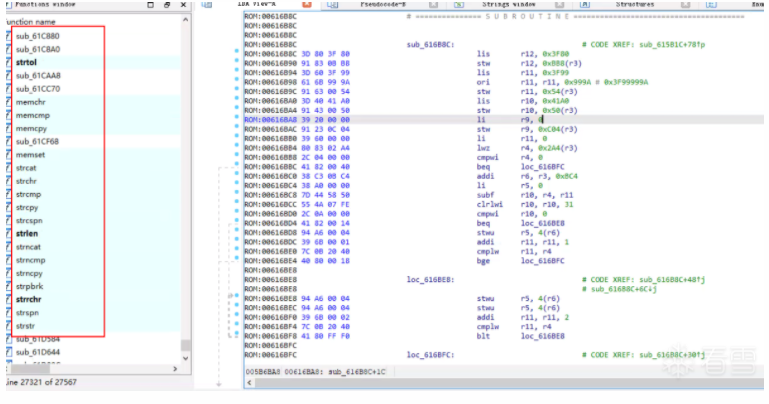
0x04 TODO
Due to the lack of an actual operating environment, dynamic analysis has not been performed here, which is quite difficult. In the future, I may try to see if I can use qemu-system mode to run the firmware for dynamic debugging.
0x05 References
1. Analysis of eCos Firmware Loading Address of Zyxel Device
https://cq674350529.github.io/2021/03/04/Zyxel%E8%AE%BE%E5%A4%87eCos%E5%9B%BA%E4%BB%B6%E5%8A%A0%E8%BD%BD%E5%9C%B0%E5%9D%80%E5%88%86%E6%9E%90/
2. Research on ARM Device Firmware Load Base Address Positioning by Zhu Ruijin
http://gb.oversea.cnki.net/KCMS/detail/detail.aspx?filename=1018812112.nh&dbcode=CDFD&dbname=CDFDREF
3. PowerPC C Reverse Engineering Guide
https://bbs.pediy.com/thread-191928.htm
4. Function Recognition in Reverse Engineering of IoT Devices
http://blog.nsfocus.net/function-recognition-reverse-engineering-iot-equipment/

– End –

Kanxue ID: KenLi
https://bbs.pediy.com/user-home-627167.htm
*This article is original by Kanxue Forum KenLi, please indicate the source from the Kanxue community when reprinting.
# Previous Recommendations
-
Fastbin_Attack of 2017 0ctf babyheap
-
Simple Utilization of Symbol Execution in Automated Pwn
-
Class Loading Mechanism Based on Virtual Machine to Achieve Hotfix
-
Android System Kernel Extraction and Reverse Engineering
-
Analysis of Heap-Based Buffer Overflow in Sudo (Baron Samedit) — POC Verification
 Public Account ID: ikanxueOfficial Weibo: Kanxue SecurityBusiness Cooperation: [email protected]
Share
Like

Watch
Click “Read the original text” to learn more!