🚀 Comprehensive Guide to Selecting SerDes Chips Based on Screen/Camera Resolution (Formula Derivation + Practical Cases)
1. Why Select SerDes Based on Resolution?
First, let’s briefly discuss the background:
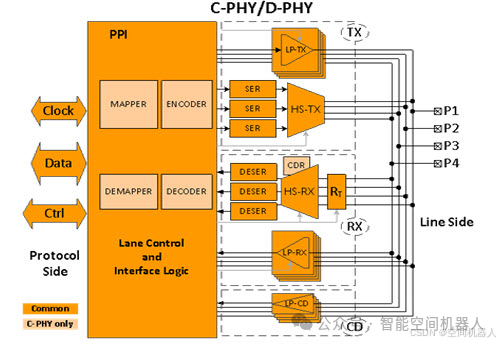
- SerDes (Serializer/Deserializer) essentially compresses/decompresses data bandwidth, transmitting high-speed data (screen images, camera video) to another location.
- The higher the resolution, the higher the refresh rate/frame rate, and the greater the color depth, the more data needs to be transmitted.
- Therefore, the SerDes chip must be able to handle the bandwidth, otherwise the image will either lag, lose data, or display artifacts!
Thus, calculating the bandwidth requirements is the first step in selecting a SerDes!
2. How to Calculate Bandwidth? 📈 (Here Comes the Formula)
The basic formula for total bandwidth requirement:

Where:
- Color depth: Generally, cameras are 10bit or 12bit, while screens are usually 8bit or 10bit.
- Overhead factor: The additional bandwidth consumed by encoding/synchronization signals, typically taken as 1.2~1.5 times.
A simplified mnemonic for memory:
“Width × Height × Frame Rate × Color Depth × 1.25”
Isn’t it easier to understand than memorizing the formula!
3. Specific Examples (Camera, Screen) 🎯
1. Display Side
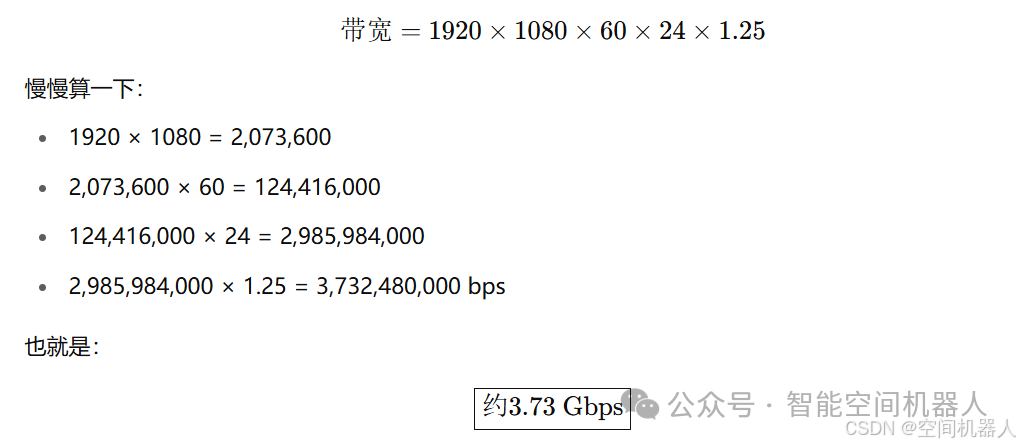
Assuming the screen parameters are:
- Resolution: 1920 × 1080 (Full HD)
- Refresh Rate: 60Hz
- Color Depth: 24bit (i.e., 8bit for each RGB pixel)
How to calculate bandwidth?
Conclusion:
- You need to select a SerDes chip that can support at least 4Gbps per channel.
- For example, TI’s DS90UB953 (supports up to 6Gbps), or higher-end FPD-Link III/IV chips.
2. Camera Side
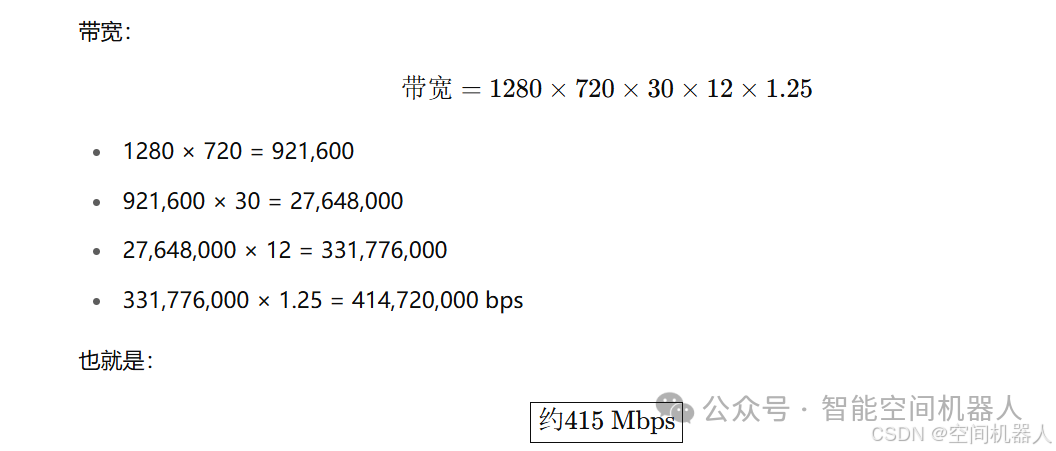
Assuming the camera parameters are:
- Resolution: 1280 × 720 (720p)
- Frame Rate: 30FPS
- Color Depth: 12bit (RAW12)
Bandwidth:
Conclusion:
- Only about 400Mbps bandwidth is needed for the SerDes, so you can choose some mid-to-low-speed options, like DS90UB933 or MAX96705.
4. Summary of Selection Thought Process 🎯
| Item | Description |
|---|---|
| Calculate Total Bandwidth | Resolution × Frame Rate × Color Depth × 1.2~1.5 |
| Select SerDes | Select chips that support this bandwidth and leave some margin (suggest leaving over 20%) |
| Pay Attention to Channel Count | Check if it is a single-channel SerDes or multi-channel composite (e.g., 4:1 multiplexing) |
| Pay Attention to Interface Protocol | For example, MIPI CSI-2, D-PHY/CPHY, FPD-Link III, GMSL |
| Pay Attention to Environmental Conditions | Automotive-grade temperature range, EMI interference requirements, preferably choose those with built-in Forward Error Correction (FEC) |
5. Final Tips 🌟
- Never just look at the chip’s “maximum Gbps”; consider the actual application Gbps!!!
- High-resolution, high-frame-rate transmission usually requires multiple parallel SerDes (e.g., 4-in-1)!
- Don’t forget to consider synchronization signals and encoding overhead (for example, 8b/10b encoding itself occupies an additional 20% bandwidth)
- For high-bandwidth transmission, use well-shielded coaxial cables/shielded twisted pairs as much as possible
🎈 In Summary:
Bandwidth = Resolution × Frame Rate × Color Depth × Overhead, calculate bandwidth first, then choose the chip!