🌐 Complete Guide to Network Protocols: In-Depth Conversations from HTTP Long and Short Connections to TCP-UDP
This article adopts a conversational format, through the Q&A of Xiao Li and Xiao Wang, to explain core concepts such as network protocols and long/short connections in a simple and accessible manner, helping readers establish a complete knowledge system of networks.
Introduction
In Java backend development, network communication is an unavoidable topic. Whether it is HTTP interface calls, database connections, or communication between microservices, it all relies on the support of network protocols. Today, let us follow the conversation between Xiao Li and Xiao Wang to deeply understand the core concepts of network protocols.
1. Is HTTP a Long Connection or a Short Connection?
Xiao Li: Today a colleague said that HTTP is a long connection, but I remember that HTTP is a short connection. Each time an HTTP interface goes from request to response, it is considered complete, and the next request is a new connection. Am I misunderstanding?
Xiao Wang: Haha, that’s a great question! Your understanding is basically correct, but some details need to be added.
HTTP/1.0 is indeed a short connection; a new TCP connection is established for each request, and the connection is immediately closed after the request is completed. It’s like dialing a new number every time you make a call.
However, with HTTP/1.1, the Connection: keep-alive mechanism was introduced, allowing multiple HTTP requests to be sent over a single TCP connection, which is known as “HTTP long connection”.
However, it is important to note that the term “long connection” here is a relative concept:
- The long connection of HTTP is based on the reuse of TCP connections
- The lifecycle of the connection is still controlled by the HTTP protocol
- The server may set a timeout, closing the connection after the timeout
Xiao Li: What about HTTP/2?
Xiao Wang: HTTP/2 goes a step further by introducing the Multiplexing mechanism, which allows multiple HTTP requests and responses to be processed simultaneously over a single TCP connection, greatly improving efficiency.
So to summarize:
- HTTP/1.0: Short connection
- HTTP/1.1: Supports long connection (keep-alive)
- HTTP/2: True long connection + multiplexing
2. Differences Between JDBC, CMPP, WebSocket, and HTTP
Xiao Li: I know that JDBC connections, CMPP connections, and WebSocket are long connections, which is quite intuitive. What are the differences between them and HTTP?
Xiao Wang: That’s a good question! They are indeed all long connections, but their application scenarios and implementation mechanisms differ:
1. JDBC Connection
// JDBC connection pool example
@Configuration
public class DataSourceConfig {
    @Bean
    public DataSource dataSource() {
        HikariConfig config = new HikariConfig();
        config.setJdbcUrl("jdbc:mysql://localhost:3306/test");
        config.setUsername("root");
        config.setPassword("password");
        config.setMaximumPoolSize(20); // Connection pool size
        config.setMinimumIdle(5);      // Minimum idle connections
        return new HikariDataSource(config);
    }
}
Characteristics:
- Based on TCP connections
- Connection pool management, reuse connections
- Supports transaction processing
- Connection lifecycle is relatively long (minutes to hours)
2. CMPP Connection (SMS Gateway Protocol)
// CMPP connection example
public class CMPPClient {
    private Socket socket;
    private DataInputStream in;
    private DataOutputStream out;

    public void connect() throws IOException {
        socket = new Socket("sms.gateway.com", 7890);
        in = new DataInputStream(socket.getInputStream());
        out = new DataOutputStream(socket.getOutputStream());
        // Send login request
        sendLoginRequest();
    }
}
Characteristics:
- Based on TCP long connection
- Specifically for SMS services
- Requires heartbeat keep-alive
- High stability requirements for connections
3. WebSocket Connection
// WebSocket client example
const ws = new WebSocket('ws://localhost:8080/websocket');
ws.onopen = function() {
    console.log('Connection established');
};
ws.onmessage = function(event) {
    console.log('Message received:', event.data);
};
Characteristics:
- Based on HTTP upgrade protocol
- Full-duplex communication
- Good real-time performance
- Suitable for chat, push, and other scenarios
4. Comparison with HTTP
| Feature | HTTP | JDBC | CMPP | WebSocket |
|---|---|---|---|---|
| Protocol Layer | Application Layer | Application Layer | Application Layer | Application Layer |
| Underlying Transport | TCP | TCP | TCP | TCP |
| Connection Method | Request-Response | Long Connection | Long Connection | Long Connection |
| Communication Mode | Unidirectional | Bidirectional | Bidirectional | Full Duplex |
| Applicable Scenarios | Web Services | Database Operations | SMS Services | Real-time Communication |
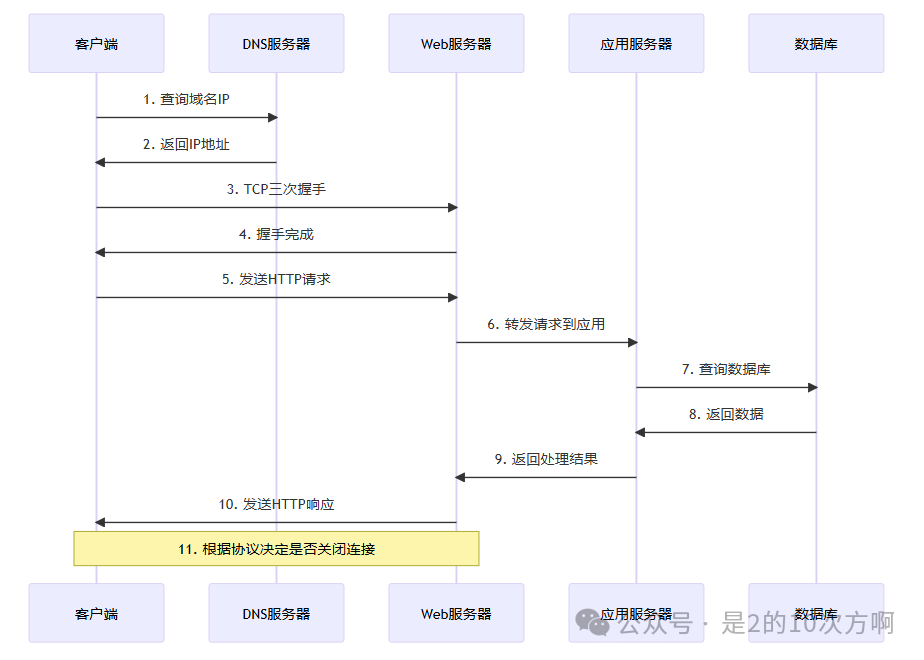
3. Complete Lifecycle of an HTTP Request
Xiao Li: In web development, HTTP interface development is very common. I might only focus on business logic usually. Can you explain in detail the entire process from initiating a request to receiving a response? What do the client and server do during this process?
Xiao Wang: Sure! Let me illustrate the complete lifecycle of an HTTP request with a specific example.
Scenario: User accesses <span>http://www.example.com/api/users</span>
1. DNS Resolution Phase
Client → DNS Server: Query IP address of www.example.com
DNS Server → Client: Returns 192.168.1.100
2. TCP Connection Establishment (Three-Way Handshake)
Client → Server: SYN=1, seq=x
Server → Client: SYN=1, ACK=1, seq=y, ack=x+1
Client → Server: ACK=1, seq=x+1, ack=y+1
3. HTTP Request Sending
GET /api/users HTTP/1.1
Host: www.example.com
User-Agent: Mozilla/5.0 (Windows NT 10.0; Win64; x64)
Accept: application/json
Connection: keep-alive
4. Server Processing Flow
@RestController
public class UserController {

    @GetMapping("/api/users")
    public ResponseEntity<List<User>> getUsers() {
        // 1. Receive HTTP request
        // 2. Parse request parameters
        // 3. Business logic processing
        List<User> users = userService.findAll();
        // 4. Construct response
        return ResponseEntity.ok(users);
    }
}
5. HTTP Response Return
HTTP/1.1 200 OK
Content-Type: application/json
Content-Length: 1234
Connection: keep-alive

[
    {"id": 1, "name": "Zhang San", "email": "[email protected]"},
    {"id": 2, "name": "Li Si", "email": "[email protected]"}
]
6. Connection Handling
- HTTP/1.0: Immediately close TCP connection
- HTTP/1.1: Keep connection (keep-alive), waiting for the next request
- HTTP/2: Reuse connection, can handle multiple requests simultaneously
Complete Sequence Diagram
4. Differences in Timeout Settings
Xiao Li: I also learned about a timeout concept. What is the relationship between the timeout of long connections and the timeout of interfaces?
Xiao Wang: This is a very practical question! There are indeed multiple levels of timeout, which can be confusing.
1. Different Levels of Timeout
HTTP Interface Timeout
// RestTemplate configuration timeout
@Configuration
public class RestTemplateConfig {
    @Bean
    public RestTemplate restTemplate() {
        HttpComponentsClientHttpRequestFactory factory =
            new HttpComponentsClientHttpRequestFactory();
        factory.setConnectTimeout(5000);    // Connection timeout: 5 seconds
        factory.setReadTimeout(10000);      // Read timeout: 10 seconds
        return new RestTemplate(factory);
    }
}
TCP Connection Timeout
// JDBC connection pool timeout configuration
@Configuration
public class DataSourceConfig {
    @Bean
    public DataSource dataSource() {
        HikariConfig config = new HikariConfig();
        config.setConnectionTimeout(30000);     // Connection timeout: 30 seconds
        config.setIdleTimeout(600000);          // Idle timeout: 10 minutes
        config.setMaxLifetime(1800000);         // Maximum lifetime: 30 minutes
        return new HikariDataSource(config);
    }
}
2. Hierarchical Relationship of Timeout Settings
Application Layer Timeout (HTTP Interface Timeout)
    ↓
Transport Layer Timeout (TCP Connection Timeout)
    ↓
Network Layer Timeout (IP Packet Timeout)
3. Practical Case Analysis
Scenario: Calling an HTTP interface with a timeout set to 10 seconds
try {
    ResponseEntity<String> response = restTemplate.getForEntity(
        "http://api.example.com/data", String.class);
    // Successfully processed
} catch (ResourceAccessException e) {
    // Possible timeout reasons:
    // 1. DNS resolution timeout
    // 2. TCP connection establishment timeout
    // 3. HTTP request sending timeout
    // 4. Server processing timeout
    // 5. HTTP response receiving timeout
}
4. Best Practices for Timeout Settings
// Timeout configuration suggestions for different scenarios
public class TimeoutConfig {

    // Internal service calls (local area network)
    public static final int INTERNAL_SERVICE_TIMEOUT = 5000;  // 5 seconds

    // External API calls (internet)
    public static final int EXTERNAL_API_TIMEOUT = 15000;     // 15 seconds

    // Database operations
    public static final int DATABASE_TIMEOUT = 30000;         // 30 seconds

    // File upload/download
    public static final int FILE_TRANSFER_TIMEOUT = 300000;   // 5 minutes
}
5. Detailed Explanation of Network Protocol System
Xiao Li: I think both HTTP and JDBC, CMPP belong to network protocols. Can you explain the network protocols in detail, including network layering and the relationship between HTTP, TCP, and UDP?
Xiao Wang: That’s a very good question! Network protocols indeed form a complete system. Let me use a diagram to help you understand.
1. OSI Seven-Layer Model vs TCP/IP Four-Layer Model
OSI Seven-Layer Model                    TCP/IP Four-Layer Model
┌─────────────────┐           ┌─────────────────┐
│   Application Layer │           │   Application Layer │ ← HTTP, FTP, SMTP, JDBC
├─────────────────┤           ├─────────────────┤
│   Presentation Layer │           │   Transport Layer │ ← TCP, UDP
├─────────────────┤           ├─────────────────┤
│   Session Layer │           │   Network Layer │ ← IP, ICMP
├─────────────────┤           ├─────────────────┤
│   Transport Layer │           │   Network Interface Layer │ ← Ethernet, WiFi
├─────────────────┤           └─────────────────┘
│   Network Layer │
├─────────────────┤
│   Data Link Layer │
├─────────────────┤
│   Physical Layer │
└─────────────────┘
2. Detailed Explanation of Protocols at Each Layer
Application Layer Protocols
// HTTP protocol example
@RestController
public class ApiController {
    @GetMapping("/api/data")
    public ResponseEntity<Map<String, Object>> getData() {
        Map<String, Object> response = new HashMap<>();
        response.put("status", "success");
        response.put("data", "Hello World");
        return ResponseEntity.ok(response);
    }
}
Comparison of Transport Layer Protocols
| Feature | TCP | UDP |
|---|---|---|
| Connection Method | Connection-oriented | Connectionless |
| Reliability | Reliable transmission | Unreliable transmission |
| Orderliness | Guarantees order | Does not guarantee order |
| Flow Control | Yes | No |
| Congestion Control | Yes | No |
| Application Scenarios | HTTP, FTP, SMTP | DNS, DHCP, Video Streaming |
Network Layer Protocols
// IP address handling example
public class NetworkUtils {
    public static boolean isValidIP(String ip) {
        try {
            InetAddress.getByName(ip);
            return true;
        } catch (UnknownHostException e) {
            return false;
        }
    }

    public static String getLocalIP() {
        try {
            return InetAddress.getLocalHost().getHostAddress();
        } catch (UnknownHostException e) {
            return "127.0.0.1";
        }
    }
}
3. Data Encapsulation in the Protocol Stack
Application Data
    ↓
HTTP Header + Application Data
    ↓
TCP Header + HTTP Header + Application Data
    ↓
IP Header + TCP Header + HTTP Header + Application Data
    ↓
Ethernet Header + IP Header + TCP Header + HTTP Header + Application Data
4. Actual Network Packet Analysis
# Use Wireshark or tcpdump to capture packets
tcpdump -i eth0 -w capture.pcap port 80
Example of packet capture result:
Frame 1: 74 bytes on wire (592 bits)
Ethernet II, Src: 00:11:22:33:44:55, Dst: aa:bb:cc:dd:ee:ff
Internet Protocol Version 4, Src: 192.168.1.100, Dst: 93.184.216.34
Transmission Control Protocol, Src Port: 54321, Dst Port: 80
Hypertext Transfer Protocol
    GET /api/users HTTP/1.1\r\n
    Host: example.com\r\n
    User-Agent: Mozilla/5.0\r\n
    \r\n
5. Application of Network Protocols in Java
// Using Socket for TCP communication
public class TCPServer {
    public static void main(String[] args) throws IOException {
        ServerSocket serverSocket = new ServerSocket(8080);
        System.out.println("Server started, listening on port 8080");

        while (true) {
            Socket clientSocket = serverSocket.accept();
            new Thread(() -> handleClient(clientSocket)).start();
        }
    }

    private static void handleClient(Socket clientSocket) {
        try (BufferedReader in = new BufferedReader(
                new InputStreamReader(clientSocket.getInputStream()));
             PrintWriter out = new PrintWriter(clientSocket.getOutputStream(), true)) {

            String inputLine;
            while ((inputLine = in.readLine()) != null) {
                System.out.println("Received: " + inputLine);
                out.println("Server reply: " + inputLine);
            }
        } catch (IOException e) {
            e.printStackTrace();
        }
    }
}
6. Network Layer Attribution of Various Protocols
Xiao Li: Where do HTTP, JDBC, CMPP, Dubbo, WebSocket, WebService, and other calls belong in the network layers?
Xiao Wang: That’s a good question! These protocols indeed all belong to the application layer, but they differ in implementation details. Let me explain in detail:
Classification of Application Layer Protocols
Application Layer Protocol Stack
┌─────────────────────────────────────────────────────────┐
│                    Application Layer (Application Layer)            │
├─────────────────────────────────────────────────────────┤
│ HTTP/HTTPS    │ WebSocket │ WebService │ Dubbo │ JDBC   │
│ REST API      │           │ SOAP       │ RPC   │ CMPP   │
│ JSON/XML      │           │ WSDL       │       │        │
└─────────────────────────────────────────────────────────┘
Detailed Analysis of Each Protocol
1. HTTP/HTTPS
// HTTP belongs to the application layer, based on TCP transmission
@RestController
public class HttpController {
    @GetMapping("/api/data")
    public ResponseEntity<String> getData() {
        return ResponseEntity.ok("HTTP response");
    }
}
- Network Layer: Application Layer
- Transport Layer: TCP (Ports 80/443)
- Characteristics: Request-response model, stateless
2. WebSocket
// WebSocket is based on HTTP upgrade, but after establishment, it is an independent protocol
@ServerEndpoint("/websocket")
public class WebSocketServer {

    @OnOpen
    public void onOpen(Session session) {
        System.out.println("WebSocket connection established");
    }

    @OnMessage
    public void onMessage(String message, Session session) {
        // Full-duplex communication
        session.getAsyncRemote().sendText("Message received: " + message);
    }
}
- Network Layer: Application Layer
- Transport Layer: TCP (Ports 80/443, upgraded via HTTP)
- Characteristics: Full-duplex communication, stateful
3. WebService (SOAP)
// WebService uses SOAP protocol, based on XML
@WebService
public class UserService {

    @WebMethod
    public User getUserById(int id) {
        return new User(id, "Zhang San", "[email protected]");
    }
}
- Network Layer: Application Layer
- Transport Layer: HTTP/TCP or SMTP/TCP
- Characteristics: XML-based RPC, cross-platform
4. Dubbo
// Dubbo is Alibaba's RPC framework
@Service
public class UserServiceImpl implements UserService {

    @Override
    public User getUserById(int id) {
        return new User(id, "Li Si", "[email protected]");
    }
}
- Network Layer: Application Layer
- Transport Layer: TCP (Default port 20880)
- Characteristics: High-performance RPC, supports various serialization
5. JDBC
// JDBC is the database connection standard
public class DatabaseConnection {
    public Connection getConnection() throws SQLException {
        return DriverManager.getConnection(
            "jdbc:mysql://localhost:3306/test",
            "root", "password"
        );
    }
}
- Network Layer: Application Layer
- Transport Layer: TCP (MySQL default 3306)
- Characteristics: Database access standard, supports transactions
6. CMPP
// CMPP is the SMS gateway protocol
public class CMPPClient {
    private Socket socket;

    public void connect() throws IOException {
        socket = new Socket("sms.gateway.com", 7890);
        // Send CMPP login request
        sendLoginRequest();
    }
}
- Network Layer: Application Layer
- Transport Layer: TCP (Port 7890)
- Characteristics: Protocol specifically for SMS services
Summary of Protocol Comparison
| Protocol | Network Layer | Transport Layer | Port | Characteristics | Application Scenarios |
|---|---|---|---|---|---|
| HTTP | Application Layer | TCP | 80/443 | Request-response, stateless | Web services |
| WebSocket | Application Layer | TCP | 80/443 | Full-duplex, stateful | Real-time communication |
| WebService | Application Layer | HTTP/TCP | 80/443 | XML-RPC, cross-platform | Enterprise integration |
| Dubbo | Application Layer | TCP | 20880 | High-performance RPC | Microservices |
| JDBC | Application Layer | TCP | 3306/5432 | Database access | Data persistence |
| CMPP | Application Layer | TCP | 7890 | SMS gateway | SMS services |
Protocol Selection in Actual Development
// Protocol selection for different scenarios
public class ProtocolSelector {

    // Web front-end calls backend API
    public void webApiCall() {
        // Selection: HTTP REST API
        RestTemplate restTemplate = new RestTemplate();
        ResponseEntity<String> response = restTemplate.getForEntity(
            "http://api.example.com/users", String.class);
    }

    // Microservice calls
    public void microserviceCall() {
        // Selection: Dubbo RPC
        @Reference
        private UserService userService;
        User user = userService.getUserById(1);
    }

    // Real-time communication
    public void realtimeCommunication() {
        // Selection: WebSocket
        WebSocket webSocket = new WebSocket("ws://localhost:8080/ws");
    }

    // Database operations
    public void databaseOperation() {
        // Selection: JDBC
        Connection conn = DriverManager.getConnection(url, user, password);
    }
}
Xiao Li: So these protocols are all in the application layer. What are the differences between them?
Xiao Wang: Although they are all in the application layer, their design goals and implementation methods differ:
- HTTP: General web protocol, suitable for browser-server communication
- WebSocket: Real-time bidirectional communication, suitable for chat and push
- WebService: Enterprise-level integration, suitable for heterogeneous systems
- Dubbo: High-performance RPC, suitable for microservice architecture
- JDBC: Database access standard, focused on data operations
- CMPP: Industry-specific protocol, focused on SMS services
The choice of protocol mainly depends on your specific needs and application scenarios!
6. Best Practices in Actual Development
1. HTTP Client Configuration
@Configuration
public class HttpClientConfig {

    @Bean
    public HttpClient httpClient() {
        return HttpClients.custom()
            .setConnectionManager(createConnectionManager())
            .setRetryHandler(new DefaultHttpRequestRetryHandler(3, true))
            .build();
    }

    private PoolingHttpClientConnectionManager createConnectionManager() {
        PoolingHttpClientConnectionManager manager =
            new PoolingHttpClientConnectionManager();
        manager.setMaxTotal(200);                    // Maximum number of connections
        manager.setDefaultMaxPerRoute(20);           // Maximum connections per route
        manager.setValidateAfterInactivity(30000);   // Idle connection validation interval
        return manager;
    }
}
2. Database Connection Pool Configuration
@Configuration
public class DatabaseConfig {

    @Bean
    @Primary
    public DataSource primaryDataSource() {
        HikariConfig config = new HikariConfig();
        config.setJdbcUrl("jdbc:mysql://localhost:3306/primary");
        config.setUsername("root");
        config.setPassword("password");

        // Connection pool configuration
        config.setMaximumPoolSize(20);
        config.setMinimumIdle(5);
        config.setConnectionTimeout(30000);
        config.setIdleTimeout(600000);
        config.setMaxLifetime(1800000);

        // Connection testing
        config.setConnectionTestQuery("SELECT 1");
        config.setValidationTimeout(5000);

        return new HikariDataSource(config);
    }
}
3. Network Monitoring and Diagnosis
@Component
public class NetworkMonitor {

    private static final Logger logger = LoggerFactory.getLogger(NetworkMonitor.class);

    public void monitorConnection(String host, int port) {
        try (Socket socket = new Socket()) {
            long startTime = System.currentTimeMillis();
            socket.connect(new InetSocketAddress(host, port), 5000);
            long endTime = System.currentTimeMillis();

            logger.info("Connection to {}:{} successful, time taken: {}ms", host, port, endTime - startTime);
        } catch (IOException e) {
            logger.error("Connection to {}:{} failed: {}", host, port, e.getMessage());
        }
    }

    public void pingHost(String host) {
        try {
            InetAddress address = InetAddress.getByName(host);
            boolean reachable = address.isReachable(5000);
            logger.info("Host {} reachability: {}", host, reachable);
        } catch (IOException e) {
            logger.error("Ping to host {} failed: {}", host, e.getMessage());
        }
    }
}
Conclusion
Through today’s conversation, we have deeply understood:
- The development of the HTTP protocol: From the short connection of HTTP/1.0 to the multiplexing of HTTP/2
- Different types of long connections: JDBC, CMPP, and WebSocket each have their characteristics
- The complete lifecycle of an HTTP request: The entire process from DNS resolution to response return
- The hierarchical relationship of timeout settings: Timeout mechanisms at the application, transport, and network layers
- The network protocol system: The relationship between the OSI seven-layer model and the TCP/IP four-layer model
In actual development, understanding these network concepts is very important for:
- Performance optimization
- Problem troubleshooting
- Architecture design
- System monitoring
I hope today’s conversation helps you establish a complete knowledge system of networks!
Xiao Li: Thank you, Xiao Wang, I learned a lot today! Network protocols are indeed a deep field, but through your explanation, I feel much clearer.
Xiao Wang: You’re welcome! Network protocols are indeed the foundation of backend development. Understanding these concepts is very helpful for daily development and technology selection. If you encounter any network-related issues in the future, feel free to discuss them with me!
This article adopts a conversational format, using practical cases and code examples to help readers deeply understand the core concepts of network protocols. In actual development, it is recommended to choose the appropriate connection method and timeout configuration based on specific scenarios.