Comprehensive Analysis of the Open Source HTTP Load Testing Tool – Hurl
Hurl is an open-source command-line tool developed by Orange-OpenSource, designed to define, execute, and test HTTP requests in plain text format. It is popular in API testing, integration testing, and HTTP client scenarios due to its simple syntax and powerful features. Below is a detailed analysis of the Hurl tool, covering its core functionalities, features, use cases, installation methods, and pros and cons.
1. Core FeaturesThe design goal of Hurl is to describe HTTP requests in a concise plain text format, supporting request execution, response capture, and assertion validation. Its main features include:HTTP Request Execution: Supports various HTTP methods such as GET, POST, PUT, DELETE, and allows defining request headers, query parameters, form data, multipart form data, and request bodies.Response Assertions: Validates response headers, response bodies, and status codes using JSONPath, XPath, or regular expressions to ensure API behavior meets expectations.Value Capture: Extracts data (such as JSON fields or cookies) from responses and uses them as variables in subsequent requests, supporting dynamic testing scenarios.Template Variables: Allows defining variables (via –variable or –variables-file) that can be dynamically replaced in requests, enhancing test case reusability.Chained Execution of Multiple Requests: Supports defining multiple HTTP requests in a single file, executed in sequence, suitable for testing complex workflows.Cookie Management: Simulates cookie storage using –cookie and –cookie-jar options, supporting session management across requests.Retry Mechanism: Configures request retry strategies using –retry and –retry-interval to handle unstable networks or services.HTTP Version Control: Supports HTTP/1.0, HTTP/1.1, HTTP/2, and HTTP/3 (experimental), with the ability to specify the version via command-line options.Output Control: Supports outputting responses to files (–output), exporting as cURL commands (–to-curl), or outputting in JSON format (–json).Error Handling: Provides short or long format error messages (via –error-format) for easier debugging.
2. Technical CharacteristicsHurl is developed using the Rust programming language, ensuring excellent performance and memory safety. Its technical characteristics include:Cross-Platform Support: Compatible with Linux, macOS, and Windows, offering various installation methods (such as binary files, package managers, Cargo, etc.).Lightweight: The binary file size is small (for example, the Linux binary for version 6.1.1 is about 3.02 MB), making it suitable for CI/CD integration.Modular Design: Core functionalities are separated into hurl and hurlfmt (a formatting tool), facilitating extension.Open Source License: Licensed under Apache-2.0, allowing free use and modification.Active Maintenance: As of June 2025, the repository has 14.7k stars, 626 forks, with recent commits being active, and the latest version is 6.1.1 (released on March 19, 2025).
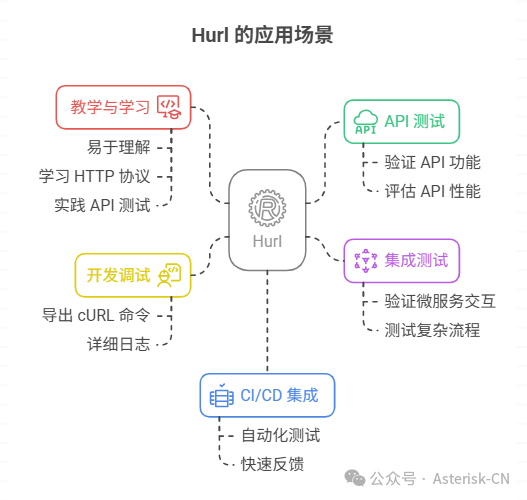
3. Use CasesAPI Testing: Validates the functionality, performance, and reliability of APIs through assertions, suitable for backend developers and testing engineers.Integration Testing: Supports chained execution of multiple requests to validate complex interactions in microservice architectures.Development Debugging: Quickly troubleshoot HTTP request issues by exporting cURL commands or detailed logs.CI/CD Integration: Its lightweight nature makes it easy to embed in continuous integration pipelines for automated test case execution.Teaching and Learning: The plain text format is simple and intuitive, making it suitable for beginners learning about HTTP protocols and API testing.
4. Installation MethodsHurl offers various installation methods to meet different user needs:Binary Installation (Linux/macOS):
INSTALL_DIR=/tmp
VERSION=6.1.1
curl --silent --location https://github.com/Orange-OpenSource/hurl/releases/download/$VERSION/hurl-$VERSION-x86_64-unknown-linux-gnu.tar.gz | tar xvz -C $INSTALL_DIR
export PATH=$INSTALL_DIR/hurl-$VERSION-x86_64-unknown-linux-gnu/bin:$PATH
Debian/Ubuntu Package Installation (Debian ≥12, Ubuntu ≥22.04):
VERSION=6.1.1
curl --location --remote-name https://github.com/Orange-OpenSource/hurl/releases/download/$VERSION/hurl_${VERSION}_amd64.deb
sudo apt update && sudo apt install ./hurl_${VERSION}_amd64.deb
Cargo Installation (requires Rust environment):
cargo install hurlNote: Some users have reported installation failures due to libxml dependencies; it is recommended to install the libxml2 development package.Package Managers: Supports Homebrew (macOS), APT (Debian/Ubuntu), Pacman (Arch Linux), etc.Source Compilation: Clone the source code from the GitHub repository and compile using the Rust toolchain.
5. Pros and Cons AnalysisProsUsability: The plain text format is intuitive, requiring no complex configuration, reducing the learning curve.Comprehensive Features: Covers HTTP requests, response validation, and dynamic variables, meeting various testing needs.Efficient Performance: Developed in Rust, ensuring high performance suitable for large-scale testing.Active Community: Frequent updates and issue fixes, with a broad user base.Cross-Platform and CI/CD Friendly: Multi-platform support and lightweight design facilitate automated integration.ConsFunctional Limitations: Some advanced features (like single request selection) need improvement; the existing –to-entry only supports execution up to a specified request.Installation Issues: Cargo installation may fail due to dependencies (like libxml2), requiring additional configuration.Scattered Documentation: Some documentation requires accessing separate repositories (like hurl-dev), which may increase search costs.Immature JVM Client: Incomplete feature implementation (like output coloring), limiting use cases.
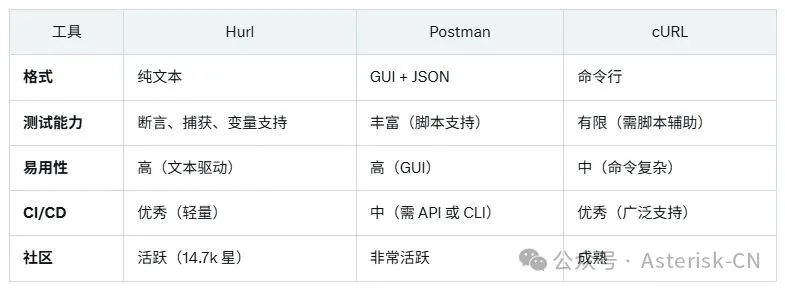
6. Comparison with Other Tools
8. Conclusion and RecommendationsHurl is a powerful and easy-to-use HTTP request testing tool, particularly suitable for developers and testing teams that need to quickly write and run API test cases. Its plain text format and Rust-driven performance make it excel in CI/CD pipelines. Despite issues with installation dependencies and some functional limitations, the active community and frequent updates ensure its long-term development.