2.5 Viewing Peripheral Registers
The internal peripheral values of the microcontroller can also be viewed in real-time through the “view” menu under “System Viewer” window, or by directly clicking the “System Viewer” window icon, allowing you to see the register values of the relevant internal peripherals of the microcontroller, as shown in Figure 2-13.
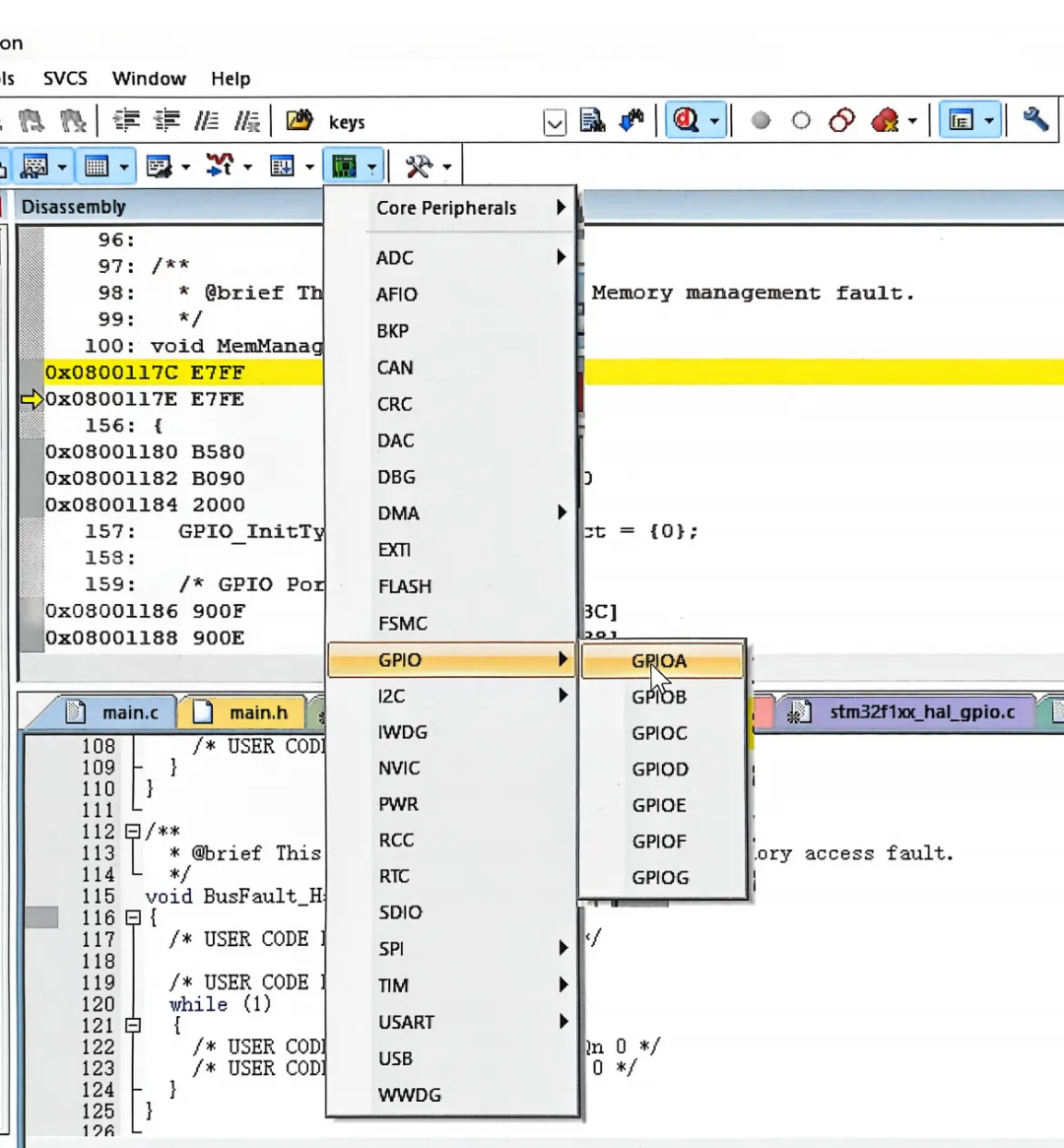
Figure2-13 System Viewer Window Register
If you click on the GPIO icon under GPIOA, you can see the register status of GPIOA, as shown in Figure 2-14.
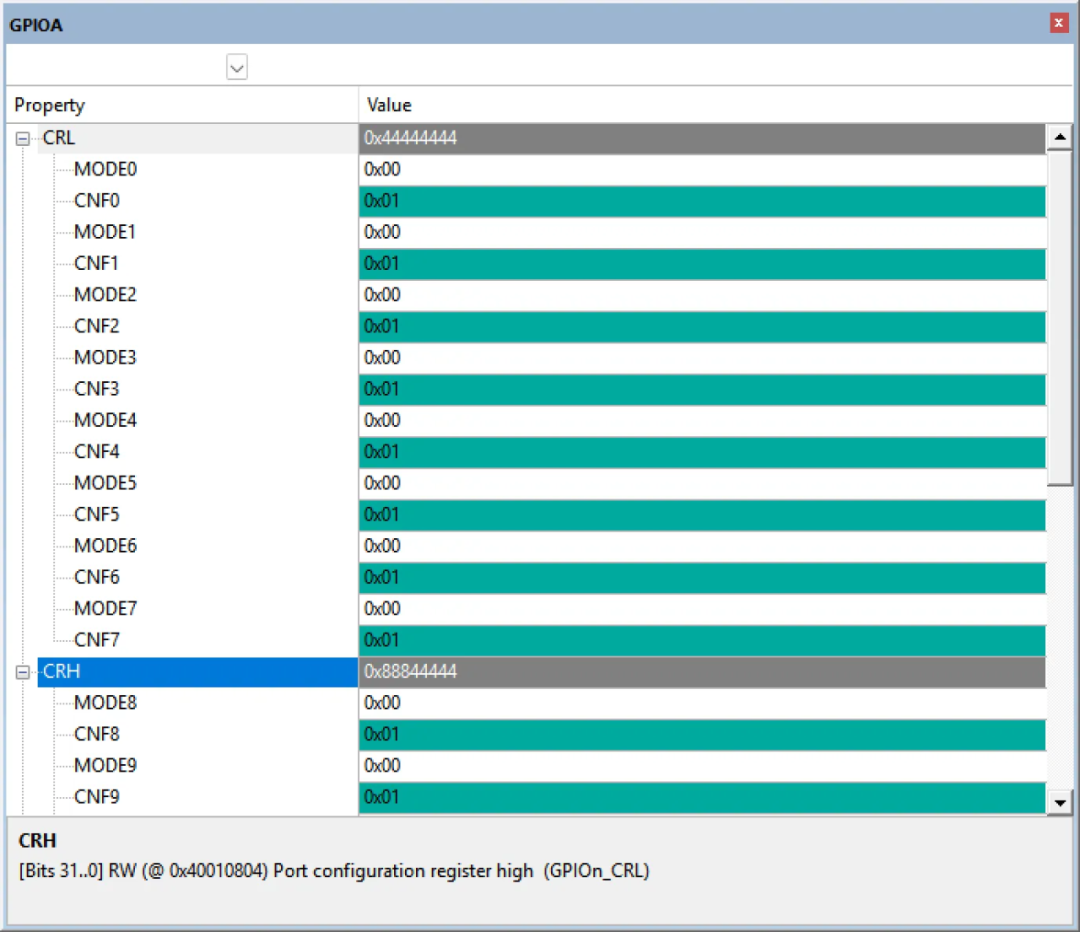
Figure2-14 GPIOA Register Status
2.6 Code Standards for HAL Project Code Generated by CubeMX
The project generated by CubeMX is generally divided into the following groups, as shown in Figure 2-15. Among them, “APPlication/MDK-ARM” stores the startup files for STM32, “APPlication/User/Core” stores user code, “Dirvers/STM32F1XX_HAL_Driver” stores the driver code for the HAL library, and “Dirvers/CMSIS” is used to store system initialization files.
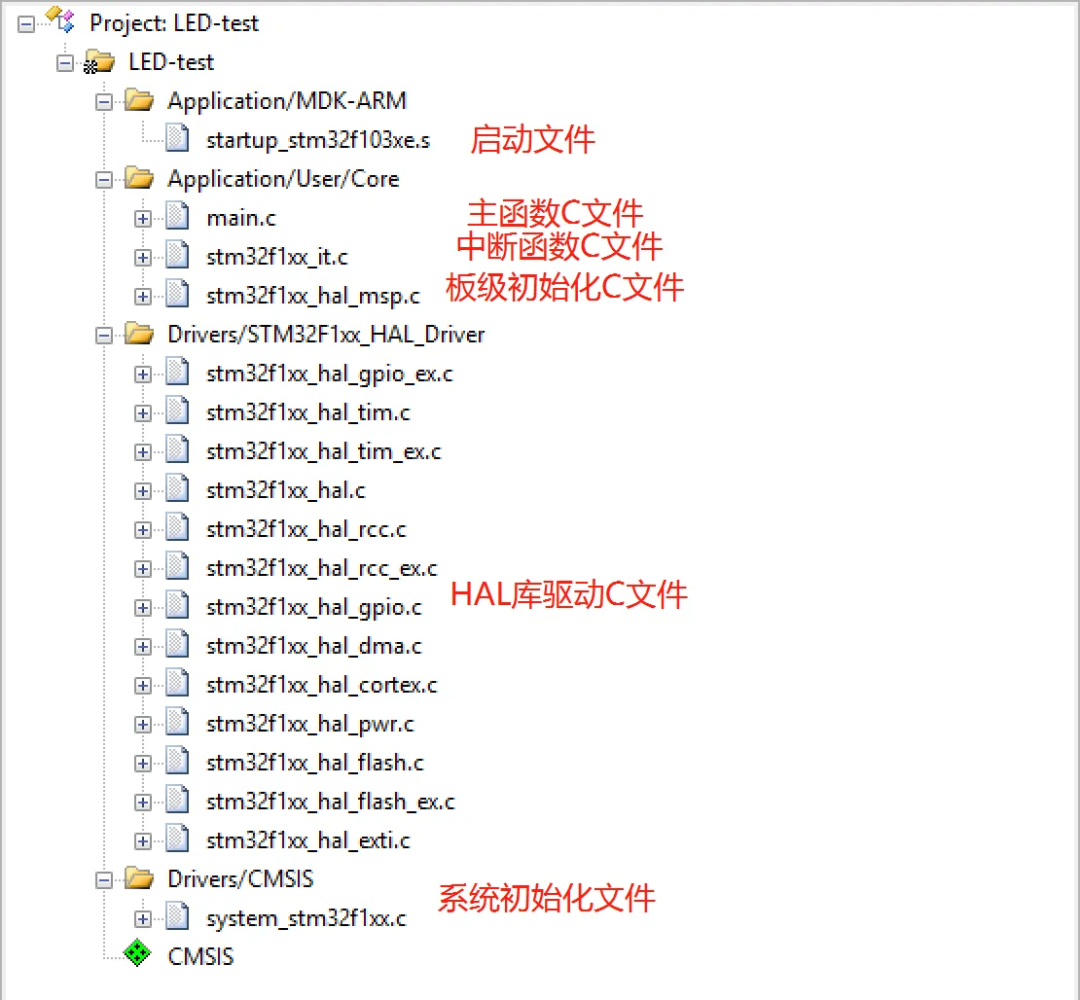
Figure2-15 CubeMX Generated Project Code File List
2.6.1 startup_stm32f103xe.s
This file is the startup file for STM32, written in assembly language. It contains information on the startup initialization and interrupt vectors for STM32, and typically, users do not need to modify or pay attention to the contents of this file.
2.6.2 main.c
The main.c file mainly contains the main function and the initialization functions for internal peripherals, which is also the main file for user code implementation. It can be seen that the code generated by CubeMX includes a lot of comments and has multiple locations marked for user use, as shown below.
/*Includes————————————————————-*/
#include “main.h”
/*Private includes—————————————————–*/
/* USER CODE BEGIN Includes */
/* USER CODE END Includes */
/*Private typedef——————————————————*/
/* USER CODE BEGIN PTD */
/* USER CODE END PTD */
/*Private define——————————————————-*/
/* USER CODE BEGIN PD */
/* USER CODE END PD */
/*Private macro——————————————————–*/
/* USER CODE BEGIN PM */
/* USER CODE END PM */
/*Private variables—————————————————-*/
/* USER CODE BEGIN PV */
/* USER CODE END PV */
Please note that the user function program code must be written between /* USER CODE BEGIN XXX */ and /* USER CODE END XXX */. If this is not done, when reopening CubeMX to add new pins or peripheral configurations, all code outside the user code will be cleared when CubeMX regenerates the code, as shown in Table 2-1.
Table2-1 User Code Area Analysis
|
Area |
Explanation |
Example |
|
Private includes |
Private header file area |
#include <stdlib.h> |
|
Private typedef |
Private data type area |
typedef unsigned int uint32_t; |
|
Private define |
Private definition area |
#define USE_FREERTOS 1 |
|
Private macro |
Private macro area |
#define MAX(a, b) (((a) > (b)) ? (a) : (b)) |
|
Private variables |
Private global variables |
int buff[10]; |
2.6.3 stm32f1xx_it.c
This file contains many functions similar to void XXXX_Handler(void), which are similar to the interrupt functions of the 51 microcontroller, such as void InterruptTimer0() interrupt 1. In the 51 microcontroller, the compiler identifies this function as an interrupt function by recognizing the “interrupt” keyword, linking the function address through “1” during linking. In the STM32 interrupt program, the HAL library has taken over all interrupts and has implemented a certain processing mechanism, allowing users to only need to write the corresponding callback functions in their own files (called through function pointers).
2.6.4 stm32f1xx_hal_msp.c
This file informs the HAL library about the hardware configuration and connection methods, and how to initialize them. It is the file that implements the hardware low-level drivers for the HAL library. Since users have already configured clocks, IO pins, and other functions in CubeMX, this part of the code is automatically generated after configuration through the CubeMX graphical interface.
2.6.5 Drivers/STM32F1xx_HAL_Driver
The files in this folder are the general driver libraries for all peripherals of the STM32F1 series microcontrollers. It provides standardized function interfaces (API) for operating peripherals, regardless of which pins are connected to which circuits or which clock sources are used; it focuses on the functional operations of the peripherals themselves.
This folder can be understood as the “arsenal” provided by ST, offering various operational interfaces (API) for peripherals (weapons, artillery, radar). It only informs users of what weapons are available and their basic operational methods, but does not tell users which bullet (pin) to load into which weapon or where to place it.
The “stm32f1xx_hal_msp.c” is the user’s “deployment plan”, where users can use either code or the CubeMX graphical interface to deploy which functional configuration is assigned to which “weapon” or “ammunition” (pin configuration), and what type of sight (interrupt priority) is used, etc.
2.7 Code Writing Standards
In the HAL project files generated by CubeMX, users need to follow the following three standards when writing code:
1. Do not modify the source code of the HAL library in the HAL_Driver folder; only make modifications in the APPlication files.
2. When modifying main.c, stm32f1xx_it.c, and stm32f1xx_hal_msp.c, follow the comment standards to prevent code loss when adding new features later.
3. Users can create new groups for their own code files.
2.8 Homework
1. Become proficient in the online debugging features of Keil software.
2. Understand the functions corresponding to the HAL project files.