For those just starting with C language, do you often encounter these confusions: Your program compiles without errors, but suddenly crashes at runtime? You want to change the input every time the program runs, but can only modify the code and recompile?
Today, we will break down two core concepts in C language that are “both important and easy to stumble upon”:Undefined Behavior (to help you avoid program crashes) and Command Line Arguments (to allow flexible value passing during program execution), explained in simple terms with easy examples, so even beginners can easily understand!
1. First, understand: What is “Undefined Behavior”? Why does it make the program go “crazy”?
Have you ever experienced this (especially in competitions, where such pitfalls are more common): you wrote “accessing the 5th element of an array”, but the array only has 3 elements, and sometimes the program outputs garbage, or crashes directly? This is likely due to triggering “undefined behavior” in C language.
1. Understanding Undefined Behavior in One Sentence
The C language standarddoes not specify how a certain operation should be executed, so the program may produce “unpredictable results”—it may crash, data may become corrupted, or it may seem normal at times, but cause issues when compiled on a different compiler or computer.
In simple terms: Undefined Behavior = the program’s “Schrödinger’s state”, you never know what it will do next.
2. The 10 Most Common Types of Undefined Behavior Beginners Encounter (with Examples)
These situations must be avoided! Each is accompanied by very simple code that is easy to understand:
| Type of Undefined Behavior | Plain Explanation | Error Code Example (with Comments) | Possible Consequences |
|---|---|---|---|
| Array Out of Bounds | Accessing elements outside the array range | int arr[3] = {1,2,3};printf(“%d”, arr[5]); // The array only has indices 0-2 | Output garbage, program crash |
| Dereferencing a Null Pointer | Accessing a value from a pointer that points to “null address” | int *ptr = NULL;printf(“%d”, *ptr); // ptr does not point to any valid memory | Direct crash |
| Using Uninitialized Local Variables | Using a local variable that has not been assigned a value | int x;printf(“%d”, x); // x has not been assigned, value is random | Output random number, interfere with other logic |
| Integer/Floating Point Division by Zero | Dividing by 0 is not allowed for both integers and floating points | int x=10;int y=x/0; // Integer division by 0 | Crash, calculation error |
| Signed Overflow | Integer operation result exceeds the range that the type can represent | signed char x=127;x=x+1; // signed char max is 127, adding 1 exceeds | Result becomes negative (e.g., -128) |
| Shifting Too Many Bits | Shifting bits ≥ the number of bits in the variable | int x=1;int y=x<<32; // int is usually 32 bits, shifting 32 bits exceeds | Random result, program anomaly |
| Modifying String Literals | Attempting to change the content of fixed strings like “Hello” | char *str = “Hello”;str[0] = ‘h’; // String literals cannot be modified | Program crash, memory error |
| Function Parameter Mismatch | Calling a function with a different number of parameters than defined | printf(“%s %d”, “Name”); // Format specifier requires 2 parameters, only 1 provided | Output garbage |
| Comparing NaN (Not a Number) Values | Comparing two “non-numeric” values (e.g., sqrt(-1)) for equality | float x=sqrt(-1);if (x==y) { … } // NaN cannot be compared for equality | Logical judgment error |
| Using Memory After Freeing | Writing data to memory after it has been freed | int *p = malloc(sizeof(int));free(p);*p=10; // Memory has been freed | Data corruption, crash |
3. Key Points: 5 Practical Tips to Avoid Undefined Behavior
Now that you know where the pitfalls are, how do you avoid them? Remember these 5 points to save 90% of the trouble:
- Check the standard before writing codeFor uncertain operations (like shifting, type conversion), refer to the C language standard (e.g., C11) to confirm if it falls under undefined behavior;
- Use tools to help you find errorsAdd the -Wall option during compilation (e.g., gcc -Wall test.c), or use static analysis tools (like Clang Static Analyzer) to automatically detect potential issues;
- Initialize all variablesLocal variables must be assigned a value (even if it’s 0), and arrays and pointers should be initialized to point explicitly (e.g., int x=0; char *ptr=NULL;);
- Never rely on “seemingly normal” undefined behaviorFor example, if “array out of bounds by 1” does not crash under some compilers, do not assume it is safe; it will cause problems in a different environment;
- Use safe functions from the standard libraryFor string operations, do not write your own; use strcpy_s (the safe version of strcpy) to avoid memory overflow.
2. Next, Learn: Command Line Arguments — Making Program Value Passing Flexible at Runtime
Having solved the “no crash” issue, let’s learn a technique to enhance program flexibility:Command Line Arguments.
For example, if you wrote a program to read files and want to specify different files each time you run it (today read a.txt, tomorrow read b.txt), you can’t change the code every time, right? Command line arguments can solve this!
1. Core: The Two “Hidden Parameters” of the main Function
Usually, we write main(), but it actually has two parameters specifically for receiving values passed from the command line:
int main(int argc, char *argv[]) { // Your code return 0; }The two parameters are key, and beginners must understand:
| Parameter Name | Plain Explanation | Example (Run Command: a.exe PLC WeChat) |
|---|---|---|
| argc | Total number of parameters,including the program name itself | argc=3 (program name + PLC + WeChat, 3 in total) |
| argv | String array, each element is a command line parameter | argv[0] = “a.exe” (program name) argv[1] = “PLC” (first parameter) argv[2] = “WeChat” (second parameter) |
Note: The last element of argv is NULL (null pointer), indicating the end of the parameter list.
2. Example: Writing a Program that Accepts Command Line Arguments (using Windows as an example)
Talk is cheap, show me the code! Here’s a simple example: checking whether the user has passed parameters and how many.
First, we create a C program and save it as a.c
#include <stdio.h>int main(int argc, char *argv[]) {    printf("Current program name: %s\n", argv[0]); // Print the program's name
    if (argc == 1) {        printf("Tip: Please pass parameters, e.g., a test123\n");    } else {        printf("Received %d parameters, which are: \n", argc-1);        for (int i = 1; i < argc; i++) {            printf("Parameter %d: %s\n", i, argv[i]);        }    }    return 0;}
Then open the command line window in the program’s directory, like this, and enter the command
gcc a.c -o a.exeThis command compiles a C source file using GCC and generates an executable file.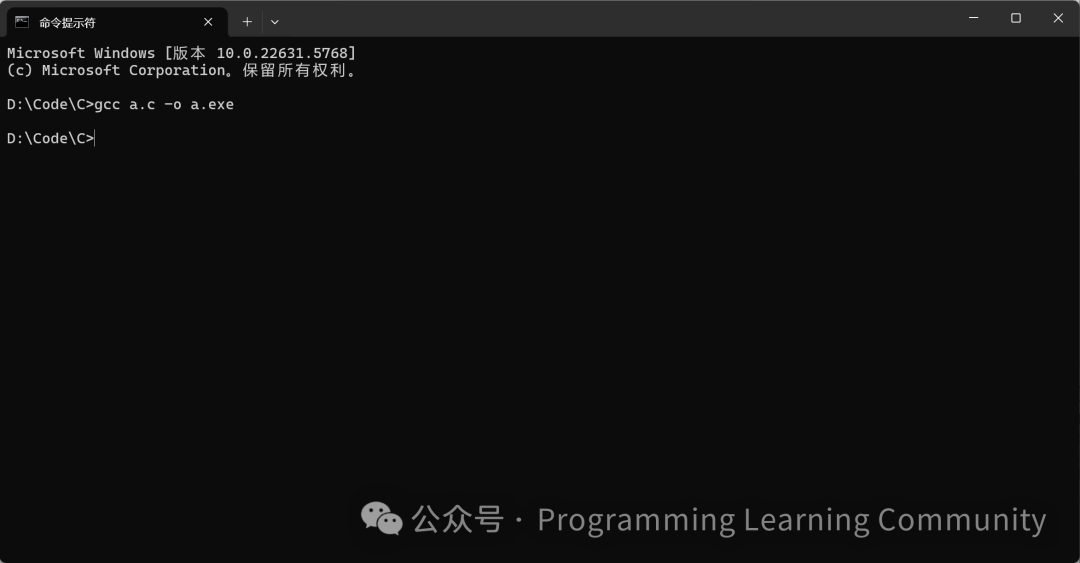 If it prompts that gcc is not an internal command: it means the compiler is not installed; first install the gcc environment and configure the environment variables, then repeat this step.
Then the directory will have the a.exe file, and next we run the program by simply entering the program name + parameters (optional), like this:
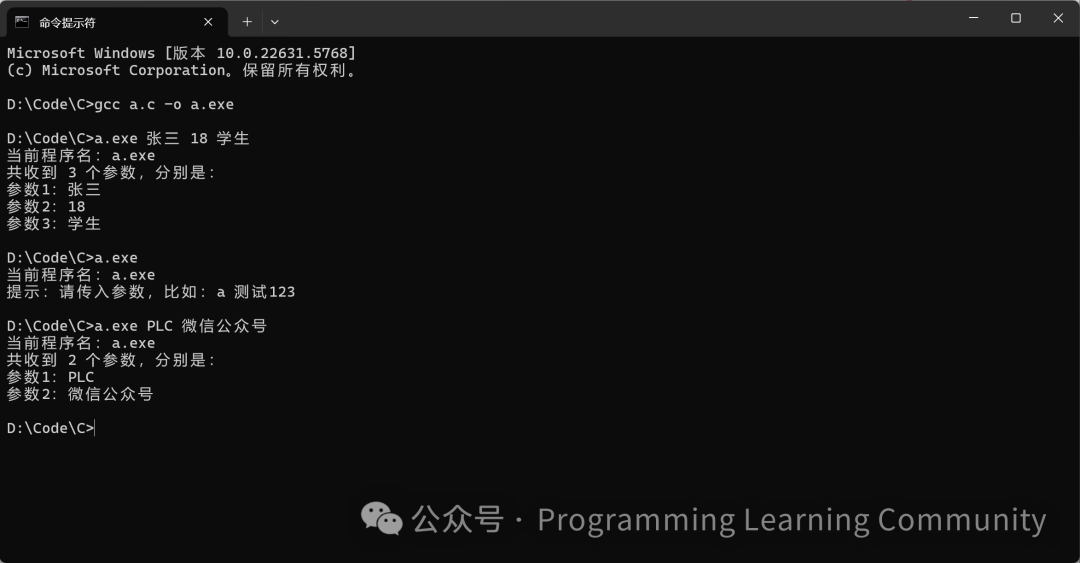
3. Tips: Handling Parameters with Spaces
If there are spaces in the parameters (like “PLC WeChat”), passing them directly will be treated as two parameters. What to do?Enclose the parameters in double quotes or single quotes! Like this:
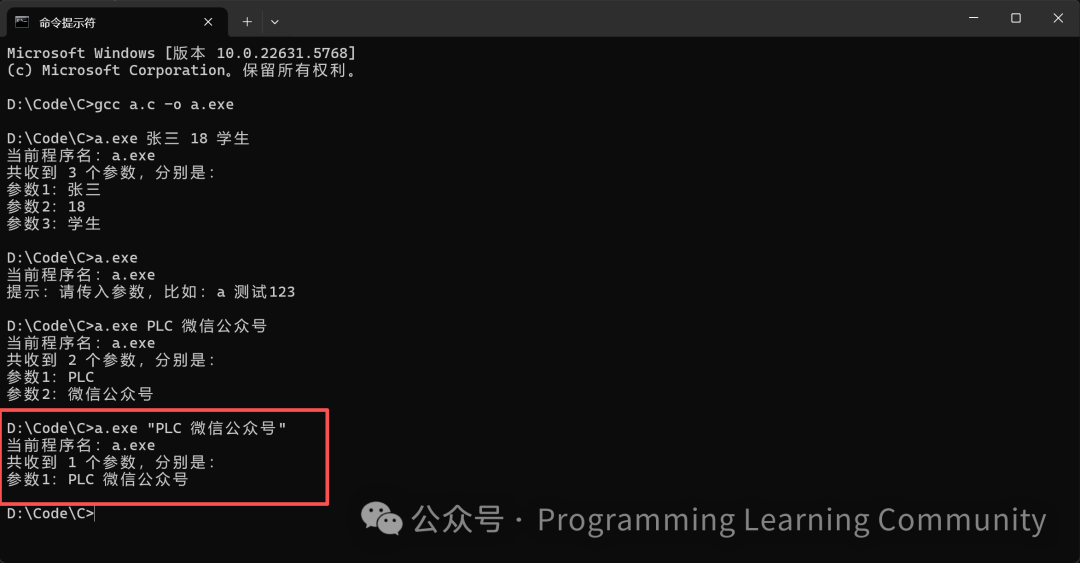
4. Four Common Scenarios for Command Line Arguments
Regarding the most concerning question: now that you know how to use them, when to use them? These four scenarios are the most common and can be directly referenced:
Specify file path (to let the program read input.txt)
readfile.exe input.txt Enable debug mode (add -debug flag, program outputs more debug information)
app.exe -debug Pass runtime options (use -add to specify calculation type, 10 and 20 are values)
calc.exe -add 10 20 Set configuration items (to let the server listen on port 8080)
server.exe -port 80805. Notes: 2 Points Beginners Often Overlook
- Parameters are strings, need to use utility functions to convert to numbers
Command line parameters are strings by default (for example, the passed “123” is character type), if you want to use it as an integer, you need to useatoi() to convert, like this:
int num1 = atoi(argv[1]);  // Convert "123" to integer 123
int num2 = atoi(argv[2]);  // Convert "456" to integer 456
int sum = num1 + num2;
- Always validate parameter legality
For example, if the user does not pass parameters and accessesargv[1], it will trigger array out of bounds (undefined behavior!), so check the value of argc first, then use the elements in argv.
// Require the user to pass 2 parameters (program name + parameter1 + parameter2, a total of 3)
if (argc != 3) {    printf("Usage: program_name.exe parameter1 parameter2\n");    return 1;  // Exit if parameters are incorrect to avoid errors}
// Confirm enough parameters before using
printf("Parameter1: %s, Parameter2: %s\n", argv[1], argv[2]);
3. Summary: Small Steps for Beginners to Advance in C Language
The two concepts discussed today are actually key to “moving from running to running well” in C language:
- First, avoid “undefined behavior”: check variable initialization, array indices, pointer usage while writing code, use tools to find errors, and avoid program crashes;
- Then use “command line arguments”: free the program from “hard coding”, allowing flexible value passing at runtime, such as specifying files and configuration options;
- Finally, practice more: type out today’s examples, try writing a program that “receives a file name and prints the file content”, and you will gradually become proficient!
If you find this useful, feel free to share it with your friends who are also learning C language, so the next time they encounter program crashes or need to pass parameters, they can refer back to this article!