Chapter 1: Introduction to Hive
1.1 Overview of Hive
1) Introduction to HiveHive is an open-source data warehouse tool based on the Hadoop ecosystem, developed by Facebook. Its core function is to map structured data files into database tables and provide a query interface similar to SQL (HiveQL).
Development BackgroundHive was created to address the high complexity of traditional Hadoop MapReduce programming. By providing a SQL-like abstraction layer, it significantly lowers the barrier for big data analysis, allowing users familiar with SQL to efficiently process massive datasets.
Typical Application Scenarios
- Log analysis (e.g., web clickstream statistics)
- Data warehouse ETL processes
- Preprocessing feature data for machine learning
Case Demonstration: Word CountAssuming we need to count the occurrences of words in a text, Hive can achieve this through the following steps:
- Map the raw text file to a Hive table
- Write a HiveQL query (e.g.,
<span>SELECT word, COUNT(*) FROM word_table GROUP BY word</span>) - Directly output the results without writing underlying MapReduce code
aaadasda
atdasdaguigu
das
sdass
ssss
ssss
1111
ssss
If implemented through Hive SQL, it can be done in one line, which is simple, convenient, and easy to understand.
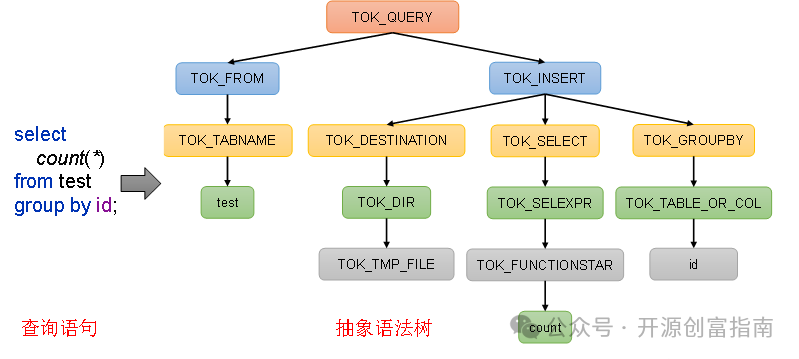
select count(*) from test group by id;2. Analysis of Hive’s Core Essence and Architecture
1) Hive as a Core Component of the Hadoop EcosystemHive is a data warehouse tool built on top of Hadoop, essentially serving as a high-level Hadoop client with the following main functions:
- HQL Conversion Engine: Converts HiveSQL (HQL) into an abstract syntax tree (AST) using the ANTLR parser, which is then compiled into distributed computing jobs such as MapReduce/Spark/Tez45
- Metadata Management: Uses a relational database (e.g., MySQL) to store table structures, partition information, and other metadata, managed uniformly through the Metastore service2
- Execution Framework Adaptation: Supports multiple computing engine configurations (default is MapReduce, can switch to Spark or Tez), flexibly adjusted through the
<span>hive.execution.engine</span>parameter8
2) Technical Implementation Features
- Storage Layer: All table data is stored in HDFS by default, utilizing Hadoop’s distributed file system to achieve high fault tolerance
- Computation Layer:
- MapReduce: Suitable for extremely large-scale batch processing, highly stable but with higher latency (minute-level)7
- Tez: Uses a DAG execution model, reducing intermediate data persistence, improving performance by 2-5 times (second to minute level)8
- Spark: Supports in-memory iterative computation, suitable for real-time queries and machine learning scenarios9
- Resource Scheduling: Manages computing resources through YARN cluster, enabling parallel execution and dynamic allocation of jobs12
3) Typical Workflow
- SQL Parsing: HQL undergoes lexical/syntactic analysis to generate an AST
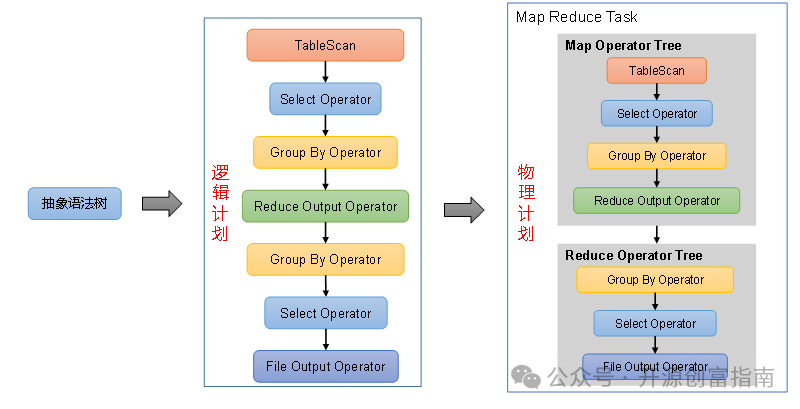
- Logical Optimization: Optimizations such as predicate pushdown and column pruning (e.g., filtering early to reduce data scans)4
- Physical Execution: Generates MapReduce jobs and submits them to YARN, with data support provided by HDFS
1.2 Hive Architecture Principles
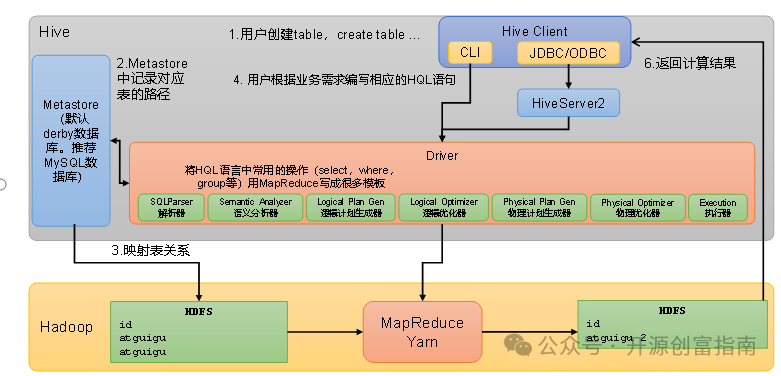
1. User Interface (Client)
Hive provides various client interfaces to meet different development needs:
- CLI (Command-Line Interface):
- Terminal-based interactive query tool that supports direct execution of HQL
- Suitable for debugging and simple query scenarios, providing both
<span>beeline</span>(JDBC wrapper) and traditional CLI implementations - JDBC/ODBC:
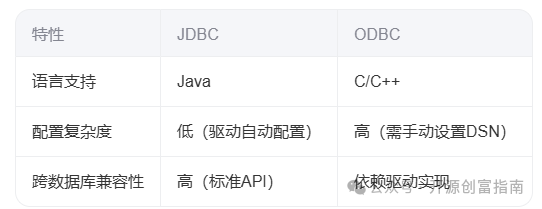
- Language Adaptation: Primarily supports C/C++, enabling cross-platform access via
<span>ODBC API</span> - Configuration Complexity: Requires manual configuration of data sources (DSN), with separate driver parameters for different databases
- Typical Applications: Legacy system transformation, data access in non-Java environments
- Language Adaptation: Specifically designed for Java, providing standardized access via
<span>java.sql</span>API - Portability Advantage: Driver automatically handles configuration, eliminating the need for separate settings for different databases (e.g., MySQL JDBC driver is plug-and-play)
- Typical Applications: Java application integration, BI tool connections (e.g., Tableau connecting to Hive via JDBC plugin)
- JDBC (Java Database Connectivity)
- ODBC (Open Database Connectivity)
Core Differences Comparison
 4) HadoopUses HDFS for storage, with options for MapReduce/Tez/Spark for computation.
Chapter 2: Hive Installation
2.1 Hive Installation Address
1) Hive official websitehttp://hive.apache.org/2) Documentation viewing addresshttps://cwiki.apache.org/confluence/display/Hive/GettingStarted3) Download addresshttp://archive.apache.org/dist/hive/4) GitHub addresshttps://github.com/apache/hive
2.2 Hive Installation Deployment2.2.1 Installing Hive1) Upload apache-hive-3.1.3-bin.tar.gz to the /opt/software directory on Linux2) Unzip apache-hive-3.1.3-bin.tar.gz to the /opt/module/ directory
tar -zxvf /opt/software/apache-hive-3.1.3-bin.tar.gz -C /opt/module/3) Rename apache-hive-3.1.3-bin.tar.gz to hive
mv /opt/module/apache-hive-3.1.3-bin/ /opt/module/hive4) Initialize the metadata database (default is Derby database)
bin/schematool -dbType derby -initSchema5) Configure the execution environment in the configuration file
<?xml version="1.0"?>
<?xml-stylesheet type="text/xsl" href="configuration.xsl"?>

<configuration>
<property>
    <name>fs.defaultFS</name>
    <value>file:///</value>
</property>
<property>
    <name>hive.exec.mode.local.auto</name>
    <value>true</value>
</property>
<property>
    <name>hive.server2.thrift.port</name>
    <value>10000</value>
    <!-- HiveServer2 listening port, can be modified as needed -->
</property>
<property>
    <name>hive.server2.thrift.bind.host</name>
    <value>0.0.0.0</value>
    <!-- Host address to bind, 0.0.0.0 means listening on all available network interfaces -->
</property>
<property>
    <name>hive.server2.authentication</name>
    <value>NONE</value>
    <!-- Authentication method, using no authentication here, a more secure method is recommended in production environments -->
</property>
</configuration>
6) Start HiveThere may be configuration file conflicts that prevent the environment configuration from taking effect. You can specify the local environment when starting Hive, which is the environment used during Hive learning.
bin/hive -hiveconf fs.defaultFS=file:/// -hiveconf hive.metastore.warehouse.dir=/opt/module/hive/warehouse2.2.2 Using Hive
1) Using Hive
hive> show databases;
hive> show tables;
hive> create table stu(id int, name string);
hive> insert into stu values(1,"ss");
hive> select * from stu;
2) Start the hiveserver2 serviceThe role of Hive’s hiveserver2 service is to provide JDBC/ODBC interfaces, allowing users to remotely access Hive data. For example, if a user wants to access Hive data on a remote service from their personal computer, they need to use Hiveserver2.Since we are in a local environment using Derby for metadata, close the previously opened Hive client before starting the hiveserver2 service.Then execute bin/hiveserver2

Follow the public account “Open Source Wealth Guide” to unlock more technologies. Thank you for your attention, and wish you success and prosperity!