
Follow「Raymond Operations」 public account, and set it as「Starred」, or scan the QR code at the bottom to join the group chat, to get the latest content first and not miss out on exciting content.
Introduction to Linux OpenSSL
SSL and TLS
Before understanding OpenSSL, we first need to know what SSL/TLS is.
SSL (Secure Sockets Layer) is a protocol known as the Secure Sockets Layer protocol. It aims to provide an encrypted transport layer channel for application layer data, meaning that data from the application layer to the transport layer is first encrypted by SSL.
However, over time, SSL’s successor, TLS (Transport Layer Security), was introduced to provide a higher level of security for network connections. TLS offers more encryption algorithms and options, gradually replacing earlier versions of SSL.
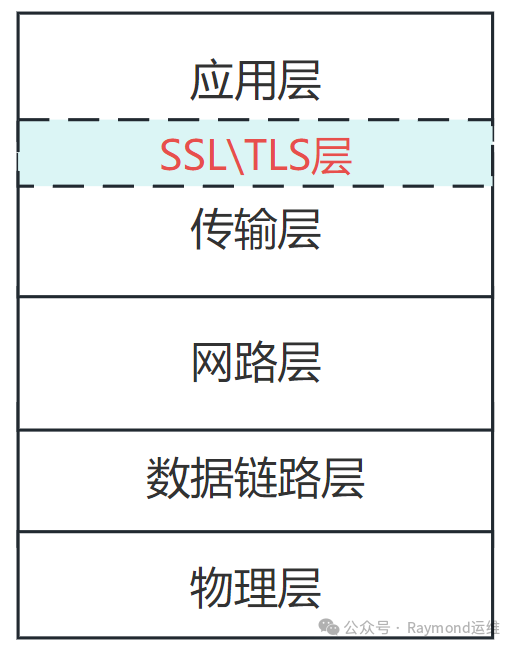
For example:
Before the introduction of SSL and TLS, requests and responses using the HTTP protocol were in plaintext, meaning that packets were easily eavesdropped, captured, or tampered with by third parties during transmission. After the introduction of SSL/TLS, when data is sent from the application layer to the transport layer, it is encrypted by SSL or TLS. This establishes a secure channel, ensuring that the entire path from the sender (one end) to the receiver (the other end) is encrypted, thus achieving end-to-end security.
The reason for encrypting application layer data before it reaches the transport layer;
There has always been a question of why application layer data should be encrypted at the transport layer rather than at the network layer or other layers. Initially, it was thought that application layer data must pass through the transport layer, and if it was captured at the transport layer, encrypting it at the next layer would be meaningless. Later, it was realized that this was considered:
- 1. Encrypting application layer data at the transport layer is highly selective, as transport layer encryption allows for different applications to choose whether encryption is needed, enabling encryption for specific applications. If done at the network layer or data link layer, everything would be encrypted.
- 2. Transport layer encryption ensures end-to-end security, while network layer or data link layer encryption may only provide encryption between two devices or networks.
- 3. If data is encrypted at the transport layer, it cannot be understood if captured at the network layer or data link layer.
OpenSSL
OpenSSL is an open-source toolkit and library for handling SSL and TLS protocols as well as various operations for encrypting and decrypting data.
OpenSSL Chinese website: https://www.openssl.net.cn/
Generally, the most commonly used tool is the command-line tool called openssl provided in this software package, which can implement various encryption algorithms, such as SSL, TLS, etc.
In Linux distributions, the OpenSSL tool is usually installed by default, and you can check the version information of OpenSSL by using openssl version.

Basic Usage of OpenSSL
Implementing Symmetric Encryption
Symmetric encryption uses the same key for both encryption and decryption, and it encrypts the original data by splitting it into several blocks for individual encryption, making it efficient and fast.
openssl enc -e algorithm_type -a -salt -in file_to_encrypt -out file_to_store_encrypted_resultFor example:
openssl enc -e -des3 -a -salt -in file1 -out file1.cipher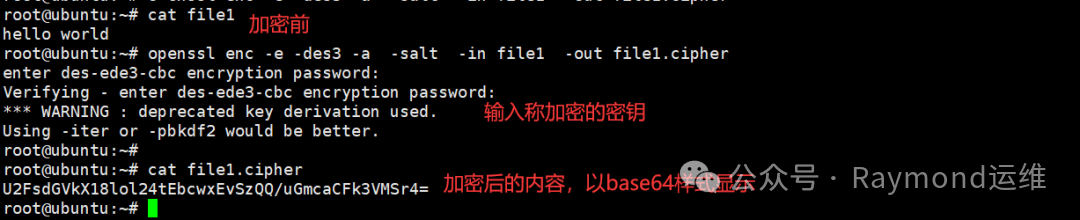
Explanation:
- • Using -salt to add salt (adding a random string during hashing) means that OpenSSL will automatically generate a random salt and use it during the encryption process.
- • Besides -des3, there are other types of encryption. You can use man openssl enc to see the corresponding parameters for other encryption types.
- • Using -a allows the encrypted content to be displayed in base64 format.
Implementing Symmetric Decryption
openssl enc -d algorithm_type -a -salt -in file_to_decrypt -out decrypted_fileFor example:
openssl enc -d -des3 -a -salt -in file1.cipher -out file1_new
Explanation:
- • The algorithm type must match the one used during encryption.
- • When using symmetric encryption, you will be prompted to enter a password, as symmetric encryption algorithms use the same password for both encryption and decryption.
Implementing Asymmetric Encryption
The characteristic of asymmetric encryption is that the keys appear in pairs, with different keys used for encryption and decryption, and both parties in communication need their own public and private keys.
- • If using a public key for encryption and a private key for decryption, the encrypted data can only be decrypted by the owner, ensuring data security.
- • If using a private key for encryption and a public key for decryption, this can confirm the source of the data, which is what we refer to as a digital signature.
Generating a Private Key:
openssl genrsa -out file_to_store_private_key encryption_algorithm_typeFor example:
openssl genrsa -out b.enc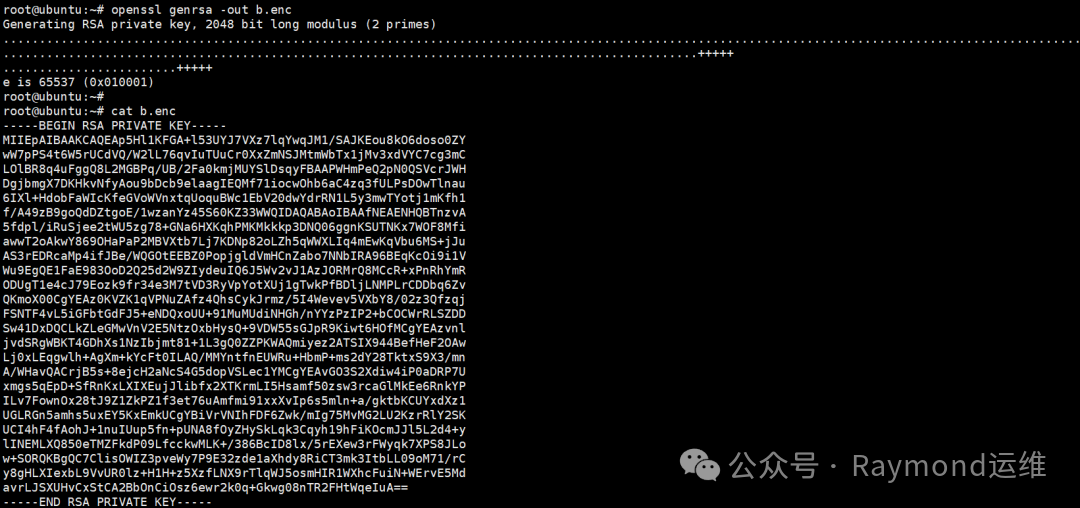
Explanation:
- • If the key length is not specified, the default length is 2048. The longer the key length, the higher the encryption strength, but the longer the encryption and decryption time. Generally, using the default is sufficient.
- • If the encryption algorithm type is not specified, the default asymmetric encryption algorithm used is RSA.
- • The generated key is output in PEM format by default, which displays text information in base64 format.
Generating a Public Key:
The public key is hidden within the private key and can be derived from the private key.
openssl rsa -in private_key_file -pubout -out extracted_public_key_fileFor example:
openssl rsautl -encrypt -pubin -inkey public_key_file -in file_to_encrypt -out encrypted_filePrivate Key Decryption:
openssl rsautl -decrypt -inkey private_key_file -in file_to_decrypt -out decrypted_fileImplementing One-Way Hashing
Hashing is a one-way encryption algorithm that is irreversible. The result produced by the hashing algorithm is called a digest, which has a fixed length and varies with different content. Once the original data changes, the digest will also change, so it is generally used to confirm data integrity and check for tampering.
Here, there is a concept called fingerprint, which is unique to each individual. Different people (data) have different fingerprints (digests), but knowing the fingerprint (digest) does not reveal who it belongs to (the original data cannot be derived from the digest).
openssl dgst hashing_algorithm file_to_generate_digestFor example:
openssl dgst file1
Explanation:
- • If no hashing algorithm is specified, the default is SHA256. You can use man openssl dgst to see the corresponding options for different hashing algorithms.
- • If no display type is specified, the default display is in hexadecimal characters.
Generating User Passwords
You can use OpenSSL to generate passwords for users. When creating a user with the useradd command, you can specify the user’s password, but this password must be encrypted. At this point, OpenSSL can be used to generate it.
It essentially uses the hashing algorithm to generate a digest value for the password.
openssl passwd algorithm_type user_passwordIf no hashing algorithm option is specified, the default is the traditional UNIX crypt() method, which is older than MD5.
Algorithm Type Explanation:
- • -6: Indicates using the sha512 encryption algorithm, which will also use a random salt by default.
- • -5: Indicates using the sha256 algorithm, which will also use a random salt by default.
- • -1: Indicates using the md5 algorithm, which will also generate a random salt to hash with the password.
These three are part of the UNIX password hashing scheme.
For example:
useradd bob -m -s /bin/bash -p $(openssl passwd -6 redhat)
When creating a user with useradd, if no relevant attributes are specified, the default attributes defined in /etc/default/useradd will be used.
Generating Random Numbers
openssl rand display_format (mainly hex and base64) number_of_random_bytesFor example: Generate 16 random bytes and output in hexadecimal format
openssl rand -hex 16
Explanation: A hexadecimal number consists of 4 binary digits, and one byte is 8 bits, so one hexadecimal number equals two bytes. A total of thirty-two characters will be output.
For example: Display random numbers in base64 encoding format
openssl rand -base64 16Introduction to Base64 Encoding
Base64 is a method of representing arbitrary binary data using 64 characters. In some early protocols, such as SMTP and HTTP, they were designed only for the transmission of ASCII character data. When it was necessary to include non-ASCII characters or binary data, problems would arise because, although binary data is composed of 0s and 1s, the challenge lies in how to represent and transmit these 0s and 1s.
At this point, using base64 encoding perfectly solves the problem by converting binary data into a secure string composed solely of ASCII characters, thus avoiding any interpretation or transmission issues caused by the transmission of binary data.
Encoding Principles
- 1. First, the three bytes of binary data (a total of 24 bits) are re-divided into four groups, each containing 6 bits. (Each 6 bits can represent a value ranging from 0 to 63.)
- 2. Then, each 6-bit data (one group) is converted into a decimal number, and the corresponding character is obtained based on the base64 character set.
- 3. Repeat this process until all input data has been processed.
- 4. If the length of the original data (i.e., the data to be encoded) is not a multiple of three bytes (base64 processes every three bytes as a unit), padding characters, i.e., =, will be added to meet the length requirement. This is why you see the equal sign.
Link:https://www.cnblogs.com/heyongshen/p/17787948.html
(Copyright belongs to the original author, please delete if infringed)
WeChat group
To facilitate better communication regarding operations and related technical issues, a WeChat group has been created. Those who want to join can scan the QR code below to add me as a friend and I will add you to the group (note: join group).

Code Repository
Code Repository
| Code Repository | Website |
| Github | https://github.com/raymond999999 |
| Gitee | https://gitee.com/raymond9 |
Blog
Blog
| Blog | Website |
| CSDN | https://blog.csdn.net/qq_25599925 |
| Juejin | https://juejin.cn/user/4262187909781751 |
| Knowledge Planet | https://wx.zsxq.com/group/15555885545422 |
| Aliyun Community | https://developer.aliyun.com/profile/snzh3xpxaf6sg |
| Tencent Cloud Community | https://cloud.tencent.com/developer/user/11823619 |
| Huawei Cloud Community | https://developer.huaweicloud.com/usercenter/mycommunity/dynamics |
Visit the blog website for more quality original content.