Previous《Experience DFRobot ESP32-P4: Build Your Own “Xiao Zhi” Based on MicroPython》shared the implementation of an AI assistant based on ESP32-P4 (non-voice wake-up version). This note shares the implementation of an AI assistant based onXIAO ESP32S3 Sense.
1. Development Board Introduction
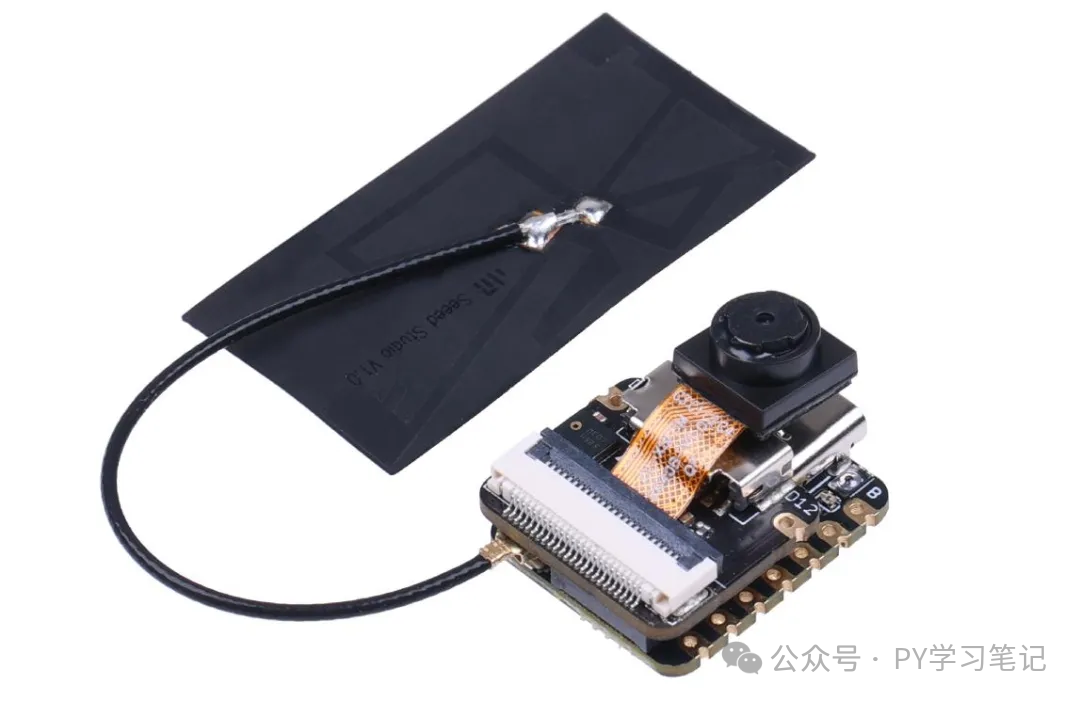
<span>Seeed Studio XIAO ESP32S3 Sense</span> is a powerful mini ESP32-S3 development board, only the size of a thumb, yet it integrates modules such as a camera sensor, digital microphone, and SD card, making it a compact powerhouse.
2. Firmware and Driver Introduction
It is necessary to use firmware that includes the PDM microphone driver. The firmware we used in the “XIAO ESP32S3 Sense Development Board ESP-DL (Deep Learning) Testing” contains this.
The firmware is available in the QQ group.
3. Implementation Method
Principle: Long press the Boot button → Record → ASR API → LLM API (text displayed on OLED screen) → TTS API → Download wav → Decode and play → Sleep
ASR and LLM use<span>siliconflow</span>‘s free model, and TTS uses Baidu’s speech synthesis. The reference code is as follows:
# main.py  ——  Complete loop of recording + speech recognition + SiliconFlow conversation
import network, urequests, ujson, gc, time, ssd1315_buf, baidu_tts
from easydisplay import EasyDisplay
from machine import Pin, I2S, SoftI2C

# ---------- Global Configuration ----------
WIFI_SSID = "xxx"
WIFI_PASS = "xxx"
API_KEY   = "xxx"
TTS_API_KEY = "xxx"
TTS_SEC_KEY = "xxx"
ASR_URL   = "https://api.siliconflow.cn/v1/audio/transcriptions"
CHAT_URL  = "https://api.siliconflow.cn/v1/chat/completions"
ASR_MODEL = "FunAudioLLM/SenseVoiceSmall"
LLM_MODEL = "Qwen/Qwen3-8B"

# I2S Pins
SCK_PIN = 42
SD_PIN  = 41
boot = Pin(0, Pin.IN, Pin.PULL_UP)   # BOOT button, pressed is 0
led = Pin(21,Pin.OUT)
i2c = SoftI2C(scl=Pin(6), sda=Pin(5))
dp = ssd1315_buf.SSD1315_I2C(128, 64, i2c, addr=0x3C)
ed = EasyDisplay(dp, "RGB565", font="/text_lite_16px_2312.v3.bmf", show=True, color=0xFFFF, clear=True,auto_wrap=True)

# ---------- Connect to Wi-Fi ----------
def connect_wifi():
    sta = network.WLAN(network.STA_IF)
    sta.active(True)
    sta.connect(WIFI_SSID, WIFI_PASS)
    while not sta.isconnected():
        time.sleep(0.5)
    print("Wi-Fi OK:", sta.ifconfig()[0])
    return sta

def record_audio(sr=8000):
    # Wait for button press
    print("Long press BOOT to start recording...")
    while boot.value() == 1:
        time.sleep_ms(10)

    # Start recording
    pcm = bytearray()
    audio = I2S(0,
                sck=Pin(SCK_PIN),
                sd=Pin(SD_PIN),
                mode=I2S.PDM_RX,
                bits=16,
                format=I2S.MONO,
                rate=sr * 4,
                ibuf=10240)

    # Record while checking button
    chunk = bytearray(1024)
    print("Recording, release BOOT to stop...")
    while boot.value() == 0:           # 0 means still pressed
        n = audio.readinto(chunk)
        pcm.extend(chunk[:n])
    audio.deinit()
    return pcm, sr

# ---------- Construct WAV ----------
def wav_header(data_len, sample_rate):
    hdr = bytearray(44)
    hdr[0:4]   = b'RIFF'
    hdr[4:8]   = (data_len + 36).to_bytes(4, 'little')
    hdr[8:12]  = b'WAVE'
    hdr[12:16] = b'fmt '
    hdr[16:20] = (16).to_bytes(4, 'little')
    hdr[20:22] = (1).to_bytes(2, 'little')         # PCM
    hdr[22:24] = (1).to_bytes(2, 'little')         # mono
    hdr[24:28] = sample_rate.to_bytes(4, 'little')
    hdr[28:32] = (sample_rate * 2).to_bytes(4, 'little')
    hdr[32:34] = (2).to_bytes(2, 'little')         # block align
    hdr[34:36] = (16).to_bytes(2, 'little')        # bits per sample
    hdr[36:40] = b'data'
    hdr[40:44] = data_len.to_bytes(4, 'little')
    return hdr

# ---------- Speech Recognition ----------
def speech_to_text(pcm, sr):
    wav = wav_header(len(pcm), sr) + pcm
    boundary = "----VoiceBoundary"
    body  = b"--" + boundary.encode() + b"\r\n"
    body += b'Content-Disposition: form-data; name="file"; filename="mic.wav"\r\n'
    body += b"Content-Type: audio/wav\r\n\r\n"
    body += wav
    body += b"\r\n--" + boundary.encode() + b"\r\n"
    body += b'Content-Disposition: form-data; name="model"\r\n\r\n'
    body += ASR_MODEL.encode()
    body += b"\r\n--" + boundary.encode() + b"--\r\n"

    headers = {        "Authorization": "Bearer " + API_KEY,
        "Content-Type": "multipart/form-data; boundary=" + boundary    }
    print("Recognizing...")
    res = urequests.post(ASR_URL, data=body, headers=headers)
    text = res.json().get("text", "").strip()
    res.close()
    gc.collect()
    return text

# ---------- Chat with AI ----------
def chat_with_ai(text):
    headers = {        "Authorization": "Bearer " + API_KEY,
        "Content-Type": "application/json"    }
    payload = {        "model": LLM_MODEL,
        "messages": [            {"role": "system", "content": "You are my AI assistant Xiao Zhi, you must answer in Chinese and not exceed 100 words, and you are not allowed to use MD to answer"},
            {"role": "user", "content": text}        ],
        "enable_thinking":False,    }
    print("AI is thinking...")
    start = time.time()
    res = urequests.post(CHAT_URL, data=ujson.dumps(payload).encode(), headers=headers)
    delta = time.time() - start
    if res.status_code == 200:
        reply = res.json()['choices'][0]['message']['content'].replace("\n", "")
        print(f"({delta:.1f}s) AI:", reply)
        ed.text(f"({delta:.1f}s) AI:"+reply, 0, 0)
        baidu_tts.run(            access=TTS_API_KEY,            secret=TTS_SEC_KEY,            text=reply,            out_path='welcome.wav'        )
    else:
        print("Error:", res.status_code, res.text)
        reply = ""
    res.close()
    gc.collect()
    return reply

# ---------- Main Loop ----------
def main():
    connect_wifi()
    while True:
        pcm, sr = record_audio()
        text = speech_to_text(pcm, sr)
        if not text:
            print("I didn't catch that, please say it again")
            baidu_tts.run(                access=TTS_API_KEY,                secret=TTS_SEC_KEY,                text="I didn't catch that, please say it again",                out_path='welcome.wav'            )
            continue
        elif "turn on the light" in text:
            print("You:", text)
            led.off()
            print("AI: The LED light has been turned on")
            ed.text("AI: The LED light has been turned on", 0, 0)
            baidu_tts.run(                access=TTS_API_KEY,                secret=TTS_SEC_KEY,                text="The LED light has been turned on",                out_path='welcome.wav'            )
        elif "turn off the light" in text:
            print("You:", text)
            led.on()
            print("AI: The LED light has been turned off")
            ed.text("AI: The LED light has been turned off", 0, 0)
            baidu_tts.run(                access=TTS_API_KEY,                secret=TTS_SEC_KEY,                text="The LED light has been turned off",                out_path='welcome.wav'            )
        else:
            print("You:", text)
            chat_with_ai(text)

if __name__ == "__main__":
    main()
4. Effect
Since MicroPython does not support offline speech recognition and synthesis, this AI assistant operates entirely in the cloud: speech recognition, AI inference, and speech synthesis are all completed online, so the response may be slower than local solutions.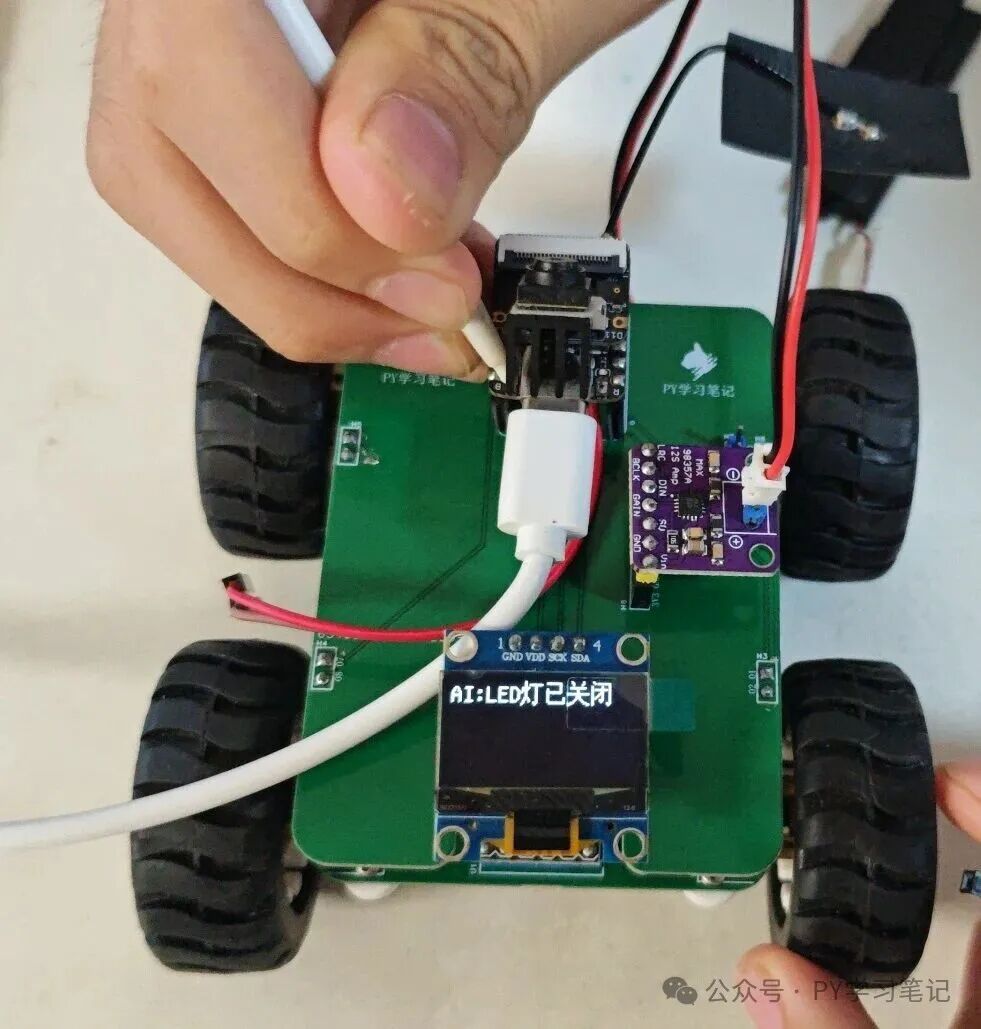 PS:The BOOT button on the XIAO ESP32S3 Sense is hard to press, it is recommended to extend a separate button.
Recommended Reading:
- Practical ESP32S3: Experience AI Chatbot
- ESP32-P4 Development Board MicroPython Firmware Compilation Method
- ESP32-P4 Based on MicroPython Driving LCD Screen and Touch
- ESP32-P4 Based on MicroPython Displaying Images
- ESP32-P4 Based on MicroPython Driving Screen to Draw Chinese Characters Point by Point
- ESP32-P4 Playing with ESP-DL: Implementing Face, Human, and Cat Detection
- ESP32-P4 Playing with ESP-DL: Implementing YOLO v11 Object Detection
- Experience DFRobot ESP32-P4 Development Board, Play with MicroPython
- Experience DFRobot ESP32-P4 Development Board, Drive DSI Touch Screen
