1. Project Background and Requirements
In industrial automation scenarios, the Siemens S7-1200 PLC often needs to achieve remote monitoring, data collection, or control command issuance. However, traditional wired communication has issues such as complex wiring, poor scalability, and limitations in mobile scenarios. This solution utilizes Guangzhou Jukong’s 4G/5G wireless communication products to implement wireless data transmission for the S7-1200 PLC, supporting remote operation and maintenance, cloud monitoring, and cross-regional data interaction.
2. Core Components of the PLC Wireless Communication Solution
-
Main Device: Siemens S7-1200 PLC (e.g., 1214C DC/DC/DC)
-
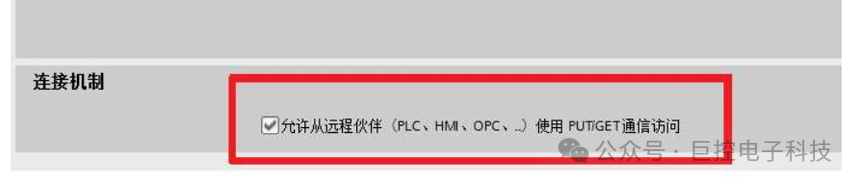
Equipped with an Ethernet interface, supporting S7 protocol data exchange
-
Requires configuration of data blocks (DB blocks) to store variables to be transmitted (e.g., sensor data, device status, control commands)
Wireless Communication Device: Guangzhou Jukong GRM550 Industrial Wireless Gateway
-
Supports wireless communication methods such as 4G/5G/WiFi, compatible with industrial Ethernet
-
Built-in S7 protocol parsing module, can directly establish communication with S7-1200
-
Supports protocol conversion, interfacing with cloud platforms (e.g., Jukong yunplc)
Auxiliary Devices:
-
Antenna (select 4G/5G omnidirectional antenna or WiFi antenna based on wireless method)
-
Power adapter (DC 24V, shared power supply with PLC or independent power supply)
-
Network cable (for connecting PLC and gateway)
3. Implementation Principles
1. Data Transmission Link
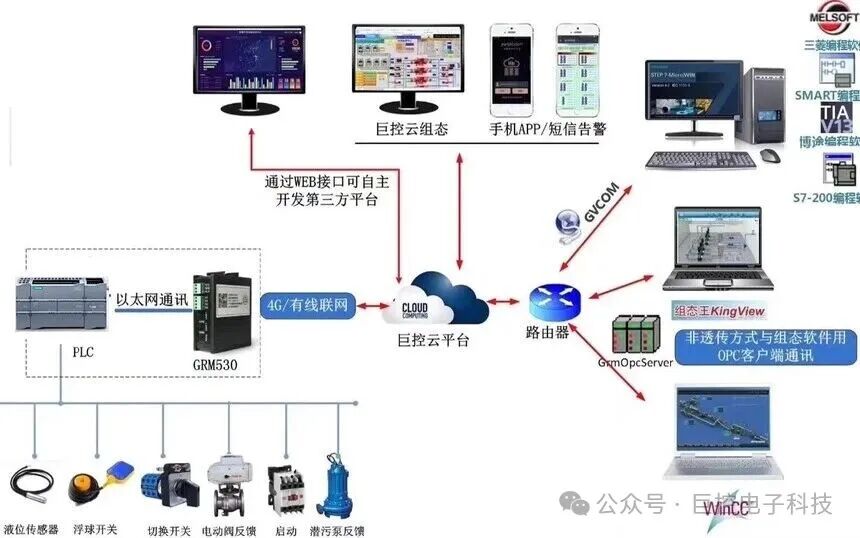
S7-1200 PLC ← (Ethernet/S7 protocol) → Jukong GRM550 Gateway ← (Wireless 4G/5G/WiFi) → Remote Terminal/Cloud Platform
2. Core Principles
-
Protocol Adaptation: The GRM550 gateway has a built-in S7 protocol driver, establishing a connection with the S7-1200 via Ethernet, directly reading the PLC’s DB block variables (e.g., temperature, pressure, operating status) or writing control commands (e.g., start/stop signals).
-
Wireless Transmission: The gateway sends the collected PLC data to the cloud platform (or remote server) via 4G/5G/WiFi, while also receiving commands issued from the cloud, converting them into S7 protocol format before forwarding to the PLC.
-
Cloud Integration: Achieves data visualization, historical storage, and alarm push through the Jukong cloud platform, supporting remote access from PC and mobile devices.
4. PLC Wireless Communication Hardware Connection and Configuration Steps
1. Hardware Connection
-
Physical Wiring:
1. Connect the S7-1200 Ethernet port to the GRM550’s Ethernet port (LAN port) using a network cable.
2. Power the GRM550 gateway (DC 24V) and install the corresponding type of antenna (e.g., the 4G antenna must be connected to the gateway’s 4G module interface).
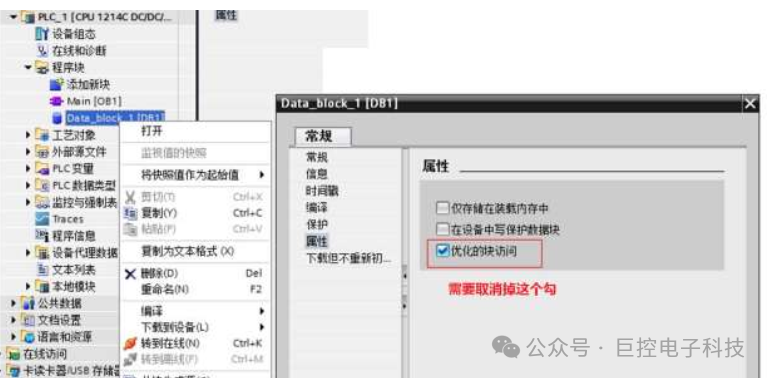
3. Ensure that the S7-1200 program has been completed using TIA Portal, and that the data blocks (DB blocks) have been defined (must be set to “optimized block access” disabled, allowing external access).
2. PLC Program Configuration (TIA Portal)
-
Data Block Settings:
1. Create a global data block (e.g., DB1), define variables (e.g., temperature value DB1.DBD0, operating status DB1.DBX2.0, start/stop command DB1.DBX3.0).
2. Right-click on the DB block → “Properties” → uncheck “optimized block access” to ensure the gateway can access via absolute address.
-
Network Configuration: Set the PLC’s Ethernet IP (e.g., 192.168.1.1, subnet mask 255.255.255.0) in the “Device Configuration” to be in the same subnet as the gateway LAN port IP (e.g., set the gateway LAN port to 192.168.1.240).
3. Gateway Parameter Configuration
Step 1: Initial Access to the Gateway
-
Connect the computer to the GRM550’s LAN port, set the computer IP to be in the same subnet as the gateway default IP (e.g., 192.168.1.240, such as 192.168.1.xxx).
-
Open a browser, enter the gateway default IP address (e.g., 192.168.1.240), and log in to the management interface (default username and password are in the device manual).
Step 2: Configure Wireless Parameters
-
If using 4G communication: No configuration is needed, just insert the 4G card into the GRM550’s card slot.
-
If using WiFi: Go to “Network Settings → WiFi Parameters”, scan and connect to the target WiFi, and enter the password.
Step 3: Configure Gateway and PLC Communication
-
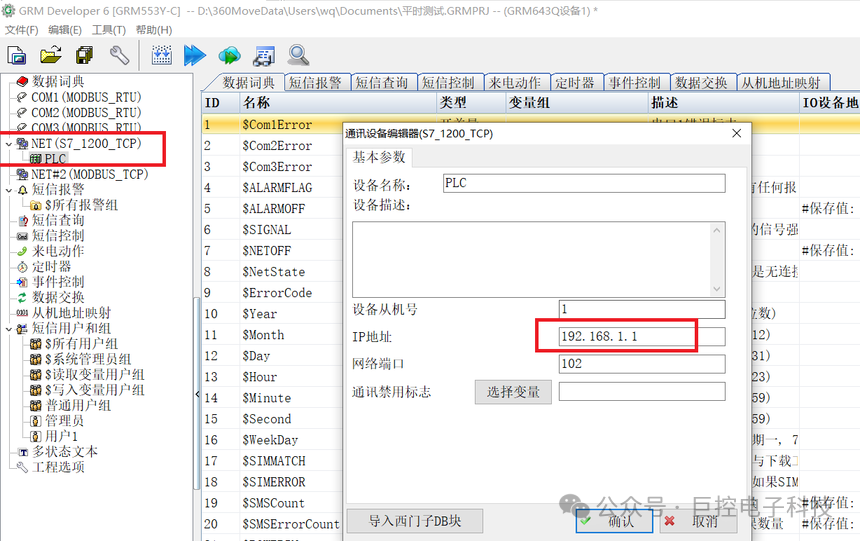
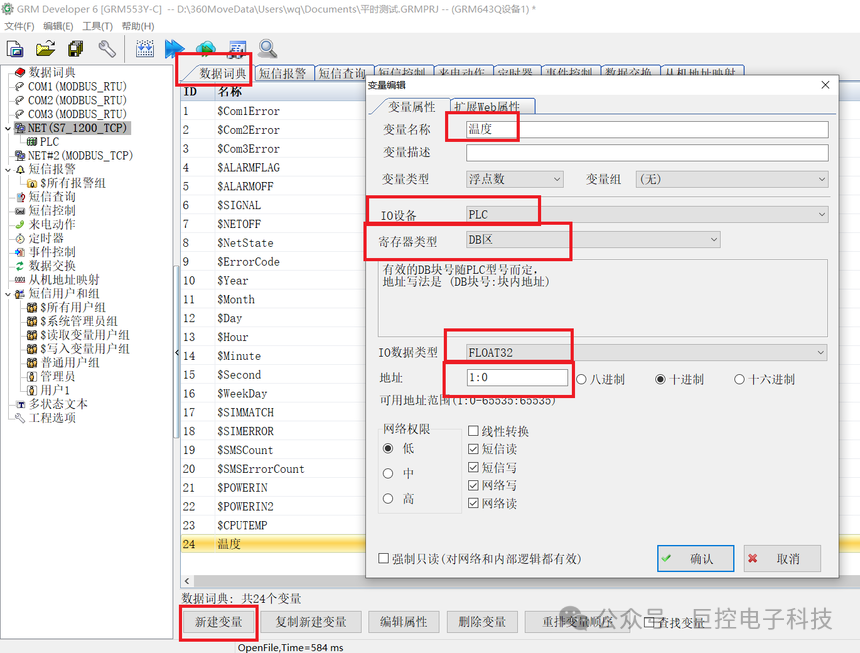
Open Jukong’s configuration software DEV6, select S7 1200 TCP protocol, and enter the IP of the PLC to be connected.
-
Establish the association between variables and PLC register addresses, for example, associate temperature with PLC’s DB1.DBD0.
-
Download the configured variable associations to the Jukong hardware, which will then collect PLC data in real-time, send it to the corresponding variables, and transmit it to the cloud.
Step 4: Configure Cloud Connection
-
Go to “Cloud Platform Settings”, log in to www.yunplc.com, and enter the device ID and password for the Jukong cloud platform (the initial password for Jukong products is 12345678, and upon first login, it will require a forced password change; thereafter, users will log in with their set password).
-
Create a variable display layout on the cloud to meet project requirements.
5. Remote Monitoring and Operation
1. Cloud Platform Access (GRMCloud)
-
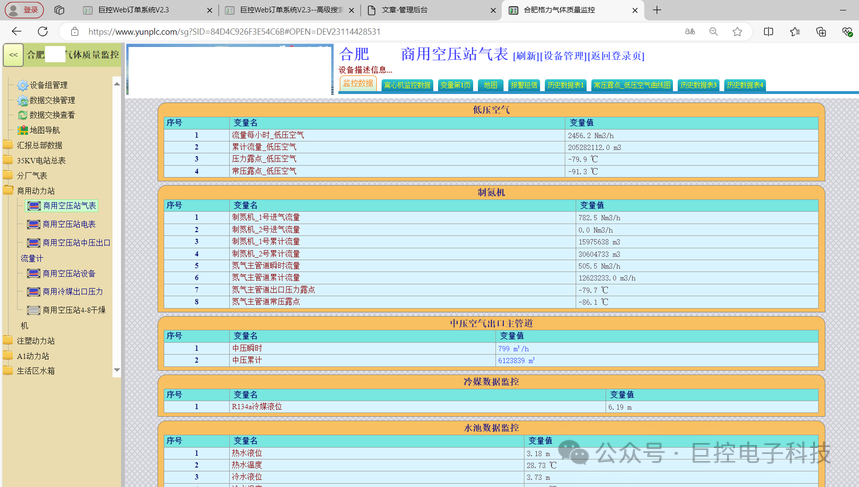
Log in to the Jukong cloud platform (www.yunplc.com), find the target gateway in the “Device List”, and enter the “Data Monitoring” interface.
-
View the real-time values of the mapped PLC variables (e.g., temperature, status), support historical curve queries, and data export.
-
For variables with “read/write” attributes (e.g., start/stop commands), values (0/1) can be directly input on the platform and issued to control PLC actions.
2. Mobile Access
-
Download the Jukong “GRM Remote Monitoring” APP, log in to the account, select the device, and achieve monitoring functions consistent with the cloud platform, supporting alarm push (e.g., SMS / APP notifications in case of device faults).
6. PLC Wireless Communication Troubleshooting and Precautions
-
Communication Interruption Troubleshooting:
-
Check the network cable connection between the gateway and PLC, confirm that both IPs are in the same subnet and can ping each other.
-
Wireless connection issues: Check the SIM card signal (on the gateway “Network Status” page) or WiFi connection status, and try reinserting the antenna.
Data Refresh Delay:
-
Adjust the “data collection cycle” in the gateway configuration (recommended 1-10 seconds, too short may increase network load).
-
Confirm wireless signal strength (4G signal should be ≥2 bars, WiFi signal ≥-70dBm).
Security Precautions:
-
Gateway management passwords and cloud platform accounts should be changed regularly, and data encryption transmission should be enabled (GRM550 supports SSL encryption).
-
Add permission verification logic in the PLC program to prevent illegal remote commands from causing device anomalies.
7. Advantages of the PLC Wireless Communication Solution
-
Strong Compatibility: The Jukong GRM550 directly supports the S7 protocol without the need for additional driver development.
-
Flexible Deployment: Wireless methods eliminate wiring restrictions, suitable for outdoor devices, mobile machinery, and other scenarios.
-
High Scalability: Multi-PLC centralized monitoring can be achieved through the cloud platform, supporting integration with MES/ERP systems (providing API interfaces).
This solution enables the rapid implementation of wireless communication functions for the S7-1200 PLC, reducing wiring costs in industrial sites and enhancing remote operation and maintenance efficiency.