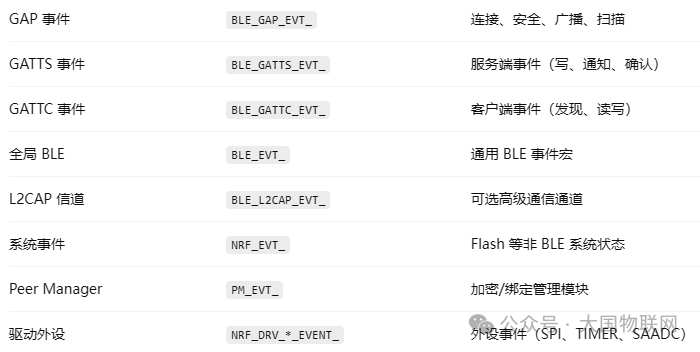
1. GAP Events
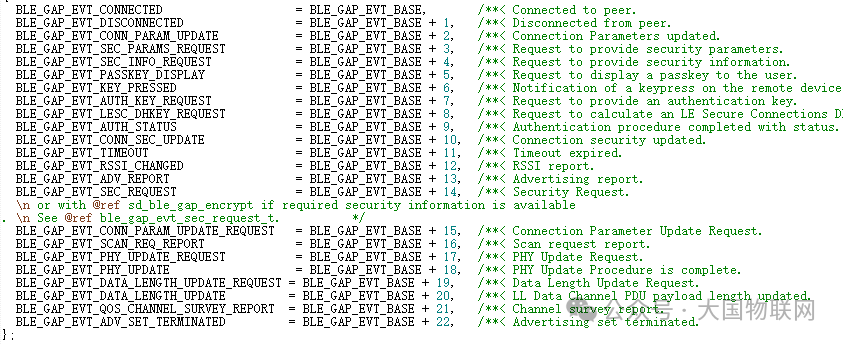
enum BLE_GAP_EVTS
{
BLE_GAP_EVT_CONNECTED
BLE_GAP_EVT_DISCONNECTED
BLE_GAP_EVT_CONN_PARAM_UPDATE
BLE_GAP_EVT_SEC_PARAMS_REQUEST
BLE_GAP_EVT_SEC_INFO_REQUEST
BLE_GAP_EVT_PASSKEY_DISPLAY
BLE_GAP_EVT_KEY_PRESSED
BLE_GAP_EVT_AUTH_KEY_REQUEST
BLE_GAP_EVT_LESC_DHKEY_REQUEST
BLE_GAP_EVT_AUTH_STATUS
BLE_GAP_EVT_CONN_SEC_UPDATE
BLE_GAP_EVT_TIMEOUT
BLE_GAP_EVT_RSSI_CHANGED
BLE_GAP_EVT_ADV_REPORT
BLE_GAP_EVT_SEC_REQUEST
BLE_GAP_EVT_CONN_PARAM_UPDATE_REQUEST
BLE_GAP_EVT_SCAN_REQ_REPORT
BLE_GAP_EVT_PHY_UPDATE_REQUEST
BLE_GAP_EVT_PHY_UPDATE
BLE_GAP_EVT_DATA_LENGTH_UPDATE_REQUEST
BLE_GAP_EVT_DATA_LENGTH_UPDATE
BLE_GAP_EVT_QOS_CHANNEL_SURVEY_REPORT
BLE_GAP_EVT_ADV_SET_TERMINATED
};
In fact, there are notes following the definitions of these events.
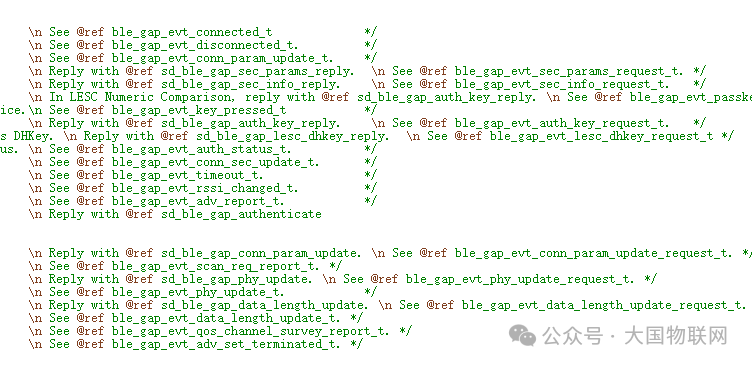
And the data passed from the protocol stack after the corresponding event occurs
1. <span><span>BLE_GAP_EVT_CONNECTED</span></span>
🔍 Connection Established Successfully
-
When Triggered: After the device actively connects or is connected
-
Fields:
ble_gap_evt_connected_t
→ .conn_params (connection parameters) → .peer_addr (peer address) → .role (central or peripheral) -
Common Uses: Start services, negotiate MTU, initiate security, record conn_handle
2. <span><span>BLE_GAP_EVT_DISCONNECTED</span></span>
🔍 Connection Disconnected
-
When Triggered: Actively disconnected or unexpectedly disconnected
-
Fields:
ble_gap_evt_connected_t → .conn_params (connection parameters) → .peer_addr (peer address) → .role (central or peripheral) -
Common Uses: Clean up resources, restart advertising, reconnect
<span><span>3. BLE_GAP_EVT_CONN_PARAM_UPDATE</span></span>
🔍 Connection Parameters Updated Successfully
-
When Triggered: After the peer or you initiate
<span>sd_ble_gap_conn_param_update()</span><span> is accepted</span> -
Fields:
ble_gap_evt_disconnected_t
→ .reason (disconnection reason enum BLE_HCI_*)
4. <span><span>BLE_GAP_EVT_SEC_PARAMS_REQUEST</span></span>
🔐 Peer Requests Pairing/Encryption
-
When Triggered: The peer wishes to establish a secure connection (encryption or re-pairing)
-
Fields: No additional parameters (need to call
<span>sd_ble_gap_sec_params_reply()</span><span> to respond)</span> -
Uses: Start pairing or reject
5. <span><span>BLE_GAP_EVT_SEC_INFO_REQUEST</span></span>
🔐 Request for Encryption Information (e.g., LTK)
-
When Triggered: The peer attempts to use old connection encryption, requiring you to provide the previously paired LTK, EDIV, Rand.
-
Uses: Pairing recovery, no need to re-pair.
-
Processing: Use
<span>sd_ble_gap_sec_info_reply()</span><span> to return the key or reject.</span>
6. <span><span>BLE_GAP_EVT_PASSKEY_DISPLAY</span></span>
🔐 Display 6-digit pairing password
-
When Triggered: Using Passkey pairing (usually triggered by Central), the slave needs to display the password.
-
Processing: Call
<span>NRF_LOG_INFO()</span><span> to print </span><code><span>params.passkey</span><span>; wait for the peer to input.</span>
7. <span><span>BLE_GAP_EVT_KEY_PRESSED</span></span>
🔐 Keyboard Key Event (only for Keypress pairing)
-
When Triggered: The peer sends key status during password input (e.g., press, delete, submit).
-
Processing: Usually just print information, not commonly used unless implementing a complete Keypress UI.
8. <span><span>BLE_GAP_EVT_AUTH_KEY_REQUEST</span></span>
🔐 Request for User Input of Pairing Password
-
When Triggered: Using Passkey pairing, the protocol stack requests the user to input the pairing password.
-
Processing: Call
<span>sd_ble_gap_auth_key_reply(conn_handle, type, passkey)</span><span> to respond.</span>
9. <span><span>BLE_GAP_EVT_LESC_DHKEY_REQUEST</span></span>
🔐 Request for LESC DH Public Key (LE Secure Connection)
-
When Triggered: ECDH key exchange in LESC mode
-
Processing: Call
<span>sd_ble_gap_lesc_dhkey_reply()</span><span> to provide DH Key, provided the local key pair has been generated first</span>
10. <span><span>BLE_GAP_EVT_AUTH_STATUS</span></span>
🔐 Pairing/Encryption Result
-
When Triggered: After completing the pairing process (success/failure)
-
Processing:
-
<span>.auth_status == BLE_GAP_SEC_STATUS_SUCCESS</span>indicates success -
<span>.error_src</span>indicates the source of failure -
Can print results, store keys, etc.
11. <span><span>BLE_GAP_EVT_CONN_SEC_UPDATE</span></span>
🔐 Encryption Status Update
-
When Triggered: After successful encryption or encryption level upgrade
-
Uses: Confirm connection security
-
Processing: Check
<span>.conn_sec.sec_mode</span><span> and other fields to decide whether to allow subsequent operations (e.g., enable Notify)</span>
<span>BLE_GAP_EVT_TIMEOUT</span>
⏱️ Timeout Event (Advertising/Scanning/Connection)
-
Fields:
.src = BLE_GAP_TIMEOUT_SRC_CONN/ADV/SCAN -
Processing:
-
Advertising timeout → re-advertise
-
Scanning timeout → stop scanning
-
Connection timeout → reconnect or prompt failure
12. <span><span>BLE_GAP_EVT_RSSI_CHANGED</span></span>
📶 RSSI Value Change (must be enabled)
-
When Triggered: Periodically update RSSI after calling
<span>sd_ble_gap_rssi_start()</span><span>.</span> -
Processing: Read
<span>.rssi</span><span>, used for proximity sensing, signal quality judgment.</span>
4. <span><span>BLE_GAP_EVT_ADV_REPORT</span></span>
📡 Scanned Advertising Packet
-
When Triggered: Triggered every time an advertising packet is received while scanning in Central mode
-
Processing: Read
<span>adv_report.peer_addr</span><span>, </span><code><span>data</span><span>, </span><code><span>rssi</span><span>, to determine the target device or service UUID</span>
13. <span><span>BLE_GAP_EVT_SEC_REQUEST</span></span>
🔐 Peripheral Actively Requests Encryption
-
When Triggered: The peripheral initiates the pairing process (e.g., when the app calls
<span>sd_ble_gap_authenticate()</span><span>)</span> -
Processing: The Central calls
<span>sd_ble_gap_authenticate()</span><span> to continue pairing</span>
14. <span><span>BLE_GAP_EVT_CONN_PARAM_UPDATE_REQUEST</span></span>
🔁 Request to Update Connection Parameters
-
When Triggered: The peer wishes to change connection parameters (interval, latency, timeout)
-
Processing: Use
<span>sd_ble_gap_conn_param_update()</span><span> to accept or reject</span>
15. <span><span>BLE_GAP_EVT_SCAN_REQ_REPORT</span></span>
📡 Scan Request Report (Slave Listening)
-
When Triggered: When the slave has set a scan response in the advertising and receives a scan request packet from the Central
-
Uses: Used for counting scan frequency, making triggered advertising responses
16. <span><span>BLE_GAP_EVT_PHY_UPDATE_REQUEST</span></span>
🔁 PHY Mode Request (1M/2M/Coded)
-
When Triggered: The peer proposes to switch PHY
-
Processing: Use
<span>sd_ble_gap_phy_update()</span><span> to respond</span>
17. <span><span>BLE_GAP_EVT_PHY_UPDATE</span></span>
🔁 PHY Update Completion Notification
-
When Triggered: PHY protocol negotiation completed
-
Processing: Check new
<span>.tx_phy / .rx_phy</span><span> results to confirm whether it is 2M/1M/Coded</span>
18. <span><span>BLE_GAP_EVT_DATA_LENGTH_UPDATE_REQUEST</span></span>
📦 Data Length Update Request
-
When Triggered: The peer requests to update the maximum PDU length
-
Processing: Use
<span>sd_ble_gap_data_length_update()</span><span> to respond</span>
19. <span><span>BLE_GAP_EVT_DATA_LENGTH_UPDATE</span></span>
📦 Data Length Update Completion
-
When Triggered: Notification after negotiation is completed
-
Processing: Record new
<span>.max_tx_octets</span><span>, used to optimize write and notification transmission efficiency</span>
20. <span><span>BLE_GAP_EVT_QOS_CHANNEL_SURVEY_REPORT</span></span>
📡 QoS Channel Survey Report (Interference Detection)
-
When Triggered: Periodically reported after calling
<span>sd_ble_gap_qos_channel_survey_start()</span><span></span> -
Uses: Statistics on channel interference level, optimize advertising channel
21. <span><span>BLE_GAP_EVT_ADV_SET_TERMINATED</span></span>
📡 Multiple Advertising Set Termination Notification
-
When Triggered: When an advertising instance stops manually or automatically (e.g., timer, successful connection, etc.)
-
Processing: Record termination reason, decide whether to re-advertise
2. GATTS Events
enum BLE_GATTS_EVTS
{
BLE_GATTS_EVT_WRITE = BLE_GATTS_EVT_BASE,
BLE_GATTS_EVT_RW_AUTHORIZE_REQUEST,
BLE_GATTS_EVT_SYS_ATTR_MISSING,
BLE_GATTS_EVT_HVC,
BLE_GATTS_EVT_SC_CONFIRM,
BLE_GATTS_EVT_EXCHANGE_MTU_REQUEST,
BLE_GATTS_EVT_TIMEOUT,
BLE_GATTS_EVT_HVN_TX_COMPLETE
};
GATTS, S stands for server events, usually the server is the device side, which is also the events we focus on.

1️⃣ <span><span>BLE_GATTS_EVT_WRITE</span></span>
| Content | Description |
|---|---|
| When Triggered | When the Client writes to the characteristic, CCCD, Descriptor, etc. that you defined |
| Typical Uses | Client writes data, enables Notify, controls command writes |
| Server Processing Method | Read <span>p_evt_write->handle</span><span> to distinguish which characteristic was written, read </span><code><span>p_evt_write->data</span><span> for corresponding processing</span> |
case BLE_GATTS_EVT_WRITE:
// Determine which handle is which characteristic or CCCD
// Determine data length and content, execute logic
break;
2️⃣ <span><span>BLE_GATTS_EVT_RW_AUTHORIZE_REQUEST</span></span>
| Content | Description |
|---|---|
| When Triggered | When the attribute of the characteristic or descriptor is set to require authorization for read/write |
| Typical Uses | Do not allow writes before encryption, need to determine permissions before allowing access, etc. |
| Server Processing Method | Read <span>p_evt->params.authorize_request</span><span>, decide whether to authorize </span><code><span>read</span><span> or </span><code><span>write</span><span>, use </span><code><span>sd_ble_gatts_rw_authorize_reply()</span><span> to reply</span> |
case BLE_GATTS_EVT_RW_AUTHORIZE_REQUEST:
    // Authorization decision, call sd_ble_gatts_rw_authorize_reply()
    break;
3️⃣ <span><span>BLE_GATTS_EVT_SYS_ATTR_MISSING</span></span>
| Content | Description |
|---|---|
| When Triggered | When a new device connects for the first time, or system attributes have not been set |
| Typical Uses | Inform the application that system attributes need to be restored |
| Server Processing Method | Call <span>sd_ble_gatts_sys_attr_set(conn_handle, NULL, 0, 0)</span><span> to use default attributes</span> |
✅ Generally respond directly:
case BLE_GATTS_EVT_SYS_ATTR_MISSING:
    sd_ble_gatts_sys_attr_set(conn_handle, NULL, 0, 0);
    break;
4️⃣ <span><span>BLE_GATTS_EVT_HVC</span></span>
| Content | Description |
|---|---|
| When Triggered | When you send an <span>Indication</span><span> to the client and receive confirmation from the other party</span> |
| Typical Uses | The server knows that the previous Indicate has been confirmed by the client |
| Server Processing Method | Can be used to continue sending the next packet, or set a flag indicating confirmation completion |
case BLE_GATTS_EVT_HVC:
    // Indication confirmed
    break;
5️⃣ <span><span>BLE_GATTS_EVT_SC_CONFIRM</span></span>
| Content | Description |
|---|---|
| When Triggered | When you call <span>sd_ble_gatts_service_changed()</span><span> and send an Indication, then receive confirmation</span> |
| Typical Uses | Inform the Central that “your GATT service has changed” |
| Server Processing Method | Usually record confirmation status, for logging purposes |
6️⃣ <span><span>BLE_GATTS_EVT_EXCHANGE_MTU_REQUEST</span></span>
| Content | Description |
|---|---|
| When Triggered | The Central actively initiates MTU negotiation |
| Typical Uses | Both parties determine the maximum data packet length (MTU) |
| Server Processing Method | Call <span>sd_ble_gatts_exchange_mtu_reply()</span><span> to reply with the MTU value, generally </span><code><span>NRF_SDH_BLE_GATT_MAX_MTU_SIZE</span><span> or the value supported by the other party</span> |
7️⃣ <span><span>BLE_GATTS_EVT_TIMEOUT</span></span>
| Content | Description |
|---|---|
| When Triggered | GATT operation (e.g., Indicate) timeout, no response received |
| Typical Uses | Clean up GATT state, disconnect, etc. |
| Server Processing Method | Generally call <span>sd_ble_gap_disconnect()</span><span> to actively disconnect, avoiding deadlock state</span> |
case BLE_GATTS_EVT_TIMEOUT:
sd_ble_gap_disconnect(p_evt->conn_handle, BLE_HCI_REMOTE_USER_TERMINATED_CONNECTION);
    break;
8️⃣ <span><span>BLE_GATTS_EVT_HVN_TX_COMPLETE</span></span>
| Content | Description |
|---|---|
| When Triggered | One or more Notifies have been sent through the BLE stack |
| Typical Uses | Used for flow control: one Notify has been sent, prepare to send the next |
| Server Processing Method | Mark notification as completed, can continue to send the next Notify data |
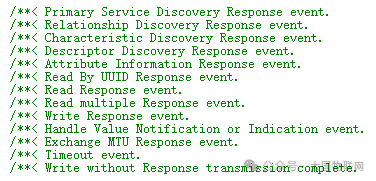
3. GATTC Events
enum BLE_GATTC_EVTS
{
BLE_GATTC_EVT_PRIM_SRVC_DISC_RSP = BLE_GATTC_EVT_BASE,
BLE_GATTC_EVT_REL_DISC_RSP,
BLE_GATTC_EVT_CHAR_DISC_RSP,
BLE_GATTC_EVT_DESC_DISC_RSP,
BLE_GATTC_EVT_ATTR_INFO_DISC_RSP,
BLE_GATTC_EVT_CHAR_VAL_BY_UUID_READ_RSP,
BLE_GATTC_EVT_READ_RSP,
BLE_GATTC_EVT_CHAR_VALS_READ_RSP,
BLE_GATTC_EVT_WRITE_RSP,
BLE_GATTC_EVT_HVX,
BLE_GATTC_EVT_EXCHANGE_MTU_RSP,
BLE_GATTC_EVT_TIMEOUT,
BLE_GATTC_EVT_WRITE_CMD_TX_COMPLETE
};
C represents client events, and the client usually refers to the central device.
1️⃣ <span><span>BLE_GATTC_EVT_PRIM_SRVC_DISC_RSP</span></span>
🔍 Primary Service Discovery Response
-
✅ Meaning: The result received after you call
<span>sd_ble_gattc_primary_services_discover()</span><span></span> -
🎯 Used to discover which service UUIDs the device supports
-
🚫 Ignore ➜ Cannot subsequently discover characteristics
-
✅ Suggestion: Traverse
<span>services[]</span><span> to extract </span><code><span>uuid</span><span> + </span><code><span>handle_range</span>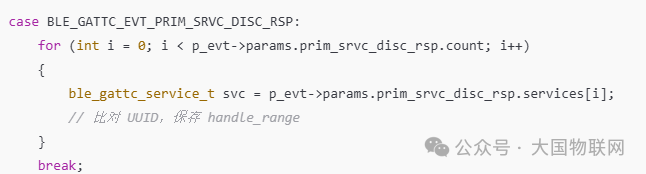
2️⃣ <span><span>BLE_GATTC_EVT_REL_DISC_RSP</span></span>
🔎 Included Services Discovery Response
-
🎯 Used to discover other services nested within a service (not commonly used)
-
✅ Usually skipped unless you are using a complex Profile
3️⃣ <span><span>BLE_GATTC_EVT_CHAR_DISC_RSP</span></span>
🔍 Characteristic Discovery Response
-
✅ Meaning: Called after
<span>sd_ble_gattc_characteristics_discover()</span><span></span> -
🎯 Scenario: Obtain characteristic UUID, attributes, handle
-
✅ Suggestion: Save
<span>.uuid</span><span>, </span><code><span>.handle_value</span><span>, </span><code><span>.handle_decl</span><span>, etc.</span>
4️⃣ <span><span>BLE_GATTC_EVT_DESC_DISC_RSP</span></span>
🔍 Descriptor Discovery Response
-
✅ Used to discover descriptors such as CCCD
-
🎯 For example: To enable Notification, you need to find and write to CCCD
5️⃣ <span><span>BLE_GATTC_EVT_ATTR_INFO_DISC_RSP</span></span>
📄 Attribute Information Discovery Response
-
✅ Applicable to Attribute Info Protocol (ATT v1.4+)
-
✅ Generally not used, can be skipped
6️⃣ <span><span>BLE_GATTC_EVT_CHAR_VAL_BY_UUID_READ_RSP</span></span>
📖 Batch Read Characteristic Values by UUID Response
-
🎯 Applicable for finding all instances of a certain UUID
-
✅ Can be used to match instance values of the same UUID across multiple services
7️⃣ <span><span>BLE_GATTC_EVT_READ_RSP</span></span>
📖 Read Characteristic or Descriptor Response
-
✅ You receive data after calling
<span>sd_ble_gattc_read()</span><span></span> -
✅ Typical scenario: Read battery level, device name, custom data
8️⃣ <span><span>BLE_GATTC_EVT_CHAR_VALS_READ_RSP</span></span>
📖 Batch Read Multiple Characteristic Values Response (not commonly used)
-
✅ Used for
<span>sd_ble_gattc_read()</span><span> specifying multiple handles</span>
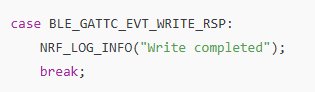
9️⃣ <span><span>BLE_GATTC_EVT_WRITE_RSP</span></span>
✍️ Write Response (Write Request)
-
✅ You call
<span>sd_ble_gattc_write()</span><span> after</span> -
🎯 Scenario: Write to remote characteristic, enable Notify
-
✅ Must wait for this event before sending the next write (writes with response are synchronous and blocking)
🔟 <span><span>BLE_GATTC_EVT_HVX</span></span>
📡 Received Notify / Indicate
-
✅ Meaning: The peer sends data to you via Notify/Indicate
-
🎯 You receive real-time data after subscribing to a certain characteristic
1️⃣1️⃣ <span><span>BLE_GATTC_EVT_EXCHANGE_MTU_RSP</span></span>
📐 Protocol Stack MTU Negotiation Result
-
✅ You call
<span>sd_ble_gattc_exchange_mtu_request()</span><span> after triggering</span> -
🎯 Optimize throughput (recommended to negotiate immediately after connection)
1️⃣2️⃣ <span><span>BLE_GATTC_EVT_TIMEOUT</span></span>
⏱️ Client Operation Timeout
-
✅ Generally, no response during read/write/service discovery process
-
✅ Suggest to disconnect
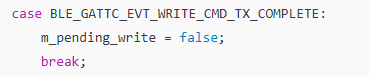
1️⃣3️⃣ <span><span>BLE_GATTC_EVT_WRITE_CMD_TX_COMPLETE</span></span>
✅ No Response Write Completion (Write Command)
-
✅ Triggered when you use
<span>BLE_GATT_OP_WRITE_CMD</span><span></span> -
✅ Used for flow control (no response writes may also block TX)
4. Global Events
1️⃣ <span><span>BLE_EVT_CONNECTED</span></span>
-
✅ Meaning: Device has established a connection (master or slave)
-
🎯 Scenario:
-
Central actively connects to Peripheral
-
Peripheral is connected
-
🚫 If you do not save
<span>conn_handle</span><span>, you will not be able to send data later</span> -
✅ Suggestion:
case BLE_GAP_EVT_CONNECTED:
    m_conn_handle = p_ble_evt->evt.gap_evt.conn_handle;
    NRF_LOG_INFO("Connected. conn_handle: 0x%x", m_conn_handle);
break;
⚠️ Essentially, it is
<span>#define BLE_EVT_CONNECTED BLE_GAP_EVT_CONNECTED</span>
2️⃣ <span><span>BLE_EVT_DISCONNECTED</span></span>
-
✅ Meaning: Connection Disconnected
-
🎯 Scenario:
-
Communication failure
-
Actively call
<span>sd_ble_gap_disconnect()</span> -
🚫 Not cleaning up resources may lead to crashes or resource leaks
-
✅ Suggestion:
case BLE_GAP_EVT_DISCONNECTED:
    NRF_LOG_INFO("Disconnected, reason: 0x%x", p_ble_evt->evt.gap_evt.params.disconnected.reason);
    m_conn_handle = BLE_CONN_HANDLE_INVALID;
break;
⚠️ Essentially, it is
<span>#define BLE_EVT_DISCONNECTED BLE_GAP_EVT_DISCONNECTED</span>
3️⃣ <span><span>BLE_EVT_TX_COMPLETE</span></span>
-
✅ Meaning: SoftDevice TX buffer available (Notify / Write without response sent)
-
🎯 Scenario: You have sent many Notifies, TX FIFO is full
-
🚫 Not processing will cause you to continue writing data to fail (NRF_ERROR_RESOURCES)
-
✅ Suggestion: Used for sending queue flow control
case BLE_EVT_TX_COMPLETE:
    m_tx_pending = false;
    send_next_notify();
break;
4️⃣ <span><span>BLE_EVT_USER_MEM_REQUEST</span></span>
-
✅ Meaning: GATT Client does “long write” (prepare write), SoftDevice requests you to provide memory cache
-
🎯 Scenario: You call
<span>sd_ble_gattc_write()</span><span> using </span><code><span>BLE_GATT_OP_PREP_WRITE_REQ</span> -
🚫 Ignore ➜ Long write process suspended
-
✅ Suggestion: Immediately call
<span>sd_ble_user_mem_reply()</span><span> to pass in buffer</span>
case BLE_EVT_USER_MEM_REQUEST:
{
static uint8_t write_buf[256];
ble_user_mem_block_t mem = {
        .len   = sizeof(write_buf),
        .p_mem = write_buf
    };
    sd_ble_user_mem_reply(conn_handle, &mem);
}
break;
5️⃣ <span><span>BLE_EVT_USER_MEM_RELEASE</span></span>
-
✅ Meaning: SoftDevice no longer uses the memory you provided (long write ends)
-
🎯 Scenario: prepare-write, reliable write completed
-
✅ Suggestion: Release and reuse the cache
case BLE_EVT_USER_MEM_RELEASE:
    NRF_LOG_INFO("Long write buffer released");
break;
5. Events of the Pairing/Security/Binding/Storage Management Module
typedef enum
{
PM_EVT_BONDED_PEER_CONNECTED,
PM_EVT_CONN_CONFIG_REQ,
PM_EVT_CONN_SEC_START,
PM_EVT_CONN_SEC_SUCCEEDED,
PM_EVT_CONN_SEC_FAILED,
PM_EVT_CONN_SEC_CONFIG_REQ,
PM_EVT_CONN_SEC_PARAMS_REQ,
PM_EVT_STORAGE_FULL,
PM_EVT_ERROR_UNEXPECTED,
PM_EVT_PEER_DATA_UPDATE_SUCCEEDED,
PM_EVT_PEER_DATA_UPDATE_FAILED,
PM_EVT_PEER_DELETE_SUCCEEDED,
PM_EVT_PEER_DELETE_FAILED,
PM_EVT_PEERS_DELETE_SUCCEEDED,
PM_EVT_PEERS_DELETE_FAILED,
PM_EVT_LOCAL_DB_CACHE_APPLIED,
PM_EVT_LOCAL_DB_CACHE_APPLY_FAILED,
PM_EVT_SERVICE_CHANGED_IND_SENT,
PM_EVT_SERVICE_CHANGED_IND_CONFIRMED,
PM_EVT_SLAVE_SECURITY_REQ,
PM_EVT_FLASH_GARBAGE_COLLECTED,
PM_EVT_FLASH_GARBAGE_COLLECTION_FAILED,
} pm_evt_id_t;
1️⃣ <span><span>PM_EVT_BONDED_PEER_CONNECTED</span></span>
-
✅ Meaning: Successfully reconnected to a bonded peer.
-
🎯 Scenario: The device remembers the peer_id, the other party is a previously paired device.
-
🚫 If ignored: You may miss the opportunity to restore historical data.
-
✅ Suggestion: Record
<span>peer_id</span><span>, load bonded data.</span>
if (p_evt->evt_id == PM_EVT_BONDED_PEER_CONNECTED)
{
    m_peer_id = p_evt->peer_id;  // Save the currently connected peer_id
}
2️⃣ <span><span>PM_EVT_CONN_CONFIG_REQ</span></span>
-
✅ SoftDevice requests connection parameter configuration.
-
✅ Usually handled internally, no application response required.
-
✅ You can ignore it.
3️⃣ <span><span>PM_EVT_CONN_SEC_START</span></span>
-
✅ Meaning: Start encryption or pairing.
-
🎯 Scenario: You or the peer initiated a secure connection.
-
🚫 Ignoring it is not a big deal, mainly for logging.
-
✅ Suggestion: Log or set status.
if (p_evt->evt_id == PM_EVT_CONN_SEC_START)
{
    NRF_LOG_INFO("Security procedure started.");
}
4️⃣ <span><span>PM_EVT_CONN_SEC_SUCCEEDED</span></span>
-
✅ Meaning: Connection encryption/pairing succeeded.
-
🎯 Scenario: First pairing or re-connection using old keys for encryption.
-
🚫 Ignoring it will lead to subsequent services being unable to start or notifications failing.
-
✅ Suggestion:
-
Record peer_id
-
Start notifications, GATT services, etc.
if (p_evt->evt_id == PM_EVT_CONN_SEC_SUCCEEDED)
{
    m_peer_id = p_evt->peer_id;
    notify_start(); // Notifications can only be sent after the connection is secure
}
5️⃣ <span><span>PM_EVT_CONN_SEC_FAILED</span></span>
-
✅ Meaning: Encryption/pairing failed
-
🎯 Mobile pairing process interrupted, password mismatch, IO capability conflict, etc.
-
🚫 Continuing to maintain the connection will have no security guarantee
-
✅ Suggestion: Disconnect immediately
<span>if (p_evt->evt_id == PM_EVT_CONN_SEC_FAILED)</span><span>{</span><span> sd_ble_gap_disconnect(p_evt->conn_handle, BLE_HCI_REMOTE_USER_TERMINATED_CONNECTION);</span><span>}</span>
6️⃣ <span><span>PM_EVT_CONN_SEC_CONFIG_REQ</span></span> (the one you should focus on)
-
✅ Meaning: The peer wishes to re-pair (and you are bonded)
-
🎯 Scenario: The mobile device deletes the device and reconnects
-
🚫 Not processing ➜ Will lead to pairing failure
-
✅ Suggestion:
-
Reply allowing repairing
-
Delete the original bond
pm_conn_sec_config_t config = {.allow_repairing = true};
pm_conn_sec_config_reply(p_evt->conn_handle, &config);
pm_peer_delete(p_evt->peer_id);  // Delete old bond
7️⃣ <span><span>PM_EVT_CONN_SEC_PARAMS_REQ</span></span>
-
✅ Meaning: SoftDevice requests pairing parameters
-
🎯 Occurs during the pairing process
-
✅ PM handles it automatically internally, no need for you to respond
8️⃣ <span><span>PM_EVT_STORAGE_FULL</span></span>
-
✅ Meaning: Flash is full, unable to store pairing data
-
🎯 Multiple pairings without timely GC (garbage collection)
-
🚫 Subsequent bonding will fail, record write failure
-
✅ Suggestion:
<span>fds_gc(); </span><span>// Manually trigger garbage collection</span>
9️⃣ <span><span>PM_EVT_ERROR_UNEXPECTED</span></span>
-
✅ PM internal exception (e.g., FDS error)
-
✅ Suggestion: Log the error code for debugging
🔟 <span><span>PM_EVT_PEER_DATA_UPDATE_SUCCEEDED</span></span>
-
✅ Indicates that data (e.g., LTK, flags) has been successfully updated and written to FDS.
-
✅ Suggestion: Log the mark.
1️⃣1️⃣ <span><span>PM_EVT_PEER_DATA_UPDATE_FAILED</span></span>
-
✅ Indicates that writing to FDS failed (possibly Flash Busy)
-
✅ Suggestion: Retry after GC
1️⃣2️⃣ <span><span>PM_EVT_PEER_DELETE_SUCCEEDED</span></span>
-
✅ Successfully deleted peer
-
✅ Usually used for UI display “cleared successfully”
1️⃣3️⃣ <span><span>PM_EVT_PEER_DELETE_FAILED</span></span>
-
✅ Deletion failed (Flash Busy)
-
✅ Suggestion: Retry later or trigger GC
1️⃣4️⃣ <span><span>PM_EVT_PEERS_DELETE_SUCCEEDED</span></span>
-
✅ Successfully cleared all peers
-
✅ Suggestion: Re-advertise afterwards, enter pairing state
1️⃣5️⃣ <span><span>PM_EVT_PEERS_DELETE_FAILED</span></span>
-
✅ Failed to delete all
-
✅ Reason is usually that GC is not completed
1️⃣6️⃣ <span><span>PM_EVT_LOCAL_DB_CACHE_APPLIED</span></span>
-
✅ Indicates that the service cache has been successfully applied (used to skip the discovery process)
-
✅ Can skip
<span>ble_db_discovery_start()</span>
1️⃣7️⃣ <span><span>PM_EVT_LOCAL_DB_CACHE_APPLY_FAILED</span></span>
-
✅ GATT cache invalid
-
✅ Needs to rediscover services
1️⃣8️⃣ <span><span>PM_EVT_SERVICE_CHANGED_IND_SENT</span></span>
-
✅ Notified the peer “service has changed”
-
✅ Suggestion: Wait for confirmation before enabling services
1️⃣9️⃣ <span><span>PM_EVT_SERVICE_CHANGED_IND_CONFIRMED</span></span>
-
✅ The client confirmed the Indicate
-
✅ Suggestion: Use GATT services normally afterwards
2️⃣0️⃣ <span><span>PM_EVT_SLAVE_SECURITY_REQ</span></span>
-
✅ The slave actively requests the host for encryption
-
✅ Suggestion: The master device calls
<span>sd_ble_gap_authenticate()</span>
2️⃣1️⃣ <span><span>PM_EVT_FLASH_GARBAGE_COLLECTED</span></span>
-
✅ GC successfully completed, Flash available
2️⃣2️⃣ <span><span>PM_EVT_FLASH_GARBAGE_COLLECTION_FAILED</span></span>
-
✅ GC failed (e.g., writing Flash)
-
✅ Suggestion: Retry later
6. Flash Data Storage (FDS) Module Events

1️⃣ <span><span>FDS_EVT_INIT</span></span> — Initialization Complete
-
✅ Meaning: FDS module initialization succeeded or failed (triggered after calling
<span>fds_init()</span><span>)</span> -
🎯 Scenario: During startup, initialization must be completed to read/write records
-
🚫 Ignoring may cause all subsequent FDS API calls to fail
-
✅ Processing Suggestion:
<span>void</span><span> fds_evt_handler</span><span>(</span><span>fds_evt_t</span><span> const</span><span> * p_evt)</span><span>{</span><span> if</span><span> (p_evt->id == FDS_EVT_INIT)</span><span> {</span><span> if</span><span> (p_evt->result == NRF_SUCCESS)</span><span> {</span><span> NRF_LOG_INFO(</span><span>"FDS init successful"</span><span>);</span><span> }</span><span> else</span><span> {</span><span> NRF_LOG_ERROR(</span><span>"FDS init failed: %d"</span><span>, p_evt->result);</span><span> }</span><span> }</span><span>}</span>
2️⃣ <span><span>FDS_EVT_WRITE</span></span> — Record Write Complete
-
✅ Meaning:
<span>fds_record_write()</span><span> successfully written to Flash</span> -
🎯 Scenario: Pairing information, parameter settings, application state written
-
🚫 Ignoring may lead to unknown data state, unable to continue operations
-
✅ Suggestion: Record
<span>record_id</span><span>, update status</span> -
<span>if</span><span> (p_evt->id == FDS_EVT_WRITE)</span><span>{</span><span> NRF_LOG_INFO(</span><span>"Record written. ID: 0x%x"</span><span>, p_evt->write.record_id);</span><span>}</span>
3️⃣ <span><span>FDS_EVT_UPDATE</span></span> — Record Update Complete
-
✅ Meaning: Called
<span>fds_record_update()</span><span> successfully</span> -
🎯 Replaces old record content, automatically invalidates the old record
-
🚫 Ignoring will lead to uncertainty about whether the overwrite was successful
-
✅ Suggestion: Confirm and release the old record (if needed)
if (p_evt->id == FDS_EVT_UPDATE)
{
    NRF_LOG_INFO("Record updated. ID: 0x%x", p_evt->write.record_id);
}
4️⃣ <span><span>FDS_EVT_DEL_RECORD</span></span> — Record Deletion Complete
-
✅ Meaning:
<span>fds_record_delete()</span><span> successfully deleted the specified record_id</span> -
🎯 Scenario: Unbinding, resetting configuration
-
🚫 Not confirming may cause status errors, not actually deleted
-
✅ Suggestion: Update internal record status or synchronize UI
if (p_evt->id == FDS_EVT_DEL_RECORD)
{
    NRF_LOG_INFO("Record deleted. ID: 0x%x", p_evt->del.record_id);
}
5️⃣ <span><span>FDS_EVT_DEL_FILE</span></span> — File Deletion Complete (All Records with the Same file_id)
-
✅ Meaning:
<span>fds_file_delete()</span><span> successfully, all records in the file have been deleted</span> -
🎯 Scenario: Clear a type of data (e.g., all binding records)
-
🚫 Not processing may miss cleaning up subsequent processes
-
✅ Suggestion: Update local status flags or trigger re-initialization
<span>if (p_evt->id == FDS_EVT_DEL_FILE)</span><span>{</span><span>    NRF_LOG_INFO("File deleted. File ID: 0x%x", p_evt->del.file_id);
}
</span>
6️⃣ <span><span>FDS_EVT_GC</span></span> — Garbage Collection Complete
-
✅ Meaning: Called
<span>fds_gc()</span><span> completed garbage block collection</span> -
🎯 Scenario: Insufficient storage space or manual collection
-
🚫 If you do not wait for GC to complete, it may lead to write failures
-
✅ Suggestion: Retry writing, update status
<span>if (p_evt->id == FDS_EVT_GC)</span><span>{</span><span>    NRF_LOG_INFO("FDS GC completed.");
// Can continue writing previously failed records
}
</span>
✅ Recommended <span>fds_evt_handler()</span><span> Template Structure</span>
void fds_evt_handler(fds_evt_t const * p_evt)
{
 switch (p_evt->id)
 {
  case FDS_EVT_INIT:
  case FDS_EVT_WRITE:
  case FDS_EVT_UPDATE:
  case FDS_EVT_DEL_RECORD:
  case FDS_EVT_DEL_FILE:
  case FDS_EVT_GC:
  // Handle each as above
  break;

  default:
   NRF_LOG_WARNING("Unknown FDS event: %d", p_evt->id);
    break;
 }
}