Table of Contents
-
Deploying LNMP with Ansible Playbook
-
Installing Ansible
-
Basic Preparation with Ansible
-
Writing with Playbook
-
Using Variables
Environment Introduction:
| System | IP | Hostname | Service |
|---|---|---|---|
| centos8 | 192.168.222.250 | ansible | ansible |
| centos8 | 192.168.222.137 | nginx | nginx |
| centos8 | 192.168.222.138 | mysql | mysql |
| centos8 | 192.168.222.139 | php | php |
nginx-1.22.0mysql-5.7.38php-8.1.11
Installing Ansible
Aliyun Official Website
// Configure Aliyun Source
[root@ansible~]# cd /etc/yum.repos.d/
[root@ansible yum.repos.d]# rm -rf *
[root@ansible yum.repos.d]# curl -o /etc/yum.repos.d/CentOS-Base.repo https://mirrors.aliyun.com/repo/Centos-vault-8.5.2111.repo
% Total    % Received % Xferd  Average Speed   TimeTimeTimeCurrent
                                 Dload  Upload   Total   Spent    Left  Speed
1002495100249500104390--:--:-- --:--:-- --:--:-- 10439
[root@ansible yum.repos.d]# sed -i -e '/mirrors.cloud.aliyuncs.com/d'-e '/mirrors.aliyuncs.com/d'/etc/yum.repos.d/CentOS-Base.repo
// Configure EPEL
[root@ansible yum.repos.d]# yum install -y https://mirrors.aliyun.com/epel/epel-release-latest-8.noarch.rpm
[root@ansible yum.repos.d]# sed -i 's|^#baseurl=https://download.example/pub|baseurl=https://mirrors.aliyun.com|'/etc/yum.repos.d/epel*
[root@ansible yum.repos.d]# sed -i 's|^metalink|#metalink|'/etc/yum.repos.d/epel*
[root@ansible yum.repos.d]# ls
CentOS-Base.repo  epel-modular.repo  epel-testing-modular.repo  epel-testing.repo  epel.repo
[root@ansible yum.repos.d]# cd
// Install Ansible
[root@ansible~]# dnf -y install platform-python
[root@ansible~]# dnf -y install centos-release-ansible-29
[root@ansible~]# dnf -y install ansible  --nobest
[root@ansible~]# ansible --version   // Check version
ansible 2.9.27
  config file =/etc/ansible/ansible.cfg
  configured modulesearch path = ['/root/.ansible/plugins/modules', '/usr/share/ansible/plugins/modules']
  ansible python module location =/usr/lib/python3.6/site-packages/ansible
  executable location =/usr/bin/ansible
  python version =3.6.8 (default, Sep 102021, 09:13:53) [GCC 8.5.020210514 (Red Hat 8.5.0-3)]
Basic Preparation with Ansible
// Mapping
[root@ansible~]# vim /etc/hosts
[root@ansible~]# cat /etc/hosts
127.0.0.1   localhost localhost.localdomain localhost4 localhost4.localdomain4
::1         localhost localhost.localdomain localhost6 localhost6.localdomain6
192.168.222.137 nginx
192.168.222.138 mysql
192.168.222.139 php
[root@ansible~]# mkdir playdemo
[root@ansible~]# cd playdemo/
[root@ansible playdemo]# cp /etc/ansible/ansible.cfg .
[root@ansible playdemo]# ls
ansible.cfg
[root@ansible playdemo]# vim ansible.cfg
#inventory      =/etc/ansible/hosts
inventory       = inventory
[root@ansible playdemo]# vim inventory   // Directory for storing inventory
[root@ansible playdemo]# cat inventory
[nginx]     // Controlled Host
192.168.222.137
[mysql]
192.168.222.138
[php]
192.168.222.139
[root@ansible playdemo]# ls
ansible.cfg  inventory
// Check controlled hosts
[root@ansible playdemo]# ansible all --list-hosts
  hosts (3):
192.168.222.137
192.168.222.138
192.168.222.139
// Implement passwordless login to controlled hosts
[root@ansible playdemo]# ssh-keygen -t rsa
Generating public/private rsa key pair.
Enter file in which to save the key (/root/.ssh/id_rsa):
Created directory '/root/.ssh'.
Enter passphrase (empty for no passphrase):
Enter same passphrase again:
Your identification has been saved in/root/.ssh/id_rsa.
Your public key has been saved in/root/.ssh/id_rsa.pub.
The key fingerprint is:
SHA256:mpyjGH8V9Fiy/Snu9xMsGcCtrQQFEm5dvSSgI++dqco root@ansible
The key's randomart image is:
+---[RSA3072]----+
|      o.o=oo     |
|     . ++.=+|
|    . =..O* .   |
|+.+=+|
|      . So o =|
|     o =.oo = o  |
|  .   B.+. . . . |
|=..o  . . .  |
|  . Eo.  ......|
+----[SHA256]-----+
[root@ansible playdemo]# ssh-copy-id 192.168.222.137
[root@ansible playdemo]# ssh-copy-id 192.168.222.138
[root@ansible playdemo]# ssh-copy-id 192.168.222.139
// Check if machine nodes are reachable
[root@ansible playdemo]# ansible all -m ping
192.168.222.137|SUCCESS=> {
"ansible_facts": {
"discovered_interpreter_python": "/usr/libexec/platform-python"
    },
"changed": false,
"ping": "pong"
}
192.168.222.139|SUCCESS=> {
"ansible_facts": {
"discovered_interpreter_python": "/usr/libexec/platform-python"
    },
"changed": false,
"ping": "pong"
}
192.168.222.138|SUCCESS=> {
"ansible_facts": {
"discovered_interpreter_python": "/usr/libexec/platform-python"
    },
"changed": false,
"ping": "pong"
}
// Stop the firewall on the control host
[root@ansible playdemo]# systemctl stop firewalld.service
[root@ansible playdemo]# vim /etc/selinux/config
SELINUX=disabled
[root@ansible playdemo]# setenforce 0
[root@ansible playdemo]# systemctl disable  --now firewalld.service
Removed /etc/systemd/system/multi-user.target.wants/firewalld.service.
Removed /etc/systemd/system/dbus-org.fedoraproject.FirewallD1.service.
Writing with Playbook
[root@ansible playdemo]# mkdir playbook  // The playbook directory needs to be at the same level as the inventory directory
[root@ansible playdemo]# cd playbook/
[root@ansible playbook]# vim lnmp.yml
[root@ansible playbook]# cat lnmp.yml
---
-name: nginx mysql php stop firewalld and selinux
hosts: all
tasks:
-name: stop firewalld
service:
name: firewalld.service
state: stopped
enabled: no
-name: Ensure SELinux is set to disabled mode
lineinfile:
path: /etc/selinux/config
regexp: '^SELINUX='
line: SELINUX=disabled

-name: install nginx
hosts: nginx
tasks:
-name: create user nginx
user:
name: nginx
system: yes
shell: /sbin/nologin
create_home: no
state: present
-name: download nginx
get_url:
url: https://nginx.org/download/nginx-1.22.0.tar.gz
dest: /usr/local/src
-name: Unarchive nginx
unarchive:
src: /usr/local/src/nginx-1.22.0.tar.gz
dest: /usr/src/
remote_src: yes

-name: yum install
yum:
name: pcre-devel, openssl, openssl-devel, gd-devel, make, gcc, gcc-c++, wget
state: present

-name: nginx configure
shell:
cd /usr/src/nginx-1.22.0 && ./configure --prefix=/usr/local/nginx --user=nginx --group=nginx --with-debug --with-http_ssl_module --with-http_realip_module --with-http_image_filter_module --with-http_gunzip_module --with-http_gzip_static_module --with-http_stub_status_module

-name: nginx make
shell:
cd /usr/src/nginx-1.22.0 && make -j$(grep 'processor' /proc/cpuinfo | wc -l) && make install

-name: nginx PATH
copy:
dest: /etc/profile.d/nginx.sh
content: export PATH=$PATH:/usr/local/nginx/sbin

-name: nginx service file
copy:
dest: /usr/lib/systemd/system/nginx.service
content: |
          [Unit]
          Description=nginx server daemon
          After=network.target

          [Service]
          Type=forking
          ExecStart=/usr/local/nginx/sbin/nginx
          ExecStop=/usr/local/nginx/sbin/nginx -s stop
          ExecReload=/bin/kill -HUP $MAINPID

          [Install]
          WantedBy=multi-user.target

-name: modify configuration file
copy:
dest: /usr/local/nginx/conf/nginx.conf
content: |
          user  nginx;
          worker_processes  1;
          events {
              worker_connections  1024;
          }

http {
include mime.types;
default_type application/octet-stream;
sendfile on;
keepalive_timeout 65;
server {
listen 80;
server_name localhost;

location / {
root html;
index index.php;
                  }
error_page 500 502 503 504 /50x.html;
location = /50x.html {
root html;
                  }
location ~ \.php$ {
root /var/www;
fastcgi_pass 192.168.222.139:9000;
fastcgi_index index.php;
fastcgi_param SCRIPT_FILENAME $document_root$fastcgi_script_name;
include fastcgi_params;
                  }
              }
          }
-name: index.php
file:
path: /usr/local/nginx/html/index.php
state: touch

-name: start nginx
service:
name: nginx.service
state: restarted
enabled: yes

-name: install mysql
hosts: mysql
tasks:
-name: create user mysql
user:
name: mysql
system: yes
shell: /sbin/nologin
create_home: no
state: present
-name: download mysql
get_url:
url: https://downloads.mysql.com/archives/get/p/23/file/mysql-5.7.38-linux-glibc2.12-x86_64.tar.gz
dest: /usr/local/src/
-name: unarchive mysql
unarchive:
src: /usr/local/src/mysql-5.7.38-linux-glibc2.12-x86_64.tar.gz
dest: /usr/src/
remote_src: yes

-name: Modifying Directory Permissions
file:
src: /usr/src/mysql-5.7.38-linux-glibc2.12-x86_64
dest: /usr/local/mysql
owner: mysql
group: mysql
state: link

-name: mysql PATH
copy:
dest: /etc/profile.d/mysql.sh
content: export PATH=$PATH:/usr/local/mysql/bin

-name: create mysql data
file:
path: /opt/data
state: directory
owner: mysql
group: mysql

-name: Modifying mysql include
file:
src: /usr/local/mysql/include
dest: /usr/include/mysql
state: link

-name: Modifying mysql lib
copy:
dest: /etc/ld.so.conf.d/mysql.conf
content: /usr/local/mysql/lib

-name: Initializing the database
shell:
mysqld --initialize --user=mysql --datadir /opt/data > /tmp/passwd
-name: create mysql.conf
copy:
dest: /etc/my.cnf
content: |
          [mysqld]
          basedir = /usr/local/mysql
          datadir = /opt/data
          socket = /tmp/mysql.sock
          port = 3306
          pid-file = /opt/data/mysql.pid
          user = mysql
          skip-name-resolve
-name: create service file
copy:
dest: /usr/lib/systemd/system/mysqld.service
content:|
          [Unit]
          Description=mysql server daemon
          After=network.target sshd-keygen.target

          [Service]
          Type=forking
          ExecStart=/usr/local/mysql/support-files/mysql.server start
          ExecStop=/usr/local/mysql/support-files/mysql.server stop
          ExecReload=/bin/kill -HUP

          [Install]
          WantedBy=multi-user.target
-name: start mysql
service:
name: mysqld.service
state: started
enabled: yes

-name: install php
hosts: php
tasks:
-name: php yum
yum:
name: libxml2-devel, openssl-devel, curl-devel, libjpeg-devel, libpng-devel, libicu-devel, freetype-devel, openldap-devel, openldap, openldap-devel, gcc, gcc-c++, sqlite-devel, libzip-devel, openssl, libcurl-devel.x86_64, libpng.x86_64, libpng-devel.x86_64, freetype-devel, readline, readline-devel, make
state: present
-name: php yum
shell:
yum -y install http://mirror.centos.org/centos/8-stream/PowerTools/x86_64/os/Packages/oniguruma-devel-6.8.2-2.el8.x86_64.rpm
-name: download php
get_url:
url: https://www.php.net/distributions/php-8.1.11.tar.gz
dest: /usr/local/src/
-name: unarchive php
unarchive:
src: /usr/local/src/php-8.1.11.tar.gz
dest: /usr/src/
remote_src: yes

-name: php configure
shell:
cd /usr/src/php-8.1.11 && ./configure --prefix=/usr/local/php --with-config-file-path=/etc --enable-fpm --disable-debug --disable-rpath --enable-shared --enable-soap --with-openssl --enable-bcmath --with-iconv --with-bz2 --enable-calendar --with-curl --enable-exif --enable-ftp --enable-gd --with-jpeg --with-zlib-dir --with-freetype --with-gettext --enable-mbstring --enable-pdo --with-mysqli=mysqlnd --with-pdo-mysql=mysqlnd --with-readline --enable-shmop --enable-simplexml --enable-sockets --with-zip --enable-mysqlnd-compression-support --with-pear --enable-pcntl --enable-posix

-name: php make
shell:
cd /usr/src/php-8.1.11 && make -j$(grep 'processor' /proc/cpuinfo | wc -l) && make install
-name: php copy conf file
copy:
src: /usr/local/php/etc/php-fpm.conf.default
dest: /usr/local/php/etc/php-fpm.conf
remote_src: yes

-name: php copy php-fpm.conf
copy:
src: /usr/local/php/etc/php-fpm.d/www.conf.default
dest: /usr/local/php/etc/php-fpm.d/www.conf
remote_src: yes

-name: config listen
lineinfile:
path: /usr/local/php/etc/php-fpm.d/www.conf
regexp: '^listen = '
line: listen=192.168.222.139:9000

-name: config listen allowed_clients
lineinfile:
path: /usr/local/php/etc/php-fpm.d/www.conf
regexp: '^;listen.allowed_clients = '
line: listen.allowed_clients=192.168.222.137

-name: php service
copy:
dest: /usr/lib/systemd/system/php.service
content:|
          [Unit]
          Description=php server daemon
          After=network.target

          [Service]
          Type=forking
          ExecStart=/usr/local/php/sbin/php-fpm
          ExecStop=ps -ef | grep php | grep -v grep | awk '{print $2}' | xargs kill
          ExecReload=/bin/kill -HUP $MAINPID

          [Install]
          WantedBy=multi-user.target
-name: start php
service:
name: php.service
state: restarted
enabled: yes

-name: var directory
file:
path: /var/www
state: directory

-name: index.php
copy:
dest: /var/www/index.php
content:|
          <?php
              phpinfo();
          ?>
[root@ansible playbook]# cd ..
[root@ansible playdemo]# ansible-playbook playbook/lnmp.yml -vv
...
PLAY RECAP***********************************************************************************************
192.168.222.137            :ok=15 changed=13 unreachable=0 failed=0 skipped=0 rescued=0 ignored=0
192.168.222.138            :ok=16 changed=14 unreachable=0 failed=0 skipped=0 rescued=0 ignored=0
192.168.222.139            :ok=18 changed=16 unreachable=0 failed=0 skipped=0 rescued=0 ignored=0
Access: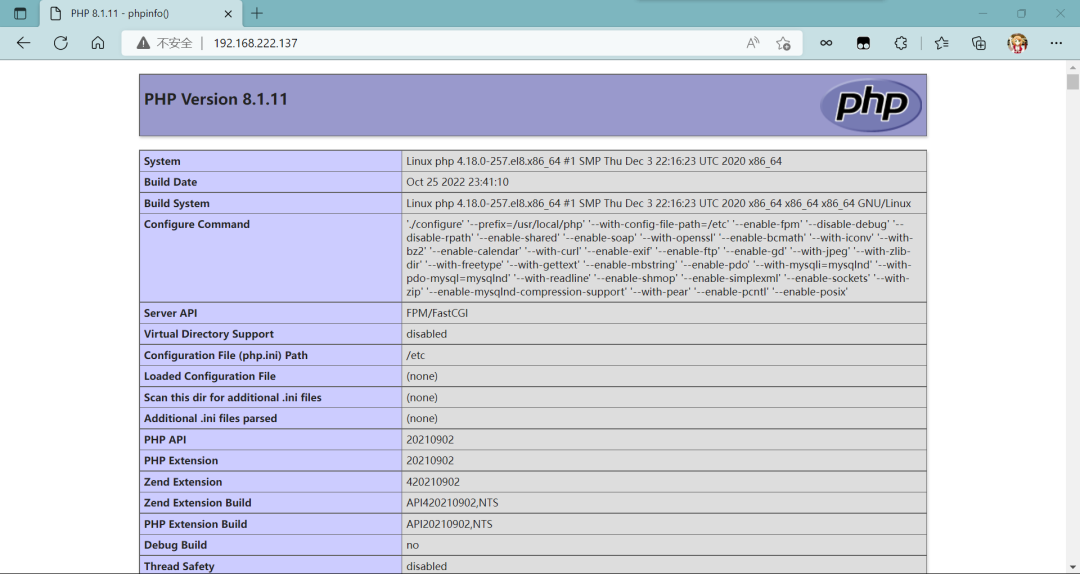
Using Variables
[root@ansible~]# tree playdemo
playdemo
|-- ansible.cfg
|-- inventory
|-- package
||-- mysql-5.7.38-linux-glibc2.12-x86_64.tar.gz
||-- nginx-1.22.0.tar.gz
|`-- php-8.1.11.tar.gz
|-- playbook
|`-- lnmp.yml
`-- var
|-- dir.yml
|-- hos.yml
`-- package.yml

3 directories, 9 files
[root@ansible playdemo]# cd
[root@ansible~]# cd playdemo/
[root@ansible playdemo]# ls
ansible.cfg inventory package playbook var
[root@ansible playdemo]# ls package/
mysql-5.7.38-linux-glibc2.12-x86_64.tar.gz nginx-1.22.0.tar.gz php-8.1.11.tar.gz
[root@ansible playdemo]# ls playbook/
lnmp.yml
[root@ansible playdemo]# ls var/
dir.yml hos.yml package.yml
[root@ansible playdemo]# cat var/package.yml
package:
nginx: nginx-1.22.0
mysql: mysql-5.7.38-linux-glibc2.12-x86_64
php: php-8.1.11
[root@ansible playdemo]# cat var/dir.yml
url_dir: ../package/
dow_dir: /usr/local/src/
una_dir: /usr/src/
ins_dir:
nginx: /usr/local/nginx
mysql: /usr/local/mysql
php: /usr/local/php
[root@ansible playdemo]# cat var/hos.yml
host_ip:
nginx: 192.168.222.137
mysql: 192.168.222.138
php: 192.168.222.139
[root@ansible playdemo]# cd playbook/
[root@ansible playbook]# vim lnmp.yml
[root@ansible playbook]# cat lnmp.yml
---
-name: nginx mysql php stop firewalld and selinux
hosts: all
tasks:
-name: stop firewalld
service:
name: firewalld.service
state: stopped
enabled: no
-name: Ensure SELinux is set to disabled mode
lineinfile:
path: /etc/selinux/config
regexp: '^SELINUX='
line: SELINUX=disabled

-name: install nginx
vars_files:
- ../var/dir.yml
- ../var/hos.yml
- ../var/package.yml
hosts: "{{ host_ip['nginx'] }}"
tasks:
-name: create user nginx
user:
name: nginx
system: yes
shell: /sbin/nologin
create_home: no
state: present
-name: copy nginx
copy:
src: "{{ url_dir }}{{ package['nginx'] }}.tar.gz"
dest: "{{ dow_dir }}"
-name: Unarchive nginx
unarchive:
src: "{{ dow_dir }}{{ package['nginx'] }}.tar.gz"
dest: "{{ una_dir }}"
remote_src: yes

-name: yum install
yum:
name: pcre-devel, openssl, openssl-devel, gd-devel, make, gcc, gcc-c++, wget
state: present

-name: nginx configure
shell:
cd {{ una_dir }}{{ package['nginx'] }} && ./configure --prefix={{ ins_dir['nginx'] }} --user=nginx --group=nginx --with-debug --with-http_ssl_module --with-http_realip_module --with-http_image_filter_module --with-http_gunzip_module --with-http_gzip_static_module --with-http_stub_status_module

-name: nginx make
shell:
cd {{ una_dir }}{{ package['nginx'] }} && make -j$(grep 'processor' /proc/cpuinfo | wc -l) && make install

-name: nginx PATH
copy:
dest: /etc/profile.d/nginx.sh
content: export PATH=$PATH:{{ ins_dir['nginx'] }}/sbin

-name: nginx service file
copy:
dest: /usr/lib/systemd/system/nginx.service
content:|
          [Unit]
          Description=nginx server daemon
          After=network.target

          [Service]
          Type=forking
          ExecStart={{ ins_dir['nginx'] }}/sbin/nginx
          ExecStop={{ ins_dir['nginx'] }}/sbin/nginx -s stop
          ExecReload=/bin/kill -HUP $MAINPID

          [Install]
          WantedBy=multi-user.target

-name: modify configuration file
copy:
dest: "{{ ins_dir['nginx'] }}/conf/nginx.conf"
content:|
          user  nginx;
          worker_processes  1;
          events {
              worker_connections  1024;
          }

http {
include mime.types;
default_type application/octet-stream;
sendfile on;
keepalive_timeout 65;
server {
listen 80;
server_name localhost;

location / {
root html;
index index.php;
                  }
error_page 500 502 503 504 /50x.html;
location = /50x.html {
root html;
                  }
location ~ \.php$ {
root /var/www;
fastcgi_pass {{ host_ip['php'] }}:9000;
fastcgi_index index.php;
fastcgi_param SCRIPT_FILENAME $document_root$fastcgi_script_name;
include fastcgi_params;
                  }
              }
          }
-name: index.php
file:
path: "{{ ins_dir['nginx'] }}/html/index.php"
state: touch

-name: start nginx
service:
name: nginx.service
state: restarted
enabled: yes

-name: install mysql
vars_files:
- ../var/dir.yml
- ../var/hos.yml
- ../var/package.yml
hosts: "{{ host_ip['mysql'] }}"
tasks:
-name: create user mysql
user:
name: mysql
system: yes
shell: /sbin/nologin
create_home: no
state: present
-name: copy mysql
copy:
src: "{{ url_dir }}{{ package['mysql'] }}.tar.gz"
dest: "{{ dow_dir }}"
-name: unarchive mysql
unarchive:
src: "{{ dow_dir }}{{ package['mysql'] }}.tar.gz"
dest: "{{ una_dir }}"
remote_src: yes

-name: Modifying Directory Permissions
file:
src: "{{ una_dir }}{{ package['mysql'] }}"
dest: "{{ ins_dir['mysql'] }}"
owner: mysql
group: mysql
state: link

-name: mysql PATH
copy:
dest: /etc/profile.d/mysql.sh
content: export PATH=$PATH:{{ ins_dir['mysql'] }}/bin

-name: create mysql data
file:
path: /opt/data
state: directory
owner: mysql
group: mysql

-name: Modifying mysql include
file:
src: "{{ ins_dir['mysql'] }}/include"
dest: /usr/include/mysql
state: link

-name: Modifying mysql lib
copy:
dest: /etc/ld.so.conf.d/mysql.conf
content: "{{ ins_dir['mysql'] }}/lib"

-name: Initializing the database
shell:
mysqld --initialize --user=mysql --datadir /opt/data > /tmp/passwd
-name: create mysql.conf
copy:
dest: /etc/my.cnf
content:|
          [mysqld]
          basedir = {{ ins_dir['mysql'] }}
          datadir = /opt/data
          socket = /tmp/mysql.sock
          port = 3306
          pid-file = /opt/data/mysql.pid
          user = mysql
          skip-name-resolve
-name: create service file
copy:
dest: /usr/lib/systemd/system/mysqld.service
content:|
          [Unit]
          Description=mysql server daemon
          After=network.target sshd-keygen.target

          [Service]
          Type=forking
          ExecStart={{ ins_dir['mysql'] }}/support-files/mysql.server start
          ExecStop={{ ins_dir['mysql'] }}/support-files/mysql.server stop
          ExecReload=/bin/kill -HUP

          [Install]
          WantedBy=multi-user.target
-name: start mysql
service:
name: mysqld.service
state: started
enabled: yes

-name: install php
vars_files:
- ../var/dir.yml
- ../var/hos.yml
- ../var/package.yml
hosts: "{{ host_ip['php'] }}"
tasks:
-name: php yum
yum:
name: libxml2-devel, openssl-devel, curl-devel, libjpeg-devel, libpng-devel, libicu-devel, freetype-devel, openldap-devel, openldap, openldap-devel, gcc, gcc-c++, sqlite-devel, libzip-devel, openssl, libcurl-devel.x86_64, libpng.x86_64, libpng-devel.x86_64, freetype-devel, readline, readline-devel, make
state: present
-name: php yum
shell:
yum -y install http://mirror.centos.org/centos/8-stream/PowerTools/x86_64/os/Packages/oniguruma-devel-6.8.2-2.el8.x86_64.rpm
-name: copy php
copy:
src: "{{ url_dir }}{{ package['php'] }}.tar.gz"
dest: "{{ dow_dir }}"
-name: unarchive php
unarchive:
src: "{{ dow_dir }}{{ package['php'] }}.tar.gz"
dest: "{{ una_dir }}"
remote_src: yes

-name: php configure
shell:
cd "{{ una_dir }}{{ package['php'] }}" && ./configure --prefix=/usr/local/php --with-config-file-path=/etc --enable-fpm --disable-debug --disable-rpath --enable-shared --enable-soap --with-openssl --enable-bcmath --with-iconv --with-bz2 --enable-calendar --with-curl --enable-exif --enable-ftp --enable-gd --with-jpeg --with-zlib-dir --with-freetype --with-gettext --enable-mbstring --enable-pdo --with-mysqli=mysqlnd --with-pdo-mysql=mysqlnd --with-readline --enable-shmop --enable-simplexml --enable-sockets --with-zip --enable-mysqlnd-compression-support --with-pear --enable-pcntl --enable-posix

-name: php make
shell:
cd "{{ una_dir }}{{ package['php'] }}" && make -j$(grep 'processor' /proc/cpuinfo | wc -l) && make install
-name: php copy conf file
copy:
src: "{{ ins_dir['php'] }}/etc/php-fpm.conf.default"
dest: "{{ ins_dir['php'] }}/etc/php-fpm.conf"
remote_src: yes

-name: php copy php-fpm.conf
copy:
src: "{{ ins_dir['php'] }}/etc/php-fpm.d/www.conf.default"
dest: "{{ ins_dir['php'] }}/etc/php-fpm.d/www.conf"
remote_src: yes

-name: config listen
lineinfile:
path: /usr/local/php/etc/php-fpm.d/www.conf
regexp: '^listen = '
line: listen=192.168.222.139:9000

-name: config listen allowed_clients
lineinfile:
path: "{{ ins_dir['php'] }}/etc/php-fpm.d/www.conf"
regexp: '^;listen.allowed_clients = '
line: listen.allowed_clients=192.168.222.137

-name: php service
copy:
dest: /usr/lib/systemd/system/php.service
content:|
          [Unit]
          Description=php server daemon
          After=network.target

          [Service]
          Type=forking
          ExecStart={{ ins_dir['php'] }}/sbin/php-fpm
          ExecStop=ps -ef | grep php | grep -v grep | awk '{print $2}' | xargs kill
          ExecReload=/bin/kill -HUP $MAINPID

          [Install]
          WantedBy=multi-user.target
-name: start php
service:
name: php.service
state: restarted
enabled: yes

-name: var directory
file:
path: /var/www
state: directory

-name: index.php
copy:
dest: /var/www/index.php
content:|
          <?php
              phpinfo();
          ?>
[root@ansible playbook]# cd ..
[root@ansible playdemo]# ansible-playbook playbook/lnmp.yml -vv
...
PLAY RECAP***********************************************************************************************
192.168.222.137            :ok=15 changed=13 unreachable=0 failed=0 skipped=0 rescued=0 ignored=0
192.168.222.138            :ok=16 changed=14 unreachable=0 failed=0 skipped=0 rescued=0 ignored=0
192.168.222.139            :ok=18 changed=16 unreachable=0 failed=0 skipped=0 rescued=0 ignored=0
Access: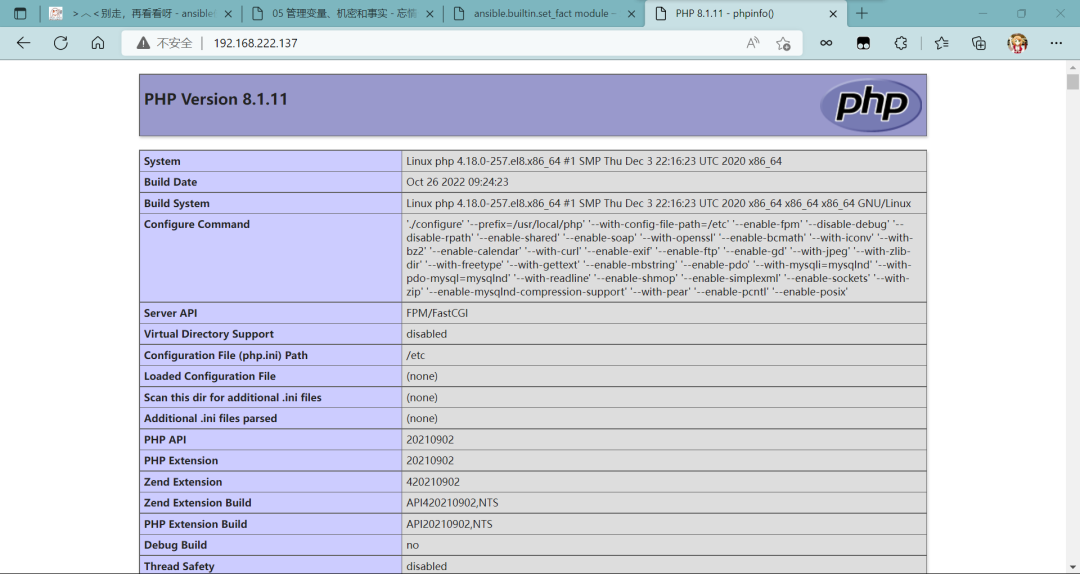
Link: https://www.cnblogs.com/tushanbu/p/16826895.html
(Copyright belongs to the original author, please delete if infringing)
WeChat group
To facilitate better communication on operation and maintenance and related technical issues, a WeChat group has been created. Friends who need to join the group can scan the QR code below to add me as a friend (note: join group).

Blog
CSDN Blog: https://blog.csdn.net/qq_25599925
Juejin Blog: https://juejin.cn/user/4262187909781751
Knowledge Planet: https://wx.zsxq.com/group/15555885545422
Long press to identify the QR code to visit the blog website for more quality original content.