When we browse the internet, we often see URLs prefixed with “http” or “https”. Both represent the HyperText Transfer Protocol, but there is a key difference between them: “security”. Today, we will delve into the differences between HTTPS and HTTP, as well as their working principles and application scenarios.
Basic Definitions of HTTP and HTTPS
THINKMO
01
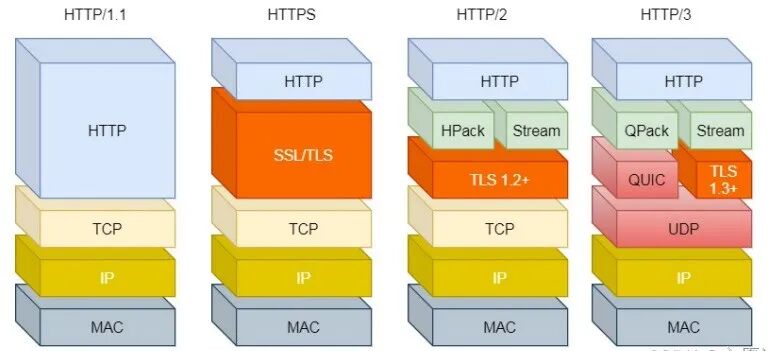
HTTP (HyperText Transfer Protocol) is one of the most common protocols we encounter while browsing the web. Almost all web browsers use the HTTP protocol to request and receive web content. Its operation is as follows: the browser sends a request to the server, and the server returns the corresponding data (such as web pages, images, etc.). However, the HTTP protocol itself transmits data in plaintext, meaning that any data transmitted over the network can be intercepted by a third party.
HTTPS (HyperText Transfer Protocol Secure) is the “secure version” of HTTP. It is built on the HTTP protocol and incorporates SSL/TLS encryption protocols, ensuring that the communication content is encrypted. This means that even if someone intercepts the data over the network, they cannot read its contents. Therefore, HTTPS not only provides data transmission but also offers authentication and encryption protection.
Working Principles of HTTP and HTTPS
THINKMO
02
1. Working Principle of HTTPThe working process of the HTTP protocol is relatively simple. The client (browser) sends a request to the server, and the server returns the requested content. Since the HTTP protocol lacks an encryption mechanism, all data is transmitted in plaintext, which poses security risks. For example, hackers can intercept and tamper with data through man-in-the-middle attacks.
2. Working Principle of HTTPS
The working process of the HTTPS protocol is relatively complex, but its basic steps are as follows:1. SSL/TLS Handshake Process:When the client (browser) requests an HTTPS website, a series of encryption and authentication processes occur between the client and the server. First, the browser exchanges certificates with the server to ensure the server’s identity is genuine. Then, data is encrypted and decrypted using public and private keys.2. Data Encryption:Once a secure connection is established, all transmitted data is protected using encryption algorithms. Even if hackers intercept this data, they cannot read its contents.3. Data Integrity Verification:The HTTPS protocol also verifies whether the data has been tampered with during transmission. If the data is modified during transmission, the communication will be interrupted, thus preventing tampering.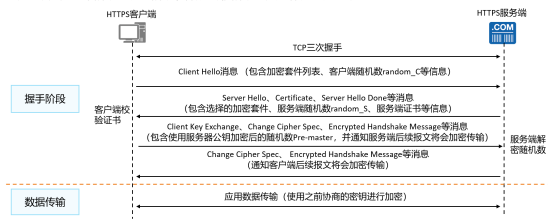
Key Differences Between HTTP and HTTPS
THINKMO
03
| Feature |
|
Security |
| Port |
| Certificate |
| Performance |
| Usage |
Advantages and Necessity of HTTPS
THINKMO
04
1. Data Encryption and Privacy Protection
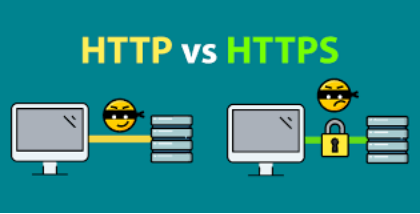
The most significant advantage of HTTPS is data encryption. In modern networks, privacy protection has become increasingly important, especially when handling sensitive personal information (such as usernames, passwords, payment information, etc.). HTTPS ensures that even if data is intercepted during transmission, hackers cannot decrypt and access this information through encryption technology.
2. Prevention of Man-in-the-Middle Attacks
Man-in-the-middle attacks (MITM) are a common type of network attack where an attacker can intercept communication between the user and the server, tampering with or stealing data. HTTPS effectively prevents such attacks by using SSL/TLS certificates to verify the server’s identity, ensuring that users are connected to the correct server.
3. Improved Search Engine Ranking
In recent years, search engines like Google have begun to consider HTTPS as a ranking factor. Websites using HTTPS are often prioritized in search results, positively impacting the site’s SEO optimization.
4. Enhanced User Trust
When accessing HTTPS websites, browsers typically display a small lock icon or indicate “secure” in the address bar. This increases user trust in the website, especially when making payments or submitting personal information. If a website does not use HTTPS, the browser may display a warning of “not secure,” which can raise user concerns and negatively affect the website’s user experience and trustworthiness.
In our daily lives, we access most websites using HTTPS, while using HTTP is rare. We may use HTTP for experimental demonstrations, but in real life, HTTPS is predominantly used.
Because the internet contains a vast amount of our identity information and personal data, using HTTPS encryption can prevent information from being tampered with or stolen by hackers.
How to Enable HTTPS
THINKMO
05
1. Obtain an SSL/TLS Certificate:First, you need to purchase and install an SSL/TLS certificate. Many service providers offer certificates, such as Let’s Encrypt, which provides free SSL certificates suitable for personal websites or small businesses.2. Configure the Web Server:Depending on the web server you are using (such as Apache, Nginx, IIS, etc.), you need to configure the server to support HTTPS. Typically, this requires specifying the SSL certificate for the server and enabling the SSL/TLS protocol in the configuration file.3. Enforce HTTPS:By using HTTP redirection (301 redirection), ensure that all HTTP requests are automatically forwarded to HTTPS. This way, users will access the website through a secure connection regardless of how they enter the URL.We hope this article helps everyone better understand the differences between HTTP and HTTPS, as well as how HTTPS plays a role in protecting data security and user privacy in the modern network environment.
Disclaimer: The images and text in this article are sourced from the internet, and the copyright belongs to the original authors! We are merely sharing good articles and knowledge with everyone, and we promise that the articles shared are not for commercial profit. If there is any infringement on the original author, or if the original author does not wish for their images and text to be reproduced, please notify us promptly, and we will delete them in a timely manner. Thank you!