-
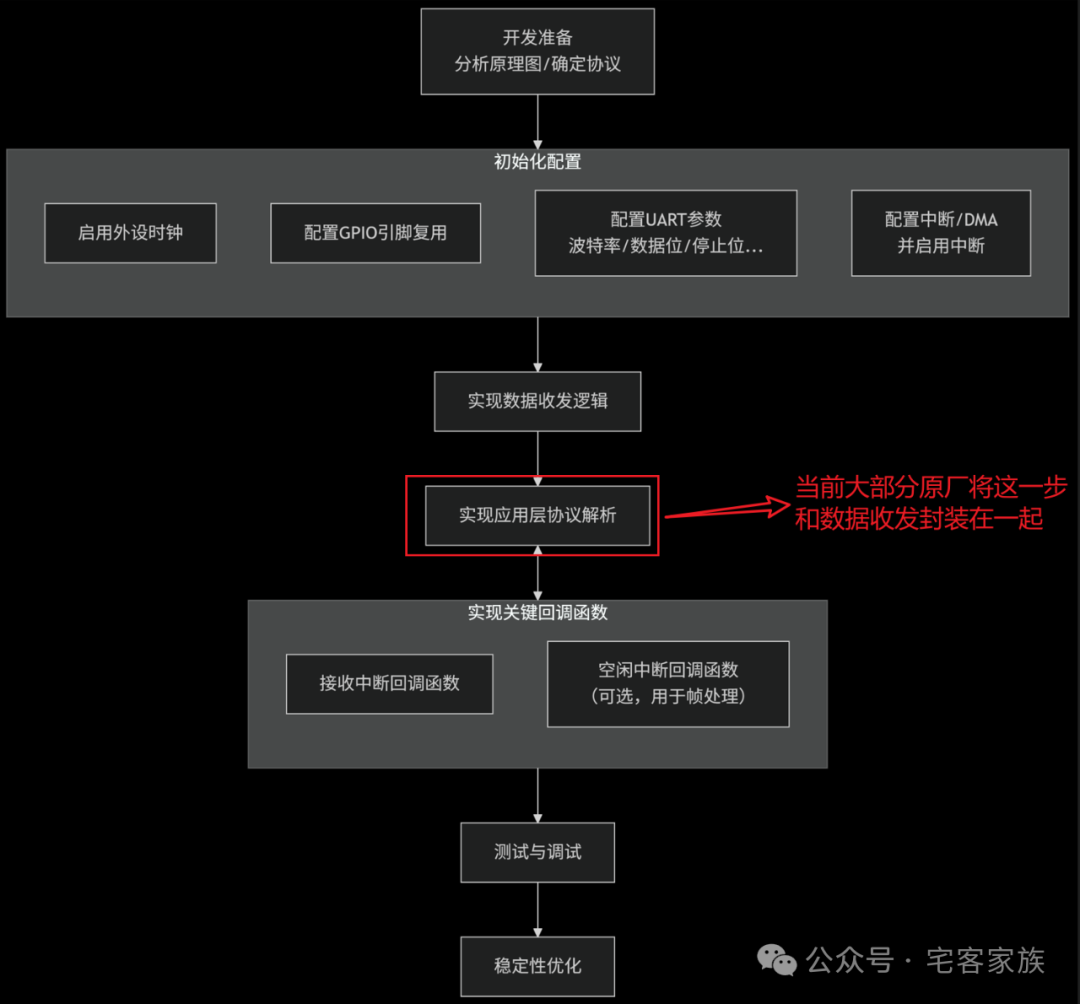
Preparation Work
-
Hardware
-
Confirm the MCU serial port (USART1, UART4, etc.);
-
Confirm the “pins” (TX: transmit pin, RX: receive pin). For example: PA9, PA10;
-
TX connects to RX, RX connects to TX, GND connects to GND;
Note: Ensure common ground (GND), which is essential for the signal circuit and level reference.
-
Protocol Format: Ensure that the baud rate, data bits, stop bits, parity bits, and other configurations are completely consistent;
2. MCU Program Initialization (Using STM32 HAL Library as an Example)
-
Initialization Configuration
-
Enable Peripheral Clock: First, enable the clock for UART and the corresponding GPIO.
__HAL_RCC_USART1_CLK_ENABLE();__HAL_RCC_GPIOA_CLK_ENABLE();-
GPIO Configuration Initialization: Set the TX pin to “Alternate Function Push-Pull Output”, and the RX pin to “Floating Input or Pull-Up Input”.
GPIO_InitStruct.Pin = GPIO_PIN_9;GPIO_InitStruct.Mode = GPIO_MODE_AF_PP; // Alternate Function Push-Pull OutputGPIO_InitStruct.Pull = GPIO_NOPULL;GPIO_InitStruct.Speed = GPIO_SPEED_FREQ_HIGH;HAL_GPIO_Init(GPIOA, &GPIO_InitStruct);-
UART Configuration Parameter Initialization:
huart1.Instance = USART1;huart1.Init.BaudRate = 115200;huart1.Init.WordLength = UART_WORDLENGTH_8B;huart1.Init.StopBits = UART_STOPBITS_1;huart1.Init.Parity = UART_PARITY_NONE;huart1.Init.Mode = UART_MODE_TX_RX; // Transmit and Receive Modehuart1.Init.HwFlowCtl = UART_HWCONTROL_NONE; // No Hardware Flow ControlHAL_UART_Init(&huart1);-
Data Transmission and Reception Mode Selection (Three Core Methods)
-
Blocking Mode (Polling):
-
Send: HAL_UART_Transmit(&huart1, pData, Size, Timeout)
-
Receive: HAL_UART_Receive(&huart1, pData, Size, Timeout)
-
Characteristics: The CPU will wait until the send/receive is complete or times out. Simple but inefficient, as the CPU cannot perform other tasks while waiting, suitable for simple applications.
-
Interrupt Mode:
-
Send: HAL_UART_Transmit_IT(&huart1, pData, Size)
-
Receive: HAL_UART_Receive_IT(&huart1, pData, Size)
-
Characteristics: The CPU returns immediately after starting the transmission, and an interrupt is triggered upon completion. High efficiency, allowing the CPU to handle other tasks during data transmission.
-
Key: It is necessary to rewrite the interrupt callback functions HAL_UART_TxCpltCallback and HAL_UART_RxCpltCallback to handle the logic after sending or receiving is complete.
-
DMA Mode (Direct Memory Access):
-
Send: HAL_UART_Transmit_DMA(&huart1, pData, Size)
-
Receive: HAL_UART_Receive_DMA(&huart1, pData, Size)
-
Characteristics: The DMA controller transfers data in the background without CPU involvement, achieving the highest efficiency, especially suitable for large data transfers or high-speed communication.
-
Key: Callback functions are also required. Can be combined with idle interrupts to receive variable-length data: enable idle interrupts, which will trigger when a frame of data is received and the bus is idle, allowing processing of the data received in the DMA buffer.
3. Common Software Issues
-
Can only send once/unable to receive continuously: When using interrupt reception, HAL_UART_Receive_IT must be called again after one reception is complete to start the next reception;
-
Data Loss: Data is received too quickly, and the CPU cannot process it in time. Optimize code efficiency or use DMA + idle interrupts + circular buffer to receive data;
-
Program Freezes:
-
May be due to improper interrupt handling, leading to frequent interrupts. Check interrupt priority;
-
Timeout setting is too long in blocking mode.
Summary