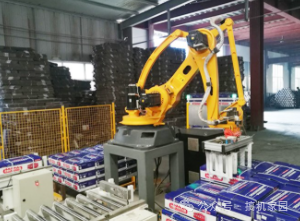
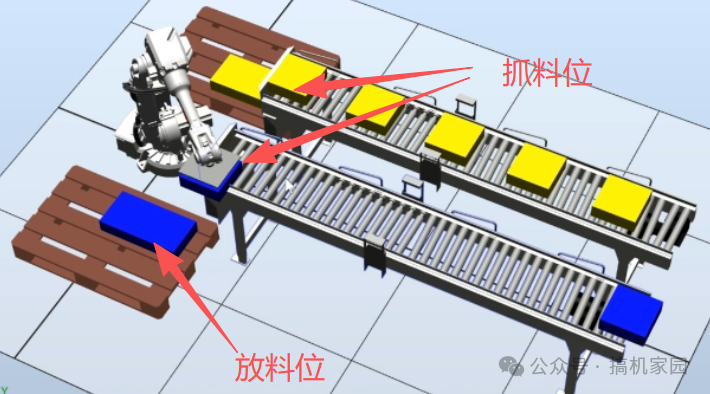
Using the ER6-600-SR to implement a standard handling project, the gripper has two suction cups, allowing the robot to pick up two items at once from the pickup location and place them sequentially at the same drop-off location, stacking them on top of each other. After stacking five times, a signal is given to indicate that the drop-off is complete.
The signal allows the next workstation to proceed.
The working conditions have a fixed pickup position, and the drop-off position is also fixed in XY, with Z varying according to height.
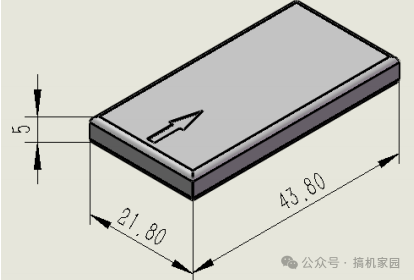
The items to be stacked are 43.8X21.8X5 mm in size, represented by black squares with directional markers.
Requirements:
1. Simple pick-and-place with TOOL
Objective: Upon receiving the pickup signal, the robot should pick up items from the pickup location, with the gripper structure designed to pick up two items simultaneously.
It is allowed to drop off items at the drop-off location, stacking them on top of each other, and after stacking five times, a signal is given to allow the next workstation to proceed.
1) Requirements:
Use logical operations for picking and placing items.
Individual point teaching is not allowed.
The use of stacking and array instructions is not allowed.
A TOOL is required.
If five items are stacked and there are still items in hand, the robot must wait for the next round to receive the drop-off signal before placing them.
2) Programming Approach:
Calculate the number of items in the Z direction (Put.z) and height (5mm) for stacking items. The pickup position and the position above it are also calculated.
By teaching the two gripper TOOL switches, only one drop-off position needs to be taught.
3) Program Section:
Variable Definitions
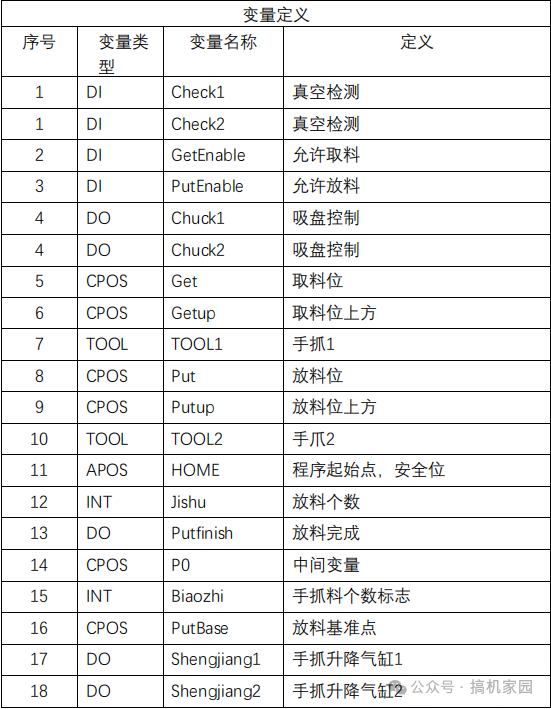
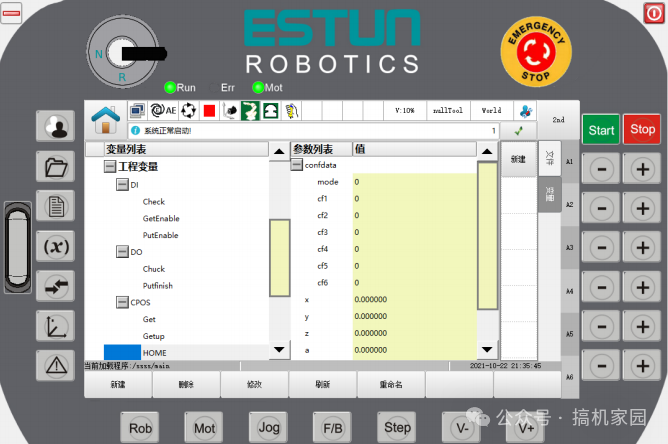
Program Writing
Start:
GetCurCPos{P=t_p.P0} # Get current position
t_p.P0.z = t_p.HOME.z
t_p.Getup = t_p.Get
t_p.Putup = t_p.PutBase
t_p.biaozhi.value = 0
t_p.jishu.value = 0
t_p.Getup.z = t_p.HOME.z
t_p.Putup.z = t_p.HOME.z
# Assignment Section
MovL{P=t_p.P0,V=t_s.V2000,B=”RELATIVE”,C=t_s.C100} # Lift to current position to
HOME height
MovL{P=t_p.HOME,V=t_s.V2000,B=”RELATIVE”,C=t_s.C100}
# Arrive at HOME point
xunhuan:
# Loop Label
WaitDI{IO=t_p.GetEnable,Val=1,T=0,InterEnable=0,Ret=t_l.INT0} # Wait for pickup signal
MovL{P=t_p.Getup,V=t_s.V2000,B=”RELATIVE”,C=t_s.C100} # Move to above pickup position
MovL{P=t_p.Get,V=t_s.V2000,B=”RELATIVE”,C=t_s.C100} # Move to pickup position
SetDO{IO=t_p.Chuck1,Val=1}
SetDO{IO=t_p.Chuck2,Val=1}
# Open vacuum
WaitCondition{JudgeCondi=”t_p.Check1.value==1andt_p.Check2.value == 1″,T=1000,InterEnable=0,Ret=t_l.INT1}# Wait for vacuum to reach, 1000 milliseconds is the timeout
IF t_l.INT1.value > 0 THEN # If timeout
SetRtToErr{msg=”zhenkongchaoshi”,eid=90001} # Custom robot alarm
Vacuum abnormal
SetDO{IO=t_p.Chuck1,Val=0} # Close vacuum
SetDO{IO=t_p.Chuck2,Val=0} # Close vacuum
MovL{P=t_p.Getup,V=t_s.V2000,B=”RELATIVE”,C=t_s.C100} # Lift to above pickup position
GOTO xunhuan # Jump to loop label, restart waiting for pickup signal
ENDIF
t_p.biaozhi.value = 2 # Flag as 2, indicating the robot has two items not placed
WHILE t_p.biaozhi.value > 0 DO # Loop condition is when the robot has items in hand
WaitDI{IO=t_p.PutEnable,Val=1,T=0,InterEnable=0,Ret=t_l.INT2}# Wait for allow drop-off signal
t_p.Put = t_p.PutBase
t_p.Put.z = t_p.PutBase.z + ( t_p.jishu.value * 5 ) # Calculate drop-off height
IF ( t_p.jishu.value % 2 ) == 0 THEN # Check remainder of count by 2, if 0 then TOOL1 gripper drops, if 1 then TOOL2 gripper drops
MovL{P=t_p.Putup,V=t_s.V2000,B=”RELATIVE”,C=t_s.C100,Tool=t_g.TOOL1,DO=”SetDO{IO=t_p.shegnjiang1,Val=1}”} # Drop-off action
MovL{P=t_p.Put,V=t_s.V2000,B=”RELATIVE”,C=t_s.C100} # Drop-off action
SetDO{IO=t_p.Chuck1,Val=0} # Close vacuum
SetDO{IO= t_p.shegnjiang1=0} # Lift cylinder
t_p.biaozhi.value = t_p.biaozhi.value – 1 # One item less in hand
t_p.jishu.value = t_p.jishu.value + 1 # Increment item count by one
ELSE # Check remainder of count by 2, if 0 then TOOL1 gripper drops, if 1 then TOOL2 gripper drops
MovL{P=t_p.Putup,V=t_s.V2000,B=”RELATIVE”,C=t_s.C100,Tool=t_g.TOOL2,DO=”SetDO{IO=t_p.shegnjiang2,Val=1}”}
MovL{P=t_p.Put,V=t_s.V2000,B=”RELATIVE”,C=t_s.C100} # Drop-off action
SetDO{IO=t_p.Chuc2k,Val=0} # Close vacuum
SetDO{IO= t_p.shegnjiang2=0} # Lift cylinder
t_p.biaozhi.value = t_p.biaozhi.value – 1 # One item less in hand
t_p.jishu.value = t_p.jishu.value + 1 # Increment item count by one
ENDIF
IF t_p.jishu.value >= 4 THEN # If filled 0-4, meaning 5 items
PulseOut{IO=t_p.Putfinish,Val=1,Time=500,InterEnable=0} # Output completion signal
WaitDI{IO=t_p.PutEnable,Val=0,T=0,InterEnable=0,Ret=t_l.INT3} # Ensure PLC receives completion and closes drop-off allow signal before exiting judgment, to avoid misjudgment conditions.
t_p.jishu.value = 0 # Reset count
ENDIF
Wait{T=5}
ENDWHILE # Can only exit this position when there are no items in hand
GOTO xunhuan # Jump back to loop, start pickup action
End;
- This demonstrates a standard usage specification and example.
- This program is mainly for educational purposes, helping learners understand how to correctly write program functions.
If you need an actual application program, please describe it based on actual requirements, such as:
- What functionality you want to achieve
- How many products you need to use
- Project complexity requirements
- Any special functional requirements, etc.