(Click the blue text above to quickly follow us)
Source: Nerxious
Link: http://www.cnblogs.com/nerxious/archive/2013/01/18/2866548.html
Sometimes we need the Linux system to automatically load certain scripts or system services at boot time.
This can be done mainly in three ways:
ln -s Create a symbolic link to /etc/init.d/service in the /etc/rc.d/rc*.d directory (* represents one of the run levels 0 to 6)
chkconfig Command line run level settings
ntsysv Pseudo-graphical run level settings
Note: 1. These three methods are mainly used for Red Hat-based distributions.
2. If you are not familiar with run levels, it is best to review relevant materials before experimenting.
Method 1: ln -s Create a Startup Symbolic Link
In Linux, there are 7 run levels (which can be set in the /etc/inittab file), each corresponding to one of the /etc/rc.d/rc[0~6].d directories.
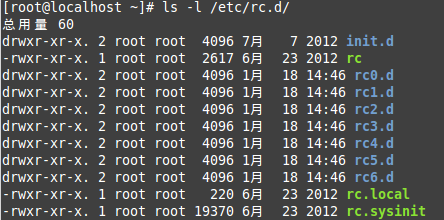
Tips: /etc/rc[0~6].d is actually a symbolic link to /etc/rc.d/rc[0~6].d, mainly to maintain compatibility with Unix.
Each of these 7 directories contains the services that need to be stopped or started when loading the corresponding run level.
From the detailed information, we can see that each script file corresponds to a specific service in the /etc/init.d/ directory.
Scripts starting with K represent services that need to be stopped during the run level loading, while those starting with S represent services that need to be executed.
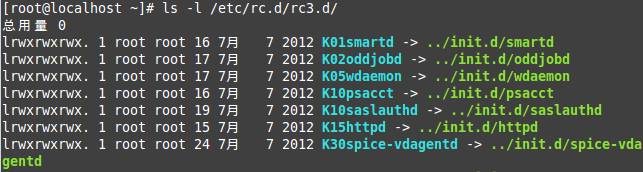
Therefore, when we need to start our script at boot, we just need to place the executable script in the /etc/init.d directory and then create a symbolic link in /etc/rc.d/rc*.d.
[root@localhost ~]# ln -s /etc/init.d/sshd /etc/rc.d/rc3.d/S100ssh
Here, sshd is the specific service script, and S100ssh is its symbolic link, where S indicates that it starts automatically during loading.
If you need to set it to start automatically in multiple run levels, you need to create multiple symbolic links.
This method is relatively cumbersome and is suitable for custom service scripts.
If certain services already exist in the system (for example, when installing Apache, there will be an httpd service item), you can use the following two methods.
Method 2: chkconfig

If you need to set certain services to start automatically, simply use chkconfig service_name on; to turn it off, change on to off.
By default, chkconfig will start at run levels 2, 3, 4, and 5. If you want to customize, you can add the –level option.

Here, we first turn off all startup levels for the sshd service, and then use the –level option to start it at a custom level.
Tips: The –list option can be used to check the startup status of a specified service, and chkconfig without any options will show the status of all services.
Method 3: ntsysv Pseudo-Graphical
ntsysv is actually the same as chkconfig, but with a graphical interface.
There are two ways to start ntsysv: one is to directly enter ntsysv in the command line, and the other is to use the setup command and then select system services.
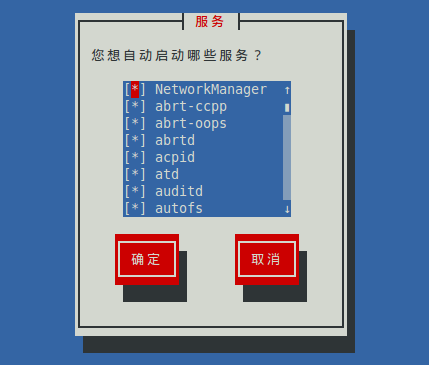
By default, the current run level is set in ntsysv, and the startup service level will be the same.
For example, if my current run level is 3, then the run level for the services I select to start in the pseudo-graphical interface will also be 3.
If you want to customize the run level, you can use the ntsysv –level option.

All three methods require that the service script files are executable and that you have root permissions.
Among them, the first method is mainly used for custom scripts, while the second and third methods are mostly used for services that already exist in the system.
For example, ftp, samba, ssh, httpd, etc.
Additionally, to make relevant settings, you need to understand the concept of run levels.
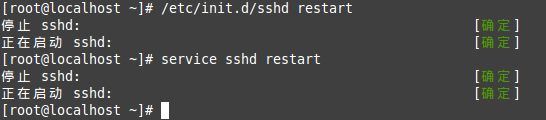
Tips: If you want to manually start a service, the traditional way is /etc/init.d/service_name start.
In fact, you can also do it this way: service service_name start.
Follow “Linux Enthusiasts”
See more selected Linux technical articles
↓↓↓